

UPDATE FROM MABULA
I have had a very rough 2 months unfortunately health wise. I was struck 3x in a row with bacterial infections. The second infection occurred after a routine hospital checkup and I became very sick. I had to rest and take a lot of antibiotics. Once I was recovering and restarting work 1 month ago, I again became sick. The infection was not yet gone, so even more antibiotics and rest was needed. Needless to say, it took a lot of my energy and I needed a lot of rest.
Finally, the infection is really gone and my energy is coming back step-by-step now and I have started work again. I am terribly sorry to have kept you waiting for support. I will address all outstanding questions and e-mails step-by step and will be on the forum daily from today.
APP 2.0.0-beta47 will come soon as well, a lot of work was already completed before I became very ill, so the release is also nearly ready for you. Beta47 will be much faster actually. Many workflows will be more than 2x faster, mosaics can even be 10x faster than before because registration really received a major boost... all compared to beta46. Before I release it, I will make sure that everything is working properly and then I will release it.
Hello from Austria!
After the "CSC" step my picture gets a strange brown cast. Is that normal?

The colors look better before correction. Should I skip CSC or will I get the natural colors back with adjusting the sliders?
CS
Gernot
The picture after correction actually looks better. Just have a look at the stars, there should be blue-ish and orange/yellow-ish stars around. And M31 looks a bit more yellow-ish in the center, have a look at this public one;

The extra blue is difficult to get and requires either dark skies or way more data. You can always tweak the color a bit, but the starting point of your second one is more correct. If you want I can always give your data go to process it a bit?
Hello @vincent-mod 🙂
Please check out my stack and try to calibrate the colors. I'm excited to see what you can get out of it.
Please download the stack here: https://drive.google.com/drive/folders/1kMuvMV07M2hyUvNHMeq4FBh5bv8oAh1E?usp=sharing
The picture was made at a Bortle 2 site and the the total integration time is about 1,5 hours.
CS
Ok, very nice result already! The only thing you'd have to do is to collect way more data. This will result in the blue coming up around the galaxy, that signal is just too low. Blue is always tricky in that sense. It is starting to be seen faintly already though. In the star color calibration I manipulated the slope a bit, as there is a bit of an offset in your data. Did you use filters in this image? Things like an unmodified DSLR will also contribute in cutting the amount of data it can record.
To see that the colors are correct, you can look at the stars in the field. They are now nicely blue and orange. I upped saturation, protecting the background, bit more contrast and I lowered green a little with the Selective Color tool. In that tool I selected the green channel, turned that saturation down 50%, moved the green->Magenta slider towards magenta.


@vincent-mod
Thank you for your help! I will deal with the calibration again today and then post my result here 🙂
CS
Hi Gernot @skanker and @vincent-mod,
I have downloaded the data as well to check what color is there... but there actually is a big problem I think with the data to do a meaningfull Star Color Calibration based on physics:
The metadata of the file shows:
FITS HDUs: 1
HDU1 - SIMPLE = T / Java FITS: Sun Jun 21 14:32:06 CEST 2020
HDU1 - BITPIX = -32 / bits per data value
HDU1 - NAXIS = 3 / number of axes
HDU1 - NAXIS1 = 5959 / size of the n'th axis
HDU1 - NAXIS2 = 3958 / size of the n'th axis
HDU1 - NAXIS3 = 3 / size of the n'th axis
HDU1 - EXTEND = T / Extensions are permitted
HDU1 - BSCALE = 1.0 / scale factor
HDU1 - BZERO = 0.0 / no offset
HDU1 - DATE = '2020-06-21T12:32:58' / creation date of Other/Processed
HDU1 - DATE-OBS= 'N/A ' / observation date of Other/Processed
HDU1 - SOFTWARE= 'Astro Pixel Processor by Aries Productions' / software
HDU1 - VERSION = '1.080 ' / Astro Pixel Processor version
HDU1 - FRAME = 'Other/Processed' / frame was processed by Astro Pixel Processor
HDU1 - INSTRUME= 'notAvailable' / instrument name
HDU1 - CFAIMAGE= 'no ' / Color Filter Array pattern
HDU1 - EXPTIME = 6360.0 / exposure time (s)
HDU1 - GAIN = 0.0 / gain or ISO depending on instrument
HDU1 - AD-PED = 0.00840 / adaptive pedestal from data calibration
HDU1 - END
The frame type shows that something has been done to the linear integrated data. This is not the stack/integration. Now the question is what has been to it already in processing?
And by using the preview filter on the right side, I can see that this is actually no longer linear data, but already stretched data:
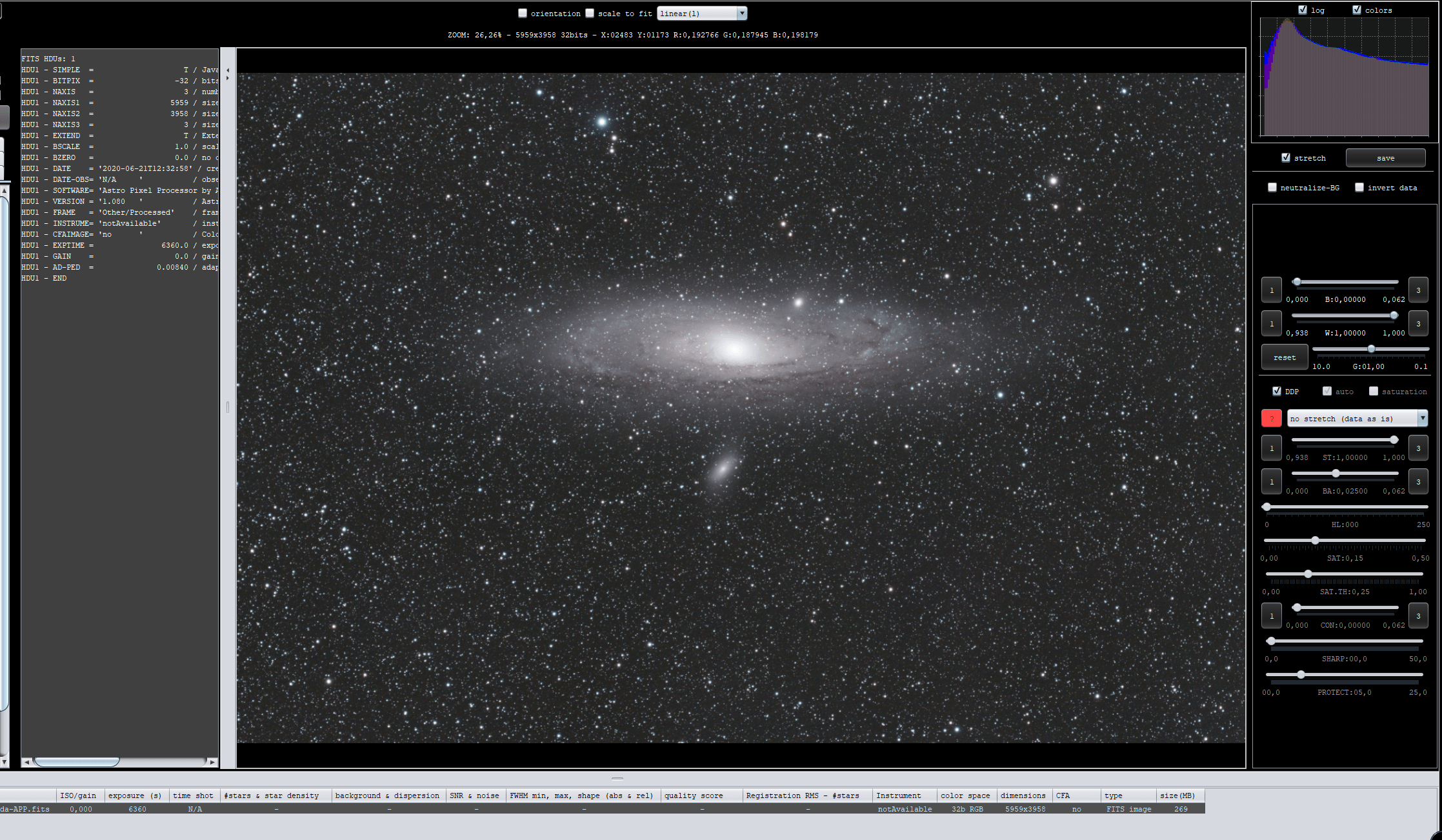
I set the DDP preset to no stretch (data as is) and as you can see, the data is already stretched. This is a problem for Star Color Calibration based on actual physics. The color ratio's R/G B/G in the star cores are not valid measurements because the data is non-linear.
Gernot, do you have the original stack with linear data ?
Mabula
Woops, very good call there Mabula, I missed that for some reason.
Hello @mabula-admin!
First of all i would like to thank you and @vincent-mod for the premium support!
You were right i uploaded the wrong file into the folder. Now the raw stack can be found in the directory. Feel free to analyze it 🙂
I used a Hutech IDAS LPS D2!
So far I've squeezed the following out of the data (stars were removed with starnet++):

CS
Gernot
Hi Gernot @skanker,
Thanks for uploading the linear data 😉
So the Idas LPS filter actually is a bit complicated for star color calibration, because it is not full broadband RGB data, only partially. So the LPS filter needs somewhat different calibration parameters to get good colors, check this screenshot with those parameters 😉

So you need to lower the slopes quite a bit and reduce green cast quite strongly... but then you get good colors for M31
I used selective color a little bit to reduce some cyan stars.. and then I get this:

So the linear data does work much !!! better than the non-linear data 🙂
Oh, I see that the adaptive pedestal kicked in, the value is non-zero in the metadata of the stack. This actually means, that you have underexposed your images... more exposure time per sub would have helped quite a bit probably for detail, for color and to get deeper...
Mabula
Thank you for your help @mabula-admin
I tried it with two boxes and your settings and unfortunately it gives a different result. I will have to take a closer look at the CSC tab.
On the subject of underexposure:
Here are the settings for the lights:
Canon 77Da + WO Whitecat
Sub: 122 seconds @ ISO 800
Since I was afraid to overexpose the core, I stayed at 2 minutes. How long do you think I could have exposed the individual lights?
CS
Gernot
I would expose until there is no need for the pedestal, maybe start at 3 min per sub? The core might be an issue, but that’s always a little bit of the trade-off, getting better signal in the lower exposed area’s requires longer exposures. At the moment APP doesn’t have HDR processing, so you might need to use another application to then combine a long with a shorter exposure.
It took a bit now but here is my result 🙂

Full details and quality: https://www.astrobin.com/cnwlm9/?nc=user
Thx for your help @vincent-mod & @mabula-admin
What do you say about the colors and the overall result?
CS
Gernot
I think that's looking great! Maybe a bit dark for the background, but very nice signal- and colorwise!
@skanker Thats a great result. Can I ask what settings you ended up with the star colour calibration? I have almost the same filter and have the same issues trying to calibrate for pleasing true colour.
Thanks,
Chris
Hi Chris! Sorry i cant remember the exact settings!I tried the sliders and checked the effect on the image . I can guarantee that it will work 🙂
CS
Gernot
