2026-10-09 APP 2.0.0-beta48 has been released !
This is mainly a bug fix release for the reported bugs in beta47. In addition it has a significant User Interface performance improvement noticable when you need to process 1000s of images in APP.
2026-10-03 APP 2.0.0-beta47 has been released !
This is a very big release... many code optimizations/rewrites, many parts of APP are much faster and more precise, especially star analysis and registration are much faster ! Big mosaics will go much faster 🙂
And we introduce a new preview filter, which includes the new Adaptive Deep Sky Stretch and a General Levels Stretch, this has been long over due. The old preview filter (the panel on the right side to stretch and preview your data) has not been updated for a couple of years and it is a critical part of any APP session.
Adaptive Deep Sky Stretch or ADSS is a much more intuitive stretch algorithm. It is also color preserving (which is a great new addition in itself ! ) which means that the highlights are no longer bleached, color is maintained from the linear data while stretching. You can simply stretch your data using the sky background level and signal width sliders which work much easier and more intuitive. You no longer need to fiddle with the old complicated sliders with zoom buttons. All the zoom buttons for the sliders are made redundant. And you can enter slider values in the slider value fields yourself. I will make a youtube video in the coming days to explain and fully introduce ADSS. Once the video is ready, it will be highlighted on the forum.
RGB Combine upgrade !. The RGB Combine Tool has been rewritten mostly. The tool is faster and easier to use and most importantly, the Luminance slider to inject a luminance channel or channels into the RGB composite is now working correctly. It no longer bleaches the RGB colors. Combined with the new ADSS preview, you will get much better and easier great composites with great color! I will also explain this in a new youtube video.
Astro Pixel Processor 2.0.0-beta42
- Upgrade development platform to Oracle JDK 26.0.1
JDK 26 has several nice improvements for performance of APP! The garbage collector, the system that frees memory after object allocations, will now instantly free the memory of our images once we no longer need them. Previously, the garbage collector needed still to perform analysis before freeing these large parts of memory. With instant release, performance of APP is definitely improved overall. Please see this for technical background from Oracle: https://bugs.openjdk.org/browse/JDK-8048180
Another free improvement of using JDK 26 is more technical, it relates to how the internal garbage collector works. It is described in JEP 522 : https://openjdk.org/jeps/522 . Simply put, APP's performance instantly improves several % is the indication.
- FIXED reported crashes in integration on Windows and macOS
Several users have reported random crashes / instability on Windows and macOS with beta40/41. By upgrading the development platform to Oracle JDK 26.0.1 these crashes are fixed. APP runs stable now also on heavy workloads where many ! images need to be integrated.
- 5) NORMALIZE upgraded ! More robust and better with bright/HDR objects.
The normalization engine has been upgraded. The calculations of the sky background (lokation) level and the dispersion (the spread of the pixel values relative to the sky background) have been improved. Previously we calculated the sky background and the dispersion in blocks spread over each image (or overlap area) and not the full image/overlap area was analysed. This was a fast and effective method. But in the new normalization engine, the whole image or overlap area is now analysed and not in blocks. We are using very fast sorting of all the pixels values and we then aggressively clip the distribution on both the positive and negative side to get a very good sky background estimate. We then calculate the dispersion as MAD or BWMV on only the truncated distribution. Testing has shown that these methods are more robust on data with bright/HDR object and strong gradients. OVeral the sky background/lokation and dispersion values will be more robust leading to better image normalization and also better initial background neutralization by the normalization engine and the neutralize-BG option below the histogram. Initial normalization for mosaics with bright objects will be much better as a consequence. Previously we had two modes in the normalization engine: regular and advanced.
The new engine still has 2 modes, but they work differently and so we have renamed them. The first mode is now called full-image. This mode is most similar to the previous regular mode. The new second mode is called overlap area and this mode is more similar to the old advanced mode. Full-image always analyses each image fully as the name indicates. Overlap area mode will only analyze the overlap area between the image to be analyzed and it's reference frame. If you run a mosaic, and an image does not overlap with the main reference, another frame that does overlap with the image to be analyzed will be used to calculate the overlap area. Simply put, for normal registration where most images overlap almost fully, using any mode will give nearly identical results. if the images have some difference in Field Of View, the overlap area will be more robust because the sky background and dispersion will be based on exactly the same field of view. If however, you run a classic mosaic, like a 5x5 mosaic with only 10% overlap between the images, the full image mode will be best. All is explained as well in new tool tips, the little pop up menus attached to each option. The below screenshot shows the initial normalization of a 3x3 HDR mosaic of M42 with the new normalization engine in Full-image mode. The sky backgrounds already match very well. LNC and MBB only need to do little work to make it a seamless mosaic now.
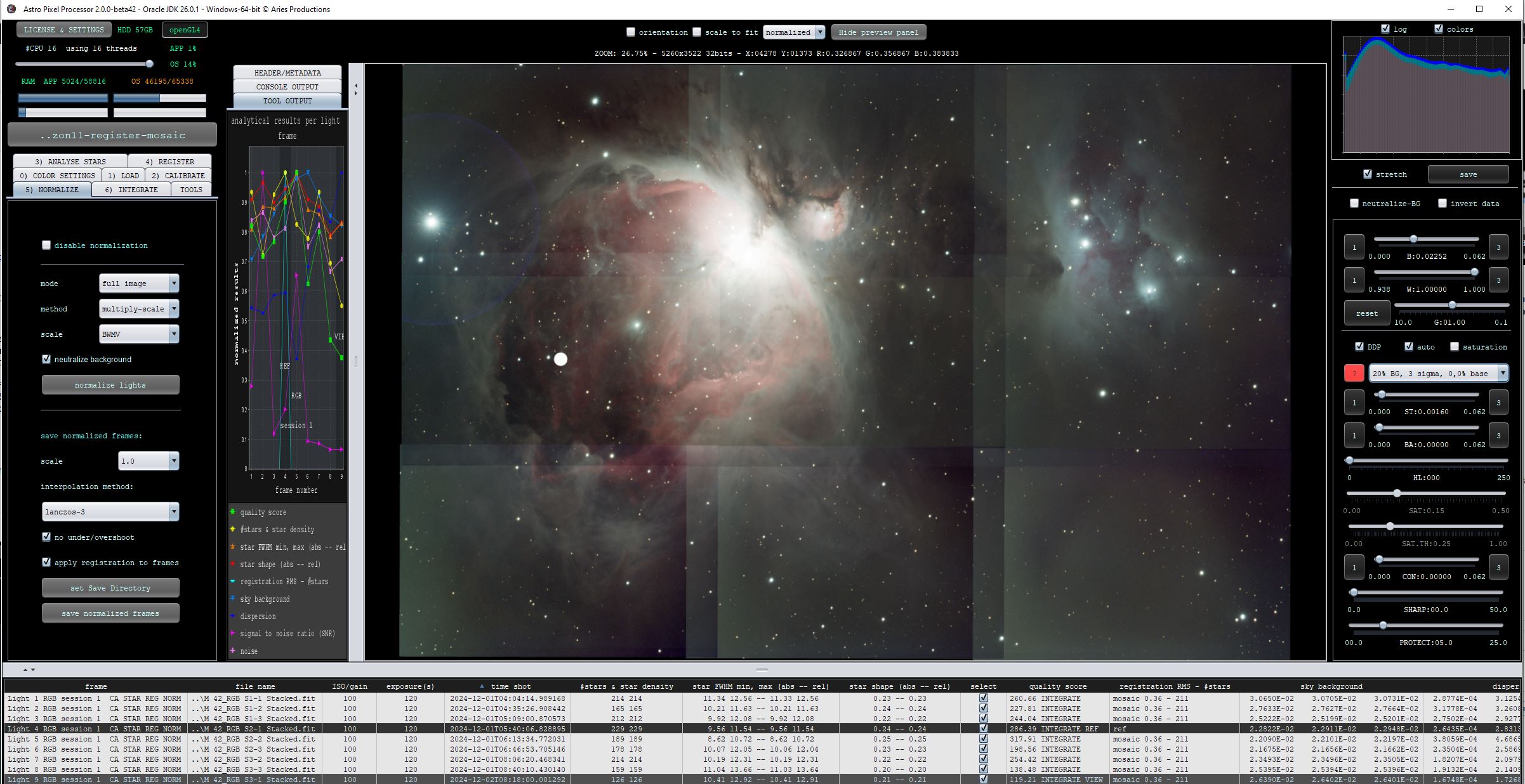
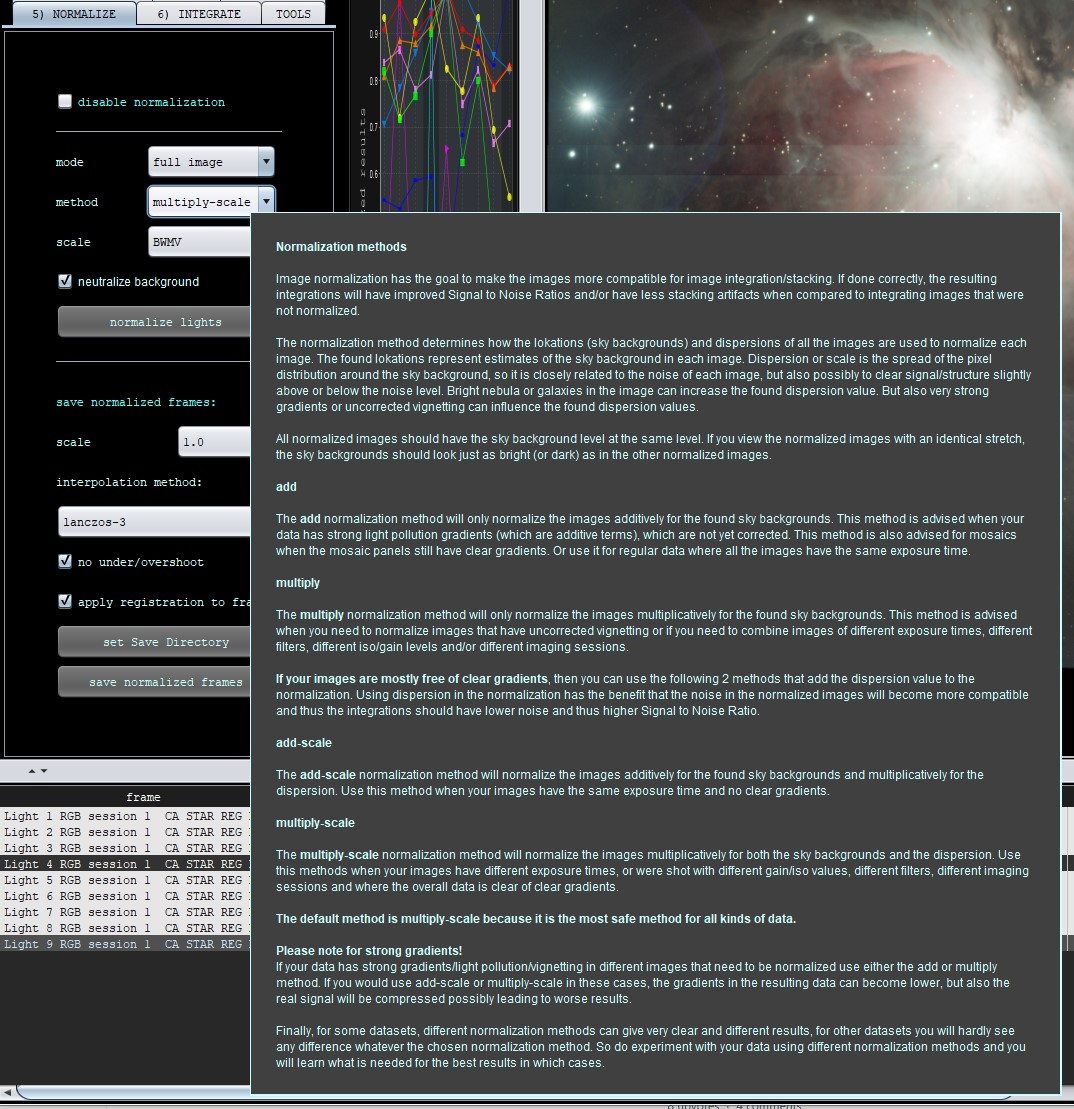
The new tooltips are shown in the next screenshots:

- Image Normalizer is further optimized
The image normalizer is the module that applies normalization parameters to an image. By optimizing this, performance overall is again increased, especially in 2) Calibrate (flat normalization), 5) Normalize and 6) integrate where images are normalized. OSC/RGB data will have a nice performance gain from this.
- FIXED RGB Combine normalization
As reported here https://www.astropixelprocessor.com/community/main-forum/excessive-auto-stretch-in-rgb-combine/#post-33297 the rgb combine tool could produce very bad and weird looking results. The issue was caused by not properly normalizing the data internally. The issue is solved properly now.


- FIXED CALIBRATE STAR COLORS & RGB COMBINE TOOLS
As reported here https://www.astropixelprocessor.com/community/main-forum/strange-calibrate-star-color-behavior/#post-33826 , the Calibrate Star Color tool could exhibit very weird behaviour creating fully red results instead of a nicely calibrated result. The bug was caused by the RGB Combine tool not removing old FITS tags from previously background calibrated files. This issue has been fixed. The problem caused Calibrate Star Colors to think that the image was properly background calibrated, but it was not and needed to be properly background calibrated first before running Calibrate Star Colors. Another related bug was solved as well that would cause the RGB Combine Tool to use wrong background lokations and dispersions to normalize the data.


- FIXED 0)COLOR SETTINGS single NarrowBand demosaic algorithms
Multi-NB extract Ha, O3 etcetara and the other Narrowband algorithms like Hydrogen-alpha, Nitrogen II etcetara were not working correctly. They would produce a smeared result as reported here: https://www.astropixelprocessor.com/community/appreleases/beta-41-multi-nb-extract-h-a-gives-smeared-result/#post-34238 This issue has been fixed. Algorithms like Multi-NB Ha+O3 that produce multiple stacks at the same time still worked fine, the issue concerns only the algorithms that would produce 1 monochrome narrowband stack from a OSC/RGB image that needs to be demosaiced.
- FIXED ArrayIndexOutOfBoundsException in FindBestRegistrationModel
As reported here https://www.astropixelprocessor.com/community/main-forum/arrayindexoutofboundsexception-in-findbestregistrationmodel-while-registering/#post-34227 an ArrayIndexOutOfBoundsException could be thrown when registering in the FindBestRegistrationModel module. The issue will be caused when dynamic distortion correction is enabled. When disabled all works as expected. The issue would manifest if APP tries to calculate distortion correction on data that really does not need it for already perfect registration. The issue is now solved and prevented by simply disabling distortion correction completely in the 2-view registration phase on data that has very little movement in the stars between the images. The user can simply leave distortion correction enabled, internally, APP will disable it for the specific registration task.
- FIXED & IMPROVED CORRECT VIGNETTING, REMOVE LIGHT POLLUTION, CALIBRATE BACKGROUND, CALIBRATE STAR COLORS
As reported here https://www.astropixelprocessor.com/community/main-forum/star-colour-saving-causes-computer-freeze/#post-34327 if APP is calculating in the Calibrate Star Colors tool and you would push the OK & SAVE button while still calculating, APP would freeze and it would also produce an error on the command line through system out. This bug was present in all 4 tools as indicated in the bullet point for this release note. Another bug was pushing the Cancel button while calculating, it would also produce an error on the command line. Both bugs have been solved. If you push the OK & SAVE button while calculating, the tools will simply wait until the calculation is finished. If you push the cancel button while calculating, the tool will stop properly without showing an error on the command line. During these tools, a little popup window can appear showing progress, we have removed this popup because it no longer serves a purpose and can be quite annoying as well.
- RGB Combine Tool removed popup window
During the RGB Combine Tool, a liitle annoying popup window would show indicating loading of images. This popup has been removed.
- HSL Selective Color Tool removed popup window
During the tool, a liitle annoying popup window would show indicating loading of images. This popup has been removed.
- ALL BATCH TOOLS removed popup window
During all the batch tools, a liitle annoying popup window would show indicating loading of images. This popup has been removed.
- FIXED BATCH CROP TOOL up/down arrow keys offset fields
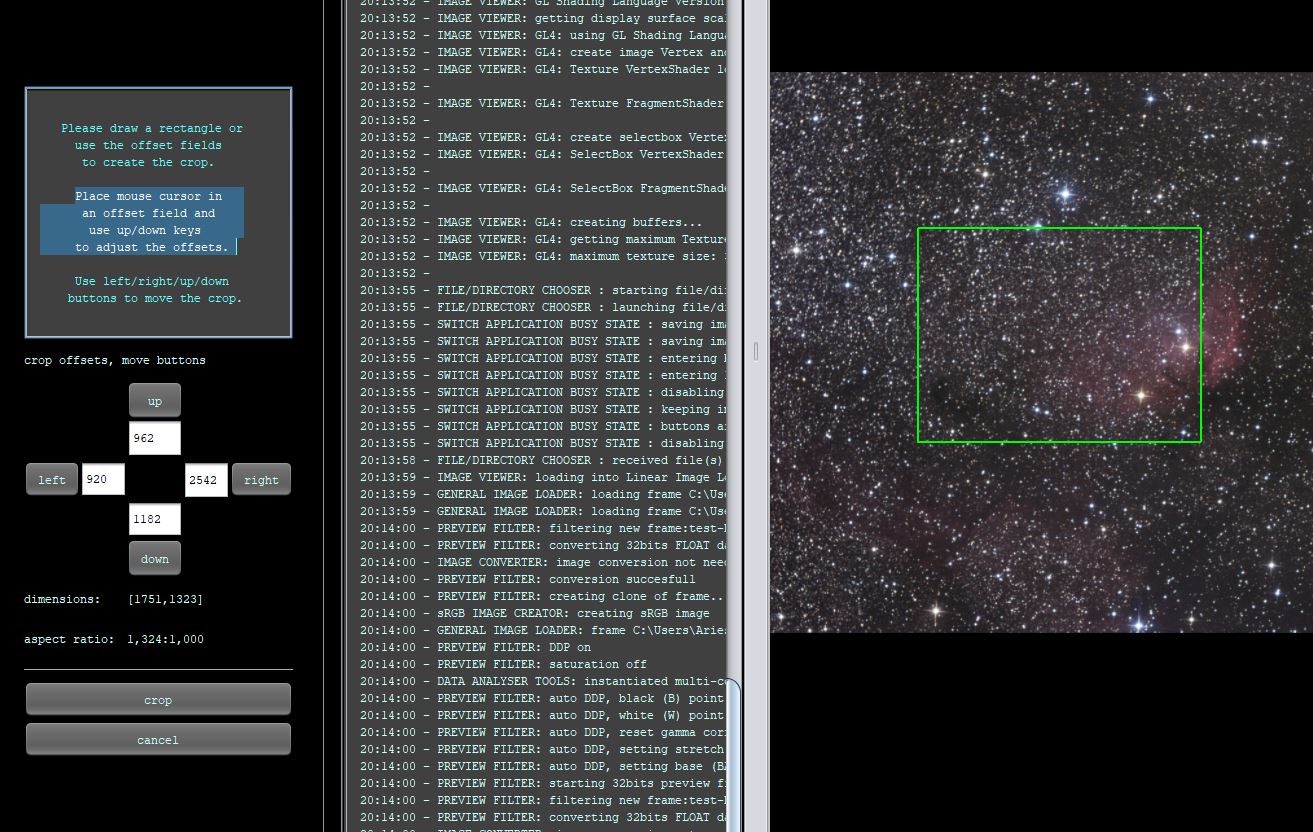
When drawing a crop in the batch crop tool, you can move the crop with the up/left/right/down buttons. Next to the buttons, you see the crop offset fields. You can enter a value directly to change it. Or you can use the up/down arrow keys to increase/decrease the offsets. The up/down arrow keys were no longer working. This is now fixed and they work now again as expected.

- FIXED NullPointerException in RegistrationActionListener: Cannot read the array length because "coor" is null
We fixed a Null Pointer exception in the registration engine that could manifest in rare cases.