
2026-10-09 APP 2.0.0-beta48 has been released !
This is mainly a bug fix release for the reported bugs in beta47. In addition it has a significant User Interface performance improvement noticable when you need to process 1000s of images in APP.
2026-10-03 APP 2.0.0-beta47 has been released !
This is a very big release... many code optimizations/rewrites, many parts of APP are much faster and more precise, especially star analysis and registration are much faster ! Big mosaics will go much faster 🙂
And we introduce a new preview filter, which includes the new Adaptive Deep Sky Stretch and a General Levels Stretch, this has been long over due. The old preview filter (the panel on the right side to stretch and preview your data) has not been updated for a couple of years and it is a critical part of any APP session.
Adaptive Deep Sky Stretch or ADSS is a much more intuitive stretch algorithm. It is also color preserving (which is a great new addition in itself ! ) which means that the highlights are no longer bleached, color is maintained from the linear data while stretching. You can simply stretch your data using the sky background level and signal width sliders which work much easier and more intuitive. You no longer need to fiddle with the old complicated sliders with zoom buttons. All the zoom buttons for the sliders are made redundant. And you can enter slider values in the slider value fields yourself. I will make a youtube video in the coming days to explain and fully introduce ADSS. Once the video is ready, it will be highlighted on the forum.
RGB Combine upgrade !. The RGB Combine Tool has been rewritten mostly. The tool is faster and easier to use and most importantly, the Luminance slider to inject a luminance channel or channels into the RGB composite is now working correctly. It no longer bleaches the RGB colors. Combined with the new ADSS preview, you will get much better and easier great composites with great color! I will also explain this in a new youtube video.
I like using AAD, but its still doesn't take into account (enough) the 2 G in the standard Bayer matrix, and bring it under control, tried 3 cameras on it and all leave green tinge, this due to matrix brings in so much green, the debayer algorithm needs to realize there's twice as much green coming into the sensors to normalize this and get it under control with the goal to balance R/ G/ B. I know when you write the algorithm, you like Green, because its like a luminance channel, but in the final output, suggest you AVERAGE or half the green, like someone get it under control so the final output has better white balance and all R/ G/B match in frames/ intensity like mono. I don't want to have to heavily fix this in post, and i want to come out right to start with.
Running SuperPixel vs AAD, the former has much blacker background and whiter objects (this proves the issue is with the algorithm), however I want the full resolution. Maybe we can try AHD or VNG to see how they look, or better yet, a revision on AAD like AAD2.
Hi Skye, @skysong
Getting a green cast in RGB/OSC/Bayer/X-Trans data actually does depend on many factors, the demosaic algorithm has it's role, but also the sensor and the capture conditions, I sometimes get a magenta (opposite of green) cast even. On many of my RGB datasets shot with a Nikon D850 I actually never have this problem to start with which shows that it is not only the algortihm playing a role here.
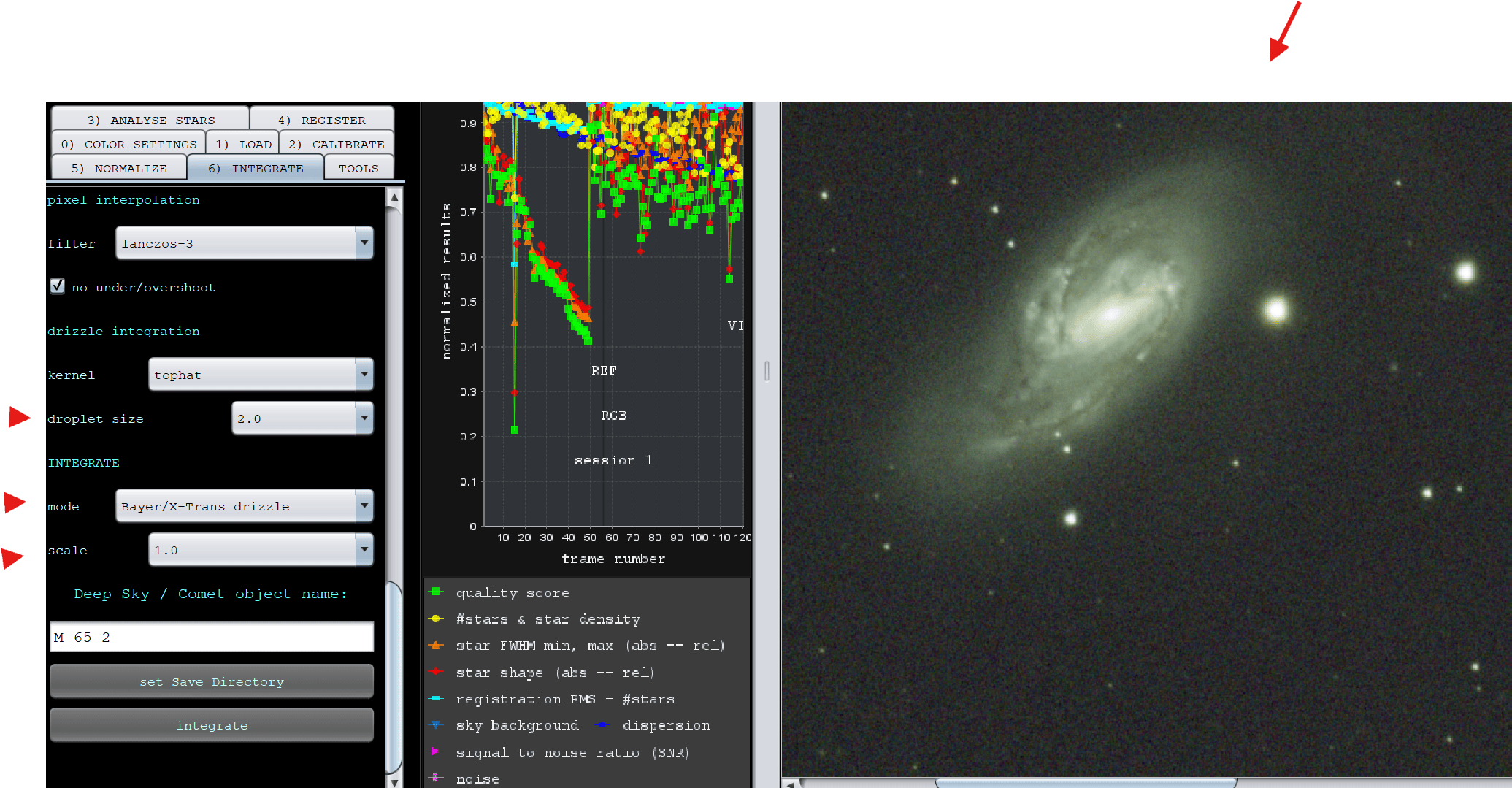
A very easy way in APP to completely avoid AAD demosaic is to not demosaic at all. In 6) Integrate, use Bayer Drizzle. Keep the scale at 1.0 and set the drizzle droplets to 2.0, use drizzle kernel gauss, and look at the result. The stars will probably better shaped and should have no green cast. Most APP users prefer Bayer Drizzle I think over demosaicing.
If you do demosaic with AAD, the green cast, if any, can easily be removed in
- Star Color Calibration if the data is RGB broadband data, simply use the green/magenta slider to find the middle between green and magenta cast.
- and or/ HSL Selective Color, select green and move it to magenta, also by finding middle ground, the green cast can be completely removed. Sometimes selecting green and then desaturating also helps well.
Please let me know if this helps.
Mabula
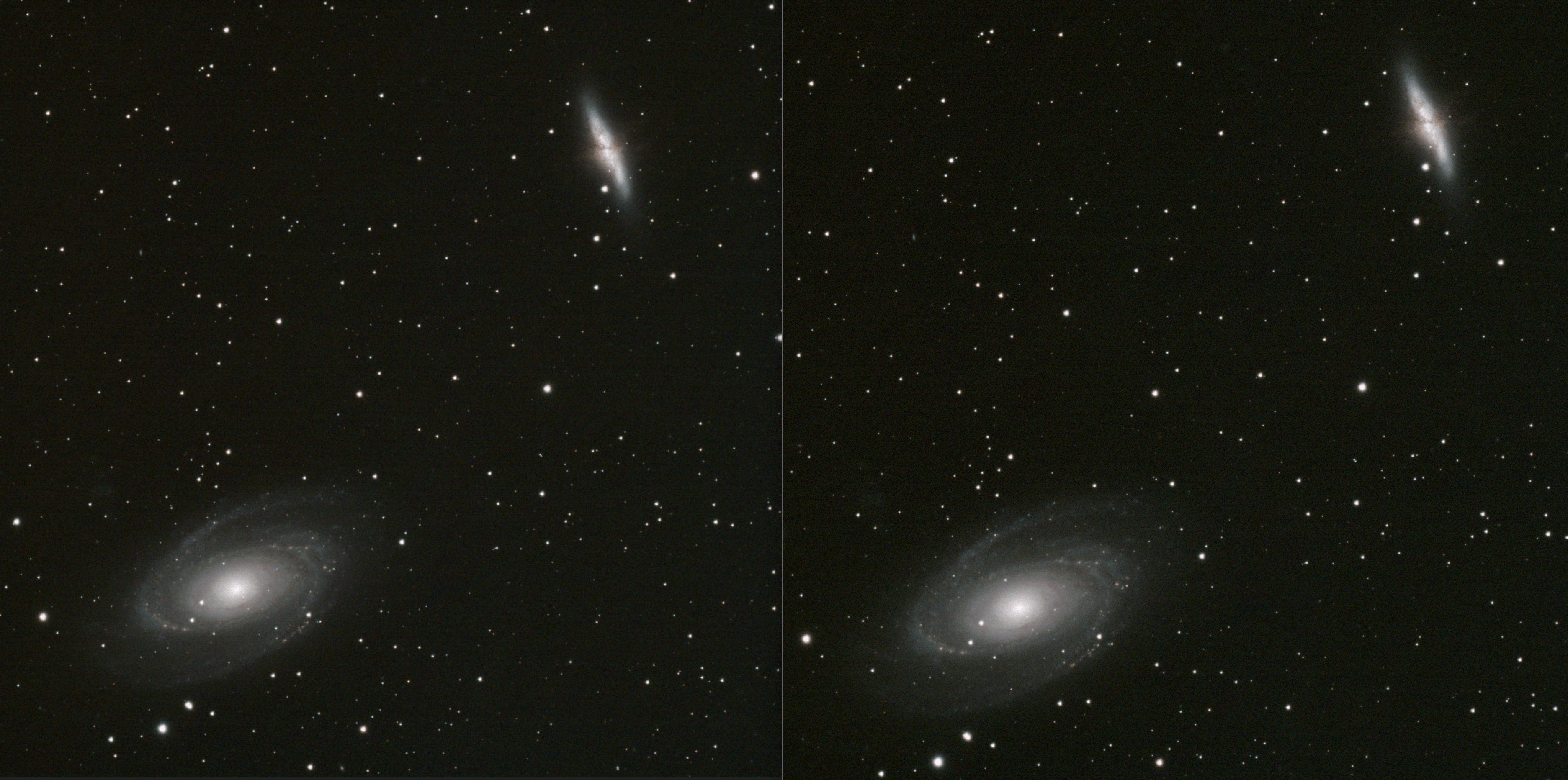
Well i did two things that made a major difference, most I used the Antila Triband Ultra II filter to help balance the color and it makes a huge difference, and then i used the Bayer Drizzle, so the two pics are with Antila Triband, on left is AAD and right is Bayer Drizzle. I can see better color and details on right. And that's just 60 frames (1 hr data) and 75% moon, so not bad.
I like using AAD, but its still doesn't take into account (enough) the 2 G in the standard Bayer matrix, and bring it under control, tried 3 cameras on it and all leave green tinge, this due to matrix brings in so much green, the debayer algorithm needs to realize there's twice as much green coming into the sensors to normalize this and get it under control with the goal to balance R/ G/ B. I know when you write the algorithm, you like Green, because its like a luminance channel, but in the final output, suggest you AVERAGE or half the green, like someone get it under control so the final output has better white balance and all R/ G/B match in frames/ intensity like mono. I don't want to have to heavily fix this in post, and i want to come out right to start with.
Running SuperPixel vs AAD, the former has much blacker background and whiter objects (this proves the issue is with the algorithm), however I want the full resolution. Maybe we can try AHD or VNG to see how they look, or better yet, a revision on AAD like AAD2.
the green cast actually has nothing at all to do with the bayer matrix, and the fact that there is twice as many green pixels as there are red and blue, it’s a real myth.
see here for proper explanation
If you compare the results of mono and color sensors (which are the same sensor but one has the bayer matrix), they are not producing excessive green as proven by mono processing (the green is not brighter there vs R/B). And the color is showing excessive green. I've thought about this deeply and I think what's really happening is that on Color cameras, when pixel is over exposed (i.e., exceed the well size) is it flows into adjacent cells, which happens often for stars but not on terrestrial photos, and for the bayer matrix this is a big issue since they adjacent pixels are almost never the same color as the originating pixel and all contain 2x more green pixels than any other color, and its the overflow pixels that actually cause the problem with unexpected color which is mostly green. For mono, this doesn't matter because the entire image is one color, such as Red/ Blue/ Green, so if some Red overflows into the next pixel, its still Red, but, but in the Color Bayer Matrix, that's almost never the case, and commonly green. A quick fix might be to take more shorter exposures. I think these cheaper sensors were never designed to take longer non-terrestrial photos. Its not about the sensor being more sensitive to green, which the mono experiment proves that image with green filter are equivalent in Blue / Red, not twice as bright, and will auto-balance to black and white. QE graphs also do not show a spike in Green for mono sensors (which is the same base sensor as in color, just without the bayer matrix). So I would get guess cheaper cameras with smaller wells would exhibit more of the green cast.
If you compare the results of mono and color sensors (which are the same sensor but one has the bayer matrix), they are not producing excessive green as proven by mono processing (the green is not brighter there vs R/B). And the color is showing excessive green. I've thought about this deeply and I think what's really happening is that on Color cameras, when pixel is over exposed (i.e., exceed the well size) is it flows into adjacent cells, which happens often for stars but not on terrestrial photos, and for the bayer matrix this is a big issue since they adjacent pixels are almost never the same color as the originating pixel and all contain 2x more green pixels than any other color, and its the overflow pixels that actually cause the problem with unexpected color which is mostly green. For mono, this doesn't matter because the entire image is one color, such as Red/ Blue/ Green, so if some Red overflows into the next pixel, its still Red, but, but in the Color Bayer Matrix, that's almost never the case, and commonly green. A quick fix might be to take more shorter exposures. I think these cheaper sensors were never designed to take longer non-terrestrial photos. Its not about the sensor being more sensitive to green, which the mono experiment proves that image with green filter are equivalent in Blue / Red, not twice as bright, and will auto-balance to black and white. QE graphs also do not show a spike in Green for mono sensors (which is the same base sensor as in color, just without the bayer matrix). So I would get guess cheaper cameras with smaller wells would exhibit more of the green cast.
did you watch the video I linked too ?
@astroshed Oh yeah (twice), and I left the same comment there. I think his assumption that the sensor is more sensitive to green is incorrect, especially if you look at QE graphs of the mono version. The issue is what i have described above.
@astroshed Oh yeah (twice), and I left the same comment there. I think his assumption that the sensor is more sensitive to green is incorrect, especially if you look at QE graphs of the mono version. The issue is what i have described above.
A mono camera is not more sensitive to any colour, as it does not see colour, you can’t compare them to each other, as all the pixels will see whatever colour filter is put in front of them.
I was always under the illusion that because of the 2 green 1 red and 1 blue in the bayer matrix, that is why I always got a green cast in my images, and I also find it hard to accept that is not the case TBH
Maybe @mabula-admin can shed some light on the matter (excuse the pun) 😀
Stewart (@astroshed)
Mono cameras typically are more sensitive to some colours, as they have different quantum efficiencies at different wavelengths. For example, the old 1600mm was famously more sensitive to green. The sensors used in the 585mm and 2600mm are better, but they are still more sensitive to blue/green than to red. RGB filters also do not have perfect transmission curves - although the newer ones are much better than in the old days.
I can't help but feel that this discussion is stuck on misdiagnosing the problem and that colour balance on load is not the issue, as the loaded frames will almost always have some colour imbalance. When I bother to look at the individual frames coming from my colour camera they are always green. The solution lies mainly in correct background neutralisation and colour calibration, which APP (and any decent astro software) can do easily in most cases.
JC
Thanks @astroshed and @connor231 for your clarification. This issue is persistently misinformed all over the internet. As you mention it is not due to greater number of green pixels. As you also mention it is partially due to sensor sensitivity which is more highly sensitive in the green area of the spectrum. But what a lot of people don't know - and this is why DSLRs produce such nice color - a color cast is also due to the color matrix dies used to give the red, green and blue filters, which do not all have the same transmittance.
And finally, if you watched the video you'll see that the red, green and blue transmission curves overlap, so that there is spillover from one pixel color to the other. DSLRs (but not Astro cameras unfortunately) have a Color Conversion Matrix (CCM) that is used to balance the color response of the sensor to compensate for all these issues. This is not being used by Astro camera image processing typically, but absolutely is used by all DSLR camera image processing. This is why Mabula reported good color from his Nikon D850.
Unfortunately, without the Color Conversion Matrix, the color spillover cannot be corrected but this usually creates a more minor color imbalance that is not significant for Astrophotography. However, proper color balance of the red, green an blue is still required and you may find that the camera driver will try to correct for this. If not, you will get a significant green cast that will have to be calibrated out at some point in the processing.
I agree with everything you have said. But my point is that we can and do routinely calibrate these issues away. It may be nice to have colour balanced data on input, but it is certainly not essential for creating good images or for colour balance in our output. To focus too much on this as a big problem seems a bit counterproductive (I'm not saying you are doing that - 😊 ).
JC
Hi all,
I fully agree that it is a misconception that you will get a green cast because of the bayer matrix having twice more green filters versus red and blue. Simple argument is that the debayering/demosaicing actually directly fixes this by filling all the holes in the CFA matrix to create the RGB image. The interpolated data is the result and the interpolated data has the exact same amount of green , red and blue pixels.
So the green cast (if any) must come from different factor and they all play a role for sure:
- the color of the night sky ! although it is dark and our eyes only perceive it is a gray scale, it has a color to it ! The color can be caused by moon glow, dessert sand in the air, or simply light pollution from city lights... many factors determine the actual color of the night sky during your capture session.
- the wavelength sensitivity of your sensor is rather crucial for sure. Each sensor has different sensitivity for different wavelengths. Most regular camera's are way more sensitive in green wavelengths. compared to red and blue. Sensitivity is usually least in blue. This is because the sensors are made for humans and we perceive most ourselves in green wavelengths 😉 Most astronomy camera's are quite similar to regular camera sensors as well. So from this alone, there is definitely a bias for green casts.
- Quality of the captures. If data is very well guided, the cast is usually much less, this is what I can say from testing many data over the past 10 years from APP users. So wit data with guiding errors, not circular stars, the cast becomes more obvious it seems.
If you do not use demosaicing, but use Bayer Drizzle, sometimes the cast goes away or becomes less, then it seems that it is caused by the demosaic filter apparently. I think then the guiding is again responsible. Drizzle as a technique solves that better than demosaicing.
Sometimes Bayer Drizzle gives the same result as demosaicing, then you know for sure that the night sky, or the sensor sensitivity plays as a factor.
All in all, indeed you should not worry to much about this. It can easily be solved with proper background calibration after creating the initial integrated file. Any cast left can be corrected with additional tools like star color calibration, HSL selective color.
I have tested so much data from so much camera's and I have seen many green casts, but also brown, blue and magenta casts as well from OSC camera's.
My H-alpha modified Nikon D5100 created magenta casts most of the times, rarely green ones... Maybe because I used it as well with a LPS filter many years ago...
Mabula
