

June 24 2026 APP 2.0.0-beta46 has been released !
Improved internal memory configuration (lower ! memory usage), fixed beta45 startup issue, fixed Set Save Directory & 2-panel mosaics.
May 27 2026 APP 2.0.0-beta45 has been released !
Fully Multi-Threaded LNC, many improvements for the registration engine, platform upgrade, and further tuning of internal memory consumption and memory release back to OS.
Apr 14 2026: Google Pay, Apple Pay & WeChat Pay added as payment options
Update on the 2.0.0 release & the full manual
We are getting close to the 2.0.0 stable release and the full manual. The manual will soon become available on the website and also in PDF format. Both versions will be identical and once released, will start to follow the APP release cycle and thus will stay up-to-date to the latest APP version.
Once 2.0.0 is released, the price for APP will increase. Owner's license holders will not need to pay an upgrade fee to use 2.0.0, neither do Renter's license holders.
I'm using a Canon 77D and record my subs using an ASIAir. When i load my fits files they are reported as iso/gain -1. The fits headers however do report the correct iso (800). When i load my Canon Raw files it works correct.
This is extra annoying because this value is also written in the filename of the master files. This way I don't know what iso the master files are created for.
Also see the attached image. I can also provide an example file if that helps the developers.
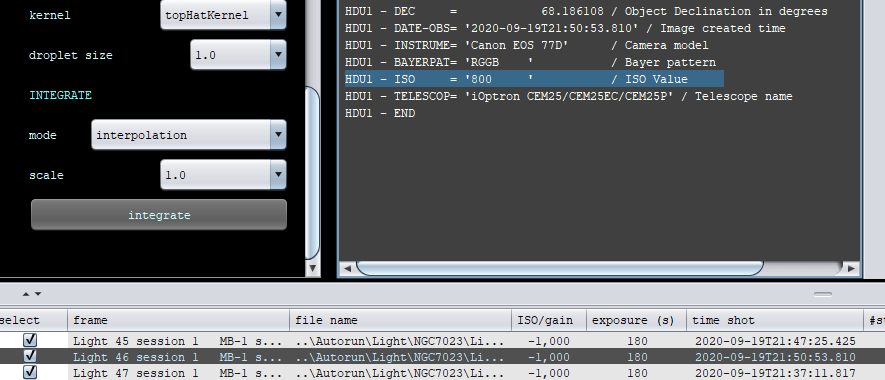
Strange, I'd like to have that subframe to check out if that's ok with you?
Go to https://upload.astropixelprocessor.com and use upload1 (or upload2 till 5) as username and password will then be the same as the username.
Create a directory named “svego-isoreporting” and upload in there. Thank you!
@vincent-mod I've just uploaded my file. Please let me know if i can do anything else to help.
I'll have a look at it asap (probably tomorrow as we're almost having dinner here 😉 ). Thanks for uploading!
Sorry, that was today then, bit busy down here.
So I see the issue I think; in the FITS header not only an ISO is reported, but also an EGAIN value of -1. I'm wondering if that is something you can check in your capture software as a Canon 77D doesn't have a gain.
@vincent-mod no problem for the delay.
I don't think there is a setting for an EGAIN value in the ASIair. I havent found it anyway.
A value of -1 seems like an invalid value.The software developer in me would probably ignore -1 values 😉
Yes, true, I'll mention that to Mabula. But it's also very strange for the ASI to write that in there. Would be nice to report that to them as well. 🙂
A Canon 80D + AsiAir Pro user here... has this ever been resolved? I also get the -1 value.
Thanks! 🙂
It's likely that the capture software is using a wrong fits header specification or reporting it in a weird way (when saved in the fits format). A regular .cr2 or .cr3 file should show the iso properly, you can try to see if that's the case.
Yes, that's the case. I copied lights, dark and flats FITS from AsiAir and bias CR2 from my camera's card. APP could not create master frames because of discrepancy between FITS -1 and CR2 1600 ISO. I then used all files from the camera's card (CR2) and everything worked properly.
Thanks for your answer, I will use CR2 and report this to ZWO. 🙂
Using the raw frames is fine as well, the less done with the original data the better usually. 🙂 Hope it's something ASI can fix indeed!
