

2026-10-09 APP 2.0.0-beta48 has been released !
This is mainly a bug fix release for the reported bugs in beta47. In addition it has a significant User Interface performance improvement noticable when you need to process 1000s of images in APP.
2026-10-03 APP 2.0.0-beta47 has been released !
This is a very big release... many code optimizations/rewrites, many parts of APP are much faster and more precise, especially star analysis and registration are much faster ! Big mosaics will go much faster 🙂
And we introduce a new preview filter, which includes the new Adaptive Deep Sky Stretch and a General Levels Stretch, this has been long over due. The old preview filter (the panel on the right side to stretch and preview your data) has not been updated for a couple of years and it is a critical part of any APP session.
Adaptive Deep Sky Stretch or ADSS is a much more intuitive stretch algorithm. It is also color preserving (which is a great new addition in itself ! ) which means that the highlights are no longer bleached, color is maintained from the linear data while stretching. You can simply stretch your data using the sky background level and signal width sliders which work much easier and more intuitive. You no longer need to fiddle with the old complicated sliders with zoom buttons. All the zoom buttons for the sliders are made redundant. And you can enter slider values in the slider value fields yourself. I will make a youtube video in the coming days to explain and fully introduce ADSS. Once the video is ready, it will be highlighted on the forum.
RGB Combine upgrade !. The RGB Combine Tool has been rewritten mostly. The tool is faster and easier to use and most importantly, the Luminance slider to inject a luminance channel or channels into the RGB composite is now working correctly. It no longer bleaches the RGB colors. Combined with the new ADSS preview, you will get much better and easier great composites with great color! I will also explain this in a new youtube video.
So I have been navigating my ways and trying to learn APP to a viable/better option to DSS. When going through the stacking process I got this message. I mentioned this in a previous post and am not grasping it. Flats were taken to get around 50% of full ADU value. Input is appreciated.
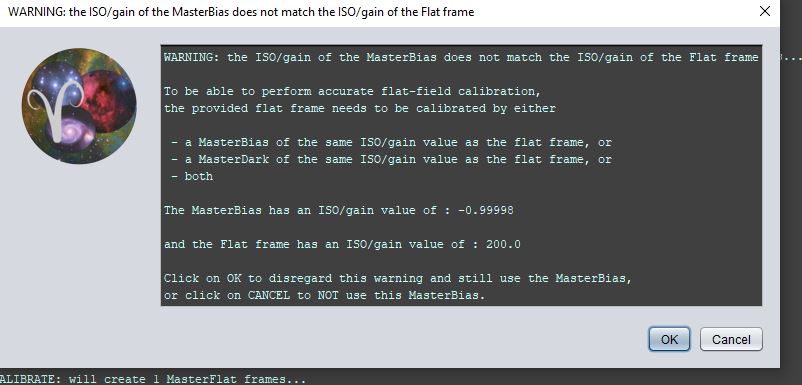
Can you either place a link to your other post, or tell here which calibration frames you are using exactly? Flat, dark, dark flat, bias? Which iso/gain for each?
Sorry about that. I am using Lights, Darks, Bias and Flats. All taken at ISO 200 (Nikon D5300) Lights and Darks are the same time frame. Bias typically come out around 50ms and flats at around 125 ms based on my current setup.
Also out of curiosity I opened up the flat for viewing and notice that the blue and green are far right and red is quite a ways to the left. I thought I saw a video describing this and how to check but am not seeing this.
Mmm, so the warning does relate specifically to the Bias. For some reason the readout of this ISO/gain value is different. Are you sure you selected them to use the same ISO/gain and used the same software for taking these data frames?
Hmm, I see what you mean now. I went back and checked and APP shows -.99998 for master bias and darks on both sessions. I pulled a handful of the ASIAIR fits files for each and they are all at ISO 200. To be clear I stacked 2 sessions with lights, darks and bias's for each session and grabbed a set of flats and selected use the flats for both sessions. Interesting enough, the flats show the correct ISO. I did load everything and processed everything at once going through each step of APP I am using a dslr and am wondering if I should be following the tutorial Mabula demonstrates in which he makes all the masters individually. I also have a fresh set of data from the Trifid that I can run and see how it goes. Also wondering if I have error'd related to the multiple sessions although it is pretty straight forward.
So I went and tried to create a master dark. Each frame shows an ISO of -1. Very strange. i have included snips of top and bottom screens in APP and notedpad information on from ASIAIR fits file



I just loaded some different darks and all seemed well. I have a theory but not sure how to prove it. In this event that was creating the odd ISO number; in the ASIAIR one performs an auto sequence command in which you enter in exposure time, number of images and the type of image, i.e. lights, darks, flats, etc.
With this particular data set i didn't change the image type and left all of them as lights. Not sure if this does anything strange to fits file so that it is not liked by APP.
I don’t know what the ASI air is doing in that regard, but I’m suspecting the header information is somehow wrong or absent when it is writing these frames. You can compare the headers by loading in a light with correct gain and looking at the data left to the main view window. Then load in the other and see what the headers state there.
