

2026-10-09 APP 2.0.0-beta48 has been released !
This is mainly a bug fix release for the reported bugs in beta47. In addition it has a significant User Interface performance improvement noticable when you need to process 1000s of images in APP.
2026-10-03 APP 2.0.0-beta47 has been released !
This is a very big release... many code optimizations/rewrites, many parts of APP are much faster and more precise, especially star analysis and registration are much faster ! Big mosaics will go much faster 🙂
And we introduce a new preview filter, which includes the new Adaptive Deep Sky Stretch and a General Levels Stretch, this has been long over due. The old preview filter (the panel on the right side to stretch and preview your data) has not been updated for a couple of years and it is a critical part of any APP session.
Adaptive Deep Sky Stretch or ADSS is a much more intuitive stretch algorithm. It is also color preserving (which is a great new addition in itself ! ) which means that the highlights are no longer bleached, color is maintained from the linear data while stretching. You can simply stretch your data using the sky background level and signal width sliders which work much easier and more intuitive. You no longer need to fiddle with the old complicated sliders with zoom buttons. All the zoom buttons for the sliders are made redundant. And you can enter slider values in the slider value fields yourself. I will make a youtube video in the coming days to explain and fully introduce ADSS. Once the video is ready, it will be highlighted on the forum.
RGB Combine upgrade !. The RGB Combine Tool has been rewritten mostly. The tool is faster and easier to use and most importantly, the Luminance slider to inject a luminance channel or channels into the RGB composite is now working correctly. It no longer bleaches the RGB colors. Combined with the new ADSS preview, you will get much better and easier great composites with great color! I will also explain this in a new youtube video.
Hi All, hope I'm posting in the right place. Apologies if not.
I'm just starting out with astrophotography and gave the big dipper constellation a go. However, when I finished stacking (in Siril), there was a really severe gradient (see attached). Found out about APP and thought I'd see if that was any better at removing the LP, so loaded the fits file from Siril and tried to use APP's LP removal tool, I couldn't get any better results. Have I done something wrong here, or were the conditions simply not good enough?
Please let me know if there's any more information required to make this a bit clearer. I took around 200 lights, then around 50 flats and darks, and 100 biases. Shot on a camera with 50mm lens f2.2 ss 8sec.
The attached image is from the autostretch view in Siril. It looks about the same when I open the FITS in APP.

Hi,
Graxpert works well for light polution removal, its free and works from Siril.
First of all I would say you don't need to go crazy with your calibration frames. I only do 20 of each and even then I'm not sure if I need that much - I guess it does though because there does need to be at least a statistical amount. 2nd is that you should determine if you even need calibration frames. With an 8 sec exposure, you probably don't need darks at all. Also, with modern sensors you may not need bias either - but they are easy to do anyway. So it would be good if you went through an experimentation phase to see what you need for your camera - or review its specs and see
I find the light pollution tool is very good. It even seems to get rid of vignetting. I'm surprised it didn't do anything on your image which has a clear gradient. Looks like an easy job for the tool. I don't know what could be wrong. Maybe you can upload your steps for review. Good luck.
Would just like to add - I somehow messed up the screenshot. This is actually how the image looks in Siril's autostretch view.

@dezrobertson Thank you, I may have a look at that and see if it works better.
@astrogee Really appreciate the pointers, thank you. I just assumed more is better, but as you mentioned I'll experiment with things and see how it goes!
My steps so far are as follows:
Place the images into subfolders (lights, darks, flats, biases)
Run the OSC_Preprocessing script in Siril
Autostretch view (This is where I saw the huge gradient)
Then in siril, background removal - this created some crazy patterns, I suspect I'm not doing my samples correctly - see attached. I did try only sampling the dark areas but it still doesn't look right.

Then, tried APP, followed some instructions I found here. This slowly started looking better (as in the dark background of the image started to slowly spread) but ended up going round in circles as the light would creep back in.
Very possible I'm doing something totally wrong here!
I'm still stumped. You can try my method which is to put 5-10 evenly placed boxes about the image while trying to keep out of nebulosity - i.e. trying to sample true background. You can get red and yellow boxes after calculating but they really don't matter too much - they indicate deviation from the gradient model. You can remove them and try placing other boxes. It should look pretty flat even on the first calc. (I leave the flexibility slider at the default 1.)
@astrogee Thanks again for your help. I'm at a loss here - once again loaded image into APP, set stretch to 30% BG on the right hand panel. That looks like this:

Then, clicked on tools->remove light pollution, and followed your method (see the next image, boxes are on there, couldn't get them very evenly placed but zoomed in and made sure the boxes were over the black areas)

And that's the result. I think it made the light a little darker, and of course more blue, but still not what I want!
No offence, but I don't think you have understood what @astrogee had said. You need to start by giving the LP tool the whole gradient to play with by distributing the select boxes around the edge of the image, like this (I hope I have pasted these correctly) -
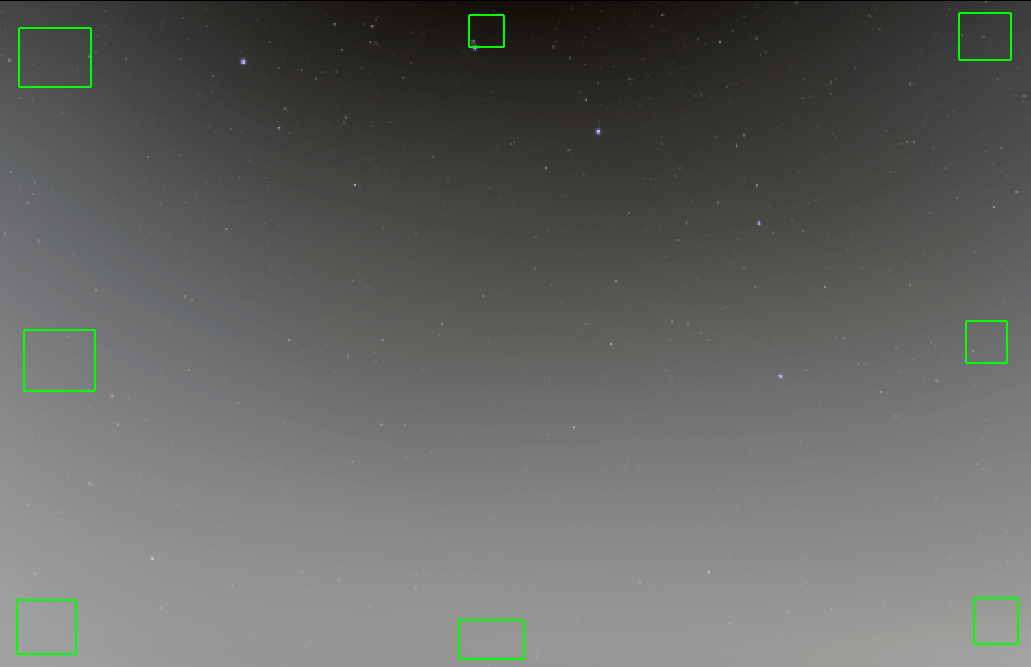
Then run the tool. You will get something like this (based on the image you posted above) -
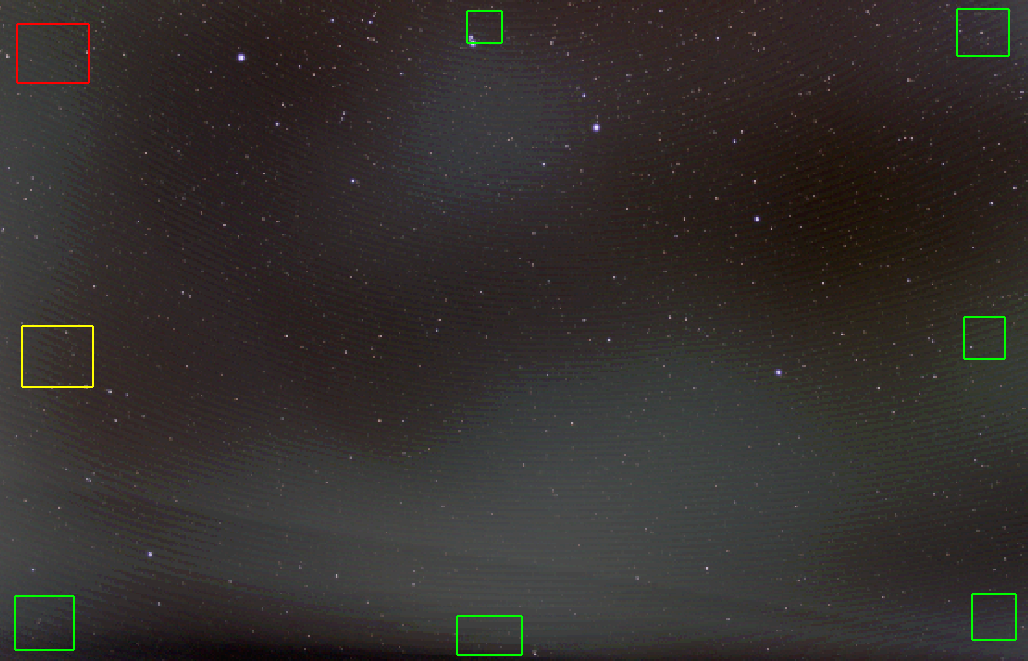
The selection boxes can be refined progressively by adding more selections and assessing the result. You can see the image still has problems, but the gradient has been more or less removed.
JC
Hi @pleasedontent, yeah I think you are doing what was kind of implied in the link you gave earlier but in the end you would need boxes distributed throughout the whole image - APP says it can be as little as 5 so I guess that would be something like four corners and middle. I've seen some gradient tools auto place boxes in a grid all over the image. Sometimes its difficult to find background that doesn't have nebulosity but in your case, it looks like a pretty clear image and you are quite zoomed out and not imaging any nebulosity. I think Mabula did a video on the light pollution tool that was interesting - try these links: https://www.astropixelprocessor.com/community/main-forum/how-to-set-light-pollution-boxes-correctly/#post-5655 , https://www.astropixelprocessor.com/part-4-light-pollution-correction-and-background-calibration-of-the-mosaic-tutorial-milky-way-to-rho-ophiuchi-by-mabula/
