

UPDATE FROM MABULA
I have had a very rough 2 months unfortunately health wise. I was struck 3x in a row with bacterial infections. The second infection occurred after a routine hospital checkup and I became very sick. I had to rest and take a lot of antibiotics. Once I was recovering and restarting work 1 month ago, I again became sick. The infection was not yet gone, so even more antibiotics and rest was needed. Needless to say, it took a lot of my energy and I needed a lot of rest.
Finally, the infection is really gone and my energy is coming back step-by-step now and I have started work again. I am terribly sorry to have kept you waiting for support. I will address all outstanding questions and e-mails step-by step and will be on the forum daily from today.
APP 2.0.0-beta47 will come soon as well, a lot of work was already completed before I became very ill, so the release is also nearly ready for you. Beta47 will be much faster actually. Many workflows will be more than 2x faster, mosaics can even be 10x faster than before because registration really received a major boost... all compared to beta46. Before I release it, I will make sure that everything is working properly and then I will release it.
I'm new to making calibration frames.
1) I have 4 nights of data I want to calibrate so I can add more later. When adding Lights, I am having it choose the filter but selecting 1 session for all four nights. Is this correct? I had always made each night a session before but was told it wasn't needed.
2) My working directory is in a folder "Stacked". The output of frames goes to a folder "Calibrated 1-4". Is this the best way to do that? What will I get saved to the Stacked folder?
3) When I calibrate the next 4-8 nights, do I load the raw darks and bias files I used this time or will I have "Master" files to use? Does that make a difference?
4) When I am ready to stack to get my final LRGBH files, do I just put the calibrated frames in Lights and nothing else? Thanks!
Steve
There is no 'right' way to organise your data. Whatever works for you, helps you avoid mistakes and reminds you what you did is the 'right' way. I can give you a run down on how I do it, but feel free to disregard what I say and do what makes sense to you. When I was first starting I was pretty haphazard about data management, but over time I developed a more rigid structure that works for me.
Bear in mind that your acquisition software may have rules or capabilities that affect data management. I use NINA, so my workflows will start from there.
I only use sessions to group data by exposure time. In the layout below (which is related to narrowband imaging of a faint target), session 1 has all the 10 min exposures for Ha and Oiii and session 2 has all the 20 min exposures for Sii. I make no distinction for data from different nights. I may add a session 3 to hold 2 min rgb exposures for star colours if I get the chance.
However, if you are setting up your equipment from scratch each night then it may make more sense to use a session for each night so that each session can have its own calibration frames.
Often you may only need one session, even for multiple nights.
I hope this is legible.
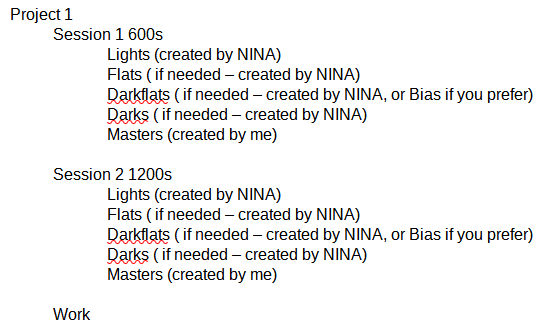
The working directory (Work) is where APP stores all the files it creates, unless you tell it differently.
Each Masters folder holds the masterdarks and masterflats that relate to that session. They can be created (in Work) during your first test integration and moved to the masters folder for use in later integrations, assuming your optical setup is unchanged. After they have been created the Flats, Darkflats (Bias) and Darks folders can be deleted.
The Lights, Flats, etc folders are created by NINA (in my setup). Each folder has a subfolder for filter type (again - assuming NINA is set up that way).
Assuming you only use one camera there will be a BPM that can be stored in any masters folder and used for all sessions.
The final integration is pretty simple. For each session load the raw lights from the lights folder, the master calibration frames from the masters folder and you are good to go.
Hope this helps
JC
@connor231 thanks! I am using Nina at StarFront so my scope is always there.
How does NINA save to folders by filter, etc. Currently, all my subs are uploaded to a folder on my cloud drive, all at once. I can sort there by name or date created. It would be nice to go into separate folders.
Steve
In NINA, under Options/Imaging, there is a field called 'Image file pattern'. This can contain details on how NINA is to save its subs.
The pattern I use is:
$$IMAGETYPE$$\$$FILTER$$_$$TARGETNAME$$\$$DATETIME$$_$$GAIN$$_$$EXPOSURETIME$$s_$$OFFSET$$_$$FRAMENR$$
This pattern creates a folder for each imagetype (lights, flats, etc) and a subfolder that concatenates the filter name and target name.
The last part is how it creates the filename for each sub. All this must be entered precisely, but gives a lot of flexibility and control over NINA.
I'm using an older version of NINA, but I think this should work in the latest version.
JC
@connor231 Is the difference that you put a "\" in the format rather than the underscore "_"? That causes the folders for Lights and inside, target and filter?
Steve
Yes that's right.
It works like a typical Windows directory string and file identifier. Each "\" separates a folder from a subfolder, except the last "\" which precedes the filename. The "_" is just a placeholder that is placed into the name to make it easier to read.
Its a format that is familiar to oldies like me, who go back to the days of MSDOS (or even earlier).
JC
I'm new to making calibration frames.
1) I have 4 nights of data I want to calibrate so I can add more later. When adding Lights, I am having it choose the filter but selecting 1 session for all four nights. Is this correct? I had always made each night a session before but was told it wasn't needed.
2) My working directory is in a folder "Stacked". The output of frames goes to a folder "Calibrated 1-4". Is this the best way to do that? What will I get saved to the Stacked folder?
3) When I calibrate the next 4-8 nights, do I load the raw darks and bias files I used this time or will I have "Master" files to use? Does that make a difference?
4) When I am ready to stack to get my final LRGBH files, do I just put the calibrated frames in Lights and nothing else? Thanks!
Hi Steve @stevehookem & John @connor231,
Steve, did all of your questions get answered? Or do you still have more questions about this? I think that John (thanks!) has answered part of it?
1) The separation of data into several sessions is only needed if you will calibration data that is different for the different actual/real life sessions. So if you can can use all darks, bias, flats from the first actual session also for the other subsequent nights. Then you can simply disable the multi-session mode and treat all data as 1 session.
2) That will be fine, in the working directory, a temporary file is created and destroyed while integrating your data. The working directory is also the default location of your integrated files, unless you select that save directory yourself.
3) You will be able to use the previously created masterframes. You can load them directly as masters with the master load buttons in 1) Load. It will not make a difference if you don't load the masters that you already have, and thus recreate the masters, since they should be indentical pixel by pixel and thus give identical calibration results.
4) Yes, if you chose to save the calibrated frames, then you simply load those to make your integrated LRGBHa files.
Please let me know if this answers all of your questions.
Mabula
Great Steve!
