

2026-10-09 APP 2.0.0-beta48 has been released !
This is mainly a bug fix release for the reported bugs in beta47. In addition it has a significant User Interface performance improvement noticable when you need to process 1000s of images in APP.
2026-10-03 APP 2.0.0-beta47 has been released !
This is a very big release... many code optimizations/rewrites, many parts of APP are much faster and more precise, especially star analysis and registration are much faster ! Big mosaics will go much faster 🙂
And we introduce a new preview filter, which includes the new Adaptive Deep Sky Stretch and a General Levels Stretch, this has been long over due. The old preview filter (the panel on the right side to stretch and preview your data) has not been updated for a couple of years and it is a critical part of any APP session.
Adaptive Deep Sky Stretch or ADSS is a much more intuitive stretch algorithm. It is also color preserving (which is a great new addition in itself ! ) which means that the highlights are no longer bleached, color is maintained from the linear data while stretching. You can simply stretch your data using the sky background level and signal width sliders which work much easier and more intuitive. You no longer need to fiddle with the old complicated sliders with zoom buttons. All the zoom buttons for the sliders are made redundant. And you can enter slider values in the slider value fields yourself. I will make a youtube video in the coming days to explain and fully introduce ADSS. Once the video is ready, it will be highlighted on the forum.
RGB Combine upgrade !. The RGB Combine Tool has been rewritten mostly. The tool is faster and easier to use and most importantly, the Luminance slider to inject a luminance channel or channels into the RGB composite is now working correctly. It no longer bleaches the RGB colors. Combined with the new ADSS preview, you will get much better and easier great composites with great color! I will also explain this in a new youtube video.
Now, let me start by saying - I know the 'split channels' workaround. It... works but it requires quite a bit of fiddling around (more than necessary IMHO) and with high pixel count cameras (BIG subs) on fast optics like a RASA (LOTS of subs) the disk space requirements quickly balloon to the point of being unworkable (esp on an SSD where space is still a bit of a premium - even with a 1TB 970Pro).
This has irked me for some time now since nearly everything I do these days involves combining mono data with one-shot-color RBG, whether that is HaRGB of a galaxy or HOO/SHO narrowband nebulae with RGB stars.
All data gets loaded correctly (I fix the FITS headers the capture program spits out with 'astfits' - a great tool if you run linux) without needing to force anything on tab 0, OSC is picked up as such with the correct bayer pattern (thanks to the 'BAYERPAT' keyword) and mono is also recognized as what it is. They have their own 'Filter' as well so all I'm asking as an end result is a nice stack per filter but registered together. Alas this bombs out with an ArrayIndexOutOfBoundsException in 5) Normalize. as it is looking for the second channel (index 1) in the reference frame.
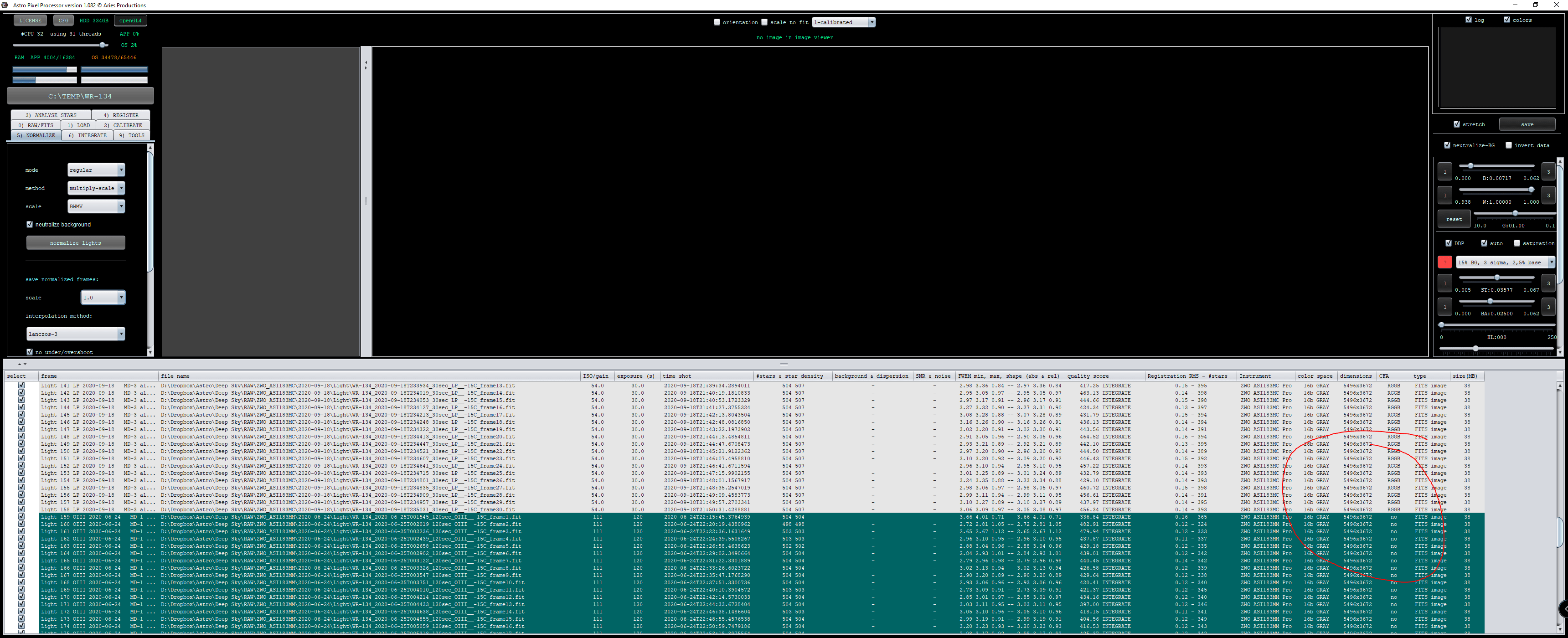
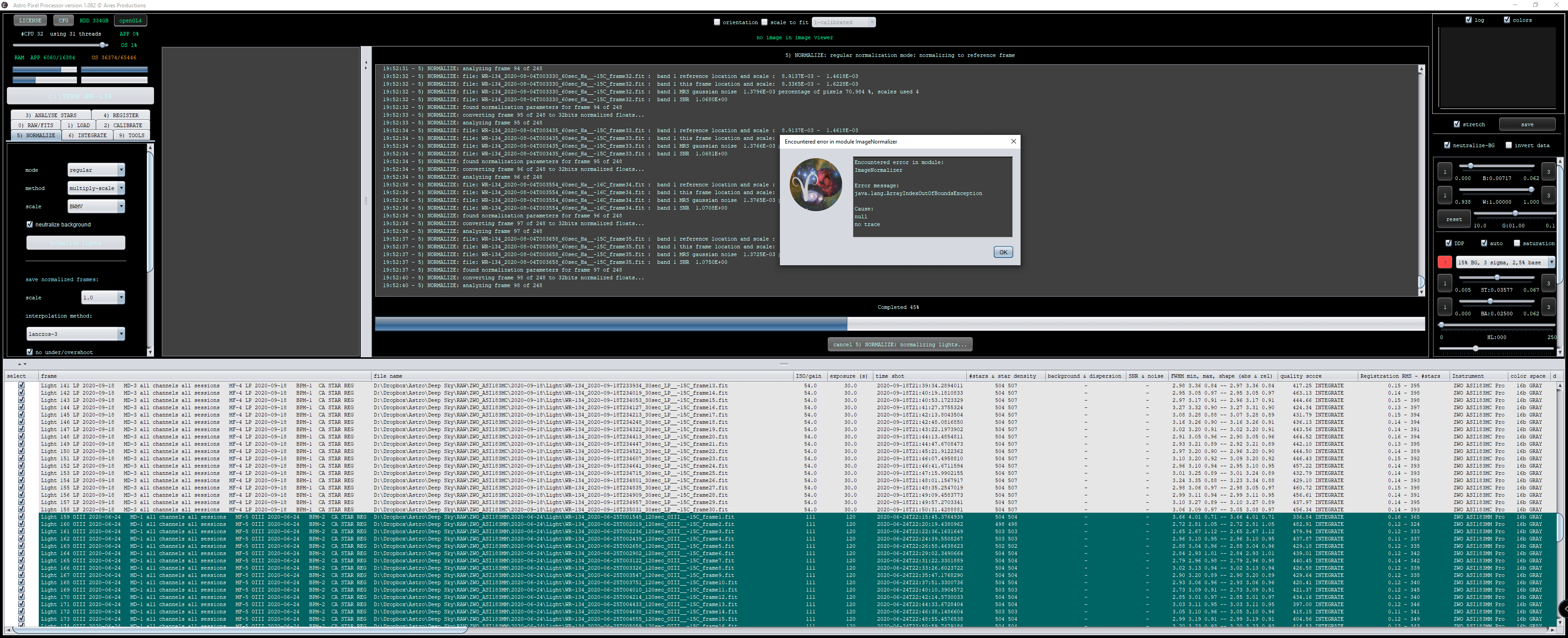
Surely this is something that can be fixed without too much hassle?
Not totally sure here, but you are still normalizing 3 channel RGB data with 1 channel data then? As the CFA pattern is still there. I might be misreading that. That's at least not possible right now, which is why the split channels workflow exists. But we do want to make this more clear and easier in a future version indeed.
I don't see why there would be a difference (from an end-user perspective) in normalizing each channel in an RGB image on-the-fly (as happens when only RGB data is in the workflow) vs that RGB image split into 3. Esp since at that point the debayering should have already occurred.
That might be something that gets implemented indeed, I don't know about the background algorithms yet though and how difficult this is (or not) to implement that way.
Is there an update on this? I've just wasted a couple of hours with Java out of bounds errors combining some Ha and L from a mono cam with OSC RGB from its sister camera. All goes fine until Normalisation and when it hits the RGB data. Both the RGB and the L-Ha stuff work through to nice images when managed separately, but it would be helpful to have the whole lot processed together so they are all aligned.
So now I have seen this thread! There is a split channels option at Stage 2 calibrate - is that the thing to tick. Presumably with align channels.
Quite a few of us augment colour with mono data so I'm a bit surprised by all this. Thanks
There is a split channels option at Stage 2 calibrate - is that the thing to tick. Presumably with align channels.
Split channels only works when using the calibrate button in tab 2 and then using the "save calibrated lights" also in tab 2.
@wvreevenk thanks. My Mac is now producing 215 triplets of calibrated separate R, G, and B mono files along with the L and Ha. Do I just work through the remaining steps as before on those 5 channels? How do I ensure that APP now looks at the five mono channels rather than lookin g at the two mono and original RGB? Is that automatic or do I have to restart the whole process with five sets of input? Ta - sorry - new to this combo
@williamshaw My advise would be to load the L and Ha files and calibrate them and save as well in step 2. Then clear all files and only load the calibrated R, G, B, L and Ha files and process them normally. You will end up with 5 integration results (one each for R, G, B, L and Ha) that you then can combine as you see fit.
@wvreeven so we are talking on two threads. I read the above before I deleted all those calibrated files, and decide to try it anyway. I have this problem in that the output of the split channel calibration is saved in a directory as ordered triples of files of the form
OLDNAME1-cal-Blue.fits
OLDNAME1-cal-Green.fits
OLDNAME1-cal-Red.fits
OLDNAME2-cal-Blue.fits
OLDNAME2-cal-Green.fits
OLDNAME2-cal-Red.fits
So the three channels are interleaved in the directory and it is a PITA to select all the reds together etc. I can drop this approach altogether but wondered if there was a cunning way to grab just each colour to reload into the relevant channel.
@williamshaw Yeah probably better to drop this workflow and use the one in the other thread.
Having said that, there is no cunning way in APP. If you are familiar with command line scripting then you can write a script that places the files with the same color in a directory and then load from there.
@wvreeven thanks - agree on both points. I tend to run the OSC and mono integrations as I go in any case. I'll do the other thing. Post-processing by splitting and registering the stacked output makes more sense and uses a lot less storage! Thanks for the feedback. I should get a nice M33 in HaLRGB form eventually.
The very very very simple simple solution that would make this very workable, would be that APP adds the colour channel as a preface rather than a suffix to the saved split calibrated files:
Blue-cal-OLDNAME1.fits
Green-cal-OLDNAME1.fits
Red-cal-OLDNAME1.fits
Blue-cal-OLDNAME2.fits
Green-cal-OLDNAME2.fits
Red-cal-OLDNAME2.fits
A simple alphabetical sort in the finder will then group all the blue, green and red files together making further sorting and re-import very easy.
Please implement this ...
Thanks, Mark
