

2026-10-09 APP 2.0.0-beta48 has been released !
This is mainly a bug fix release for the reported bugs in beta47. In addition it has a significant User Interface performance improvement noticable when you need to process 1000s of images in APP.
2026-10-03 APP 2.0.0-beta47 has been released !
This is a very big release... many code optimizations/rewrites, many parts of APP are much faster and more precise, especially star analysis and registration are much faster ! Big mosaics will go much faster 🙂
And we introduce a new preview filter, which includes the new Adaptive Deep Sky Stretch and a General Levels Stretch, this has been long over due. The old preview filter (the panel on the right side to stretch and preview your data) has not been updated for a couple of years and it is a critical part of any APP session.
Adaptive Deep Sky Stretch or ADSS is a much more intuitive stretch algorithm. It is also color preserving (which is a great new addition in itself ! ) which means that the highlights are no longer bleached, color is maintained from the linear data while stretching. You can simply stretch your data using the sky background level and signal width sliders which work much easier and more intuitive. You no longer need to fiddle with the old complicated sliders with zoom buttons. All the zoom buttons for the sliders are made redundant. And you can enter slider values in the slider value fields yourself. I will make a youtube video in the coming days to explain and fully introduce ADSS. Once the video is ready, it will be highlighted on the forum.
RGB Combine upgrade !. The RGB Combine Tool has been rewritten mostly. The tool is faster and easier to use and most importantly, the Luminance slider to inject a luminance channel or channels into the RGB composite is now working correctly. It no longer bleaches the RGB colors. Combined with the new ADSS preview, you will get much better and easier great composites with great color! I will also explain this in a new youtube video.
Hi Mabula,
I was always wondering when to use different LNC settings in the "Integrate" tab.
Can you explain to me what exactly it does and when to use different settings for it?
There are tutorial videos around with 4th degree and 6 iterations and in one of your workflow tutorials you suggest 1st degree and 1 iteration. As far as my examples show I don't see a huge difference.
Thanks in advance
Frank
Hi Frank,
LNC stands for Local Normalization Correction.
It will correct the illumination in your frames in such a manner that the illumination differences of the separate frames in your stack will be matched locally instead of globally.
Normally, normalization is only corrected globally per frame. With LNC the gradients in your data will be matched per frame while maintaining a solution for all frames at once that is stable and as flat as possible.
If you are combining data shot at 1 single night then LNC will still help, but the improvement is very little and visually hard to see, because locally the frames already match pretty well.
So if you are combining data with deviating gradients (multiple imaging sessions, data from different setups and/or photographers) then LNC should give a clear improvement.
An example: data of the Cocoon Nebula shot with a Nikon D5100 and a Robtics 102 ED apo. 2 frames shot at different nights with different moon fase and light pollution gradients and slightly different Field of Views. The effect of LNC is best seen on the borders where the stack artefacts are still visible.
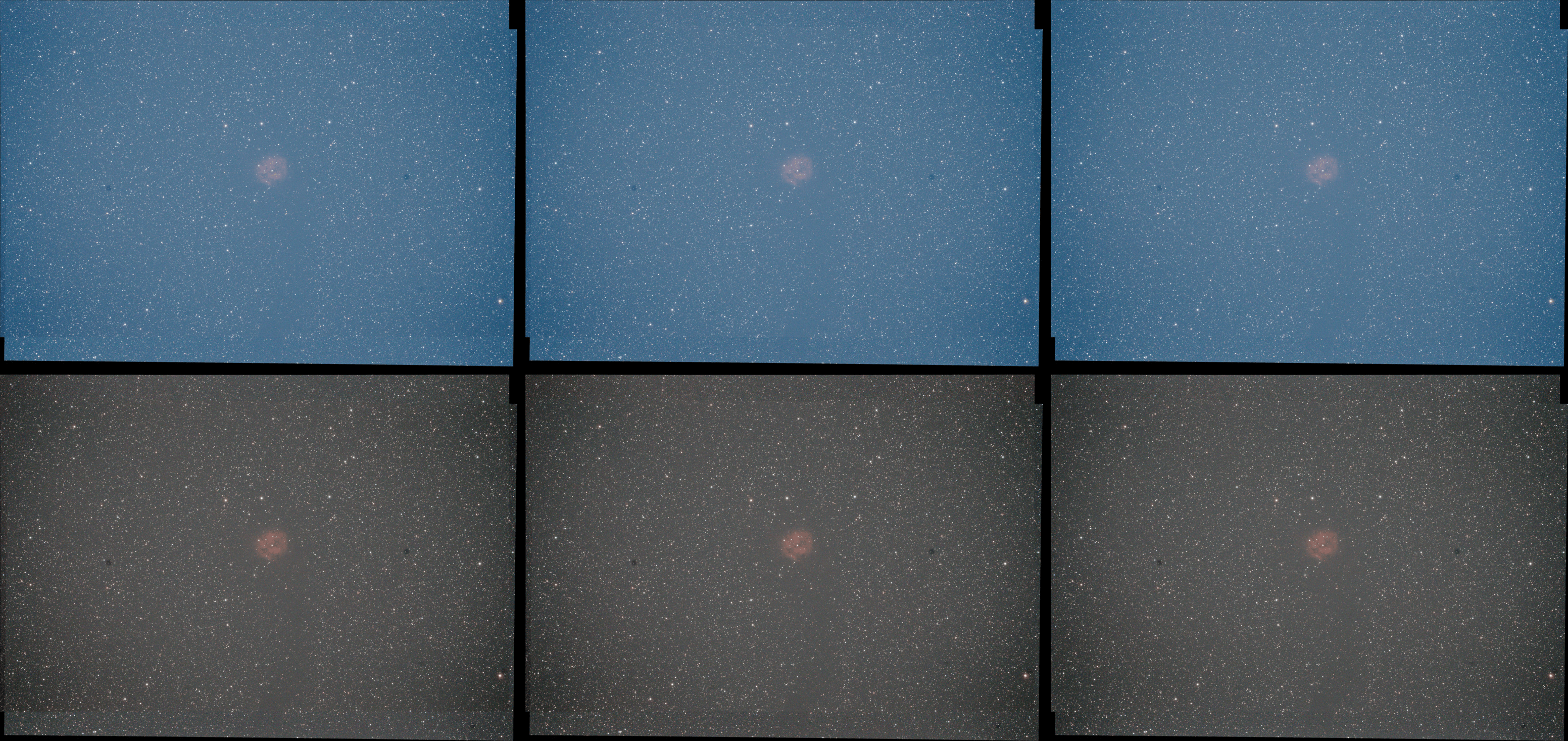
Top row: neutralize background disabled in 5)NORMALIZE
Bottom row: neutralize background enabled in 5)NORMALIZE
Left: no LNC
Middle: LNC 1st degree 1 iteration
Right: LNC 4th degree 3 iterations
When to use which settings:
For regular integrations (I mean not a mosaic), start with 1st degree and 1 iteration. Then improve from there if needed. First increase iterations to 3. If that doesn't change the outcome, increase the degree. For regular integrations (no mosaics) normally 2nd or 4th degree with 3 iterations gives a very nice improvement.
For mosaics, it really depends on the data which degree and the amount of iterations that are needed. The user should experiment, but I recommend, just like for regular integrations, start with 1st degree and 1 iteration and then improve from there.
Mabula
p.s. I have made this a sticky 😉
Hi Mabula,
would You please provide some more information about the degree parameter? Some questions:
- What is the difference between 1st vs. 2nd vs. 4th degree etc.?
- How are the factors for performance / calculation time required by the various degrees? I tried 4th degree the other day and after more than 1 hour calculation for the LNC parameters I needed to abort (2nd degree iteration is usually half an hour or so on my machine. Is this to be expected?
- Is there any difference in RAM needed or HDD space required between the degrees?
Thanks in advance,
Jochen
Hi Mabula,
would You please provide some more information about the degree parameter? Some questions:
- What is the difference between 1st vs. 2nd vs. 4th degree etc.?
1st degree means that only linear adjustments are done on all images, 2nd means kwadratic adjustments and so on. The correction models are bivariate polynomials :
https://en.wikipedia.org/wiki/Polynomial#bivariate
- How are the factors for performance / calculation time required by the various degrees? I tried 4th degree the other day and after more than 1 hour calculation for the LNC parameters I needed to abort (2nd degree iteration is usually half an hour or so on my machine. Is this to be expected?
Yes, the higher degree the more parameters need to be solved per frame and the complexity rises fast per degree. So yes 4th degree takes more than double the time of second degree.
- Is there any difference in RAM needed or HDD space required between the degrees?
Yes, you need more RAM with a higher degree and with more frames. The Matrices that need to be created and calculated grow with higher degree and more frames. In the current LNC implementation running 1000 frames with LNC2 requires a serious amount of RAM...
Going forward though, soon I will be able to make the LNC calculation faster I think and I will revise/update the LNC algorithms as well. Currently, LNC only runs on 1 cpu thread and I will be able to make it run using multiple threads. So that will speed it up considerably. And by revising the algorithms I should be able to make it smarter and run with less memory.
Mabula
Thanks Mabula,
Glad to hear this will be getting faster by multithreading - integration and LNC especially is the most time consuming activity currently.
is there a way to skip remaining LNC iterations?
Given the time needed per iteration it would helpful to have a "skip further iterations" button or an automated skip once the latest correction is lower than a certain threshold. I noticed LNC stops on its own already once the remaining error reaches 0 in all channels the second time with the message "no further improvement. But once 0, it could just stop because anyway no further improvement is to be expected.
What would be a reasonable value for a threshold?
cheers,
Jochen
Question on how this relates to multi session vs single session when selecting frames
When I load lets say "H" data over multiple nights of same target (not mosaic) is there any benefit to put each night set into a separate "session" or just do "only 1 session" and then use LNC?
