
2026-10-09 APP 2.0.0-beta48 has been released !
This is mainly a bug fix release for the reported bugs in beta47. In addition it has a significant User Interface performance improvement noticable when you need to process 1000s of images in APP.
2026-10-03 APP 2.0.0-beta47 has been released !
This is a very big release... many code optimizations/rewrites, many parts of APP are much faster and more precise, especially star analysis and registration are much faster ! Big mosaics will go much faster 🙂
And we introduce a new preview filter, which includes the new Adaptive Deep Sky Stretch and a General Levels Stretch, this has been long over due. The old preview filter (the panel on the right side to stretch and preview your data) has not been updated for a couple of years and it is a critical part of any APP session.
Adaptive Deep Sky Stretch or ADSS is a much more intuitive stretch algorithm. It is also color preserving (which is a great new addition in itself ! ) which means that the highlights are no longer bleached, color is maintained from the linear data while stretching. You can simply stretch your data using the sky background level and signal width sliders which work much easier and more intuitive. You no longer need to fiddle with the old complicated sliders with zoom buttons. All the zoom buttons for the sliders are made redundant. And you can enter slider values in the slider value fields yourself. I will make a youtube video in the coming days to explain and fully introduce ADSS. Once the video is ready, it will be highlighted on the forum.
RGB Combine upgrade !. The RGB Combine Tool has been rewritten mostly. The tool is faster and easier to use and most importantly, the Luminance slider to inject a luminance channel or channels into the RGB composite is now working correctly. It no longer bleaches the RGB colors. Combined with the new ADSS preview, you will get much better and easier great composites with great color! I will also explain this in a new youtube video.
Hi Everyone
Question on making and using a Badpixel map.
I seem to get two different maps from two different methods and not sure why and which is correct to use and in fact don't know which one was used for the final integrated image
I have a master_flat/master_darkflat/master_dark and light frames if i integrate then i end up with two badpixel maps after processing. ones generated by what looks to be the Darkframes here is the header data. Looks good about 2% badpixels
Image #1
SIMPLE = T / Java FITS: Sun Jan 16 10:53:57 GMT 2022
BITPIX = 8 / bits per data value
NAXIS = 2 / number of axes
NAXIS1 = 8288 / size of the n'th axis
NAXIS2 = 5644 / size of the n'th axis
EXTEND = T / Extensions are permitted
DATE = '2022-01-18T17:01:52' / creation date of BadPixelMap
SOFTWARE= 'Astro Pixel Processor by Aries Productions' / software
VERSION = '1.083 ' / Astro Pixel Processor version
CALFRAME= 'BadPixelMap' / bad pixel map for instrument ZWO ASI294MM Pro
INSTRUME= 'ZWO ASI294MM Pro' / instrument name
CFAIMAGE= 'no ' / Color Filter Array pattern
EXPTIME = 0.0 / exposure time (s)
GAIN = 0.0 / gain or ISO depending on instrument
AD-PED = 0.0 / adaptive pedestal from data calibration
NPIX = 46777472 / raw number of pixels
HOTKAPPA= '3.00 ' / kappa value used for hot pixel determination
COLDFRAC= '0.10 ' / percentage used for cold pixel determination
NBADPIX = 959110 / number of bad pixels
PBADPIX = '2.050 ' / percentage of bad pixels
NHOTPIX = 959110 / number of hot pixels
PHOTPIX = '2.050 ' / percentage of hot pixels
NCOLDPIX= 0 / number of cold pixels
PCOLDPIX= '0.000 ' / percentage of cold pixels
NLINPIX = 45818362 / number of linear pixels
PLINPIX = '97.950 ' / percentage of linear pixels
NUMDARKS= 50 / # of dark frames used in creation of the BPM
NUMFLATS= 0 / # of flat frames used in creation of the BPM
But i get a second badpixel map made up of Darks and Flats. This one show no badpixels
Image #1
SIMPLE = T / Java FITS: Thu Jan 20 15:00:52 GMT 2022
BITPIX = 8 / bits per data value
NAXIS = 2 / number of axes
NAXIS1 = 8288 / size of the n'th axis
NAXIS2 = 5644 / size of the n'th axis
EXTEND = T / Extensions are permitted
DATE = '2022-01-20T15:05:58' / creation date of BadPixelMap
SOFTWARE= 'Astro Pixel Processor by Aries Productions' / software
VERSION = '1.083 ' / Astro Pixel Processor version
CALFRAME= 'BadPixelMap' / bad pixel map for instrument ASI294mm
INSTRUME= 'ASI294mm' / instrument name
CFAIMAGE= 'no ' / Color Filter Array pattern
EXPTIME = 0.0 / exposure time (s)
GAIN = 0.0 / gain or ISO depending on instrument
AD-PED = 0.0 / adaptive pedestal from data calibration
NPIX = 46777472 / raw number of pixels
HOTKAPPA= '3.00 ' / kappa value used for hot pixel determination
COLDFRAC= '0.10 ' / percentage used for cold pixel determination
NBADPIX = 0 / number of bad pixels
PBADPIX = '0.000 ' / percentage of bad pixels
NHOTPIX = 0 / number of hot pixels
PHOTPIX = '0.000 ' / percentage of hot pixels
NCOLDPIX= 0 / number of cold pixels
PCOLDPIX= '0.000 ' / percentage of cold pixels
NLINPIX = 46777472 / number of linear pixels
PLINPIX = '100.000 ' / percentage of linear pixels
NUMDARKS= 50 / # of dark frames used in creation of the BPM
NUMFLATS= 200 / # of flat frames used in creation of the BPM
For now i am going to generate a badpixel map from my darks/master_dark as it seem more correct, but i am missing something here.
Mike
Hi @moviecells,
2 BPMs are created because the instrument name in your data is not consistent.
Look at the INSTRUME tag in the BPMs:
INSTRUME= 'ZWO ASI294MM Pro' / instrument name
INSTRUME= 'ASI294mm' / instrument name
So APP is seeing this as 2 different camera's which is logical and needs to be done like that.
You can fix it in your dataset by using the batch modify FITS metadata tool in the TOOLS tab.
Ok i see that now, if i ignore that for now which process gives the best pixel map just from the dark files as that give me what seem to be a good pixel map.
If i try and use both and flats/darkflat i don't seem to get a good pixelmap and the file names of the flat/darkflat match for camera i don't seem to get a good pixel map
Image #1
SIMPLE = T / Java FITS: Thu Sep 23 08:00:04 BST 2021
BITPIX = 8 / bits per data value
NAXIS = 2 / number of axes
NAXIS1 = 8288 / size of the n'th axis
NAXIS2 = 5644 / size of the n'th axis
EXTEND = T / Extensions are permitted
DATE = '2021-09-23T07:49:52' / creation date of BadPixelMap
SOFTWARE= 'Astro Pixel Processor by Aries Productions' / software
VERSION = '1.083-beta2' / Astro Pixel Processor version
CALFRAME= 'BadPixelMap' / bad pixel map for instrument ASI294mm
INSTRUME= 'ASI294mm' / instrument name
CFAIMAGE= 'no ' / Color Filter Array pattern
EXPTIME = 0.0 / exposure time (s)
GAIN = 0.0 / gain or ISO depending on instrument
AD-PED = 0.0 / adaptive pedestal from data calibration
NPIX = 46777472 / raw number of pixels
HOTKAPPA= '3.00 ' / kappa value used for hot pixel determination
COLDFRAC= '0.10 ' / percentage used for cold pixel determination
NBADPIX = 0 / number of bad pixels
PBADPIX = '0.000 ' / percentage of bad pixels
NHOTPIX = 0 / number of hot pixels
PHOTPIX = '0.000 ' / percentage of hot pixels
NCOLDPIX= 0 / number of cold pixels
PCOLDPIX= '0.000 ' / percentage of cold pixels
NLINPIX = 46777472 / number of linear pixels
PLINPIX = '100.000 ' / percentage of linear pixels
NUMDARKS= 200 / # of dark frames used in creation of the BPM
NUMFLATS= 200 / # of flat frames used in creation of the BPM
Mike
Hi Michael @moviecells,
The Bad Pixel Map tooltip explains it:
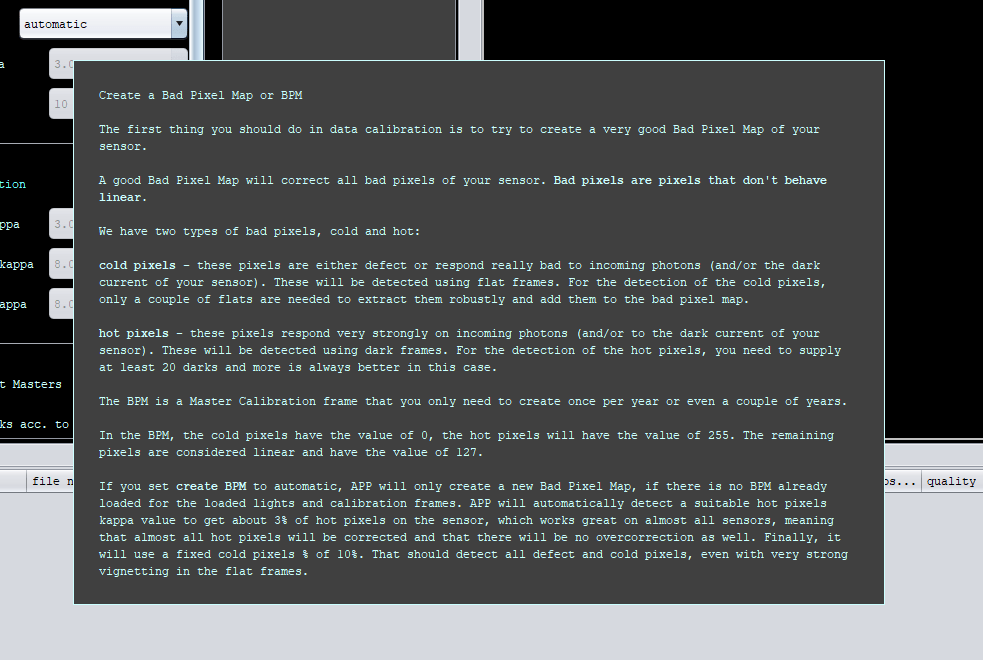
Darks are needed for hot pixels and Flats are needed if you have defective or cold pixels. Flat Darks have no influence for hot pixel detection because their exposure is so short that dark current and the hot pixels are less clear so you always want to use proper darks with several minutes of exposure time to get the best hot pixel detection.
You don't need to make darks again and again for the Bad Pixel Map. Just make one batch of long exposed darks without sensor cooling and make your Bad Pixel Map. That BPM will work very nicely for a long time on all your data 😉
The BPM is not destructive to your data, so it's a good idea to get as much noise (hot-pixels) as possible that your sensor can generate. No cooling would help with that. The no cooling-dark would then only be to create a BPM, regular darks for your data need the same settings indeed.
Can i ask why do this without cooling, should it not match the lights are cooled.
Hi @moviecells, indeed like Vincent indicates, no cooling gives much more dark signal and hot pixels so the hot pixels are detected easier and thus the BPM will become more robust if you create a BPM with uncooled darks 😉 But, to be clear, even on well-cooled darks it works very well !
And yes, only use the uncooled darks to make the BPM, don't use them for light frame calibration 😉
Thanks to all for the help, clouds roll in tomorrow so will take some long non cooled darks for a BPM. it clear tonight only the 4 night this year so far so off to set up.
