

UPDATE FROM MABULA
I have had a very rough 2 months unfortunately health wise. I was struck 3x in a row with bacterial infections. The second infection occurred after a routine hospital checkup and I became very sick. I had to rest and take a lot of antibiotics. Once I was recovering and restarting work 1 month ago, I again became sick. The infection was not yet gone, so even more antibiotics and rest was needed. Needless to say, it took a lot of my energy and I needed a lot of rest.
Finally, the infection is really gone and my energy is coming back step-by-step now and I have started work again. I am terribly sorry to have kept you waiting for support. I will address all outstanding questions and e-mails step-by step and will be on the forum daily from today.
APP 2.0.0-beta47 will come soon as well, a lot of work was already completed before I became very ill, so the release is also nearly ready for you. Beta47 will be much faster actually. Many workflows will be more than 2x faster, mosaics can even be 10x faster than before because registration really received a major boost... all compared to beta46. Before I release it, I will make sure that everything is working properly and then I will release it.
Hi!
Since a certain amount of time, APP had hard time lunching. Now it needs a fresh install to lunch. I cannot remember the last version that hadn't this problem. I think it was before the star reduction tool. I have windows 10.
Do you have any idea whats going on?
Thank you!
Edit: Once APP is running, I don't have any problem.
Interesting, could it be that you have security running that somehow prevents APP from launching? Like a virus scanner or maybe folder protection in Windows Defender? Although then I wouldn't expect a fresh install to work. This must be a system related issue as we have no reports of APP showing this behavior.
Hi @jawknee,
Which version of APP are you using? Have you tried the latest APP 2.0.0-beta17, it has an updated installer compared to earlier versions. To be sure, please do not install both 1.083 or earlier and one of the 2.0 beta's together on your system. The windows registry can't deal with this and can give problems exactly like this. So if this is the case, remove all APP versions that are installed and then install the latest available version from our download page😉 and let us know if all is okay then.
Mabula
I have the same issue and have had it for the last several versions dating back at least 4-5 months. The program will not start without a fresh install on both of my machines. One is Windows 11 machine with hardware configured to breeze through 8k footage and the other is a run of the mill Windows 10 machine. The problem started with the Windows 11 build several months back and for the last couple updates neither will will run. I have checked and made sure that all drivers are up to date and the current version is the only install on both machines.
Hi Jonathan @minroadkill,
Did you try the latest 2.0.0-beta25? We have fixed startup issue on windows 10/11 systems recenltyi in 2.0.0-beta24, several users confirmed the issue was fixed on their systems. It was due to our OpenGL dependency doing something that some security software packages don't like.
You can download beta 25 from the downloads section:
https://www.astropixelprocessor.com/downloads/
If beta25 still does not start normally on your system, you need to check your security software on your computer if it is not giving a false positive on APP.
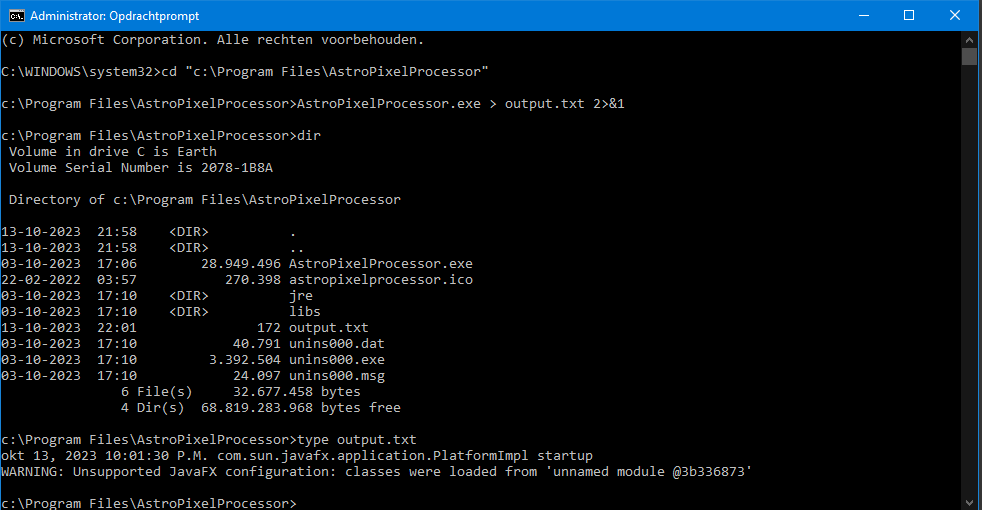
Another reason could be that something crashes when APP starts on both your machines somehow. If a crash occurs, we can get the error message in the following way:
Open a command prompt with admin rights:
go to the APP installation directory:
cd "c:\Program Files\AstroPixelProcessor"
and execute APP in the following way
AstroPixelProcessor.exe > output.txt 2>&1
Wait until it opens or if it does not open, kill the process after a couple of minutes.
Then check for the contents of the output.txt file with
type output.txt
Normally only the following is shown:
okt 13, 2023 10:01:30 P.M. com.sun.javafx.application.PlatformImpl startup
WARNING: Unsupported JavaFX configuration: classes were loaded from 'unnamed module @3b336873'
If more is shown on your system, please share it, it might explain why it does not start normally
Mabula
I'm also having this issue. Currently running Windows 10. APP Beta 26. I've been having this issues for at least a few months now. On fresh reload, program runs fine and "works as advertised". But once shutdown, it must be reinstalled to get it to start again. I've attached the requested output file. One note, APP is installed C:\Users\<User>\AppData\Local\AstroPixelProcessor. It is not under Program Files.
Thanks,
Bill
Note: Checked logs and nothing is being reported by antivirus or malware programs.
Mabula,
In my previous reply I sent the requested text file. However, I'd mentioned that APP was not under the Program Files folder and it got me thinking... I tried to reload to Program Files but Windows Security prevented it because it could not create the sub-directory. I manually created the folder but still got write errors. Went in an manually changed the folder security and loaded APP. I've been able to start the program normally 3 times without any issues. Will try a full reboot and see if all still works correctly.
Bill
Edit: Problem appears to be resolved since forcing load to Program Files folder. All good.
Hi @billgriz57,
The error that is shown in output.txt indicates that a library is not found which is in fact installed properly if APP is properly installed.
You should not move an application around from folder to folder like you are describing here. You should first uninstall with windows control panel, then run APPs installation executable and install for all users or for you only. If you install for all users, the program is installed in Program files so all users of the computer can access it. If you install only for your user, the installation is done in C:\Users\<User>\AppData\...
The problem is likely due to misinstallation due to manuel intervention which will not work normally. My advice is remove all APP installations through windows control panel, if an installation is still present after that, you will kwow something is not right already. Remove the remaining installations manually.
Then install APP with APP's installation executable and do not move it around yourself, you also run the risk of getting registry issues on windows if you try to do that.
Mabula
@mabula-admin Understood, however I was not aware that it got installed in another subdirectory, or didn't think much about it at the time of install. Usually a program will run from another location if selected during installation, which I must have done. So, just pointing this out in case someone else made the same mistake.
Bill
Okay William billgriz57, that is fine.
If you modify the installation directory during the installation process it also should work well, i have tested this just now with different custom file paths for the installation directory and it all works fine.
The error that you received is an error that would occur only if you try to manually move the installation without moving the external libraries I would think to the same new location. Better to be safe and only use the dedicated installer that we provide and deinstaller options that windows provides. If you modify the installation location with our installer, then no problem should occur, many users do I know for a fact.
Please let me know is all okay now.
Mabula
