Jan 31 2026: APP 2.0.0-beta40 will soon be released with many fixes especially for Linux, upgraded development platform and 10-20% performance boost !
Jan 15 2026: FIXED LICENSE SERVER VPN Tunnel issue
The issue could have prevented APP to start when using a VPN tunnel or another complicated network configuration, like using APP on a remote computer on a different continent. This issue is fixed now and APP should start normally.
Jan 04 2026: Update on the 2.0.0 release & the full manual
We are getting close to the 2.0.0 stable release and the full manual. The manual will soon become available on the website and also in PDF format. Both versions will be identical and once released, will start to follow the APP release cycle and thus will stay up-to-date to the latest APP version. Unfortunately, Mabula was struck by a severe flu virus in the past couple of weeks and thus could not work. He is getting much better now and he has resumed work to release 2.0.0 as soon as possible. Once 2.0.0 is released, the price for APP will increase. Owner's license holders will not need to pay an upgrade fee to use 2.0.0, neither do Renter's license holders.
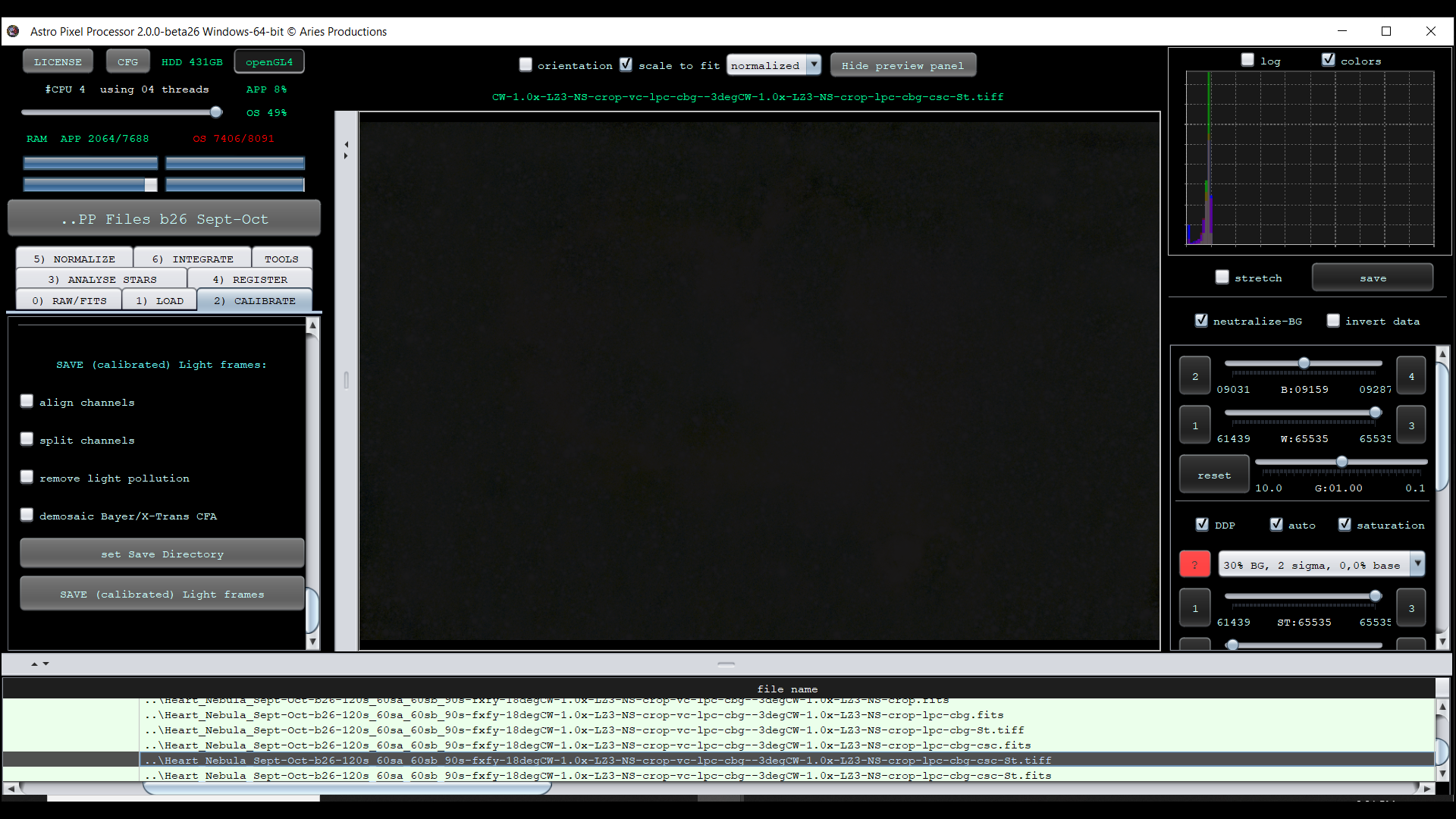
I may have found a bug in Beta 26 for Windows 64-bit. After stacking and processing, I save the "final" image as filename.FITS . I then save the Stretched version as filename-ST.TIFF. I can open the resulting TIFF file in Windows Photos, Adobe PhotoShop, and Adobe LightRoom and it looks "normal." When I attempt to open the same saved TIFF file in APP (which I have done routinely in all earlier versions), I get a black image with the histogram pressed tightly to the left, worse than the original stacked image.
APP appears to save the file correctly in both FITS and TIFF formats. However, it does not correctly load or read the TIFF file it creates, while other 3rd party programs do (Windows Photo Viewer, Adobe Photoshop, etc.)
I can provide examples of the file in question as well as screen shots. I report this as I have never had this happen in APP in the past.
This is likely not an issue with the actual TIFF that APP created, but rather an issue with APP's preview stretching on that TIFF file. How does the file look it you set the stretch preset to "no stretch (data as is)"?
@mabula-admin - Thank you for the quick reply. I agree that the APP TIFF file output was good, as it could be read by several 3rd party image apps. Now for the odd part, I went to check your suggestion tonight, and I could not get the error to repeat itself! The other night, it repeated itself several times with several different files. Tonight, all of the TIFF files I threw at it opened just fine, which is frustrating from a troubleshooting perspective. It did happen, but if its not repeatable, then it is difficult to trace the root cause. I attach proof it happened once, for the record. I'll will let you know if it repeats itself and will perform the checks you advised.
Thanks, okay, yes, the issue is probably related to the image data in the TIFF, triggering an expection that almost never happens. I will test the TIFF file tomorrow 😉
@mabula-admin - My apologies for the tardy response, a combination of home remodeling and clear skies at night! The file in question is about 78MB in size. I believe I have seen a link on the site to upload requested files in excess of 30MB. I will find it and upload it there.
As I mentioned, I have been unable to replicate the error, but I have not done much post-processing since then either.
@mabula-admin - I have uploaded the files I have had an issue with. Please excuse the sorry state of processing, both are a work in progress. They are in the folder MartinJordan_TIFF_Issue. I have uploaded two sets of files: one set of the Heart Nebula, with both a FITS and a TIFF file of the stretched image processed on October 21, 2023. The second set is of the Andromeda Galaxy, the FITS file (star reduced), a TIFF file of the unstretched star reduced FITS file, and a TIFF file of the stretched star reduced file, processed on November 22, 2023.
In both cases, APP has stacked the subs, and I have used APP functionality to get to a place where I am ready to continue processing in Photoshop. I save the "final" FITS file as a TIFF. When I attempt to open that TIFF file in APP, it shows "black" - from the histogram it appears to be an unstretched and unprocessed image. I can open that same TIFF file in Photoshop, LightRoom, or Microsoft image viewers and it looks normal. In all past versions of APP I have used, it has always been able to open and present the TIFF files it creates. Beta26 is the first time I have seen this happen, and it does not happen all the time in my experience.
Let me know if there is any additional information you might require to troubleshoot this.
Mabula - Thanks for taking the time to examine this issue. It has happened again, tonight. I have a FITS file that I save as stretched to TIFF. APP beta26 opens the file, but it does not look anything like the FITS file. The one thing "non-standard" I am doing is saving the TIFF files with Wide Gamut. I do not know if this could be an issue. Let me know if you wish me to upload this particular set of files.
Regards, Martin
The saved and stretched TIFF file as observed in APP
Mabula - Thanks for taking the time to examine this issue. It has happened again, tonight. I have a FITS file that I save as stretched to TIFF. APP beta26 opens the file, but it does not look anything like the FITS file. The one thing "non-standard" I am doing is saving the TIFF files with Wide Gamut. I do not know if this could be an issue. Let me know if you wish me to upload this particular set of files.
Regards, Martin
The saved and stretched TIFF file as observed in APP