

UPDATE FROM MABULA
I have had a very rough 2 months unfortunately health wise. I was struck 3x in a row with bacterial infections. The second infection occurred after a routine hospital checkup and I became very sick. I had to rest and take a lot of antibiotics. Once I was recovering and restarting work 1 month ago, I again became sick. The infection was not yet gone, so even more antibiotics and rest was needed. Needless to say, it took a lot of my energy and I needed a lot of rest.
Finally, the infection is really gone and my energy is coming back step-by-step now and I have started work again. I am terribly sorry to have kept you waiting for support. I will address all outstanding questions and e-mails step-by step and will be on the forum daily from today.
APP 2.0.0-beta47 will come soon as well, a lot of work was already completed before I became very ill, so the release is also nearly ready for you. Beta47 will be much faster actually. Many workflows will be more than 2x faster, mosaics can even be 10x faster than before because registration really received a major boost... all compared to beta46. Before I release it, I will make sure that everything is working properly and then I will release it.
Astro Pixel Processor 2.0.0-beta39 release notes
APP 2.0.0 stable is about to be released including a full manual in both HTML (on the webpage) and in PDF format.
Last work is being done on the manual and below are 2 sneak peaks of the PDF and HTML outputs:


I, Mabula, have been working very hard in the past 3 months on writing both the manual and developing beta39. Beta39 in itself is a major update. It includes a new and much improved registration engine where many! bugs are gone and making big mosaics becomes much easier. The registration is also much more easy to use, many of the interface settings are gone, because the engine is so much better and smarter now. The console output during registration also has been improved a lot. Another notable update in beta39 is the much better Multi-Narrowband processing options. It is faster. It has new algorithms, and can make multiple stacks at the same time with an algorithm like Multi-NB H-b + SII.
Full priority going forward is to release APP 2.0 stable and the full manual and we aim to do this before Christmas (this year). Support on email and the forum will be there going forward as well. Below are all the technical notes for this big release:
- IMPROVED 4) REGISTER, new and improved registration module ! with many new and improved algorithms for both normal and especially for mosiac mode and both projective and calibrated projective models.
Last couple of months, for this release, we have completely rewritten the registration module for the normal and mosaic modes. Simply said, the registration module works much better now, it is way more robust and way more easy to use. Many known issues and bugs have been solved robustly. And this has been done while deprecating many settings in the 4) Register menu. To be able to robustly register images with different amount of overlaps, with different optical setups with different optical distortions, with different amount of stars and star sizes, we needed to deprecate certain settings by making them dynamic and thus smart inside the registration engine. The options to need to set the scale start and scale stop have been removed. Flip descriptors in X/Y has been removed. Same camera and optics has been removed, which really helps the user, we think that this setting caused confusion in the past about what it actually meant and when you needed to enable or disable it. There is no more need and thus no more option to save an optical distortion model to use it later on. We found that the registration algorithms now work so well, that any saved models will perform less because the old saved models use different parameters. This means that the new models are better formulated mathematically as well. The distortion margin setting is gone as well, this is also now dynamic internally. The option to select the pattern recognition descriptors now includes an automatic setting which is the default as well now. With the automatic setting, you will be guaranteed that if registration is possible theoretically it will just work, you no longer need to try with different settings yourself. The calibrated projective model now is only an option in the mosaic mode, where it is only needed if the field of view is larger than 100 degrees. The new 4) Register menu as a consequence looks quite different as can be seen below:

- IMPROVED Multi-Narrowband processing
When processing Multi-Narrowband data, APP will now automatically put the correct filter name in the FITS metadata when the files are saved. We have added new algorithms for SII, H-beta and NII. The data processing speed of Multi-Narrowband processing has been improved by making some parts multi-core. The CFA demosaic algorithms have been renamed from Ha-O3 color/mono/extract Ha/extract OIII to Multi-NB color/mono/extract Ha/Hb/O3/N2/SIII and we have added more special algorithms like Multi-NB extract Ha+O3 which will automatically make 4 integrations at the same in 6) Integrate, it will produce Multi-NB color + Multi-NB mono + Multi-NB extract Ha + Multi-NB extract O3.
- IMPROVED 0) RAW/FITS has been renamed to 0) COLOR SETTINGS
While working on the improved Multi-Channel processing, we have improved the name of menu 0). RAW/FITS is a bit abstract and it is a menu only for OSC/COLOR processing, hence the name change.
- IMPROVED 4) REGISTER, 2-view registration has been greatly improved
2-view registration is the pattern recogntion phase between 2 images. This part is crucial for a good registration engine. We have improved this part considerably. Old interface settings like distortion margin, same camera and optics, the scale start/stop, type of pattern descriptors, distortion margin all affected this. All those settings have been made redundant by making the algorithms much smarter and effective.
- IMPROVED 4) REGISTER, added new projection maps for the calibrated projective model
Besides Gnomonic/Rectilinear, Equirectangular and Mercator, we have added now the following map projections to have better projections of big mosaics !
Gnomonic/Rectilinear - A Gnomonic/Rectilinear projection is how your data is normally projected by your optics. Normal telescopes and camera objectives always project your data rectilinearly. It is also called a central projection. It maps a surface of a sphere to a flat image and it yields images where straight lines remain straight both vertically and horizontally. This projection can only be used practically for field of views smaller than 100 degrees in both longitude and latitude, because the image will start to blow up to infinite size when the Field OF View is larger than 120 degrees. If you set this projection, the FOV will automatically be limited to 120x120 degrees in longitude and latitude relative to the Center of Projection (COP)
Cylindrical - A Cylindrical projection is a perspective cylindrical map projection. It corresponds to projecting the surface of a globe onto a cylinder tangent to the globe’s equator as if from light at it’s center. This projection will severely distort objects far away from the equator at high latitudes, so it is only useful for FOVs with limited latitudes. There is no limit in longitude. If you select this projection, the FOV will automatically be limited to 360x150 degrees.
Equirectangular - An Equirectangular projection is also called the equidistant cylindrical or the plate carrée projection. It simply maps the longitude on a sphere along the horizontal axis and the latitude along the vertical axis. This projection can therefor be used for FOVs of 360x180 degrees and it’s the standard for global raster datasets. Please note that objects at high latitudes (near the poles) are severely distorted horizontally though.
Miller Cylindrical - A Miller Cylindrical projection is quite similar to a Mercator projection (see lower in this list) but with much less vertical distortion of objects at high latitudes. When compared to Equirectangular projection, this projection also has less horizontal distortion near the poles, so it actually is a nice compromise between Equirectangular and Mercator projections. This projection can be used for FOVs of 360x180 degrees
Braun Stereographic & Gall Stereographic - These 2 projections are both quite similar to the Miller Cylindrical projection. They have much less vertical distortion of objects at high latitudes when compared to Mercator projection. They are a nice compromise between Equirectangular and Mercator projections. A Braun Stereographic projection is basically the same as the Gall Stereographic projection except for the asymmetric scaling horizontally and vertically. These projections can be used for FOVs of 360x180 degrees.
Stereographic - A Stereographic projection is also known as the planisphere/azimuthal conformal projection. Because it is conformal, it preserves angles and shapes at any scale in any direction, but areas will be distorted significantly near the borders of the map at +-180 degrees longitude and/or +-90 degrees latitude. It is known for making little planet images and it is very suitable for very big widefield panoramas. This projection can be used for FOVs of 360x180 degrees
Orthographic - An orthographic projection will project the sky sphere on a globe from infinite distance. You will see a hemisphere of the globe as seen from outer space. This projection is therefor practically limited to only 180x180 degrees since you can only see one side of the globe. Objects that are on the other side of the globe can be projected, but will simply not be seen.
Mercator - A Mercator projection is a conformal cylindrical map projection. It preserves angles and shapes of small objects and probably because of this reason, it is very popular for projecting big widefield panoramas. The size of objects far away from the equator are inflated however towards the poles. If you have a mosaic with objects near the zenith of the sky and you wish a Center Of Projection from the horizon (which makes the horizon a straight line and not a curved line), then this projection is not ideal. Better use Stereographic or Miller Cylindrical projections in those cases because of less distortion near the poles. This projection can be used for FOVs of 360x180 degrees
Sinusoidal - A Sinusoidal projection is a pseudocylindrical, equal-area, equidistant projection. Because of it’s equal-area property, it is great for correctly showing the size of objects relative to other objects, like showing the size of a continent on a world map relative to another continent. It does however have significant shape distortion far away from the center of the projection. This projection can be used for FOVs of 360x180 degrees
Hammer-Aitoff - Finally, a Hammer-Aitoff or simply Hammer projection is a pseudoazimuthal, equal-area projection with less shape distortion far away from the center of the projection when compared to the Sinusoidal projection. This projection is often used in astronomy for projecting all-sky maps, including those created by astronomical surveys, as it allows for a comprehensive view of celestial objects and structures. This projection can thus be used for FOVs of 360x180 degrees.
- IMPROVED 4) REGISTER, calibrated projective automatically centralize the CENTER OF PROJECTION
Use the new centralize projection button to automatically centralize the projection in the FOV for the current reference frame and the current rotation of the FOV. The projection centralization is always automatically run after registration finishes and it will automatically adjust the COP horizontal and vertical sliders. Whenever you have changed the rotation of the FOV or have changed the COP horizontal/vertical sliders, you can simply click this button to re-center the projection in the FOV.
- IMPROVED 4) REGISTER, added Quick Projection Preview
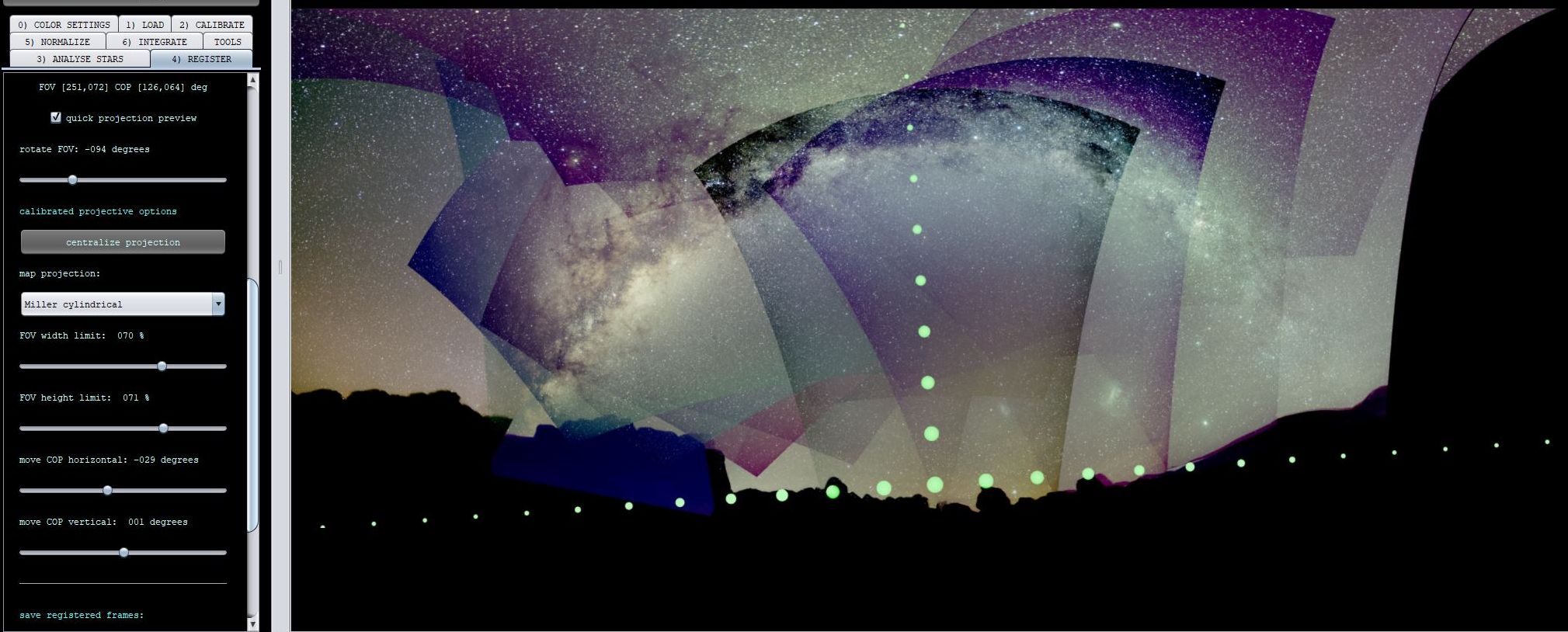
With both registration models, you can enable a quick projection preview that will load the registered images in low resolution into the image viewer and it will build up the whole Field Of View step-by-step while loading additional images from the frame list.
Start by loading an image into the image viewer by double-clicking on it in the frame list. In this example, several Hydrogen-Alpha frames from 5 different telescopes and cameras were registered. Select the quick projection preview as the next step. Then load all the light images in the frame list step-by-step by scrolling through them with the up and down arrow keys. You will see that the field of view of all data combined becomes visible now. Finally, you can adjust the projection rotation and repeat the steps again, to determine the best projection rotation for the Field Of View.
When enabled, each time that you change any of the projection sliders or load an image with the registered or normalized image viewer modes, we will load and show a low resolution preview of the FOV in full composition mode with the Center Of Projection (COP) shown as well as a white/green dot. With the calibrated projective model, you will also see the horizontal and vertical Center Of Projection adjustment lines as subsequent dots to help you move the COP to the desired location. Scroll through the image list with up/down arrow keys in the registered or normalized image viewer modes and you will see that the full FOV will reveal itself quickly.This should help you to quickly get the projection of the FOV that you desire, so simply adjust the projection sliders and witness how the projection changes.
The next images will show 1 example using the quick projection preview. The example really shows the power of the quick preview. It is an 18-panel mosaic with a big Field Of View showing the horizon and the Milky Way. This example needs a good choice for the map projection, Miller Cylindrical in this case, and a change of the Center Of Projection to have a horizontal horizon.


- IMPROVED 4) REGISTER, calibrated projective, limit the Field Of View relative to the Center Of Projection
To project a full 3D sphere to a 2D map, you will need to project 360 degrees (longitude) by 180 degrees (latitude) using a map projection. Depending on the chosen projection, it can be very useful to limit the FOV in height and/or width to create the most pleasing projection of your data.
The FOV width limit slider let’s you control the width of the FOV relative to the Center Of Projection (COP).
The FOV height limit slider let’s you control the height of the FOV relative to the Center Of Projection (COP).
- IMPROVED 4) REGISTER, calibrated projective model for mosaics, new and more robust algorithms
To improve the mosaic results with the calibrated projective registration model that enables different projections like Mercator and Equirectangular, which are needed when the field of view is larger than 100 degrees, we have added new mosaic calculation algorithms that models more and different distortion parameters. This ensures that the result will be more precise and better able to handle optical distortion. We have fully tested these new models to not become unstable and produce weird results. A result is shown below, which uses the mentioned improvements in these release notes like dynamic distortion margin, dynamic same camera and optics and all the mentioned bug fixes. You can see in the result without MBB that there are some difficult parts in the mosaic because of bad stars in the corner areas of the sensor because a wide field camera lens was used with some optical flaws. Still APP can now register this and match the stars in those corners:




- IMPROVED & FIXED 4) REGISTER, calibrated projective model for mosaics, much more robust now !
We have fixed many bugs that could manifest in mosaic registration mode with the calibrated projective registration model. The first bug that is fixed would throw and ArrayIndexOutOfBounds exception in module MultipleViewFullCameraCalibrationSimpleDistortionCorrectionNotSameCameraIncomplete. We fixed an error in MultipleViewDistortionAndCalibrationTask that throws a NullPointerException: Cannot load from object array because "simpleResults" is null error. We fixed an error where APP would say that we have infinite solution because a matrix could not be inverted. We fixed another error in MultipleViewDistortionAndCalibrationTask that would also throw a NullPointerException: Cannot load from object array because "camerasSim[i]" is null. All these errors could manifest in different occasions even when all frames could be registered in 2-view. By fixing all these bugs, the calibrated projective model for mosaics will process much more datasets successfully where previously it would break down. An example is this 18 panel mosaic shot with a 24mm lens with horizon and milky way visible and with a very large field of view. This mosaic would not work at all with beta38 or earlier. It now works flawlessly. Data is courtesy of Bikram Ghosh @bikramghosh which helped us fixing/improving this by providing his data. The below result is a full processing of the 18 panel wide field mosaic in APP by Mabula.


- FIXED 4) REGISTER, mosaic construction
We have found and fixed a bug in the general mosaic construction and thus calculation. If a 2-view registration succeeds and enters the mosaic calculation with too little starpairs, the calculation will not work and run very long, because the amount of star pairs is too little to account for all the parameters that need to be calculated per frame. This is a mathematical bug and we have fixed this now to make the mosaic calculations reliable and thus have them converge quickly and properly to an accurate and realistic result.
- IMPROVED 4) REGISTER pixel size(micron) & focal length(mm) user input have been made redundant !
If you started the calibrated projective registration model, APP used to ask you for the pixel size and focal length, so APP could perform the needed camera calibration. This is no longer needed with the new registration engine. APP can determine the focal length now automatically so the user input is no longer needed
- IMPROVED 4) REGISTER distortion margin setting has been made fully redundant !
The optical distortion margin setting has been removed from the user interface in menu 4)REGISTER. This setting is important in many ways and ideally, it needs to be dynamic internally. Data with different scales and different optical distortions need different distortion margins. The margins are needed to find matching stars between the images for alignment. If the margins are too small, registration fails, if the margins are too high, registration will succeed but slower or even worse, registration fails because too many star matches are false positives. To make this setting redundant, means that the setting internally must be dynamic and able to change depending on the frames that need to be registered. We have now implemented a way that makes this parameter dynamic without sacrificing registration speed in general. This is a very important improvement because it now means that APP will be able to better register data from different setups and data with strong optical distortion or optical aberrations like in wide field mosaic data.
- IMPROVED 4) REGISTER saving distortion profiles is no longer needed and thus removed from the settings !
The new registration engine, has new optical distortion profiles with different parameters and the engine can now find optical distortion models per image robustly while using different optical setups possibly. Saving distortion profiles was a way in the past to solve some registration difficulties. This is no longer needed. The new engine works so well that it works even better than using saved profiles. This also means that old saved distortion profiles are no longer needed nor used.
- IMPROVED/FIXED, automatic reference frame
The reference frame was chosen automatically after 3) Analyse Stars using the amount of pixels of a frame instead of the quality score. This is now corrected to use the quality scores corrected linearly for the amount of pixels of the frames. This should ensure more logical reference frames that are automatically chosen. Ideally, the best quality frame is used as a reference and thus should now be the case in almost all cases.
- FIXED 4) REGISTER, mosaic registration errors when the reference frame can't be registered into the mosaic
Previously, when you try to register a mosaic, you would run into errors when the reference frame can't be connected into the mosaic at all. This is fixed robustly now. APP will detect this and it will offer you another frame as a reference that is actually best connected in the mosaic and it will re-run with the new reference frame if you approve it. When Continue On Errors is enabled, it will not be asked, APP will simply run with the better reference frame, so at least a mosaic result is received. If there are frames that could not be entered into the mosaic, APP will offer suggestions on how to accomplish that.

- IMPROVED 4)REGISTER, all popup menus with questions and suggestions are improved and cancel behaviour
When starting registration in mosaic mode, questions can pop-up to help you with getting a good result. Also when registration fails on some of the frames, APP will use a warning message with suggestions. All these menus with warnings and questions have been updated/improved. And if you push on cancel on question, the registration process will stop and no other questions will pop-up. Also star analysis will be cancelled if you skipped it and went straight to registration.


- IMPROVED 4)REGISTER, projection tooltips
We have improved and updated all tooltips for the projection of the registered and aligned data, especially for mosaics.


- FIXED 4) REGISTER, mosaic registration errors with org.ejml.data.SingularMatrixException: Solution contains uncountable numbers
If some of the frames including the reference can be registered into the mosaic, but APP also finds a 2-view connection that does not indirectly register to the main reference frame of the mosaic, the mosaic calculation will run long and/or give the error that the solution contains uncountable numbers. This is fixed by demanding internally that all registered frames must have a direct or indirect connection to the reference frame to properly build up the mosaic.
- FIXED 4) REGISTER, mosaic registration errors when none of the frames can be connected into a mosaic
If none of the frames could be entered into a mosaic, APP would error. This is fixed by detecting this and informing the user of the problem and with suggestions.
- FIXED 6) INTEGRATE, IllegalArgumentException in Integrator
With big field of views, the integrator could break down while creating the integration buffer, this has been fixed. The bug was not present in earlier beta's and was a regression bug created by a change in the latest beta's. The error would look like this:
- FIXED Assignment of filters when automatic loading lights and masters
We have fixed a minor issue where masters could be not matched properly to lights in multi-channel mode.
- FIXED Multi-Band Blending ArrayIndexOutOfBoundsException
If MBB needed to be applied to a frame in a mosaic that actually contains no data because of composition constraints, this error could be thrown. Fixed now.
- FIXED message about amount of RMAM memory that APP can use.
Then APP would run out of memory, it would show an old message about memory configuration. This message has been updated and improved.


