This is mainly a bug fix release for the reported bugs in beta47. In addition it has a significant User Interface performance improvement noticable when you need to process 1000s of images in APP.
2026-10-03 APP 2.0.0-beta47 has been released !
This is a very big release... many code optimizations/rewrites, many parts of APP are much faster and more precise, especially star analysis and registration are much faster ! Big mosaics will go much faster 🙂
And we introduce a new preview filter, which includes the new Adaptive Deep Sky Stretch and a General Levels Stretch, this has been long over due. The old preview filter (the panel on the right side to stretch and preview your data) has not been updated for a couple of years and it is a critical part of any APP session.
Adaptive Deep Sky Stretch or ADSS is a much more intuitive stretch algorithm. It is also color preserving (which is a great new addition in itself ! ) which means that the highlights are no longer bleached, color is maintained from the linear data while stretching. You can simply stretch your data using the sky background level and signal width sliders which work much easier and more intuitive. You no longer need to fiddle with the old complicated sliders with zoom buttons. All the zoom buttons for the sliders are made redundant. And you can enter slider values in the slider value fields yourself. I will make a youtube video in the coming days to explain and fully introduce ADSS. Once the video is ready, it will be highlighted on the forum.
RGB Combine upgrade !. The RGB Combine Tool has been rewritten mostly. The tool is faster and easier to use and most importantly, the Luminance slider to inject a luminance channel or channels into the RGB composite is now working correctly. It no longer bleaches the RGB colors. Combined with the new ADSS preview, you will get much better and easier great composites with great color! I will also explain this in a new youtube video.
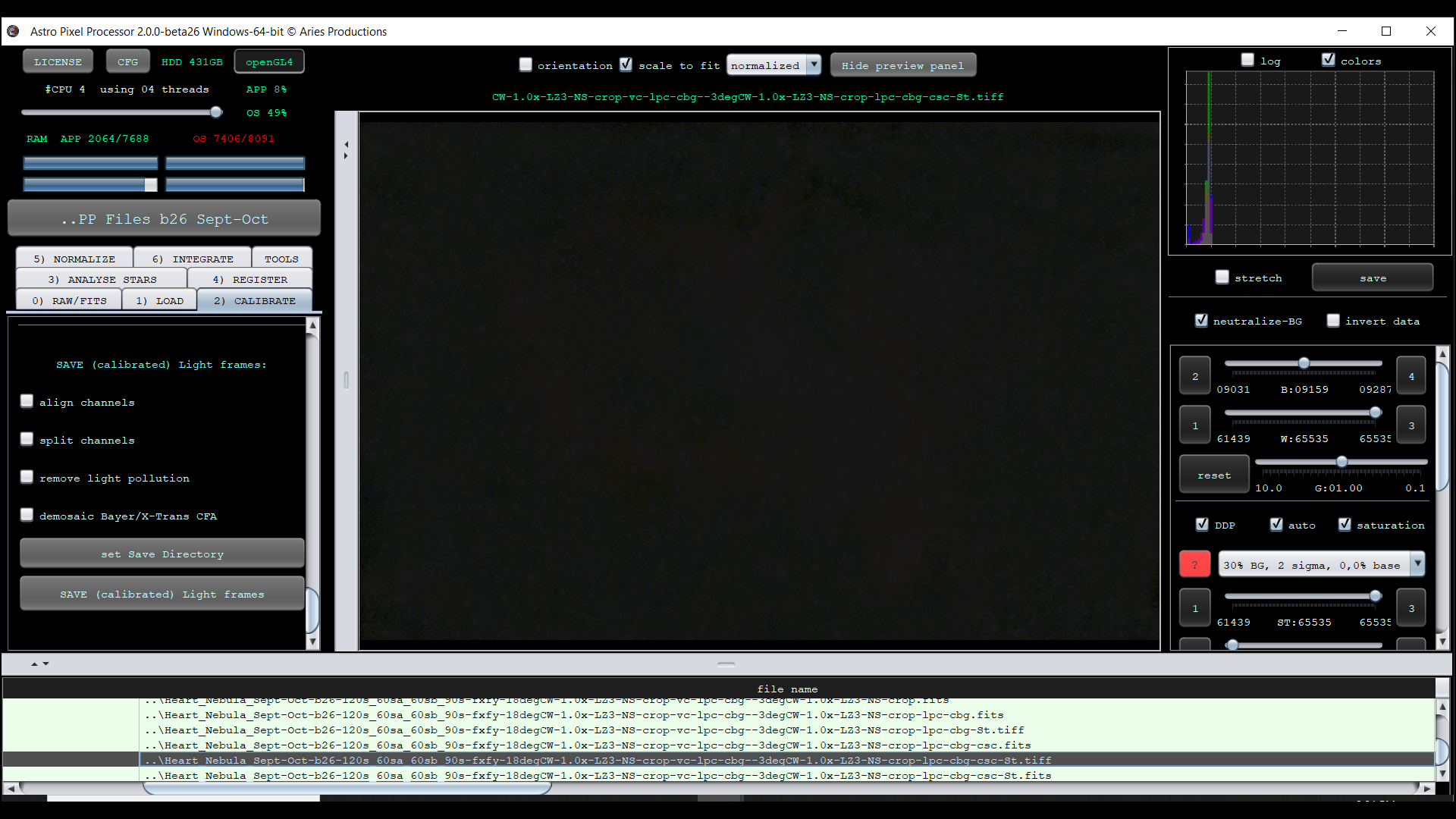
I may have found a bug in Beta 26 for Windows 64-bit. After stacking and processing, I save the "final" image as filename.FITS . I then save the Stretched version as filename-ST.TIFF. I can open the resulting TIFF file in Windows Photos, Adobe PhotoShop, and Adobe LightRoom and it looks "normal." When I attempt to open the same saved TIFF file in APP (which I have done routinely in all earlier versions), I get a black image with the histogram pressed tightly to the left, worse than the original stacked image.
APP appears to save the file correctly in both FITS and TIFF formats. However, it does not correctly load or read the TIFF file it creates, while other 3rd party programs do (Windows Photo Viewer, Adobe Photoshop, etc.)
I can provide examples of the file in question as well as screen shots. I report this as I have never had this happen in APP in the past.
This is likely not an issue with the actual TIFF that APP created, but rather an issue with APP's preview stretching on that TIFF file. How does the file look it you set the stretch preset to "no stretch (data as is)"?
@mabula-admin - Thank you for the quick reply. I agree that the APP TIFF file output was good, as it could be read by several 3rd party image apps. Now for the odd part, I went to check your suggestion tonight, and I could not get the error to repeat itself! The other night, it repeated itself several times with several different files. Tonight, all of the TIFF files I threw at it opened just fine, which is frustrating from a troubleshooting perspective. It did happen, but if its not repeatable, then it is difficult to trace the root cause. I attach proof it happened once, for the record. I'll will let you know if it repeats itself and will perform the checks you advised.
Thanks, okay, yes, the issue is probably related to the image data in the TIFF, triggering an expection that almost never happens. I will test the TIFF file tomorrow 😉
@mabula-admin - My apologies for the tardy response, a combination of home remodeling and clear skies at night! The file in question is about 78MB in size. I believe I have seen a link on the site to upload requested files in excess of 30MB. I will find it and upload it there.
As I mentioned, I have been unable to replicate the error, but I have not done much post-processing since then either.
@mabula-admin - I have uploaded the files I have had an issue with. Please excuse the sorry state of processing, both are a work in progress. They are in the folder MartinJordan_TIFF_Issue. I have uploaded two sets of files: one set of the Heart Nebula, with both a FITS and a TIFF file of the stretched image processed on October 21, 2023. The second set is of the Andromeda Galaxy, the FITS file (star reduced), a TIFF file of the unstretched star reduced FITS file, and a TIFF file of the stretched star reduced file, processed on November 22, 2023.
In both cases, APP has stacked the subs, and I have used APP functionality to get to a place where I am ready to continue processing in Photoshop. I save the "final" FITS file as a TIFF. When I attempt to open that TIFF file in APP, it shows "black" - from the histogram it appears to be an unstretched and unprocessed image. I can open that same TIFF file in Photoshop, LightRoom, or Microsoft image viewers and it looks normal. In all past versions of APP I have used, it has always been able to open and present the TIFF files it creates. Beta26 is the first time I have seen this happen, and it does not happen all the time in my experience.
Let me know if there is any additional information you might require to troubleshoot this.
Mabula - Thanks for taking the time to examine this issue. It has happened again, tonight. I have a FITS file that I save as stretched to TIFF. APP beta26 opens the file, but it does not look anything like the FITS file. The one thing "non-standard" I am doing is saving the TIFF files with Wide Gamut. I do not know if this could be an issue. Let me know if you wish me to upload this particular set of files.
Regards, Martin
The saved and stretched TIFF file as observed in APP
Mabula - Thanks for taking the time to examine this issue. It has happened again, tonight. I have a FITS file that I save as stretched to TIFF. APP beta26 opens the file, but it does not look anything like the FITS file. The one thing "non-standard" I am doing is saving the TIFF files with Wide Gamut. I do not know if this could be an issue. Let me know if you wish me to upload this particular set of files.
Regards, Martin
The saved and stretched TIFF file as observed in APP