UPDATE FROM MABULA
I have had a very rough 2 months unfortunately health wise. I was struck 3x in a row with bacterial infections. The second infection occurred after a routine hospital checkup and I became very sick. I had to rest and take a lot of antibiotics. Once I was recovering and restarting work 1 month ago, I again became sick. The infection was not yet gone, so even more antibiotics and rest was needed. Needless to say, it took a lot of my energy and I needed a lot of rest.
Finally, the infection is really gone and my energy is coming back step-by-step now and I have started work again. I am terribly sorry to have kept you waiting for support. I will address all outstanding questions and e-mails step-by step and will be on the forum daily from today.
APP 2.0.0-beta47 will come soon as well, a lot of work was already completed before I became very ill, so the release is also nearly ready for you. Beta47 will be much faster actually. Many workflows will be more than 2x faster, mosaics can even be 10x faster than before because registration really received a major boost... all compared to beta46. Before I release it, I will make sure that everything is working properly and then I will release it.
Mabula I have been processing like mad the last 45 minutes and not even a hiccup. Thank you for being so kind in helping me with this issue. It is seldom found where a company or product cares about an individual customer. I was a big fan of APP but am even more so now.
Thank you Mabula very much for your time and knowledge to resolve MY (NOT an APP) issue.
Ray
Superb to hear that Ray, thanks very much.
@vincent-mod
And thank you too Vincent for watching over this post and getting me to the right person for help. 😀
Mabula and Vincent
Guys after a week of processing and creating masters I am sad to report that the glitch does still occur. It only has been happening about every 5th use but always at the file load (Tab 1) and I have noticed that it does not seem to happen if I don't move my mouse fast or try to rush to add files where I may hover over a stray button. That may not be anything but I believe I read that when a user hit the details button and it caused the error to occur. Well being nosy I had to try that and behold instant crash. Now I have the glitch back with a vengence. Wish I had not tried that detail button trick. I did some searching and found that others had this same issue under the tread "Very Basic problem with interface-AMD Ryzen incompatability?". I read in that thread that there was a workaround that @Bcolyn had posted. He added -Dsun.java2d.d3d=false to the program somewhere and if that works it may be a perfect workaround for me. Is there anyway you can tell me where to put that command? I am not a programer but can go where I need to if I am grabbed by the nose and led there. Here is a screenshot of his post in the other thread.
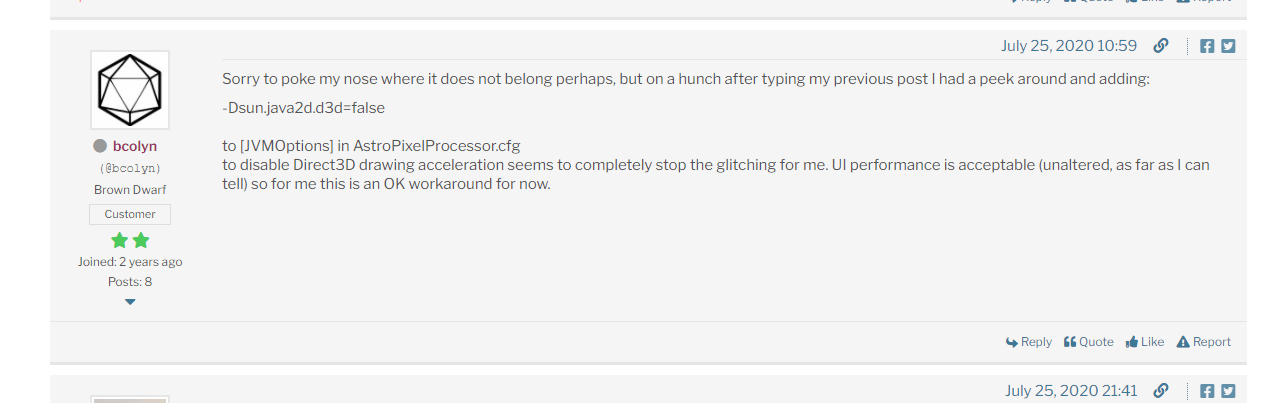
Any help would be much appreciated. Zoom call or taking over my laptop with teamviewer is fine as well.
Ray
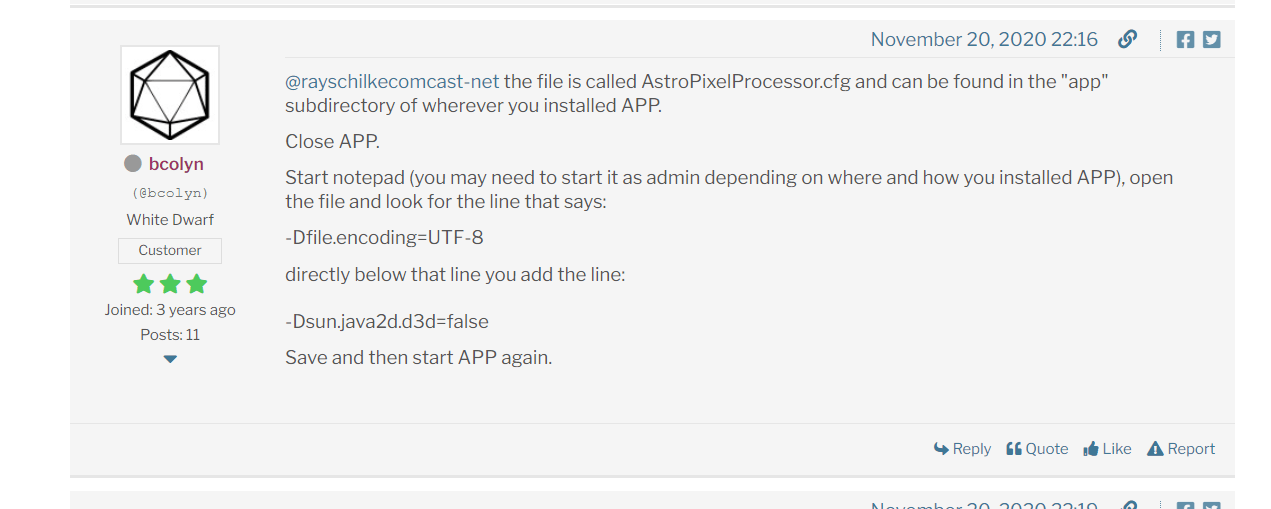
@rayschilkecomcast-net the file is called AstroPixelProcessor.cfg and can be found in the "app" subdirectory of wherever you installed APP.
Close APP.
Start notepad (you may need to start it as admin depending on where and how you installed APP), open the file and look for the line that says:
-Dfile.encoding=UTF-8
-Dsun.java2d.d3d=false
Save and then start APP again.
@rayschilkecomcast-net the file is called AstroPixelProcessor.cfg and can be found in the "app" subdirectory of wherever you installed APP.
Close APP.
Start notepad (you may need to start it as admin depending on where and how you installed APP), open the file and look for the line that says:
-Dfile.encoding=UTF-8
directly below that line you add the line:
-Dsun.java2d.d3d=false
Save and then start APP again.
Thank you very much I will see if I can find that location and enter the command. Is your program still running well?
Thanks for getting with me on this.
Ray
my windows machine hasn't got any intel drivers or intel anything bar the nic so this problem on my machine wouldn't be that. It's all Nvidia
@rayschilkecomcast-net the file is called AstroPixelProcessor.cfg and can be found in the "app" subdirectory of wherever you installed APP.
Close APP.
Start notepad (you may need to start it as admin depending on where and how you installed APP), open the file and look for the line that says:
-Dfile.encoding=UTF-8
directly below that line you add the line:
-Dsun.java2d.d3d=false
Save and then start APP again.
Well That was the answer. Seems to be running perfect. Thank you very much for your help and time. I can shoot tonight with my good laptop. For other readers I have an Alienware laptop with Intel processor and the Geforce RTX 2060. 😀 😀 😀
Thank you VERY VERY MUCH!!!!!
Best regards and clear skies,
Ray
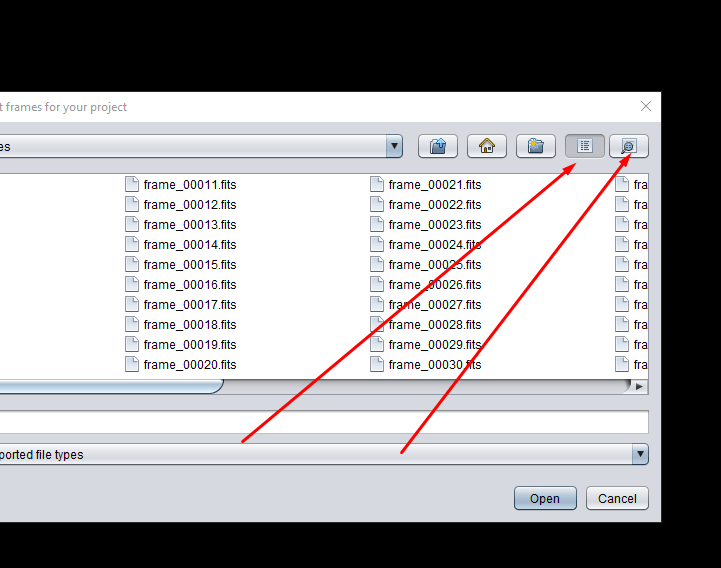
Does your APP crash instantly when you hit the view change buttons when adding files? That triggered my crash instantly. I that line that Bcolyn had added to the config file was the answer. Might be worth a try. I saved the config file to a folder in case there was any issues so I could restore it. The speed of the application seems to be the same with no ill effects.
Attached a pic of the trigger buttons that were setting mine off
@rayschilkecomcast-net. Mate, I am asking for another 30 day trial so I can check. It's been some months since coming back to this problem, life, bad weather so I haven't been astro-ing. I will see if I can get a trial again and check if recent nvidia updates over the last few months may have stopped it.
@bluknght You can ask for an extension to the trial you have, just mail Mabula at support@astropixelprocessor.com with the request and reason why.
thanks Vincent, yep I did message him on here this afternoon my time.
I just emailed him
still happening now
And did you check if you have maybe 2 gfx drivers active (Intel and NVidia for example) and things like that like is mentioned in this thread?
@13thmonkey Take a look at a different thread on here. I had issues that caused screens to start multiplying and the other thread had the answer that fixed it. Look in this thread for this shown in the picture. Worked instantly and never glitched again. https://www.astropixelprocessor.com/community/postid/13637/