This is mainly a bug fix release for the reported bugs in beta47. In addition it has a significant User Interface performance improvement noticable when you need to process 1000s of images in APP.
2026-10-03 APP 2.0.0-beta47 has been released !
This is a very big release... many code optimizations/rewrites, many parts of APP are much faster and more precise, especially star analysis and registration are much faster ! Big mosaics will go much faster 🙂
And we introduce a new preview filter, which includes the new Adaptive Deep Sky Stretch and a General Levels Stretch, this has been long over due. The old preview filter (the panel on the right side to stretch and preview your data) has not been updated for a couple of years and it is a critical part of any APP session.
Adaptive Deep Sky Stretch or ADSS is a much more intuitive stretch algorithm. It is also color preserving (which is a great new addition in itself ! ) which means that the highlights are no longer bleached, color is maintained from the linear data while stretching. You can simply stretch your data using the sky background level and signal width sliders which work much easier and more intuitive. You no longer need to fiddle with the old complicated sliders with zoom buttons. All the zoom buttons for the sliders are made redundant. And you can enter slider values in the slider value fields yourself. I will make a youtube video in the coming days to explain and fully introduce ADSS. Once the video is ready, it will be highlighted on the forum.
RGB Combine upgrade !. The RGB Combine Tool has been rewritten mostly. The tool is faster and easier to use and most importantly, the Luminance slider to inject a luminance channel or channels into the RGB composite is now working correctly. It no longer bleaches the RGB colors. Combined with the new ADSS preview, you will get much better and easier great composites with great color! I will also explain this in a new youtube video.
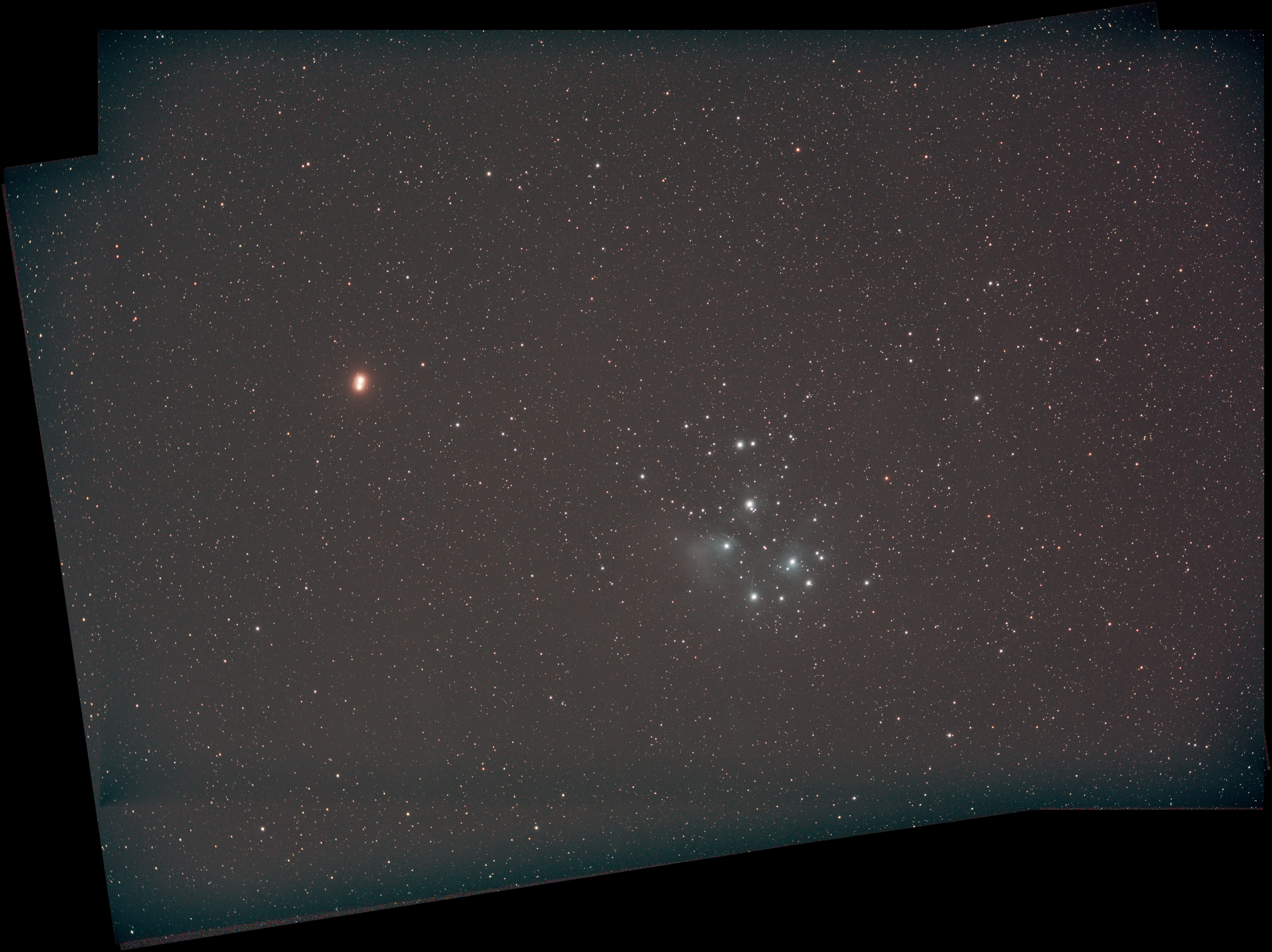
Question on stacking result - I have a double mars effect? (Pleades/Mars Conjunction)
I'm a little new to APP - was out shooting Pleades and Mars conjunction - all images from one night, but 2 sessions as took 30 min break...this is the second stacking attempt (with some tweaks in settings), and same as my first - why am I getting a "double mars" effect, yet stars are aligned...I realize planets moving different speed, but this is only about 3 hrs total...I did not think there would be that much motion over that period...I think it is something in my technique!
I did no processing to this. Enabled MBB 7%. No dither. I labeled all the lights as 2 different sessions on import, and stacked all together. Jpeg attached.
@dwephoto Currently Mars moves about 2100 arcsec a day which means 2100 / 8 = 265 arcses or almost 4.5 arc minutes in 3 hours. That motion may very well become visible in your subs. do you see a displacement in the position of Mars when you compare the first and last subs?
Well Wouter - perhaps you deserve the "Galaxy" designation! Astronomy is cool! Nice little pearl of wisdom there i didn't think would factor in...I think you are correct and looking back at things now, it does seem like only logical answer...APP is to smart to screw that up, right! 🙂
Seriously, it was honestly 3-4 hrs and i did try and compare in lightroom, which was another obvious good idea...i screen shot an extreme zoom, and it is still rotated a bit, but i does, to my eye appear to move substantially in the frame. I have only tried shooting a conjunction with Venus in past, and details fuzzy, but didn't run into this problem. Regardless, i will maybe stack half of my pics or try some magic in photo shop! Thanks for the help.
Well Wouter - perhaps you deserve the "Galaxy" designation! Astronomy is cool! Nice little pearl of wisdom there i didn't think would factor in...I think you are correct and looking back at things now, it does seem like only logical answer...APP is to smart to screw that up, right! 🙂
Seriously, it was honestly 3-4 hrs and i did try and compare in lightroom, which was another obvious good idea...i screen shot an extreme zoom, and it is still rotated a bit, but i does, to my eye appear to move substantially in the frame. I have only tried shooting a conjunction with Venus in past, and details fuzzy, but didn't run into this problem. Regardless, i will maybe stack half of my pics or try some magic in photo shop! Thanks for the help.
de
This is the exact same issue I had as well, though I had seen some images already discussing the problem so I knew the potential. I shot 160x60s for a little over 2.5 hours. I stacked the best 90% so about 144 which I realized after I did it was not very smart since it would likely pick consequentially and probably exacerbate the mars stretch (or at least not help).
The solutions I have seen so far are both what you have suggested, shorter integration or photoshop in a single (or reduced stack) of Mars.
I'm probably not smart enough for the photoshop piece, so will try the shorter stack idea.