

UPDATE FROM MABULA
I have had a very rough 2 months unfortunately health wise. I was struck 3x in a row with bacterial infections. The second infection occurred after a routine hospital checkup and I became very sick. I had to rest and take a lot of antibiotics. Once I was recovering and restarting work 1 month ago, I again became sick. The infection was not yet gone, so even more antibiotics and rest was needed. Needless to say, it took a lot of my energy and I needed a lot of rest.
Finally, the infection is really gone and my energy is coming back step-by-step now and I have started work again. I am terribly sorry to have kept you waiting for support. I will address all outstanding questions and e-mails step-by step and will be on the forum daily from today.
APP 2.0.0-beta47 will come soon as well, a lot of work was already completed before I became very ill, so the release is also nearly ready for you. Beta47 will be much faster actually. Many workflows will be more than 2x faster, mosaics can even be 10x faster than before because registration really received a major boost... all compared to beta46. Before I release it, I will make sure that everything is working properly and then I will release it.
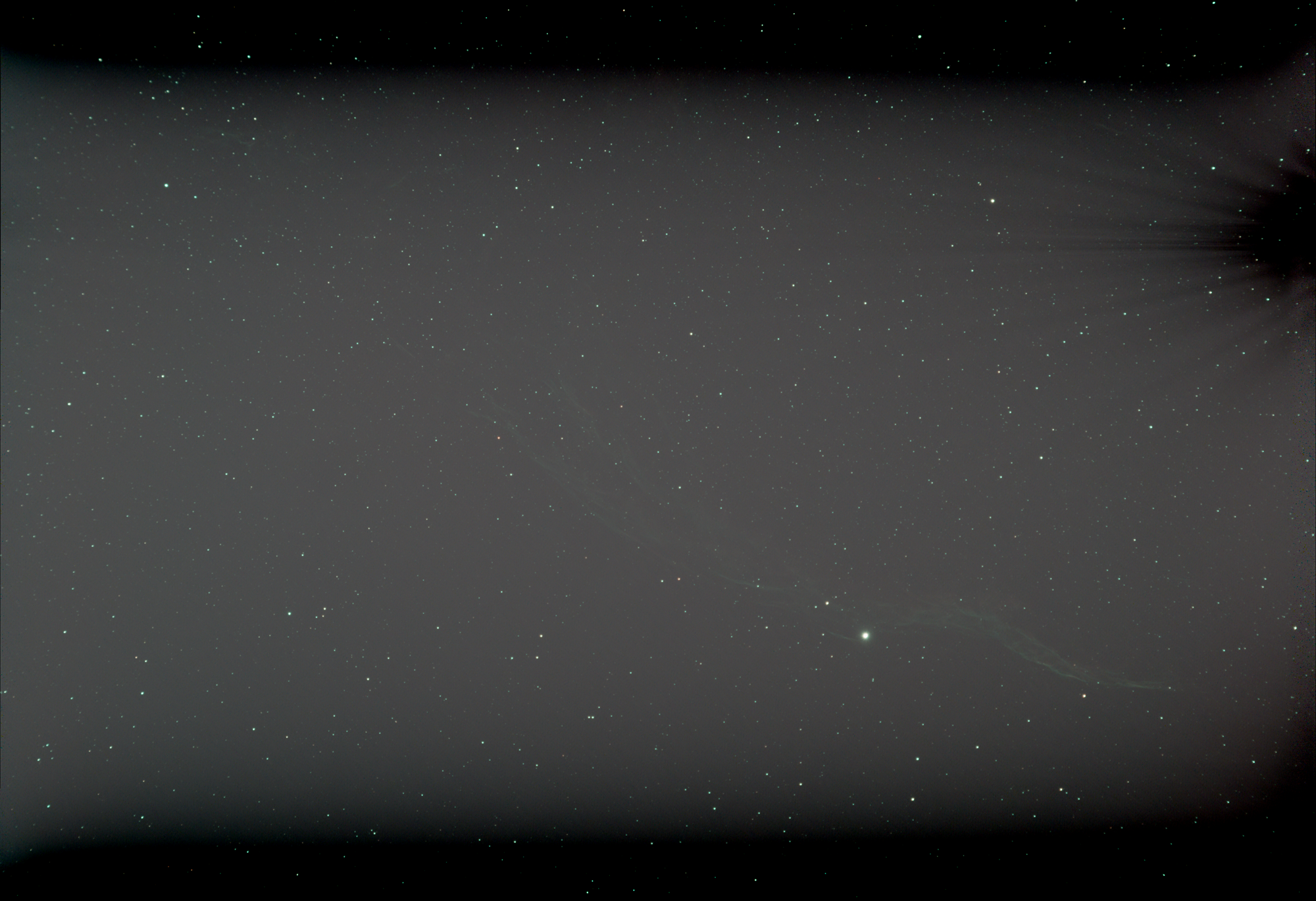
Hi, after a very long layoff due to prolonged bad weather, I finally managed to do some imaging last night. But when I processed the files in APP all I got was a very dark screen with only points of star light showing, a very faint nebula and the amp glow from my Altair 294C still showing. I checked all the files for consistency of gain, offset, binning and duration etc and everything seems to be as it should. The park library was only recently recreated. I reprocessed the image with no calibration, just flats, then flats and dark flats and all of these produce an image showing the Veil Nebula. But when using the darks as well I just get a mainly dark screen. I tried again with an older set of darks but the result was the same. So I'm at a loss about what I should do next and would be very grateful if someone would take a look at my files for me.
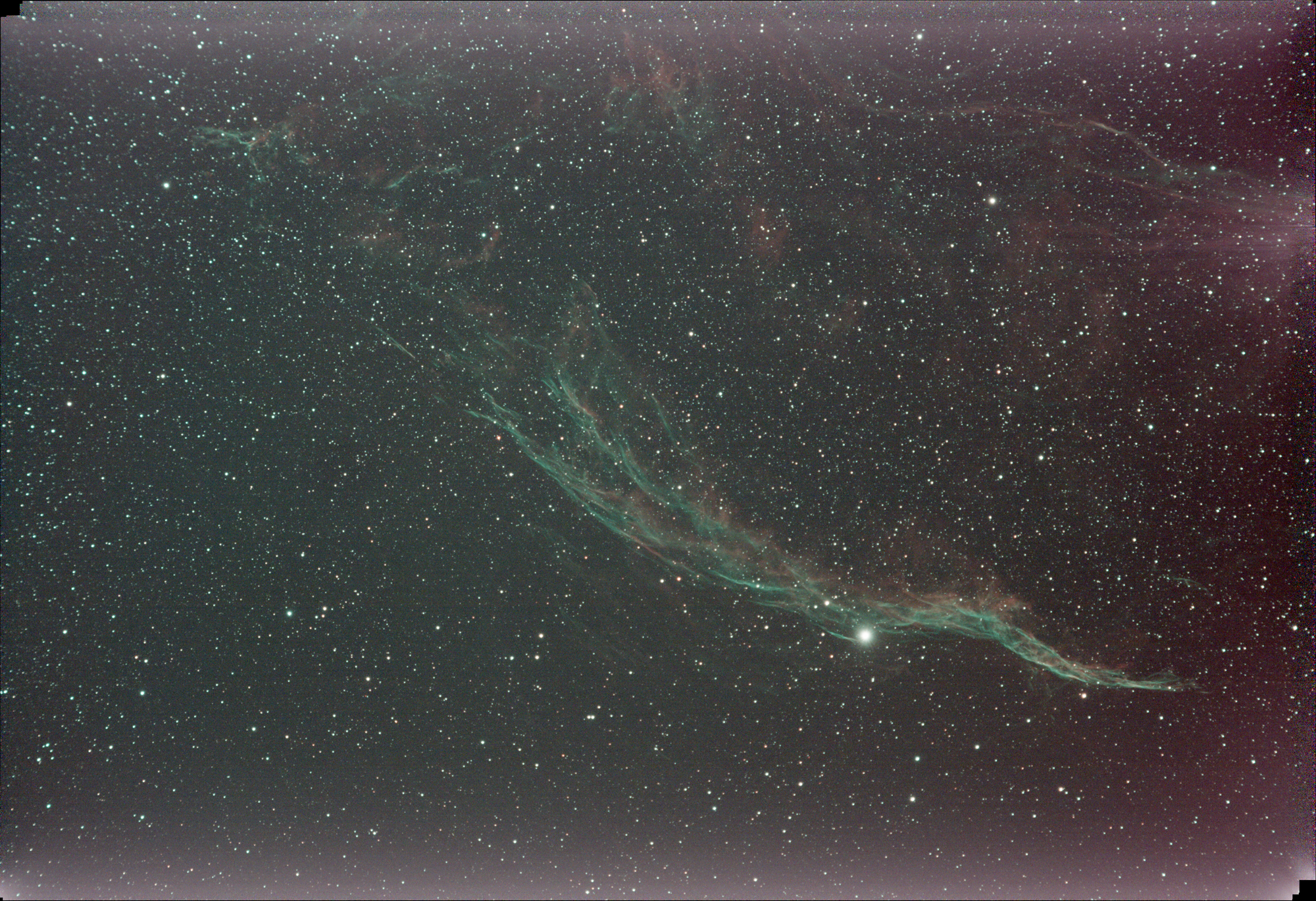
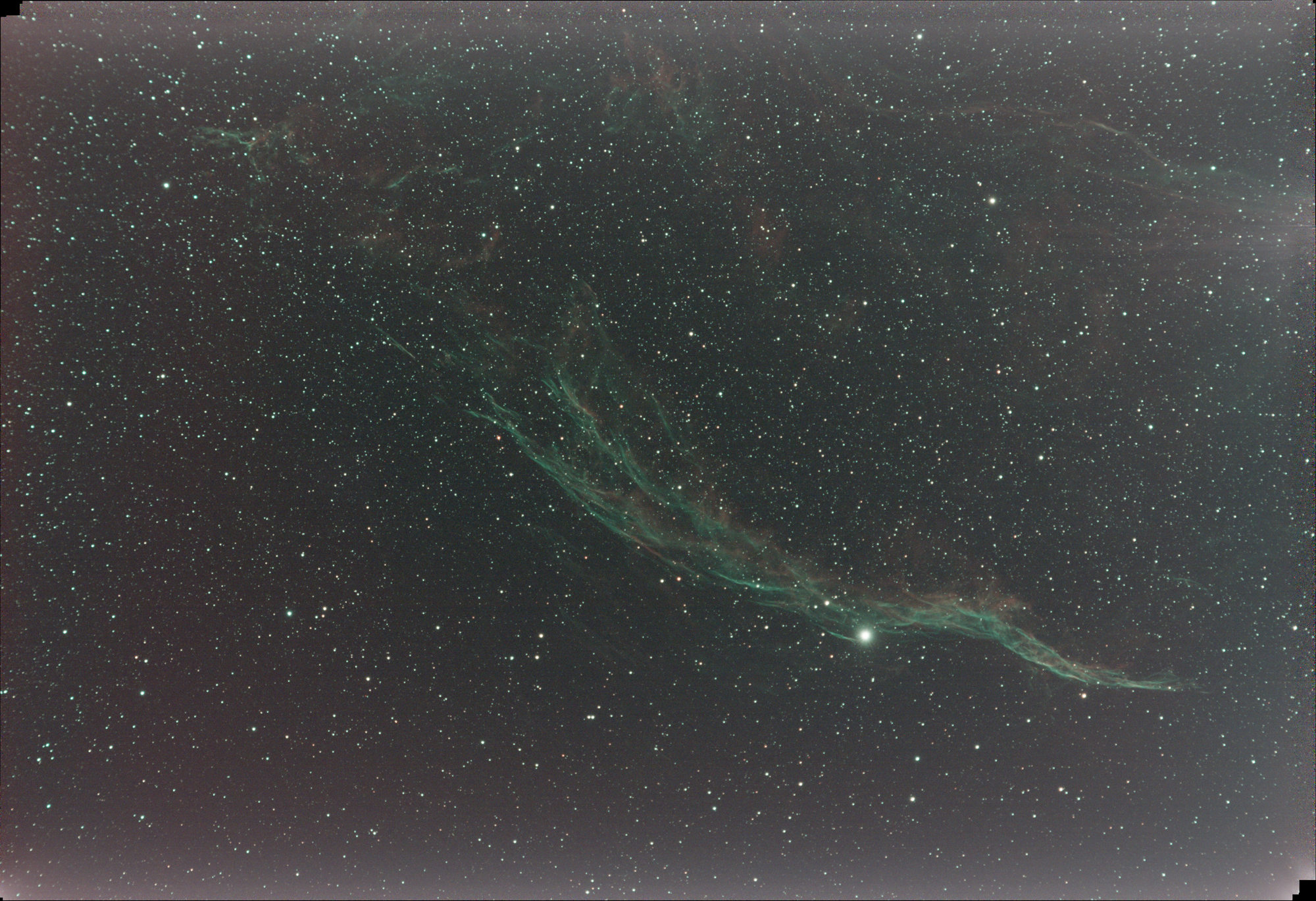
I use NINA to capture the lights and produce the calibration files using the Flats Wizard, the flats and dark flats being taken at the end of the session and the darks from a library. The lights are 180s @ 121 gain and 30 offset. The flats were 5.1s for my Altair 294C camera. I used an EvoStar 80ED telescope, guided and with an L-enHance narrowband filter. I've processed them in APP both on a Windows computer and on a Mac with the same results. I've included three TIF files here - the first is just the lights with no calibration at all, the second is the lights, flats and dark flats and the third is the full calibration including darks. No other processing has been done.
Just lights (image below)
Lights, flats and dark flats (image below)
Light, flats, dark flat and darks (image below) - full calibration
I'd like to upload some FITS files for someone to lookout Can anyone help please?
P.S. I also think I may have a light leakage problem, but that's another issue (I think).
It sounds like you did everything right. I'll take a look if you can share the files on dropbox or google drive. Right now I can only say to inspect all the calibration frames to make sure they are all good.
@astrogee Many thanks, I'll do that later to day and send you a link. Cheers.
@astrogee Many thanks. I've uploaded two zip files to my Google Drive. Veil1.zip contains all the files and Veil2.zip contains just five files of each type. Here's the link:
https://drive.google.com/drive/folders/1RQ8sWlS8_e6uBl6KFB593qag_CLdddmh?usp=sharing
Please let me know if you can't download them. I look forward to your analysis.
Cheers, Martyn
Hi @jones_mp,
Actually, there's a lot of things wrong with the files but its mostly exposure and offset.
Firstly, it looks like you do not have offset on your images. Normally the driver will set the offset but it's better for you to manually set it to the max recommended which is 30 for the 294. You must do this or darks and dark flats will not calibrate properly. So set offset to 30 for everything, imaging and calibration frames.
The lights are very underexposed hitting a max of 4963 on the green channel. Try to expose to get the max near or even hit the max ADU of 65535. It's ok to hit (saturate) as long as you know you are overexposing some stars and you're ok with it. You might want to do that is you want to focus on nebulosity and take star images separately - but I find this usually gives artifacts.
Your flat is ok but again you might double or triple the exposure on those to get the histogram generally in the middle.
Your dark shows a min ADU of 0 so this should be around 30 if you had offset set to 30.
And your dark flat also show min ADU of 0 - indicating offset is not set. (My dark flat min ADU is closer to 2000!)
It's a bit strange that your image are very attenuated. Not much signal in any of them. I think your capture/driver software is not setup correctly. The driver is provided by Altair? Mine is provided by ZWO. The camera is actually 14-bits but the files are 16-bits - as with mine - maybe zwo and altair are converting differently. Try overexposing (saturating) your image and see what max ADU you get. You should get 2^16 - 1= 65535. I'm suspecting you will get 2^14 - 1 = 16383. If this is the case then you should expose accordingly - i.e. your range will be 0-16383 and you should still use 30 offset.
I used Fits Preview to read your files , available in the mac app store if you're looking for mac apps.
Many thanks for your quick reply, it's much appreciated.
I use QuickFits on my Mac for examining FITS files and the headers for all my calibration and light files show a gain of 121 and offset of 30. I've always used these settings in the past without any problem. I always check the gain, binning and offset settings in my imaging sequences. I can't use Fits Preview as my Mac OS (12.7.6) doesn't support it and can't be upgraded. But QuickFits seems to work fine.
As I've not had this problem before and this issue has only surfaced after a six month or more layoff, and I'm starting suspect perhaps a driver or even a hardware issue somewhere. I use the original (older) Pegasus Powerbox for power distribution to all the devices and I'm wondering if its not supplying enough power to the camera. For my next outing I'll power the devices separately to see if this changes anything. I've already upgraded all the various software items to their latest versions.
I did change to using NINA (from APT) earlier in the year, but didn't notice any problems with it then, although I wasn't able to do much imaging. My earlier dark library was created in APT, but I redid this in NINA for this season and that's what I sent to you. The offset was set correctly in the sequencer when I did it. For the flats and dark flats I now use the NINA Flat Wizard straight after taking the lights, with settings to achieve a 5s flat, which is what I believe the 294C needs.
So, I'll firstly redo my dark library in APT and see if this makes a difference. If not I'll redo all my calibration files in APT. Finally I'll do another session completely in APT, which was working fine when I used it last year.
Failing all this, I'll have to reinstall everything, which I really don't want to do.
Thanks for your help, if you have any other suggestions after reading this I'd like to hear of them.
Cheers, Martyn
Hi @jones_mp
I checked out QuickFits - nice - looks very new - I never saw it before. I wouldn't worry about the power supply. It's not likely the problem. Most products these days can work off a wide ranging power supply, especially things that operate off 12V since 12V batteries have a wide range of voltage operation (11-14 V). Having said that I just bought a LiFePO4 battery and its great because it's super light and has higher voltage that is more stable so the drops in my cable are no longer a problem. The PPB may cut your power if the voltage gets low. I think it depends on the firmware.
I thought I would just show you your images and mine compared since we are talking about the same sensor. I chose images that had the exact same settings - 180s 30 offset and 121 gain.
(Since then I have boosted my gain to 240 and it's paid off - the journey is not straight lol. Here's a video I made 4 years ago about exposure you might like - it basically says to use gain such that you get 11-bits of dynamic range - so you can up your exposure and do less stretching:
)
Dark - note your min ADU should be above 0 - if you have 0 then the noise in the image is blocked (clipped at the bottom) - all the noise in the imaging system needs to be above 0 or you lose the ability to calibrate it out - this is the reason for offset.

Light - this comparison of course depends on focal ratio - mine is 5.6

Dark Flat - only 2s unfortunately - I heard to use at least 3 seconds for 294 but I take that with a grain of salt because there's a lot of mis-info out there - here again the exposure is blocked - note the peak on mine is well above 0

Thanks for these comparison shots, I'll take a better look later. Which capture software do you use please? The ones I've sent you were all done in N.I.N.A. when previously I was using APT. I've just read that APT can't read the offset value from the ASCOM driver, and I'm wondering if this is the same in N.I.N.A. Do you use native drivers or ASCOM? It seems in APT you need to set the OFFSET manually in the ASCOM driver and even then APT doesn't display its value, even though it is using the right value. I also wonder if N.I.N.A. looks like it's using the correct offset, and it's recorded in the FITS header, even if it isn't. I just set the offset in the imaging plan or sequence and assumed this would be correct. Getting more confused!
yes it’s hard to know what you are really getting with all this stuff. In fact, Astro software typically - at least in the past - were not aware of photographic imaging details. They simply took raw data and did obvious stuff like debayering, etc. if capture software ignores offset then you have to hope that the camera driver will set it appropriately. But we really want the same offset all the time regardless of gain settings so we can calibrate properly. However, I believe APP will accommodate different offsets with the “dynamic pedestal” setting. Anyway, I use the Indigo platform - I.e. “indigosky” running on a RPi on the scope, connected to my Mac via wifi , and the Mac is running “Indigo A1”. Zwo has written drivers for the ASI294 for indigo. It’s really important to select hardware that is well supported by the software out there. Some of the capture software seems t treat offset like an afterthought. I had to ask someone where the setting was in sharpcap - just was not evident. I looked at Apt but found it was too busy. I liked NINA but I don’t use it cause of the Mac. Indigo is designed for Mac and Linux.
Another good image analysis program for Mac is “AstroimageJ” - used by scientific community. UI isn’t the best but you can really see what you’re getting. You can test for offset, etc. you should see a small peak of noise in the histogram at the offset point in a bias frame. Raise the offset until all noise in the histogram is above 0. If your capture software is no responding to your settings then you know where the problem is!
