

UPDATE FROM MABULA
I have had a very rough 2 months unfortunately health wise. I was struck 3x in a row with bacterial infections. The second infection occurred after a routine hospital checkup and I became very sick. I had to rest and take a lot of antibiotics. Once I was recovering and restarting work 1 month ago, I again became sick. The infection was not yet gone, so even more antibiotics and rest was needed. Needless to say, it took a lot of my energy and I needed a lot of rest.
Finally, the infection is really gone and my energy is coming back step-by-step now and I have started work again. I am terribly sorry to have kept you waiting for support. I will address all outstanding questions and e-mails step-by step and will be on the forum daily from today.
APP 2.0.0-beta47 will come soon as well, a lot of work was already completed before I became very ill, so the release is also nearly ready for you. Beta47 will be much faster actually. Many workflows will be more than 2x faster, mosaics can even be 10x faster than before because registration really received a major boost... all compared to beta46. Before I release it, I will make sure that everything is working properly and then I will release it.
Hi,
It‘s not really an APP question - but hopefully someone can help me identifying what I do wrong in my process using APP 🤗
In the past I only had to use flats to calibrate out dust since my sensor was rather small. But since going to fullframe, I have to fight with vignetting as well... While removing dust in my lights still works pretty well, I do have issues to remove vignetting in the corners - although my setup is supposed to have an image circle of ~42 mm (Celestron C9.25 EdgeHD).
In my current process I do take 20 flats during day using a T-shirt. Exposure values are usually around 500-1000 ms - Exposure is driven by „Autoflat“ in ASIAIR. Beside those Flats I also use 20 Darks and 50 Bias.
Looking at the source data, I can not quite see/understand what may cause my issue - both (flats and lights) are not clipped in the histogramm.
I am unsure if my flats are bad (too short) or if I need to use dark flats as well?
Thank you for your ideas to better understand my processing!
So that's 0.5 to 1 second per flat, that should work, but it'll depend on the actual signal you see in the flat. Do you have screenshot of an unstretched and stretched flat? It sounds like you need to expose longer to be able to get a signal in the corners.
Some screenshots illustrating the issue - that's what you need?
You will notice some black area in the processed file in the upper right corner already. The more the data will be stretched the more it will become visible...
I also created a download for the given flat (valid until 31-03-2021):
https://www.rabbitjump.media:5101/sharing/RurJQrXWW

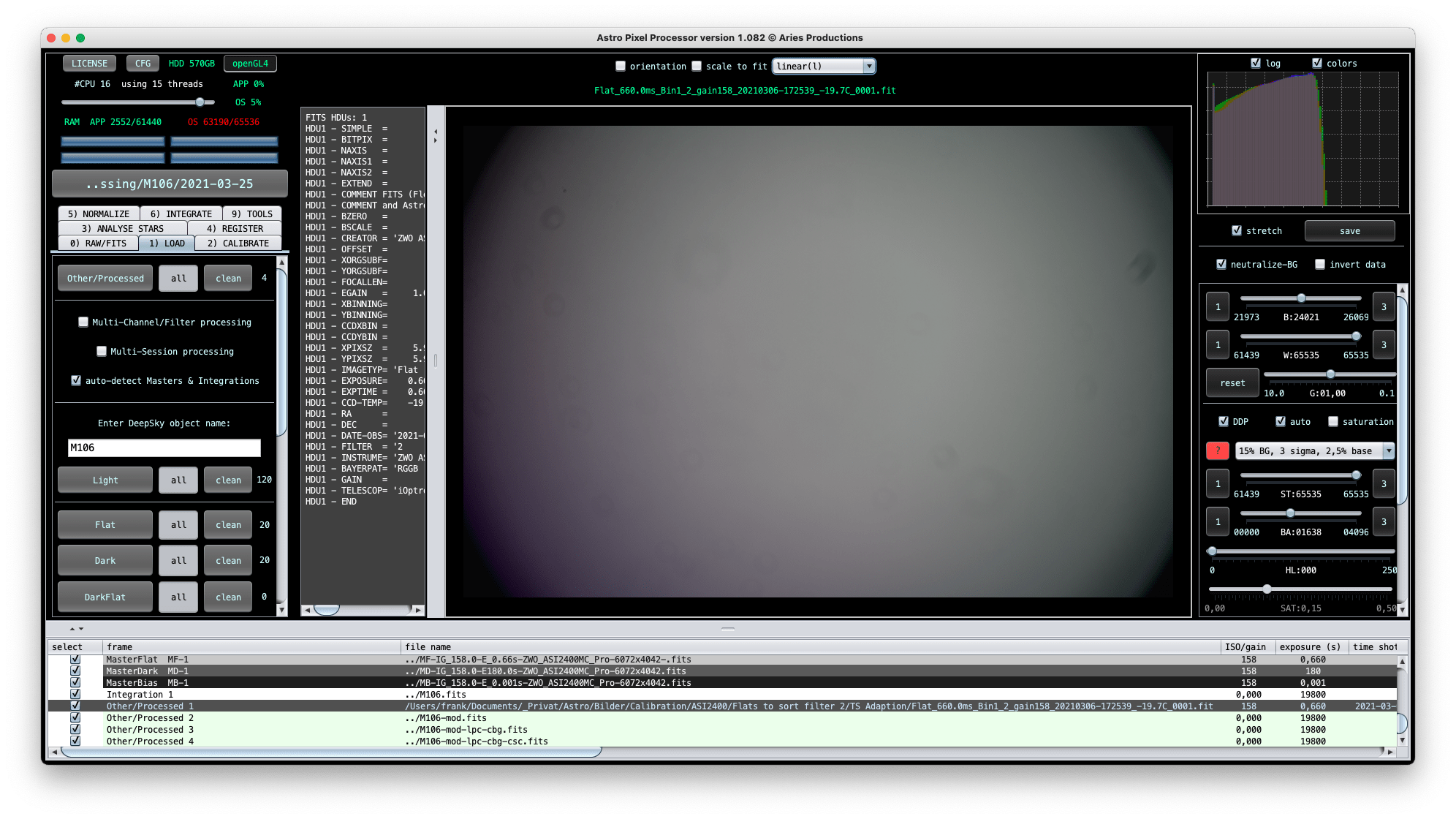


Thank you! So I'm looking at it with APP version 1.083 and it seems like flat 009 is different from the flat you show above. Can you post a screenshot of 009 as well? On my screen it doesn't look like it's so dark in the edges. I think there is variation on the light falling onto the sensor which may cause issues.
Flat #009 - looking the same like #001...


And the unstretched version of 001 is also the same? It may be interesting to go up with the exposure, not clipping on the right of course, but using more of the dynamic range you have to get the corners up more as well. That might help.
@vincent-mod
Yes #001 is identical, all Flats used are from a single sequence...
I will try to add more T-shirts and also increase the exposure time!
Yes and mainly trying to get the histogram to go more to the right might be interesting. Fullframe is always trickier as you get to deal with "shadows" in the focuser etc as well. And like you mentioned, try to use darkflats as well.
