

UPDATE FROM MABULA
I have had a very rough 2 months unfortunately health wise. I was struck 3x in a row with bacterial infections. The second infection occurred after a routine hospital checkup and I became very sick. I had to rest and take a lot of antibiotics. Once I was recovering and restarting work 1 month ago, I again became sick. The infection was not yet gone, so even more antibiotics and rest was needed. Needless to say, it took a lot of my energy and I needed a lot of rest.
Finally, the infection is really gone and my energy is coming back step-by-step now and I have started work again. I am terribly sorry to have kept you waiting for support. I will address all outstanding questions and e-mails step-by step and will be on the forum daily from today.
APP 2.0.0-beta47 will come soon as well, a lot of work was already completed before I became very ill, so the release is also nearly ready for you. Beta47 will be much faster actually. Many workflows will be more than 2x faster, mosaics can even be 10x faster than before because registration really received a major boost... all compared to beta46. Before I release it, I will make sure that everything is working properly and then I will release it.
Hi folks
When using Combine RGB, APP keeps crashing. Thats a shame cause I am shooting Duo-Narrowband with an OSC and thats one of the most needed features.
Any thoughts how to fix this?
Running Windows 7.
Cheers, Mathias.
That's a known "issue", you can't normalize 1-channel narrowband data with 3-channel RGB data. You will have to split the RGB data first in separate R, G and B channels with "split channels" in tab 2 (calibrate) all the way down. Here's an extensive workflow for it: https://www.astropixelprocessor.com/community/postid/7610/
We want to make this easier in a future release.
@vincent-mod
Hi Vincent - yes sure I did as written In this workflow. But APP keeps crashing at step 18 when trying to Calculate the combined narrowband image. And that problem is not addressed by the workflow.
Maybe I missed something?
Cheers.
I would go through the workflow very carefully, just to make sure you didn't miss a step. If it still crashed then I would need to check your data here I think.
Hi, I did everything as mentioned in the workflow. Still crashes when trying to combine RGB, using HA for R and OIII for G and B.
Interesting, then i would need your data to have a proper look at it. Just the data that gives the problem (I guess the integrations before combining should be fine right?).
Go to https://upload.astropixelprocessor.com and use upload2 as username and upload2 as password.
Create a directory named “bassniac-combineRGBissue” and upload in there. Thank you!
Hi.
I am uploading right now.
The Programm crashes if I try to combine .fits and .tif files. I didn’t try a combination of both.
I took the liberty to download the two fits files. HOO combination works without any issues on APP 1.083BETA on my MacBook. What version of APP are you using?
Beautiful pic by the way!
Wouter
@vincent-mod
Maybe this is a stupid Question, but where do I find the download link?
There are no stupid questions (almost 🙂 ). Here's the link, you can find it at the right hand side of the forum; https://www.astropixelprocessor.com/community/appreleases/downloads/
Hi
I just reinstalled 1.082 and got this error message combining RGB
Encountered error in module:
CombineThreeChannelFloatBufferWorker
Error message:
java.lang.ArrayIndexOutOfBoundsException
Cause:
null
no trace
No more crash though.
Installing the beta now.
I was just about starting your analysis, sorry for the delay. Will come back shortly.
Ok that was fast. Like Wouter I'm not getting any error (using 1.082 on Windows still). I loaded both your image into combineRGB, checked they were assigned to Halpha and OIII and combined them. So, as Wouter also didn't have a crash I'm starting to think you may have a system specific issue somehow. Where is your working directory located and what are the specs of your system?
@vincent-mod
My working directory is located on my second harddrive (NON SSD). I attached a file of my config.
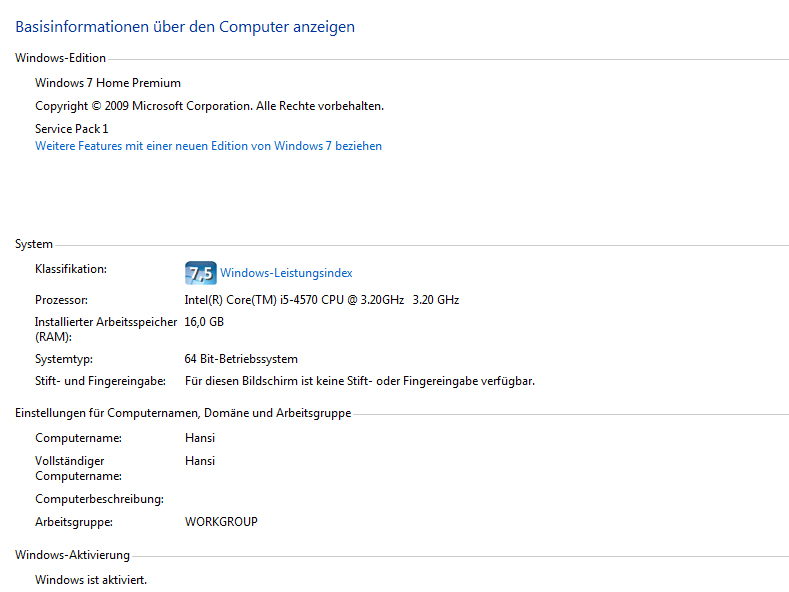
Interesting Beta crashes again
Unfortunately it's hard to see what is going on if it doesn't cause an issue overhere. Did you experience any other software besides APP that sometimes crashes?
Nope nothing else regularly crashes on that old but sturdy machine.
I figured out a workaround. I do the stacking on this computer, then transfer to my even slower Office Laptop for combining. After that, everything goes back to my PC.
I think it’s time for a new machine. If it will crash on my new computer I will reopen the case, but until then, I think we could stop investigating.
thanks a lot,
Mathias.
So it works on the other machine? Then maybe (if you have a good backup of course) a complete re-installation of Windows might help? If that's still an issue it must be system specific somehow.
