

UPDATE FROM MABULA
I have had a very rough 2 months unfortunately health wise. I was struck 3x in a row with bacterial infections. The second infection occurred after a routine hospital checkup and I became very sick. I had to rest and take a lot of antibiotics. Once I was recovering and restarting work 1 month ago, I again became sick. The infection was not yet gone, so even more antibiotics and rest was needed. Needless to say, it took a lot of my energy and I needed a lot of rest.
Finally, the infection is really gone and my energy is coming back step-by-step now and I have started work again. I am terribly sorry to have kept you waiting for support. I will address all outstanding questions and e-mails step-by step and will be on the forum daily from today.
APP 2.0.0-beta47 will come soon as well, a lot of work was already completed before I became very ill, so the release is also nearly ready for you. Beta47 will be much faster actually. Many workflows will be more than 2x faster, mosaics can even be 10x faster than before because registration really received a major boost... all compared to beta46. Before I release it, I will make sure that everything is working properly and then I will release it.
Astro Pixel Processor 1.064
- IMPROVED, BAD PIXEL MAP bad column detection, using more test data from different camera's, the bad column detection has been further improved. APP 1.063 had statistics which were skewed strongly to a lot of cold columns. APP 1.063 should prove much more reliable. Furthermore, you can now select the kappa for both hot and cold columns and this is reported in the Fits metadata as well.


- IMPROVED, STAR ANALYSIS, the progress monitor while performing star analsis now shows analytical results.

- IMPROVED, STAR ANALYSIS, further adjustments have been made to make star analysis more robust, which makes registration more robust. In this case, the automatic minimum #stars target caused the detect above noise level kappa to be adjusted inconsistenly between frames with different quality. The dynamic kappa adjustments are now more consistent.
- FIXED, User Interface, if you would load light frames and previously created masters, you couldn't directly click on Save Calibrated Frames without hanging the application. This is fixed, the masters will be properly applied and the frames will be calibrated and saved.
- IMPROVED, STAR COLOR CALIBRATION, the automatic star analysis in Star Color Calibration will now focus more on the brighter stars in the field of view which will give bettter statistics for the actual star color calibration calculation.
- IMPROVED, STAR COLOR CALIBRATION, in some cases the star color calibration Black Body & Extinction algorithm couldn't calculate a meaningfull calibration solution and it would be more or less similar to the Balance RGB model solution. The amount of cases where this would happen has been reduced, and there actually is a new calibration mode that will prevent it completely and more...
- IMPROVED, STAR COLOR CALIBRATION, the actual color calibrated result is now calculated using multiple cores, so it's faster.
- IMPROVED, STAR COLOR CALIBRATION, there is a new calibration mode called Adaptive Black Body & Extinction. Like the name suggests, it's an extension of the regular Black Body & Extinction mode. The new mode will perform succesive iterations of the algortihm, each with a smaller subset of the calibration stars to be used. At each iteration, stars are removed for the next iteration that might not be real Black Body stars, so the iterations have a learning effect in the model calculations and it will also give a better balance between red and blue stars in the final model calculation. This new mode will be the default mode in the star color calibration tool. The new mode will take longer to complete when compared to the Black Body & Extinction mode, but will have the benefit that, in most cases, both saturation of the colors is better preserved and with a better color balance to start with. In some cases the difference between the adaptive and non-adaptive mode is very minor, indicating that the non-adaptive mode is perfroming very well already. In other cases, the difference can be quite big indicating that the non-adaptive mode was not performing too well yet.
Some examples:
M51 (courtesy of Dutch Astroforum.nl Power) left: Black Body & Extinction Right: Adaptive Black Body & Extinction:


M81 & M82: left: Black Body & Extinction Right: Adaptive Black Body & Extinction:


M31 (courtesy of Anne van Houwelingen) : left: Black Body & Extinction Right: Adaptive Black Body & Extinction:


Direct comparisons of the 3 examples:


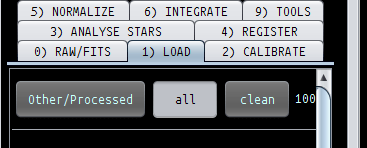
- FIXED, GUI 1) LOAD, if you load 1000 or more frames of a particular frame type, the fourth digit was not shown if the 1) Load menu had a vertical scrollbar in it. There was not enough room. The button sizes have been adjusted slightly so there is enough room now.

- ADJUSTED, Internal Memory Settings, in the last 2 versions I changed some internal memory settings which did not work well in all situations. I now have reset the memory settings similar to APP 1.060/1.061. Memory should be released between processes. Furthermore in some algorithms, like LNC I have built in to release memory between LNC iterations to prevent a possible out of memory exception.
