

UPDATE FROM MABULA
I have had a very rough 2 months unfortunately health wise. I was struck 3x in a row with bacterial infections. The second infection occurred after a routine hospital checkup and I became very sick. I had to rest and take a lot of antibiotics. Once I was recovering and restarting work 1 month ago, I again became sick. The infection was not yet gone, so even more antibiotics and rest was needed. Needless to say, it took a lot of my energy and I needed a lot of rest.
Finally, the infection is really gone and my energy is coming back step-by-step now and I have started work again. I am terribly sorry to have kept you waiting for support. I will address all outstanding questions and e-mails step-by step and will be on the forum daily from today.
APP 2.0.0-beta47 will come soon as well, a lot of work was already completed before I became very ill, so the release is also nearly ready for you. Beta47 will be much faster actually. Many workflows will be more than 2x faster, mosaics can even be 10x faster than before because registration really received a major boost... all compared to beta46. Before I release it, I will make sure that everything is working properly and then I will release it.
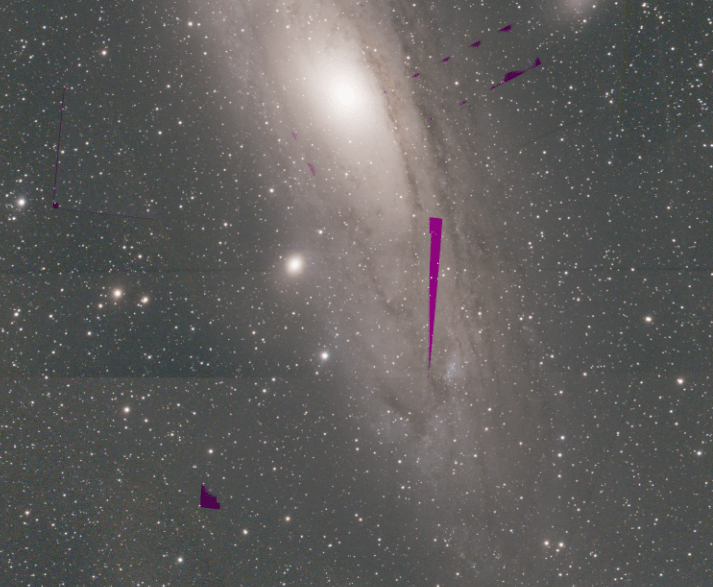
I did a mosaic with the beta22 and I got this weird artefacts.
Can you describe your workflow, kind of data etc?
@vincent-mod it happens when I do a mosaic pre-integrated frames, it happens often, just that sometimes is less visible than others
Are you creating panels first? That would be my advise at least. What APP version are you using?
Thank you very much for reporting this issue. It looks like another issue we are working on but I can't be 100% sure. Can you upload the data on which this happens and describe xactly what settings we need to set in menus 2) to 6) to be able to duplicate the problem?
You can upload it here:
https://upload.astropixelprocessor.com/
username: uploadData
password: uploadTestData
please make a folder with your name and issue like : DavidMitti-mosaic-artefacts
and let us know once uploaded, we will investigate as soon as we can 😉
Mabula
@vincent-mod yes, beta22 if I remember correctly. I'll try to reproduce and upload the files
Hi David,
Is this problem still occuring? If so, can you please upload data on which it occurs so I can test and fix it? Thanks 😉 You can use the upload instructions from my previous post.
Mabula
@mabula-admin I don't have the issue anymore, if I get it again I'll upload. thanks
Okay David @davemitti,
Thank you very much, I will close the issue on my list then, but please let me know if it does happen again 😉 then we really need to have a good look !
Mabula
@mabula-admin I uploaded 2 frames and integrated with average, weight quality, local normalization rejection, no LNC
there are bands at the edge of one frame in the final integration (called west_filamentary13_14.fits).
the other 2 images are the 2 panels combined
Hi David @davemitti,
Thank you very much, I have fixed this issue already in the meantime ;-). The fix will be included in 2.0.0-beta26 which I will try to release today or tommorow 😉
- Fixed, improved and faster Multi-Band Blending or MBB
As reported here : https://www.astropixelprocessor.com/community/main-forum/strange-horizontal-lines-in-mosaic-integrations/paged/2/#post-29618 MBB could remove data in overlap areas when the MBB % was set to a high level. We have found the cause of this. MBB was always removing 1% of the image borders relative to the set MBB percentage. This is completely fixed now. All data will always be used, so these strange artefacts should no longer happen. In addition, the MBB % was relative to the size of the entire field of view, which is not ideal for mosaics. Preferrably, the MBB % is relative for each image in the stack to the area where data is not 0 in that image, so we have implemented this improvement inlcluding code optimizations that improved MBB speed. For a big mosaic, the MBB calculation can be 3x-5x faster as well. This should improve Multi-Band Blending in all situations, especially when combining data from different setups and/or mosaics. The next image shows a mosaic where the issue occured which caused gaps/holes in the final mosaic. Now with beta26, this no longer happens and all data is preserved and MBB is about 5x faster causing the integration process to be faster as well. On the right side, the MBB weight map is shown where we used 50% MBB in this case:

Mabula
