

Mar 28 2026 APP 2.0.0-beta40 will be released in 7 days.
It did take a long time to have the work finished on this and it will have a major performance boost of 30-50% over 2.0.0-beta39 from calibration to integration. We extensively optimized many critical parts of APP. All has been tested to guarantee correct optimizations. Drizzle and image resampling is much faster for instance, those modules have been completely rewritten. Much less memory usage. LNC 2.0 will be released which works much better and faster than LNC in it's current state. And more, all will be added to the release notes in the coming weeks...
Update on the 2.0.0 release & the full manual
We are getting close to the 2.0.0 stable release and the full manual. The manual will soon become available on the website and also in PDF format. Both versions will be identical and once released, will start to follow the APP release cycle and thus will stay up-to-date to the latest APP version.
Once 2.0.0 is released, the price for APP will increase. Owner's license holders will not need to pay an upgrade fee to use 2.0.0, neither do Renter's license holders.
I am playing Whac-a-Mole with the 'undo' button in Light Pollution Correction. Although I have not yet learned the art of light pollution correction, I find I use the undo button, sometimes a lot, to remove the latest box. Doing that changes the variable length text above the buttons which then moves the buttons. So sadly, although not moving the mouse, the cursor is now over 'cancel', canceling all previous work.
Chasing buttons does not make sense to me. Obviously losing work doesn't either. I understand variable length text displays, but if they move the interface controls, that seems bad.
I also miss an ability to select previous boxes, so I may remove boxes other than the last box. I don't fully understand the intent of box placement or how they interact. I hope practice will help. Perhaps a simplified explanation of what the calculations are trying to do that I have not read yet will help.
Yes I am just starting out. Some picture processing is well beyond my understanding. Many of the terms used in astronomy and astrophotography are still unfamiliar. I hope to learn more.
To me however, moving controls, reference tabs, and variable interfaces, interfere with usability. Hopefully not having to chase things makes sense and will be an upcoming update.
Thanks
Moving controls I've not seen yet, what version of APP and on what OS are you working?
Sorry should have included screen shots. Version 1.082, Windows 10. Clicking 'Undo' changes the text box causing the controls to move. If the cursor is near the bottom of the 'Undo' control focus then moves to 'Cancel'.
Could not include cursor in pictures as the screen shots required me to move the mouse.

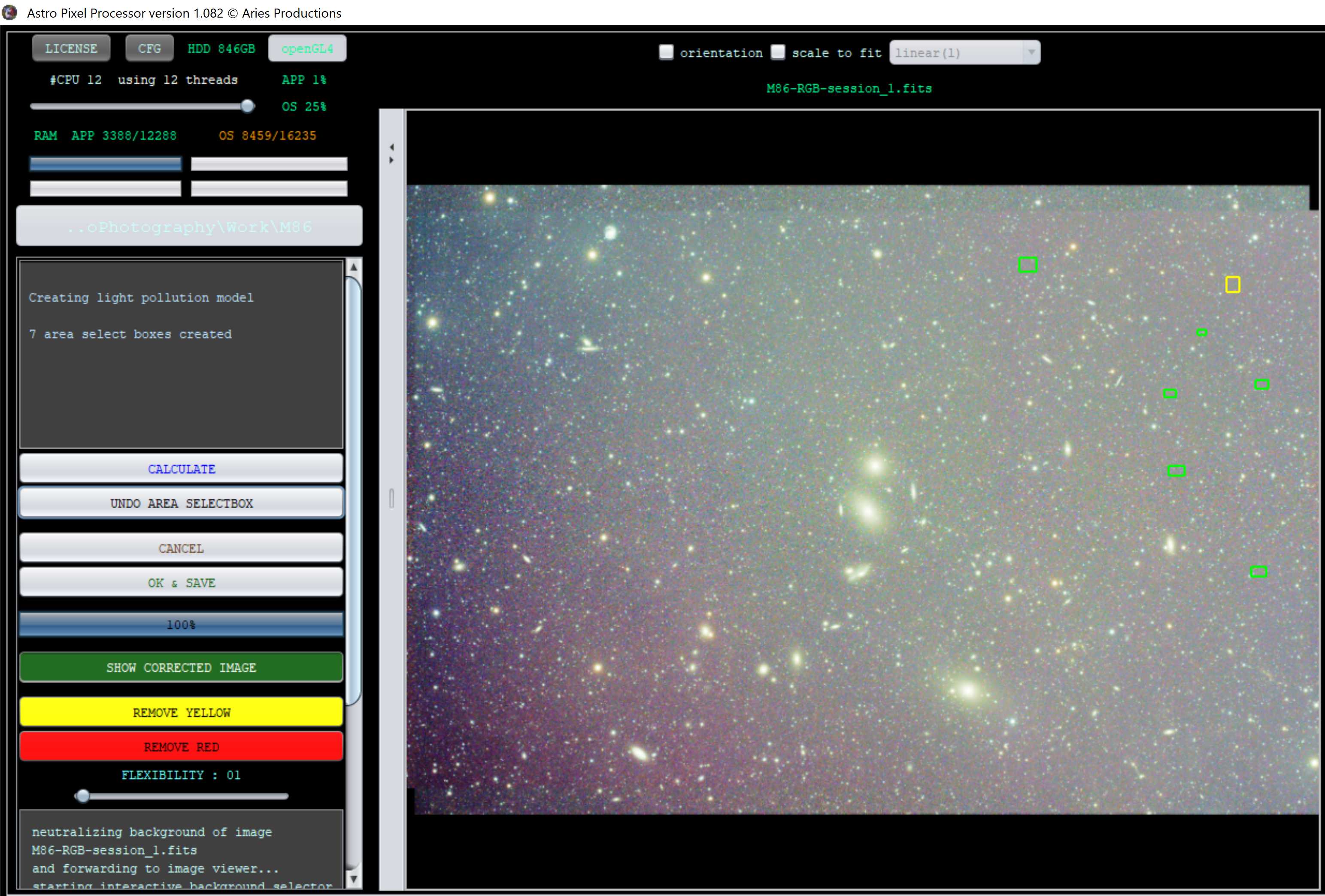
Ah now I see, that I never noticed. 🙂 Thank you and I'll report this to Mabula.
