

June 24 2026 APP 2.0.0-beta46 has been released !
Improved internal memory configuration (lower ! memory usage), fixed beta45 startup issue, fixed Set Save Directory & 2-panel mosaics.
May 27 2026 APP 2.0.0-beta45 has been released !
Fully Multi-Threaded LNC, many improvements for the registration engine, platform upgrade, and further tuning of internal memory consumption and memory release back to OS.
Apr 14 2026: Google Pay, Apple Pay & WeChat Pay added as payment options
Update on the 2.0.0 release & the full manual
We are getting close to the 2.0.0 stable release and the full manual. The manual will soon become available on the website and also in PDF format. Both versions will be identical and once released, will start to follow the APP release cycle and thus will stay up-to-date to the latest APP version.
Once 2.0.0 is released, the price for APP will increase. Owner's license holders will not need to pay an upgrade fee to use 2.0.0, neither do Renter's license holders.
Hi Mabula
Firstly, let me just say i'm loving APP! I'm currently only 3 days into the trial period, and even at this early stage i think i will be buying as soon as the trial ends. You really have done an amazing job!
I have recently had my Nikon D5300 astro-modified and have also picked up a Baader H-Alpha filter, and have done a couple of brief sessions with it. When i heard about the pre-processing abilities of APP i simply had to try it out, so i've been doing some test stacks using different methods to see what works and what doesn't, and i have a few questions for you if that's ok?
1. What's going on with Super-Pixel mode? When i use this mode in DSS i get a pretty good result, and the Blue and Green channels in the stack contain very little information (as you'd expect) so i just keep the red channel and process that. But after doing a Super Pixel stack in APP, i see that there is an awful lot of information in the B & G channels. How come? In the end i couldn't achieve a Super Pixel stack that was as good as one from DSS.
2. When choosing the 'split channels option' when saving calibrated files, how come each channel image is full res? I would have expected the Red and Blue to be 1/4 res each and Green to be 50%, but each one of mine came out as 6000 x 4000 pixels which is full res. Does this mean there is interpolation going on?
3. When using the dedicated H-Alpha algorithm (which is what i would want and expect to use given my equipment) how come APP saves an RGB image and not a mono one? This is backed up by the fact the resulting stack is 3 times the size i would ave expected (i.e only the Rec channel should be of any use). Can you explain in detail what APP is actually doing in the background with this algorithm?
4. Compared to the H-Alpha algorithm, i seem to be getting better results by saving the calibrated Lights first (using the AAD algorithm in RAW/FITS) and splitting them into the 3 channels when i save. Then i just stack channel 1 (Red). This seems to be giving me a sharper result. I would have expected the H-Alpha algorithm to be better, do you have any idea as to why this is? I've attached links below to 2 stacks that i did when comparing the two. Please excuse the noise, they are just a stack of 7 lights of 8 mins each, with Bias, a BPM, and Flats. I gave both a similar stretch so they could be more closely compared.
Cheers!
The 'Red Channel only' stack:
https://1drv.ms/i/s!AhhWC3D3zU7BnSsUAVLpgt5wT4T1
And the regular H-Alpha method stack:
https://1drv.ms/i/s!AhhWC3D3zU7BnSyxGCVFabffghW6
Hi xiga,
Thank you for your nice compliments 😉
My apologies for the late response to your questions.
1. What's going on with Super-Pixel mode? When i use this mode in DSS i get a pretty good result, and the Blue and Green channels in the stack contain very little information (as you'd expect) so i just keep the red channel and process that. But after doing a Super Pixel stack in APP, i see that there is an awful lot of information in the B & G channels. How come? In the end i couldn't achieve a Super Pixel stack that was as good as one from DSS.
I have checked the super pixel processing. I did find a problem in the processing of Fits images, which I have fixed now. (The files weren't actually reduced 2x in width and height in the super pixel modus). But I assume you are using Nikon NEF files? Maybe you can show a screenshot of what you mean by an awful lot of information in the B & G channels. The super pixel modus does not create data out of thin air so probably there will be a good explanation for this. Maybe it simply has to do with how APP stretches your H-alpha data?
2. When choosing the 'split channels option' when saving calibrated files, how come each channel image is full res? I would have expected the Red and Blue to be 1/4 res each and Green to be 50%, but each one of mine came out as 6000 x 4000 pixels which is full res. Does this mean there is interpolation going on?
I think that you did encounter an error with the super pixel processing of FITS files. So are you processing FITS files instead of NEF files? (It will be fixed in the next APP version.)
3. When using the dedicated H-Alpha algorithm (which is what i would want and expect to use given my equipment) how come APP saves an RGB image and not a mono one? This is backed up by the fact the resulting stack is 3 times the size i would ave expected (i.e only the Rec channel should be of any use). Can you explain in detail what APP is actually doing in the background with this algorithm?
Yes, for your purpose you should really forget about the super pixel processing method, because it's of less quality. (but will be fixed though). Again I think you have stumbled upon the same error ;-(. Normal behaviour should be that the output is single channel and thus monochrome. The H-alpha debayer algorithm is debayering only the red channel using only the information of the red CFA pixels, this preserves the resolution.
4. Compared to the H-Alpha algorithm, i seem to be getting better results by saving the calibrated Lights first (using the AAD algorithm in RAW/FITS) and splitting them into the 3 channels when i save. Then i just stack channel 1 (Red). This seems to be giving me a sharper result. I would have expected the H-Alpha algorithm to be better, do you have any idea as to why this is? I've attached links below to 2 stacks that i did when comparing the two. Please excuse the noise, they are just a stack of 7 lights of 8 mins each, with Bias, a BPM, and Flats. I gave both a similar stretch so they could be more closely compared.
Well, the AAD algorithm applied on H-alpha data can work if there is enough information leaked to the green channel through the CFA filters. The AAD algorithm is superior for sharpness when compared to using the H-alpha debayer method. But the AAD algorithm will be noiser as well. Basiscally the H-alpha debayer method uses only information of the red cfa pixels and therefore will be a bit more blurred and has less noise as a consequence.
You are welcome to send me couple of the original light frames so I can have a look myself at the available data in the green and blue channels.
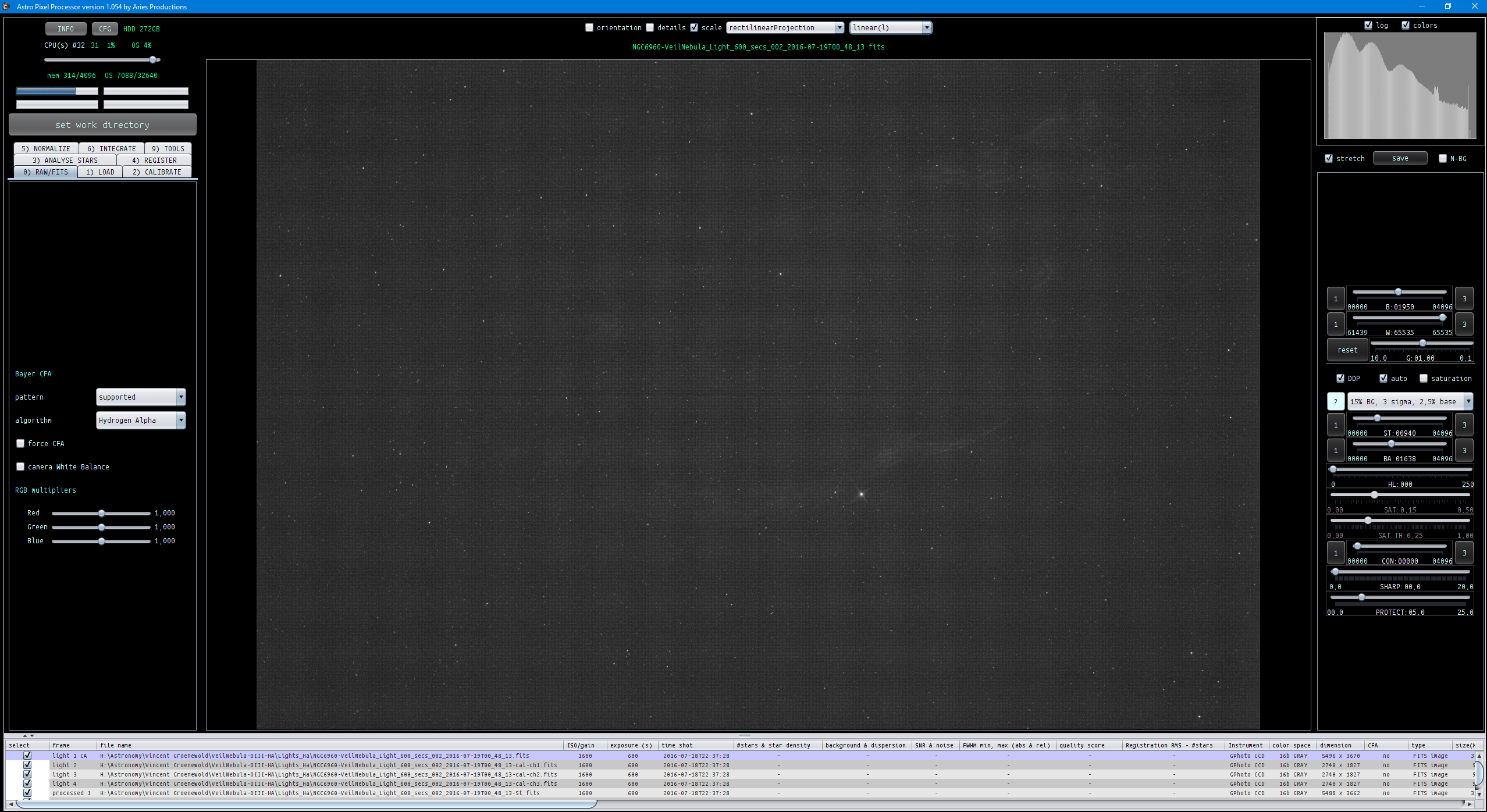
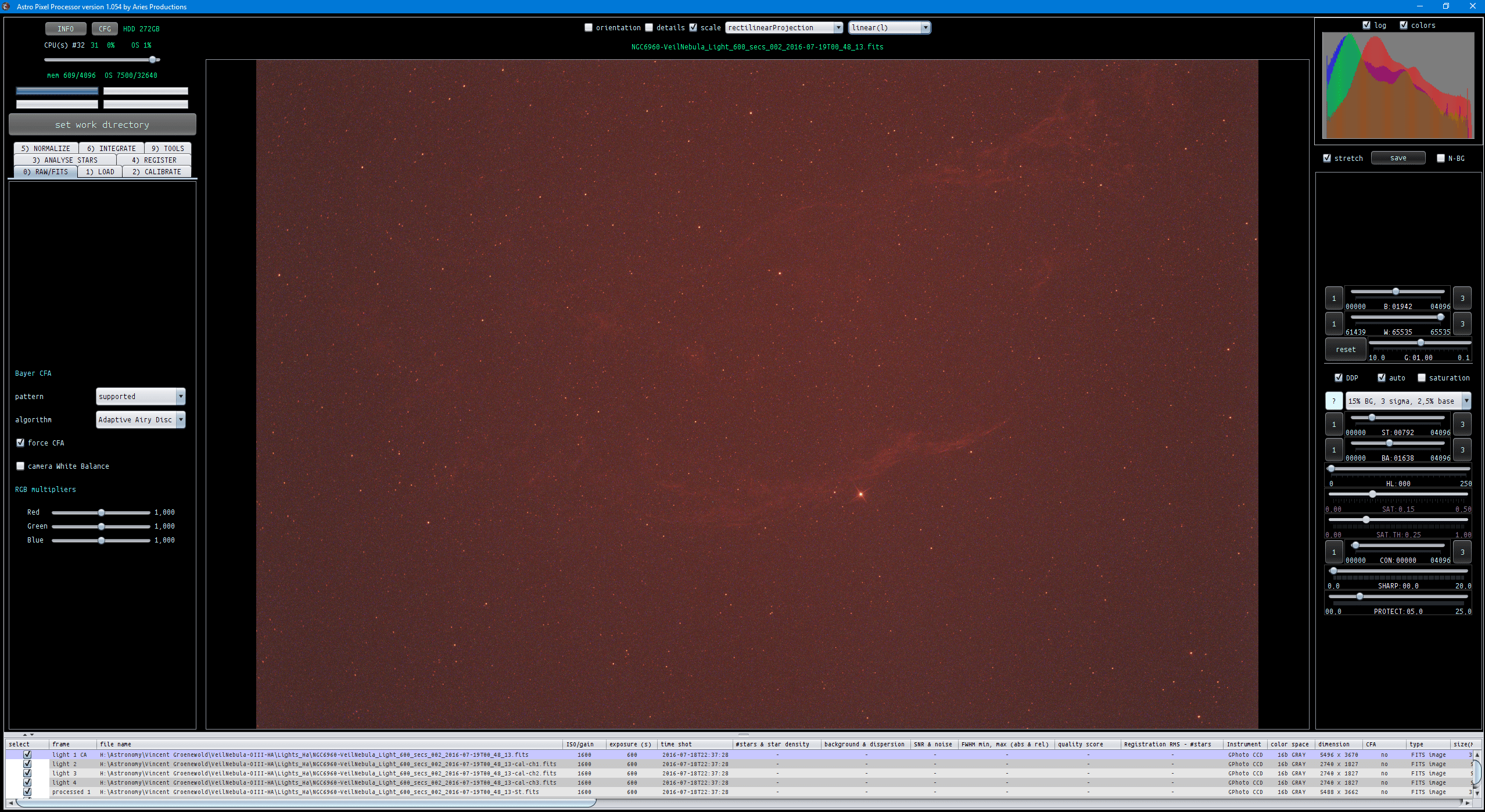
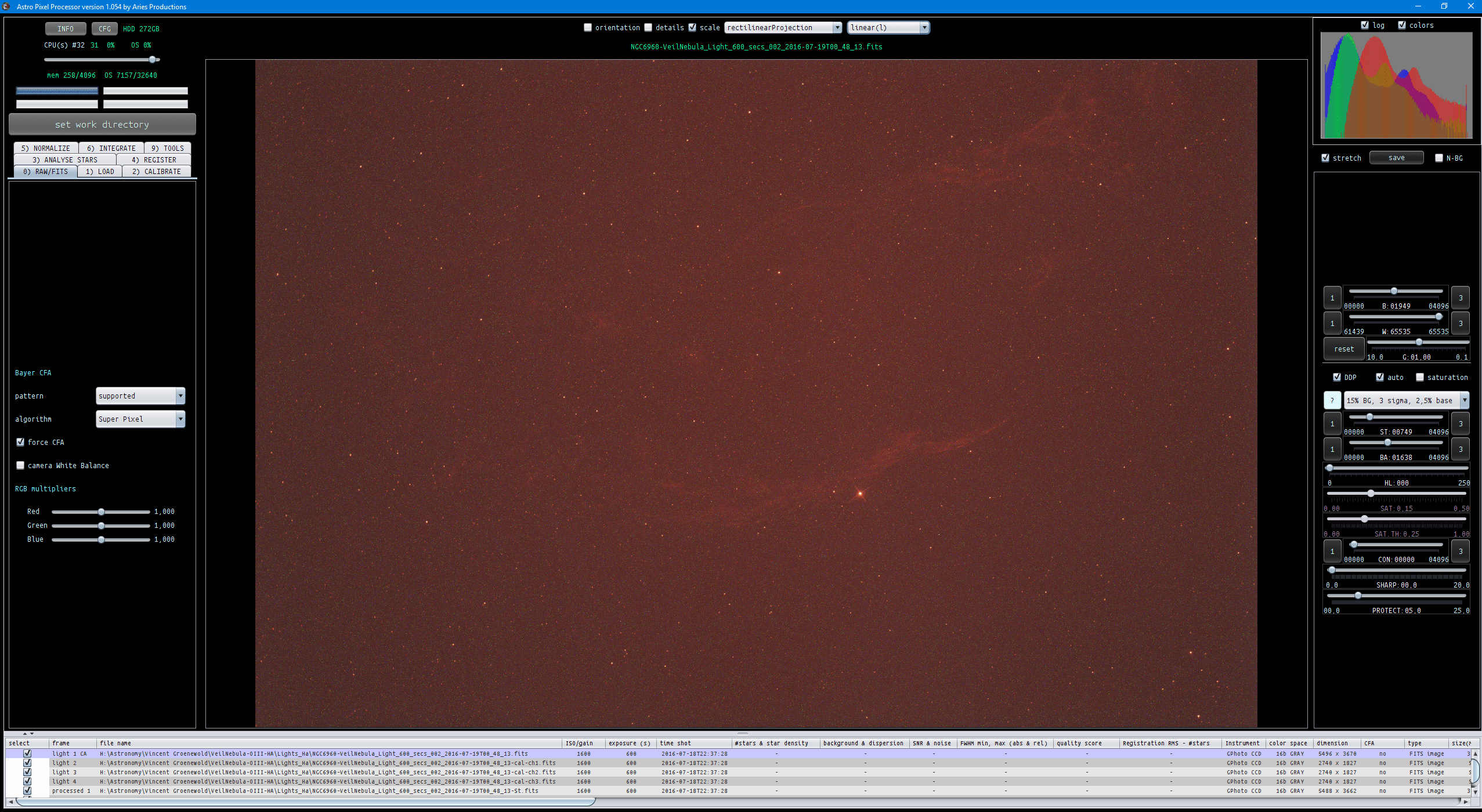
As a reference, I have some H-alpha data shot with a Canon 6D in FITS format (after having corrected the error) and this is what it looks (and should look) like in APP together with histograms in screen shots:
Just the undebayered raw data:
Then debayering with AAD, so same resolution:
Then with Super Pixel modus, half the resolution:
And finally the H-alpha debayer algortihm, with the original resolution and only 1 channel of data:
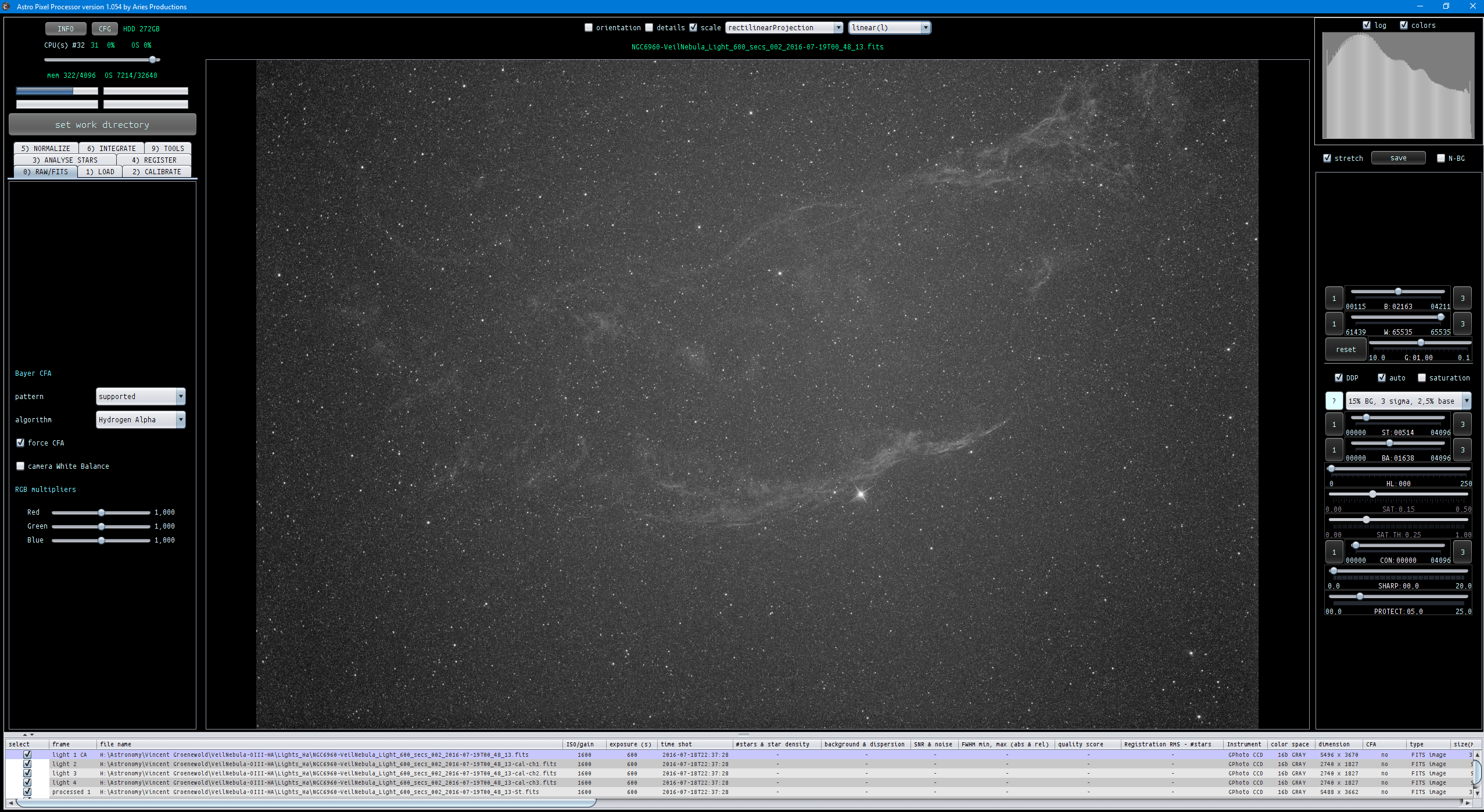
According to a lot of testing, the H-alpha debayer method of processing your narrowband data with a CFA sensor is far superior than super pixel modus and then splitting the data. So if that's not the case, we should investigate further I think 😉
I suspect your questions and problems were the result of an error in fits processing, but I need your confirmation for this. Right now I am not certain what kind of files your working with NEF or FITS?
Kind regards,
Mabula
Hi Mabula, thanks for getting back to me.
I'm at work at the moment so I can't post any pictures or links, but i'll do my best to describe what I found.
I have been using .NEF files all along. I didn't capture in .FIT format, so that definitely rules that out.
Sorry if I gave you the impression that I have been using Super Pixel mode right throughout my processing, I haven't. I only tested it out to see what sort of result I would get, to compare it to DSS. I literally just fed APP all my raw .NEF files, calibrated them (I confirmed they worked by checking a few lights by choosing 'l-calibrated' and saw that they were working) then proceeded to stack. When I then checked the stack file, the histogram showed a lot of information in the B & G channels, which I immediately thought was strange. Trying to do a quick process quickly showed that the stack was not as good as a Super Pixel stack from DSS, so I left Super Pixel mode alone and moved onto testing AAD and H-Alpha.
I can see from the file list in your pictures that when you split your channels you do end up with files that are 50% of the original size in each dimension, as expected. From memory, I was definitely still getting 100% sized files when I split my channels out. I think I might have used AAD when doing so, was this right? I note in your 2 pictures of the H-Alpha method you have ticked 'force CFA' in one but not in the other, why was this? Could this be the reason why I was getting an RGB image, and not a mono one, when I tried the H-Alpha method? For reference, my H-Alpha method stack still looked very good (it was just a bit softer than the one I did by just stacking the Channel 1 files from the AAD debayered raws, which sounds correct based on what you say above), it was the fact that I got an RGB image with data in all3 channels and not a mono one that made me a bit nervous that what I was seeing was not exactly what it should have been.
I'll try and have another play about either tonight or tomorrow night, but hopefully the above will give you enough info for the time being.
FYI, what I was originally trying to do was compare your H-Alpha method to my old workflow, which basically consisted of:
1. Calibrate the lights
2. Split out just the calibrated Red pixels (which I used to do with IRIS, resulting in file sizes of half dimension).
3. Then stack just these calibrated Red pixels.
If APP can do the above, just as well, if not better, then i'll be a happy bunny 😛 (as IRIS is something of a pain to use, whereas APP is very user friendly).
Thanks for your help with this btw!
ps - Just a small recommendation, it would be good to be able to use the sharpen command without any DDP stretch. At the moment, I *think* we are forced to use some kind of stretch, as setting the sliders down to even the min settings still applies a small stretch, and unticking the DDP box then disables the sharpening. Unless I'm missing something?
Hi xiga,
You're most welcome 😉
Okay, I'll do some testing today then with NEF files 😉 and will report back here on my findings.
About the signal in the green and blue channels: the CFA pixels on the sensor don't have 0% transparancy for the other color channels. so signal is always leaked through and thus it's not strange that the green and blue channels show some signal if you have only used an h-alpha filter. I have seen this clearly with other CFA sensors.
The super pixel method in APP doesn't alter data and doesn't interpolate data. So if APP's super pixel comes out differently then in DSS, the cause must be found somewhere else I think, for instance
- color calibration settings while integrating can be a reason.
- different way of stretching data and or applying saturation
I can see from the file list in your pictures that when you split your channels you do end up with files that are 50% of the original size in each dimension, as expected. From memory, I was definitely still getting 100% sized files when I split my channels out. I think I might have used AAD when doing so, was this right? I note in your 2 pictures of the H-Alpha method you have ticked 'force CFA' in one but not in the other, why was this? Could this be the reason why I was getting an RGB image, and not a mono one, when I tried the H-Alpha method? For reference, my H-Alpha method stack still looked very good (it was just a bit softer than the one I did by just stacking the Channel 1 files from the AAD debayered raws, which sounds correct based on what you say above), it was the fact that I got an RGB image with data in all3 channels and not a mono one that made me a bit nervous that what I was seeing was not exactly what it should have been.
The "force CFA" setting is only needed for data that hasn't got any debayer information in the metadata. This usually is only the case with FITS images captured with software (like SGP) that doesn't include CFA information in the metadata.
Maybe there is an error in NEF processing as well, I'll investigate that today 😉 and will report my findings here.
I can see from the file list in your pictures that when you split your channels you do end up with files that are 50% of the original size in each dimension, as expected. From memory, I was definitely still getting 100% sized files when I split my channels out. I think I might have used AAD when doing so, was this right? I note in your 2 pictures of the H-Alpha method you have ticked 'force CFA' in one but not in the other, why was this? Could this be the reason why I was getting an RGB image, and not a mono one, when I tried the H-Alpha method? For reference, my H-Alpha method stack still looked very good (it was just a bit softer than the one I did by just stacking the Channel 1 files from the AAD debayered raws, which sounds correct based on what you say above), it was the fact that I got an RGB image with data in all3 channels and not a mono one that made me a bit nervous that what I was seeing was not exactly what it should have been.
Yes, a separate sharpen module needs to be implemented as well. The SHARP slider only works when DDP is enabled, this is totally integrated in the DDP filter and makes use of the actual DDP stretch. I have added your suggestion to my priorities list 😉
Kind regards,
Mabula
Hi Xiga,
I have just tested with Nikon NEF and Canon CR2 files. I can't find any problems. (The FITS problem has been solved though).
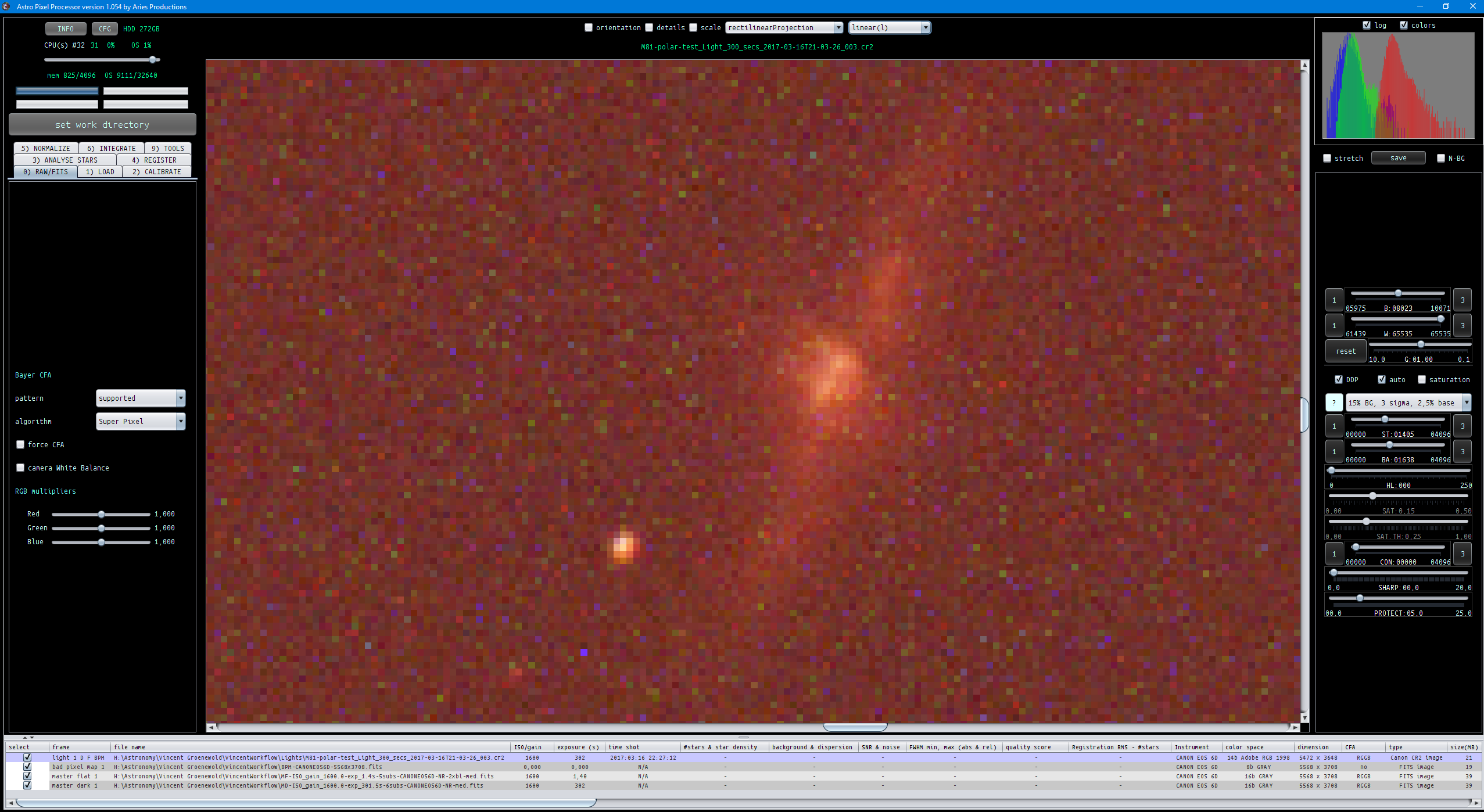
Let me show you an example using data of M81/M82 shot with a Canon 6D and a H-alpha filter, data is courtesy of Vincent Groenewold. I am going to show you screenshots of a zoomed in crop of the data so we can actually see the individual pixels.
First a single CR2 light frame with debayering on AAD, calibrated with BPM, Masterdark, Masterflat and uncalibrated:


Then a single CR2 light frame with SUPER PIXEL processing, calibrated with BPM, Masterdark, Masterflat and uncalibrated:

Finally. calibrated/uncalibrated with H-alpha debayering.

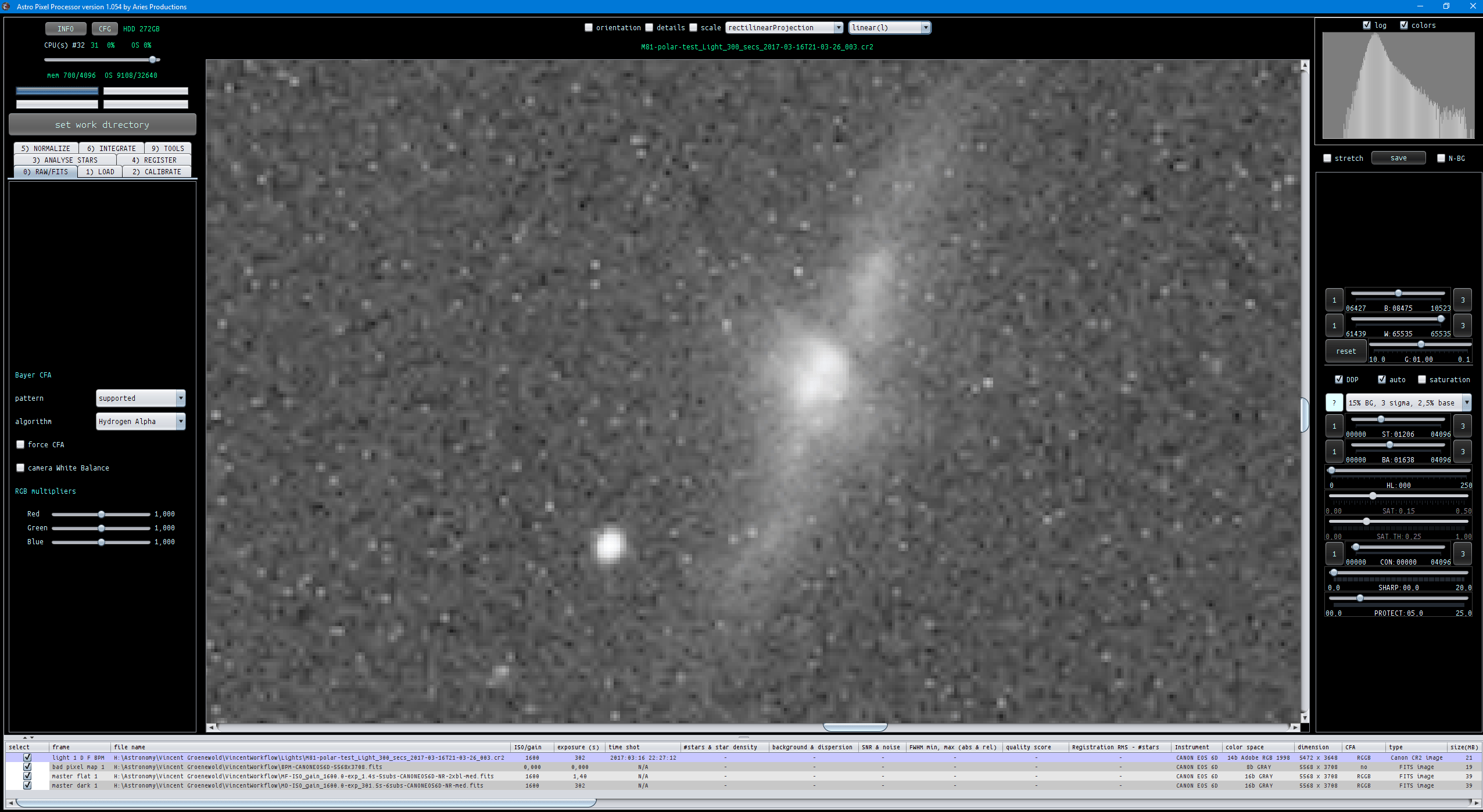
Please check the histograms in AAD and Super Pixel processing, clearly there is plenty of data in the green and blue channels.
We can also see that the super pixel modus has 2x less resolution.
I will now show 3 jpgs of a calibrated lightframe and it's image dimensions:
AAD debayer:

Super Pixel:

H-alpha debayer

Finally, I set the debayering to super pixel, and click on calirbate in 2). Then I save the calirbate frame with split channels and I get 3 monochrome FITS frames of the R, G, and B channels.
(I have enabled the option that everyone can now upload files with .fit or .fits extension )
The 3 channels in Fits format, the orignal frames are 5472x3648 in size, these super pixel channels are : 2736x1824 in size, so reduced twice in size like expected. And they have only 1 channel of data.
Let me know if this is significantly different than what you are seeing 😉
Mabula
A final remark,
If you save the calibrated data, debayering or Super Pixel modus is only applied in the following cases:
- if you apply distortion correction with a camera profile
- if you align channels to reduce chromatic aberration
- if you choose to remove light pollution in the frames
- or if you want to split the channels.
So if not one of these 4 is the case, the calibrated frames will be undebayered CFA monochrome frames giving you still full flexibility in processing of these calirbated frames. If I would let APP debayer them then you lose flexibility with this calibrated data. The 4 cases however make it necessary to apply debayering or apply super pixel modus.
Mabula
Thanks Mabula, this is all really helpful, and i can confirm i am seeing pretty much the same as you are. I think i now know the confusion here, i have taken the meaning of 'Split Channels' as being...break down each 4x4 bayer grid into the 4 constituent pixels, i.e 1 Red, 2 Green, and 1 Blue....but i now see that it's not exactly that, it is 3 channels made up of R, G, and B. The nuances of the differences i will leave to you to explain 😉
Up to now i had been using IRIS, with some success (although i couldn't get my files to calibrate as i needed to convert them from .NEF to .FIT first, which i think made calibration impossible). The IRIS command i was using was the split_cfa one, and this actually splits out the 4 pixels from the bayer grid, so each image would get split into 4, and i would then just stack the reds and discard the remaining 3/4 of the images. Despite the lack of calibration, for me this would still result in a really clean stack (i obviously just have very little dust & vignetting). Of course, using only 1 out of the 4 pixels would result in a file only 50% sized in each dimension, so i would stack with x2 drizzle to restore the resolution and i was generally happy with the outcome.
Does APP have a similar capability? From your explanation above, it sounds like one has to first use the Super Pixel mode, then save the calibrated files, to get something similar. But then, doesn't the Super Pixel mode combine the 4 pixels rather than simply split them out? Or is there actually any difference between the two?
I will quickly try and calibrate some lights in APP (without using split channels or Super Pixel mode, so that they remain undebayered). I will then import them into IRIS and split out the 4 pixels, before finally re-importing the Red Only pixels back into APP for stacking. I'll then compare to a regular H-Alpha stack done in APP.
Back soon...
🙂
Okay, i think we're almost there now 🙂
My idea of throwing IRIS some APP-calibrated lights for splitting out into the 4 pixels didn't work. The end image was seriously degraded. It appears that IRIS only likes either debayered files, or undebayered files in their raw state (i.e not converted in another program). In any case it's not a big deal, as i went ahead and compared 3 stacks and i'm now very happy with how APP is stacking these.
Below are 100% crops of a small stack of my own Ha data (only 7 lights, with calibration files). Note, to see the small differences you will need to save the files and blink between them.
The 1st picture is from a stack done in DSS using the Red Only pixels that were extracted in IRIS. Note, no calibration was done here as i could not find a way to do it (and i'm starting to think it's actually impossible). The DSS stack was drizzled x2:

The 2nd picture used the special Ha method in APP, together with calibration files:
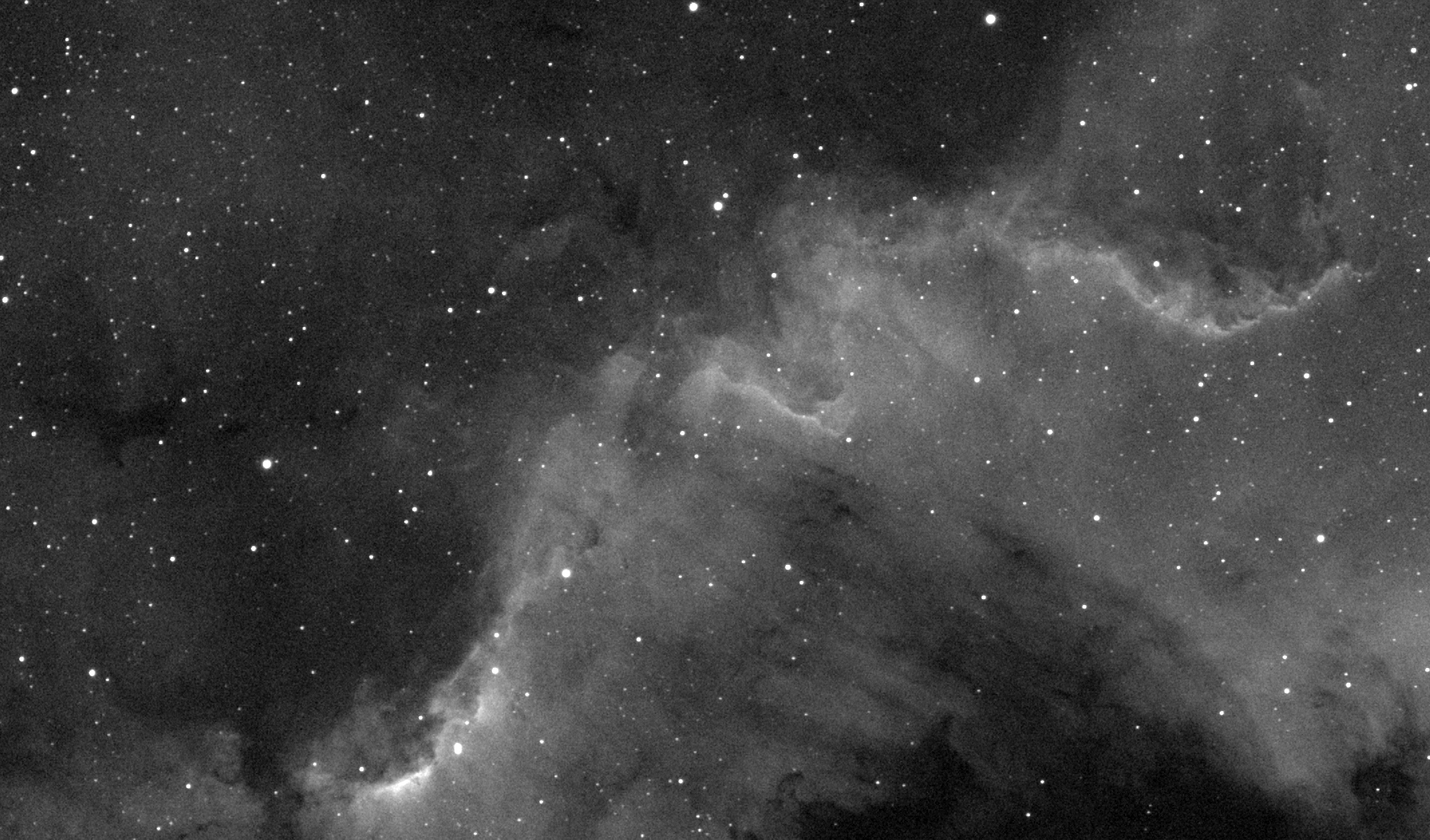
And the 3rd picture here used AAD debayering in APP, then saving the calibrated files using 'Split Channels', and finally stacking only the 'Channel 1' (i.e Red) files:

As you can see, APP is matching the DSS stack but with the added benefit of calibration, so no hot pixels, dust motes, vignetting etc 🙂
Using the method in the 3rd picture does give a slightly sharper (but also slightly noisier) image than the Ha Method image in picture 2. It is good that we also have the flexibility of stacking DSLR Ha data this way as well, because if you have enough total exposure then you could benefit from this extra sharpness.
Thanks Mabula for explaining all of this. I'm now very happy with how APP is handling this data 🙂
Hi xiga,
To make this more interesting, it's probably good to compare the 3 different linear stacks for FWHM values of the stars and for noise, SNR (after normalization with each other!). If you send me the three stacks, I'll be happy to show you such a comparison based on good statistics. Then the differences between the three methods can be expressed in clear numbers.
Kind regards,
Mabula
Does APP have a similar capability? From your explanation above, it sounds like one has to first use the Super Pixel mode, then save the calibrated files, to get something similar. But then, doesn't the Super Pixel mode combine the 4 pixels rather than simply split them out? Or is there actually any difference between the two?
Yes, if you set the debayer alogrithm to Super Pixel and save the calirbated files, these will be Super Pixel calibrated files. So simply reduced twice in resolution without any interpolation. Channel Splitting is only separating the RGB channels. So if you enable that as well, you will simply end up with Super Pixel processed and calibrated channels.
In 6) integrate, you can enable drizzle 😉 if you need it. This is a full drizzle implementation and much more advanced than DSS offers. DSS 2x drizzle in APP can be achieved by using:
- enable drizzle,
- set integration scale to 2.0
- use drizzle droplets of about 0.5 to 0.7
- and a square drizzle kernel
Kind regards,
Mabula
Hi xiga,
To make this more interesting, it's probably good to compare the 3 different linear stacks for FWHM values of the stars and for noise, SNR (after normalization with each other!). If you send me the three stacks, I'll be happy to show you such a comparison based on good statistics. Then the differences between the three methods can be expressed in clear numbers.
Kind regards,
Mabula
Hi Mabula
Here are links to the 3 stacks:
1) DSS Red Only Pixels with x2 Drizzle
https://1drv.ms/i/s!AhhWC3D3zU7BnTMijRsoYbc9vu_b
2) APP with Ha Method
https://1drv.ms/u/s!AhhWC3D3zU7BnTLz4n6X_UeP7obr
3) APP with AAD Debayer, Split Channels, Only Channel 1 Stacked
https://1drv.ms/u/s!AhhWC3D3zU7BnTH4NX1FbRIJ_WLW
I still can't decide if i prefer 3) to 2). It's sharper but also noisier, but i'm still leaning towards 3). Hopefully you can show some statistics to help me 😉
ps - Don't forget these were taken from a very small stack, just 7 images of 8 mins each. It's all i captured before the clouds came in.
One quick general question for you if you don't mind:
Lets' say i've just done a stack but i wanted to then do a 2nd stack for comparison. If i change the algorithm in the RAW/FITS tab, do i have to go through tabs 2-6 all over again, or would i only have to re-do tab 6?
Basically, under what conditions would one have to re-do all the tabs? I'm just thinking ahead to when i am dealing with larger stacks, and don't want to waste time re-doing processes that aren't necessary.
Hi xiga,
To make this more interesting, it's probably good to compare the 3 different linear stacks for FWHM values of the stars and for noise, SNR (after normalization with each other!). If you send me the three stacks, I'll be happy to show you such a comparison based on good statistics. Then the differences between the three methods can be expressed in clear numbers.
Kind regards,
Mabula
Hi Mabula
Here are links to the 3 stacks:
1) DSS Red Only Pixels with x2 Drizzle
https://1drv.ms/i/s!AhhWC3D3zU7BnTMijRsoYbc9vu_b
2) APP with Ha Method
https://1drv.ms/u/s!AhhWC3D3zU7BnTLz4n6X_UeP7obr
3) APP with AAD Debayer, Split Channels, Only Channel 1 Stacked
https://1drv.ms/u/s!AhhWC3D3zU7BnTH4NX1FbRIJ_WLW
I still can't decide if i prefer 3) to 2). It's sharper but also noisier, but i'm still leaning towards 3). Hopefully you can show some statistics to help me 😉
ps - Don't forget these were taken from a very small stack, just 7 images of 8 mins each. It's all i captured before the clouds came in.
Thanks Xiga,
I'll do the comparison tomorrow 😉
Mabula
One quick general question for you if you don't mind:
Lets' say i've just done a stack but i wanted to then do a 2nd stack for comparison. If i change the algorithm in the RAW/FITS tab, do i have to go through tabs 2-6 all over again, or would i only have to re-do tab 6?
Basically, under what conditions would one have to re-do all the tabs? I'm just thinking ahead to when i am dealing with larger stacks, and don't want to waste time re-doing processes that aren't necessary.
Hi Xiga,
Good question, if you change the settings in 0) RAW/FITS from
- super pixel to a debayer algorithm and vice versa
- a narrowband debater to normal RGB debater and vice versa
You would need to restart at 3) analyse stars. (Remember calibration is done only on CFA pixels, so things only start to deviate from process 3). )
Currently APP does't warn if you do this, so I should probably make a note of that in my priorities list.
Mabula
Following intently.
