It did take a long time to have the work finished on this and it will have a major performance boost of 30-50% over 2.0.0-beta39 from calibration to integration. We extensively optimized many critical parts of APP. All has been tested to guarantee correct optimizations. Drizzle and image resampling is much faster for instance, those modules have been completely rewritten. Much less memory usage. LNC 2.0 will be released which works much better and faster than LNC in it's current state. And more, all will be added to the release notes in the coming weeks...
Update on the 2.0.0 release & the full manual
We are getting close to the 2.0.0 stable release and the full manual. The manual will soon become available on the website and also in PDF format. Both versions will be identical and once released, will start to follow the APP release cycle and thus will stay up-to-date to the latest APP version.
Once 2.0.0 is released, the price for APP will increase. Owner's license holders will not need to pay an upgrade fee to use 2.0.0, neither do Renter's license holders.
[Solved] Mosaic won't register - with FULL composition mode in 6) INTEGRATE it does !
I have a 6 pane mosaic of the Butterfly nebula... It is only 1x600s in each pane as I want to check that it all fits together before I commit to the data. I have struggled to get it to stitch in all software..... and I was hoping that APP would make the registering process seamless. Sadly not and it won't register the files.
I'd love some ideas to make it work. I KNOW that it does work as a friend of mine did it in PI, but I want to try something easier.
Can anyone give me some suggestions? I have followed the video tutorial from Yves data so have the same settings as he used.
many thanks for these tips - I m now able to register the images. Now to try to put them together. I am trying to follow the video... Is there supposed to be sound on it? I have found it very difficult to follow if I'm honest.
To answer your questions - The files are ha so monochrome and focal length of 1.2m with a resolution of 0.93" pp
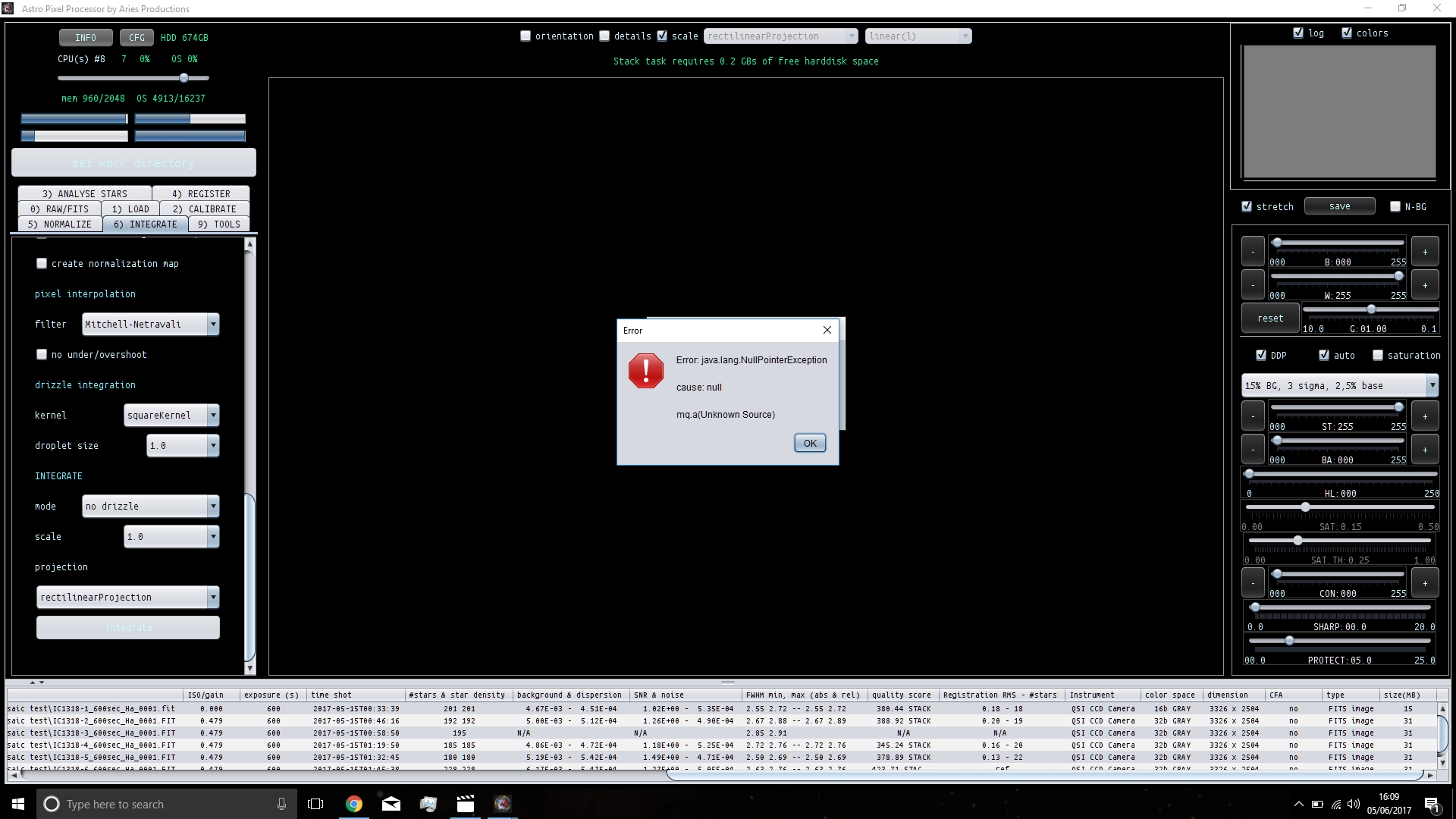
Tried to integrate and there's a couple of issues.... It only recognises 5 of my 6 panes and then I get the following error.
My apologies for the video without sound ;-( (I should really update it with sound and the current APP version) I can totally understand it's hard to follow like this. I'll work on it.
Okay, h-alpha data with long focal length.
Yes, I see the screen shot, this is not good at all. The star count is really low to begin with. Can you increase the star count by setting
3) Analyse stars, set filter star profile on, kappa at 3 and increase limit # stars to 5000 ?
If not, then we have a very little amount of stars to work with.
Only 5 out of 6 frames were registered with a very low starpair count between the frames which is troublesome.
Can you indicate how much overlap there is between the frames?
Maybe it helps if you change the scale stop to 12 instead of 10. And use triangles instead of quadrilaterals with such a low star count.
You can also send the frames to me so I can have a look and possibly locate the cause of that error message?
The first issue I have is that I cannot increase the star count beyond 2048..... And this is set with the slider at utter maximum. Is there something I am missing?
The overlap between the frames is 15% - This is a standard that I use for all of my mosaics. I can understand that there's issues with so few stars, but software needs to work at all focal lengths and image scales as people are always using different combinations.
Just used your settings as suggested... still only 5 frames available for stitching. I've got the frames in a dropbox folder...... How can I get the links to you?
I can't believe I'm saying this, but PI seems a little easier at this point in time LOL!!! And I am not a fan of PI and its complicated approach at all!
*edit update* I have managed to get 6 frames to integrate, then I get a Java null error message and that's that.... should I see the stitched mosaic somewhere?
The first issue I have is that I cannot increase the star count beyond 2048..... And this is set with the slider at utter maximum. Is there something I am missing?
The overlap between the frames is 15% - This is a standard that I use for all of my mosaics. I can understand that there's issues with so few stars, but software needs to work at all focal lengths and image scales as people are always using different combinations.
Just used your settings as suggested... still only 5 frames available for stitching. I've got the frames in a dropbox folder...... How can I get the links to you?
I can't believe I'm saying this, but PI seems a little easier at this point in time LOL!!! And I am not a fan of PI and its complicated approach at all!
Hi Sara,
The maximum amount of stars is capped by the amount of system RAM memory in your computer. But since APP only detect a couple of hundred stars, this won't be our problem at the moment.
15% is fine, this is what I usually recommend to other photographers when they are planning a mosaic 😉
Regarding long focal length mosaics, they tend to be MUCH easier than widefields due to absence of perspective distortion and hardly any optical distortion.
Furthermore, APP has no trouble at all combining data of different focal lengths or image scales. Quality parameters are calculated scale independently as well 😉
I will be most happy to help you out with your data which I will threat confidential. Possibly it can help with improving APP as well?
Somehow I have bludgeoned this to death and somehow made it work...... If I can ever replicate this I don't know!!
In answer to your question in the above - Our replies crossed...
My exclamation was that as you stated that there was so few stars to work with, this suggested to me that the 'system' preferred a much larger spread of stars which would not be available in a longer focal length...... I did not mean to cause any offence if it was taken as such.
I can't help feeling that full documentation would go a long way to have addressed my issues (and I can only think that would be the same for many others trying this for the first time) - I think that what enabled it to stitch for me was by changing the mode in Integrate to 'full'...... It seemed to work from there but I have no idea why or whether I even missed this in the video.
This was a difficult mosaic to be fair. As I said it was only 1x600s in Ha on each pane as I wanted to check it for fit before I proceeded. As it stands I have a mosaic that is not of the best quality (data related of course) but it all went together and I am pleased to say that even with just one sub there is no visible join, so this looks VERY promising indeed. I will certainly give it a try when I have all of my data and see how it goes.
My initial thoughts, for what they are worth, is that the software seems to do it's processes very well. The UI is fairly easy to work....... I have not given up on it and I look forward to trying it some more.
Stupid of me I must admit, the full composition mode should be forced when a mosaic is made. (This error has popped up before in the beta team). I'll fix this immediately. I now know the cause of the errors that you received as well, so I'll try to fix those as well !
Some explanation is due:
The full composition will use a field of view including all pixels of all frames involved.
The reference composition uses only a field of view of the reference pixels.
The crop composition enables you to integrate to a crop of the reference, which can be usefull for direct integration of only a small object in the field of view. (like a small nebula, galaxy or cluster )
"I can't help feeling that full documentation would go a long way to have addressed my issues (and I can only think that would be the same for many others trying this for the first time) - I think that what enabled it to stitch for me was by changing the mode in Integrate to 'full'...... It seemed to work from there but I have no idea why or whether I even missed this in the video."
So yes, the integration compostion mode set at reference was the cause of the failures while integrating.
And yes, full documentation is the main priority now 😉
Did you use both MBB (Multi-Band Blending) and LNC (Local Normalization Correction)?