

UPDATE FROM MABULA
I have had a very rough 2 months unfortunately health wise. I was struck 3x in a row with bacterial infections. The second infection occurred after a routine hospital checkup and I became very sick. I had to rest and take a lot of antibiotics. Once I was recovering and restarting work 1 month ago, I again became sick. The infection was not yet gone, so even more antibiotics and rest was needed. Needless to say, it took a lot of my energy and I needed a lot of rest.
Finally, the infection is really gone and my energy is coming back step-by-step now and I have started work again. I am terribly sorry to have kept you waiting for support. I will address all outstanding questions and e-mails step-by step and will be on the forum daily from today.
APP 2.0.0-beta47 will come soon as well, a lot of work was already completed before I became very ill, so the release is also nearly ready for you. Beta47 will be much faster actually. Many workflows will be more than 2x faster, mosaics can even be 10x faster than before because registration really received a major boost... all compared to beta46. Before I release it, I will make sure that everything is working properly and then I will release it.
I have stacked four channels of data - LRGB - of M3. I used the multi-channel processing for RGB and L as a single event. The RGB files are all of the same dimensions while the L is smaller.
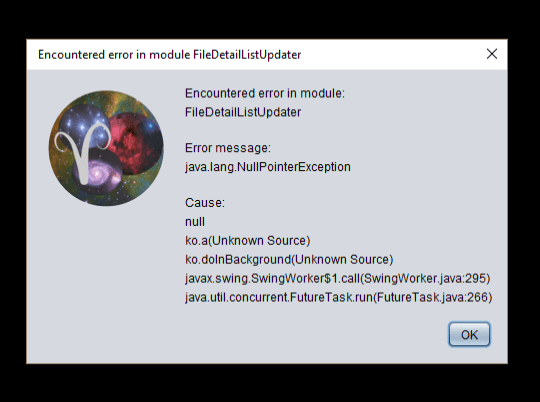
When attempting to register/normalize them all to combine in the RGB tool I get this error when attempting to load them as individual light frames. When I attempt to load them as 'processed' frames they show up in the bottom window, but do not index next to that field as being available for processing, and when I attempt to Normalize them the error message that there are no lights to process come up. But when I try to load them as individual light files this error box comes up and it fails.
Hi Eric @flywaldo,
Thank you for sharing this.
Is there a specific reason why the L was created in a single event? (should be possible off course)
When attempting to register/normalize them all to combine in the RGB tool I get this error when attempting to load them as individual light frames.
So you load the 4 integrations to register + normalize them as lights, right? What happens if you disable or enable the multi-channel mode and try loading them again? Is the error still there after a restart of APP? I will try to duplicate this problem. Can you duplicate the error yourself, or is it non-existent after a re-start? (All questions help me in finding the error).
When I attempt to load them as 'processed' frames they show up in the bottom window, but do not index next to that field as being available for processing,
That's normal behaviour, other/processed frames will not be considered for modules 2) to 6), Only light frames. I introduced this to differentiate.
and when I attempt to Normalize them the error message that there are no lights to process come up
So that then is also normal behaviour, since there are no lights loaded.
Kind regards,
Mabula
I just reprocessed all of the subdata in the multichannel setup so they are all the same size. That created four good files. However, when I attempt to load them into the Other/Processed instance they do show up in the bottom window, but not in the file index so when I attempt to normalize them all to prep for RGB integration the error of 'no lights available, so nothing to do' error bonks out the system.
I don't get the Java error after a restart. But am unable to have the processed images loaded into any useful section of the Load page.
If the Other/Processed images are not able to be registered/normalized, then how can I use the RBG integration tool as I did before?
Thank you,
Eric
Ok, I think this is an error on my part to understand the workflow in the new version. I loaded the integrated files into the RGB combine tool and it worked fine. So as long as I use the Multichannel combine process to integrate the subchannels I can just load the resulting files into the combine tool directly instead of registering/normalizing them again together before doing so.
I'll keep working through the new system. Like it a lot so far despite my self-imposed ignorance.
Thanks,
Eric
It seems to have worked!

Ok, I think this is an error on my part to understand the workflow in the new version. I loaded the integrated files into the RGB combine tool and it worked fine. So as long as I use the Multichannel combine process to integrate the subchannels I can just load the resulting files into the combine tool directly instead of registering/normalizing them again together before doing so.
I'll keep working through the new system. Like it a lot so far despite my self-imposed ignorance.
Thanks,
Eric
Hi Eric @flywaldo,
The new multi-channel processing feauture will ensure that all resulting channels are both normalized and registered directly ready to feed into the RGB combine tool 😉
The other workflow should still be possible off course, so I will test to see if I can duplicate the error that you got.
Kind regards,
Mabula
