I have had a very rough 2 months unfortunately health wise. I was struck 3x in a row with bacterial infections. The second infection occurred after a routine hospital checkup and I became very sick. I had to rest and take a lot of antibiotics. Once I was recovering and restarting work 1 month ago, I again became sick. The infection was not yet gone, so even more antibiotics and rest was needed. Needless to say, it took a lot of my energy and I needed a lot of rest.
Finally, the infection is really gone and my energy is coming back step-by-step now and I have started work again. I am terribly sorry to have kept you waiting for support. I will address all outstanding questions and e-mails step-by step and will be on the forum daily from today.
APP 2.0.0-beta47 will come soon as well, a lot of work was already completed before I became very ill, so the release is also nearly ready for you. Beta47 will be much faster actually. Many workflows will be more than 2x faster, mosaics can even be 10x faster than before because registration really received a major boost... all compared to beta46. Before I release it, I will make sure that everything is working properly and then I will release it.
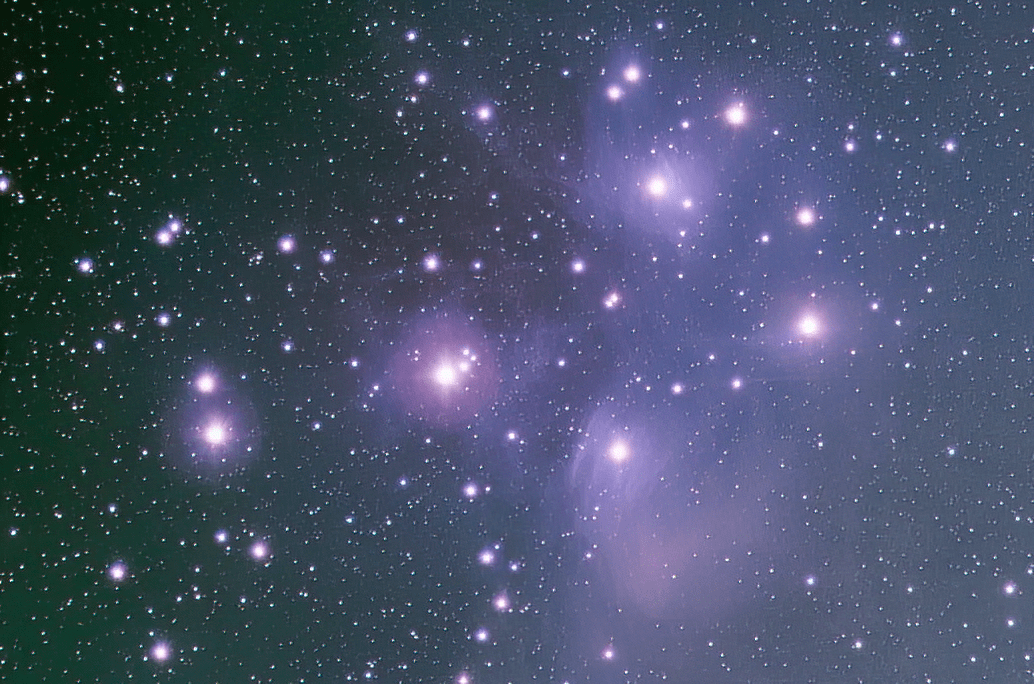
I photographed M45 with an APS-C OSC camera. This is what the stretched image looks like immediately after processing in APP. Is the blue lacking? How can I make the blue more vivid?
Yeah it should have a lot of blue. Bortle 8 is pretty bad and without a filter its probably all light pollution. Maybe even low altitude shot with refraction? Is the camera a modified DSLR? - this will give a lot of red without an IR filter.
I used Poseidon for 20 exposures of 3 minutes each. The photography was conducted while M45 was moving westward from the zenith. Refracting telescope with a focal length of 800mm.
I can offer two suggestions. Given the difficulties in shooting in Bortle 8, you may wish to consider both.
Firstly
Your exposure length is probably much too long. Dr Robin Glover has done some work in the mathematics of exposure time vs light pollution and has produced some formulae and tables to assist in determining optimum exposure times. You didn't provide your focal ratio, but given that you are using a 800mm fl refractor I will guess that you are shooting somewhere between f5 and f7. Dr Glover's work suggests that in Bortle 8, with a cmos osc, that you should be shooting exposures that are less than 30 seconds, possibly even less than 15 seconds. I do have some minor doubts about his conclusions, but I can't fault his math and he knows more about this than I do. Note that this does not reduce the total required exposure time. I would recommend that you try for two hours at 15s (or 30s if you think that is too extreme). I know that is nearly 500 exposures, but I guess that's just what you have to do in bortle 8.
Dr Glover's lecture is well worth a look for anyone dealing with light pollution, or with more general questions about optimal exposure times. If you search Youtube for "robin glover astrophotography" you will easily find the video, called "Deep Sky Astrophotograhy With CMOS Cameras". Its quite a good lecture.
Secondly
You could fairly easily enhance the blue in your existing image. One way to do this would be to separate the stars from the nebulosity and process them separately. I have given some pointers on how to do this in this post:
It relates to working with a mix of NB and OSC data, but the same technique can be used to produce "RGB_stars" and "RGB_starless" files that can be processed separately. The RGB_starless file could be taken into Gimp (or Photoshop if you must) and the blue channel can easily be stretched more strongly using the "curves" tool. If you are unsure how to do that there are various resources that can help or we could discuss it further.
Much of this can be done in APP with a bit of fiddling, but it is often easier to do some final tweaks in Gimp.
I took your screenshot above and stretched the blue channel in Gimp (and did some light noise reduction) and got this. Ignore what I have done to the stars as I didn't bother to process them separately.
You asked for more blue - here it is.
JC
This post was modified 8 months ago by John Connor
HI all, thank you very much for helping @mo-mo here.
I have another suggestion that should simply help very quickly. The blue is very likely lacking in the integration because of the RGB normalization of 5) Normalize. To get the background well gray, you should always run the Calibrate Background tool or the Remove Light Pollution tool(which does calibrate background as well). The key here is proper background calibration. If the Field Of View is dominated by 1 color like in this case. The RGB normalization in 5) Normalize will actually surpress that color. If you run background calibration, and select areas that are free of nebula, you will definitely see the Blue pop 😉
Okay, if you use the Remove Light Pollution it is possible to remove some faint part of the nebula. So maybe the original data had a bit more. Best way to see this is to not do the remove light pollution directly. But first do only the Calibrate Background Tool. In the preview filter on the right side, stretch hard and over saturate the colors, then you should see how much nebulosity is actually there in your data.
It could also be that there simply is not more nebulosity in your data because of the sky conditions when you shot the data.
Yes I see the cross-shaped pattern. These are diffraction artefacts caused by something in your optical train. It could be the telescope itself, but it could also be caused by filters or some adapter somehow.
I certainly agree with @mabula-admin, the diffraction artefacts are caused by some minor physical issue in your optical train. From the appearance I think it is probably on the objective end, rather than the camera end (but I could be wrong). Might even be a dew shield issue.
I don't like diffraction spikes much, but if I had to zoom in to make them obvious I would probably call it a minor issue and ignore it. Your call of course.
I see you are experimenting with short exposures in bortle 8. I would be interested to know your conclusions and see your final results. Please let us know.