

Mar 28 2026 APP 2.0.0-beta40 will be released in 7 days.
It did take a long time to have the work finished on this and it will have a major performance boost of 30-50% over 2.0.0-beta39 from calibration to integration. We extensively optimized many critical parts of APP. All has been tested to guarantee correct optimizations. Drizzle and image resampling is much faster for instance, those modules have been completely rewritten. Much less memory usage. LNC 2.0 will be released which works much better and faster than LNC in it's current state. And more, all will be added to the release notes in the coming weeks...
Update on the 2.0.0 release & the full manual
We are getting close to the 2.0.0 stable release and the full manual. The manual will soon become available on the website and also in PDF format. Both versions will be identical and once released, will start to follow the APP release cycle and thus will stay up-to-date to the latest APP version.
Once 2.0.0 is released, the price for APP will increase. Owner's license holders will not need to pay an upgrade fee to use 2.0.0, neither do Renter's license holders.
I thought I had the calibration frames figured out as I had no issues for some time, especially after I created a dedicated library of darks, flats and dark flats. I attempted to create some new flats and dark flats when I switched back to a LP filter from a quadband narrow band filter.
I often get the error message in the jpg below

It seems like I have met all the requirements listed in the screen shot but still get this error.
Thanks,
John
There must be a problem still, maybe have a look at the FITS header information for your flats to see if something is odd there (like offset 0 or things like that).
I ran into this error code when in calibration APP began working on the Flat's. It already completed making a Master Bias, Master Dark Flat, and Master Dark but then gives this error and stops before it complete's the Flats. I re-booted the PC and tried three times, then I eliminated some of the flat files multiple ways, then I used an entirely different set of flat files that I know worked before and are good but it made no difference, still error message the same. Here is a screen shot of the error message:
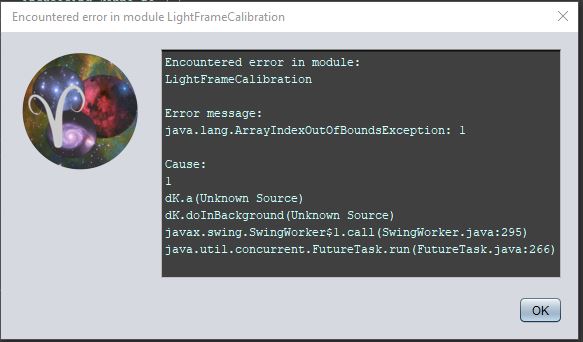
Thanks, John Williams
Mm, it seems to be an error while doing light frame calibration, not the flats. Do you have your lights loaded as well at the same time? Although I would then still expect a masterflat to be created. I may have to ask for a small set of your data to check it out.
