
UPDATE FROM MABULA
I have had a very rough 2 months unfortunately health wise. I was struck 3x in a row with bacterial infections. The second infection occurred after a routine hospital checkup and I became very sick. I had to rest and take a lot of antibiotics. Once I was recovering and restarting work 1 month ago, I again became sick. The infection was not yet gone, so even more antibiotics and rest was needed. Needless to say, it took a lot of my energy and I needed a lot of rest.
Finally, the infection is really gone and my energy is coming back step-by-step now and I have started work again. I am terribly sorry to have kept you waiting for support. I will address all outstanding questions and e-mails step-by step and will be on the forum daily from today.
APP 2.0.0-beta47 will come soon as well, a lot of work was already completed before I became very ill, so the release is also nearly ready for you. Beta47 will be much faster actually. Many workflows will be more than 2x faster, mosaics can even be 10x faster than before because registration really received a major boost... all compared to beta46. Before I release it, I will make sure that everything is working properly and then I will release it.
I thought I had the calibration frames figured out as I had no issues for some time, especially after I created a dedicated library of darks, flats and dark flats. I attempted to create some new flats and dark flats when I switched back to a LP filter from a quadband narrow band filter.
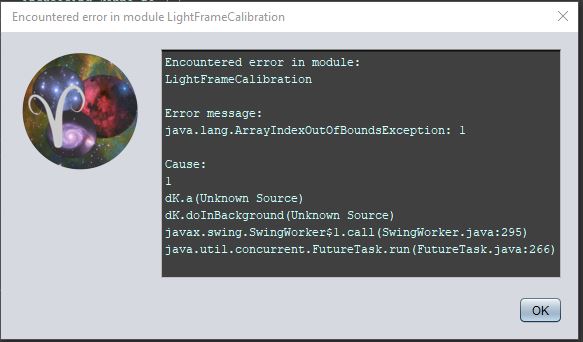
I often get the error message in the jpg below

It seems like I have met all the requirements listed in the screen shot but still get this error.
Thanks,
John
There must be a problem still, maybe have a look at the FITS header information for your flats to see if something is odd there (like offset 0 or things like that).
I ran into this error code when in calibration APP began working on the Flat's. It already completed making a Master Bias, Master Dark Flat, and Master Dark but then gives this error and stops before it complete's the Flats. I re-booted the PC and tried three times, then I eliminated some of the flat files multiple ways, then I used an entirely different set of flat files that I know worked before and are good but it made no difference, still error message the same. Here is a screen shot of the error message:
Thanks, John Williams
Mm, it seems to be an error while doing light frame calibration, not the flats. Do you have your lights loaded as well at the same time? Although I would then still expect a masterflat to be created. I may have to ask for a small set of your data to check it out.
