

June 24 2026 APP 2.0.0-beta46 has been released !
Improved internal memory configuration (lower ! memory usage), fixed beta45 startup issue, fixed Set Save Directory & 2-panel mosaics.
May 27 2026 APP 2.0.0-beta45 has been released !
Fully Multi-Threaded LNC, many improvements for the registration engine, platform upgrade, and further tuning of internal memory consumption and memory release back to OS.
Apr 14 2026: Google Pay, Apple Pay & WeChat Pay added as payment options
Update on the 2.0.0 release & the full manual
We are getting close to the 2.0.0 stable release and the full manual. The manual will soon become available on the website and also in PDF format. Both versions will be identical and once released, will start to follow the APP release cycle and thus will stay up-to-date to the latest APP version.
Once 2.0.0 is released, the price for APP will increase. Owner's license holders will not need to pay an upgrade fee to use 2.0.0, neither do Renter's license holders.
Thank you for offering the M1/ARM version and support.
I am using APP on a MBP 14" / M1 Pro / 16 GB RAM.
It is relatively fast. Results are like always stunning 🙂
The multi-window GUI is pretty non-standard and the focus on the active window is very confusing and not adapted to any app I ever used. The Image viewer keeps dropping into the background when the mouse is not focused on the viewer. Somewhat annoying.
Speed: ... Looking at the Activity Monitor during processing & stacking: 400% CPU, 0% GPU.... wow ... this is not taking any advantage of the available hardware... I hope that will be changing will Vulcan.
With this heavy CPU usage, the battery drains in real time like nothing I have seen before on this machine. The bottom of the MBP chassis is getting really hot... this is the only app, where I observe this drastic behaviour 🙁
OK... people compare APP to other processing tools... I don't think this is the right forum for this ... anyway: Affinity Photo is MUCH faster, uses Metal and Core Graphics and gives very good results. No battery drain, no heating, and full utilisation of the GPU.
I still like the APP results better for the time being. Your processing algorithms are just amazing! Waiting for full utilisation of the Mac hardware in the future.
I don't know whether this comparison is quite fair, GPU operations are very efficient for a certain class of operation, for example applying the same transformation to multiple blocks of an image in parallel with no dependency from the result of one operation to the input of the next, but a lot of algorithms are not like that and APP probably falls into the latter category for many of its functions, in fact to make a sweeping statement the majority of traditional CPU algorithms are not suitable for GPU, whereas any GPU algorithm can run on a CPU at lower throughput. I have no doubt Aries Productions are constantly reviewing their code to see if there are new techniques that can be parallelised without dependencies between simultaneously operating cores.
It is indeed not possible for all algorithms for sure, like Jonathan mentions here. And APP is using quite a bit more complex algorithms then Affinity at the moment, which is a choice of the developer. A simpler one is faster, maybe suited for the GPU, just like packages as DSS, they are also fast, but it comes with the downside that less data can be properly registered, calibrated etc. The more complex your data, the more you'll have a benefit from these more complex algorithms.
That's not to say we can't use the GPU more at all, we will, but this is quite tricky to implement and other priorities are at the moment higher up. We will start work on it in a future version though.
OK... (good!) Point taken. Indeed it seems that during the actual stacking Affinity does not use any GPU either.
So the reason for Affinity being so much faster must be a different and less elaborated processing.
So I ran this test: I compared the processing results of the same data set (of M8, taken last week): "Out-off-the-box", i.e. with "only" default settings in both programs, APP found much more subtle details in the image and in the faint nebulosity areas around the main box-shaped nebula.
The default color correction, white balance, star colours, ... is much better in APP as well. That's why I still like APP very much! Of course this could be fixed in post processing in the other program, but APP seems to be more correct and better in anticipation how the image should look like. And that seems to take some calculation time.
The longer wait in APP is definitely worth that extra cup of coffee.
I have made many tests with APP for Apple Silicon, and I must say that I am very satisfied!!!
For example, I processed the very same data... M13 free data from the Royal Astronomical Society of Canada with APP V2beta2 and with PI (1.8.9-1, WBPP 2.43).
The results of the pre-processing :
Mac MINI (M1, 16Gb Ram, 8 cores CPU, 8 cores GPU) with PI - 16 min 30 sec - with Mac Mini with APP - 9 min
MacBook Pro (M1 Pro, 16Gb Ram, 10 cores CPU, 14 cores GPU) with PI - 12 min 05 - with MacBook Pro M1 pro with APP - 7 min...
So APP makes the demonstration - in my opinion - that it's solid, fast and efficient! PI is very good at processing images, but for preprocessing, APP is superior in my opinion!!
Many thanks Mabula and the team for the hard work!
André
So far I love the update Beta2. Works great and is quite fast on my MacBook Pro M1 max with 64 gigs and all those crazy GPUs. Speaking of GPUs I'm wondering if anyone has any thoughts on why it doesn't show the GPU is being used more? In fact it seems to be using mostly the CPU. Here a couple of images during processing. It seems like GPU's are barely being tapped.


Hi,
Congratulations to Your M1 Max, this really flies.
I have the binned 24 core GPU version which seems to be a sweet spot. Even GPU optimized sogtware rarely loads the 24 GPU cores by 100%. From other threads here I picked up the APP code would need to be optimized for GPU acceleration (on all plaforms), which may only target simple, but lots of simultaneos calculations.
This is not coded yet , but as stated in the thread, it might be one of the next steps on Mabula's list (2B confirmed)
I´d be also keen if APP could be optimized for ANE use as well, because the neural engine does accelerate more complex stuff like vector and matrix calculations. From other software, tests seem to suggest this as a huge leap when optimized for neural engine.
Cheers,
Jochen
I was impressed by APP Beta2 on my M1 Mac Mini, now migrated to M1 Ultra - even more impressive, but I noticed one thing: The "simple" M1 during the final integration task was utilized 100% and reached temperatures upt to 104°C. Now the M1 Ultra with 20 CPUs utilizes about 67% of it's CPU-Power while doing final integration computing and reaches about 74°C CPU-temperature (bigger and better cooling).
So APP seems to scale poorly on M1 Ultra. OK, it is still beta - I know, but just wanted to state my experience.
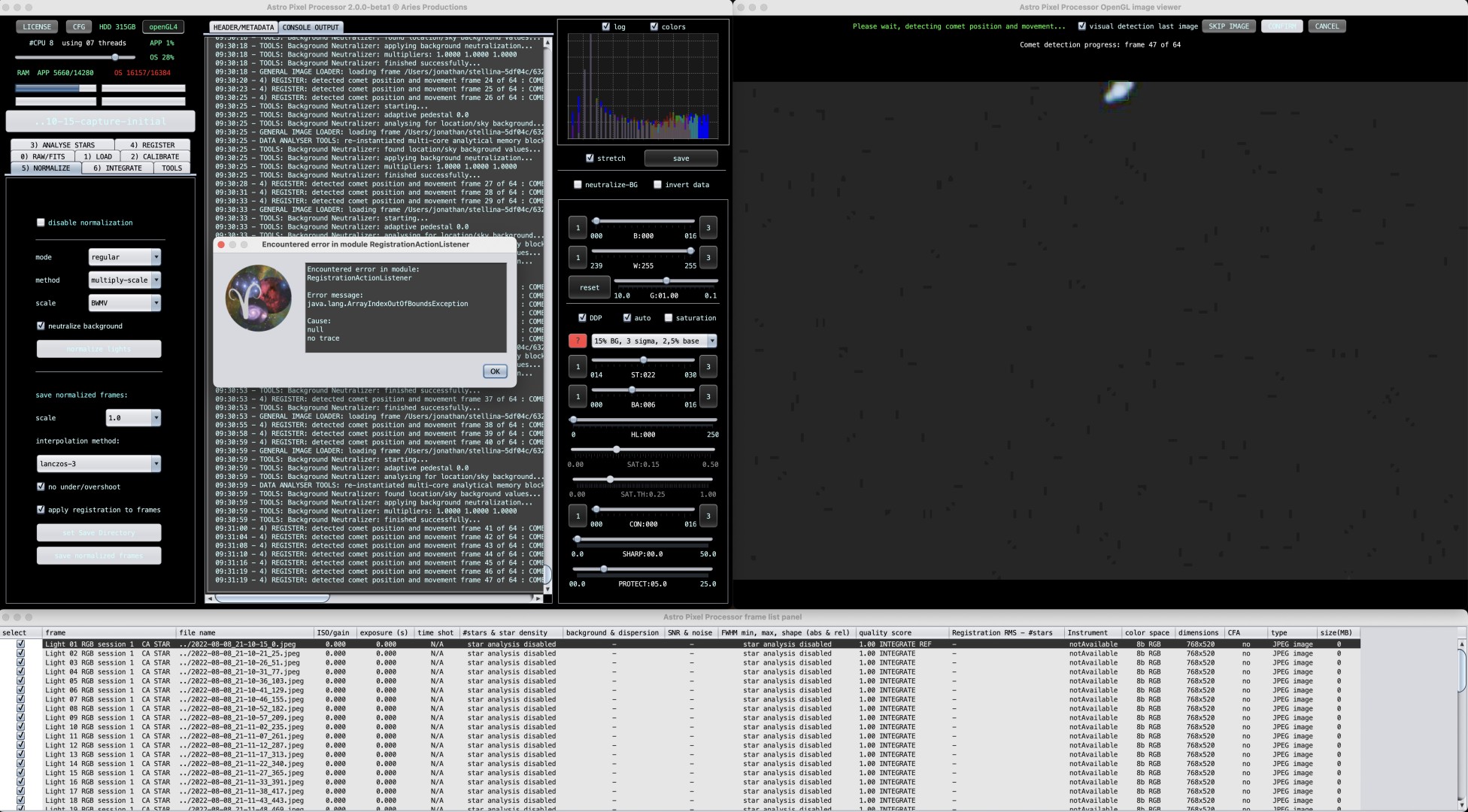
assertion failure during comet registration (message attached) - M1 beta
I was impressed by APP Beta2 on my M1 Mac Mini, now migrated to M1 Ultra - even more impressive, but I noticed one thing: The "simple" M1 during the final integration task was utilized 100% and reached temperatures upt to 104°C. Now the M1 Ultra with 20 CPUs utilizes about 67% of it's CPU-Power while doing final integration computing and reaches about 74°C CPU-temperature (bigger and better cooling).
So APP seems to scale poorly on M1 Ultra. OK, it is still beta - I know, but just wanted to state my experience.
But maybe it is a hardware-related bug, I read complaints about similar performance-issues with the M1-Ultra on other software. Even rumors are growing that Apple handicapped this processor because following products could maybe not shine that much in the shadow of the full potential of the M1 Ultra...?
I don't know, and it does not bother me too much, it's astonishing fast - this is fast enough for me. And I did not buy this machine, I just leased it - easy to pay and easy to upgrade later.
Don't know if they would have pulled a similar stunt with Ultra machines, but the base MacBook Air models have slower SSD speeds than the other MBA models:
https://www.macrumors.com/2022/07/14/m2-macbook-air-slower-ssd-base-model/
@walsc Congrats to Your new Ultra!
I think the "poor scaling" this is more of a luxury problem which has been observed with a lot of other programs already (Lightroom, Da Vinci Resolve, FinalCutPro etc.), so it's not APP specific For GPU particularly but also for CPU, the problem for the scaling is there is just not as much work to do at a certain point in time for the CPU, so it will only use 67% of the CPU, while waiting fore more instructions to be decoded/data to be loaded.The 10-core M1 Max on the other hand can be fully loaded. A sweet spot might be around 12- 16 CPU cores (which might come in the shape of M2 Pro/Max later this year.
Your Ultra seems just too big for APP and You would need to throw larger Mpix images at it for stacking (like mosaics). I do not expect the RAM to be a bottleneck here, the Unified RAM with its large bus on the Ultra is a huge leap.
Having said this, there is still room for improvement / optimization for the code and it will be hard for any power hog application to not optimize code for Apple Silicon further. Another area would be the Neural engine, because other than GPUs, which can only do simply calculations, it is also capable of handling more complex vector / matrix multiplication, while it may be addressed internally via Core ML Layer
Cheers,
Jochen
Sounds reasonable, thank you.
Sorry to revive this thread but would an M1 pro 8core cpu and 16gb ran good enough for APP?
I'm upgrading from an iMac with i7-4790 with 32gb, the machine is getting slow now
I found that 16GB is enough for good performance on stacking arbitrary amounts of 3K x 2K images. However if you are mosaicing there is a bigger memory footprint and it works best with prestacked images.
@nhantuonghuynh: It all depends on the size and number of Your subs. Mine are 4000 x 6000 (24 Mpx) and I use to stack a few hundreds of them on a 10-core on an M1 MAX (mac Studio)with 64 GB .
As APP is almost entirely using the CPU, I'd stay away from the binned CPU version if You can afford it, but You can use the binned GPU version without impact. In terms of RAM, You may be OK with 16 or 24 GB, but remember APP eats up the RAM quickly in various scenarios and runs into SWAP, meaning it pushes& shoves stuff to the SSD. So take care to have a fast and big enough drive (as a rule of thumb, You'll need 100x the picture size available).
However if You're doing weird stuff like mosaics, thing quickly build up as Jonathan mentioned. If Your are to buy an M1 laptop, choose one which is not too prone to thermal throttling, to avoid speed limits after 15 min full load. Stacking jobs tend to be marathons rather than sprints.
Clear Skies,
Jochen
@Jonathan: maybe this could be my work around
@Jochen: my mosaics are usually 100-300s 30Mpx per panel so I guess more core would be preferable, I'll check the thermal to see if these MacBook Pros could handle it running full load.
Thank you for your help!
After the installation of the Update to MacOS Ventura my M1 Ultra first time reached temps around 90°C during the final integration task. The first time ever I could hear the fans in this thing. At first I was like: what's this whispering sound? Then I noticed it was my computer. It never did that before. Maybe Apple has done something about the M1 Ultra's performane-issues and it now kind of uses the power it has? I don't know.
