

Mar 28 2026 APP 2.0.0-beta40 will be released in 7 days.
It did take a long time to have the work finished on this and it will have a major performance boost of 30-50% over 2.0.0-beta39 from calibration to integration. We extensively optimized many critical parts of APP. All has been tested to guarantee correct optimizations. Drizzle and image resampling is much faster for instance, those modules have been completely rewritten. Much less memory usage. LNC 2.0 will be released which works much better and faster than LNC in it's current state. And more, all will be added to the release notes in the coming weeks...
Update on the 2.0.0 release & the full manual
We are getting close to the 2.0.0 stable release and the full manual. The manual will soon become available on the website and also in PDF format. Both versions will be identical and once released, will start to follow the APP release cycle and thus will stay up-to-date to the latest APP version.
Once 2.0.0 is released, the price for APP will increase. Owner's license holders will not need to pay an upgrade fee to use 2.0.0, neither do Renter's license holders.
I am attempting to Integrate 2 sets of images with different sized lens. At about 10% integration I am getting the message that there isn't enough space on hard drive and that it requires over 800 gig of space.
I attempted the integration twice; one time with already calibrated flats, darks, bias and bad pixel map and another time with calibrating these images.
I have the data split in 2 separate sessions.
One thing that I have observed in the integration setup was that I could not check the LNC.
I believe there are around 300 light images in the stack up.
Mmm, that sounds odd. What kind of data are you trying to integrate?
This is DSLR images. I have 1 set of 180mm images and 1 set of Apertura 60mm images. Both sets were shot at ISO200. I was able to independently process each set of data.
These were processed with version 1.081.
As far as the processing itself there are 3 settings of which I didn't take the defaults.
2) Adaptive pedestal unchecked
5) Neutralized background unchecked
6) Enable MBB checked
Any suggestions for trouble shooting this issue?
The interesting thing is that the LNC option wasn't available.
In tab 6 Integration make sure that automatic mode is not selected. Choose another mode based on the help. Then select an LNC setting. Only then you can enable LNC.
HTH, Wouter
In tab 6 Integration make sure that automatic mode is not selected. Choose another mode based on the help. Then select an LNC setting. Only then you can enable LNC.
HTH, Wouter
Unfortunately I did try this last evening (using average) and it still didn’t allow me to check the LNC.
Trying to integrate all images at the same time will make APP scale up the 60mm images 3x meaning they will take 9x the space ending up with them taking lots of space.
Your best bet is to integrate both sesseions separate and then register the 60mm stack to the 180mm and in the end you can merge both, don't ask me how to do this in APP thou.
Trying to integrate all images at the same time will make APP scale up the 60mm images 3x meaning they will take 9x the space ending up with them taking lots of space.
Your best bet is to integrate both sesseions separate and then register the 60mm stack to the 180mm and in the end you can merge both, don't ask me how to do this in APP thou.
Sorry, telescopes and camera lens number differently. My 60mmApertura has a focal length of 360mm compared to the Nikkor 180mm.
This still would be a substantial difference; perhaps this scaling is responsible for the huge amount of data required.
I haven't tried this, but if that was the true size of file I could try this on an external drive. Normally the processed file is around 300meg so I'm guessing that there is substantial overhead in processing.
180mm vs 360mm is still 2x scaling for the 180mm images making them take 4x the space.
I would recommend you to combine the 2 separate stacked images, stacking all together not only requires a lot of space, but also a lot of time, if your computer isn't that fast it could take days
Sorry for the delay, things are getting busy down here.
Like @xplode85 says, process them separate first and then combine, it still needs to scale based on which frame is the reference.
Sorry for the delay, things are getting busy down here.
Like @xplode85 says, process them separate first and then combine, it still needs to scale based on which frame is the reference.
Vincent: Thank you for verifying this.
What would the work flow be like in doing the separate stack up integration?
You can restart APP and reload the separate integrations as lights. Then you can manually select the reference frame at the register (tab 4) tab, top button in there. Set it to the one which scale you want to have as an end result.
You can restart APP and reload the separate integrations as lights. Then you can manually select the reference frame at the register (tab 4) tab, top button in there. Set it to the one which scale you want to have as an end result.
Vincent,
If I load the 2 images as lights will I need to also add any other calibration data? Will I work the full sequence or just start from 4)?
Sorry, just want to make sure I do this proper.
No, the integrations are already calibrated (or at least I assume you do that 🙂 ). You just go with a normal workflow again, just without calibration.
No, the integrations are already calibrated (or at least I assume you do that 🙂 ). You just go with a normal workflow again, just without calibration.
I attempted to do this but after 1.5 hours the process is stuck on setting the registration frame.
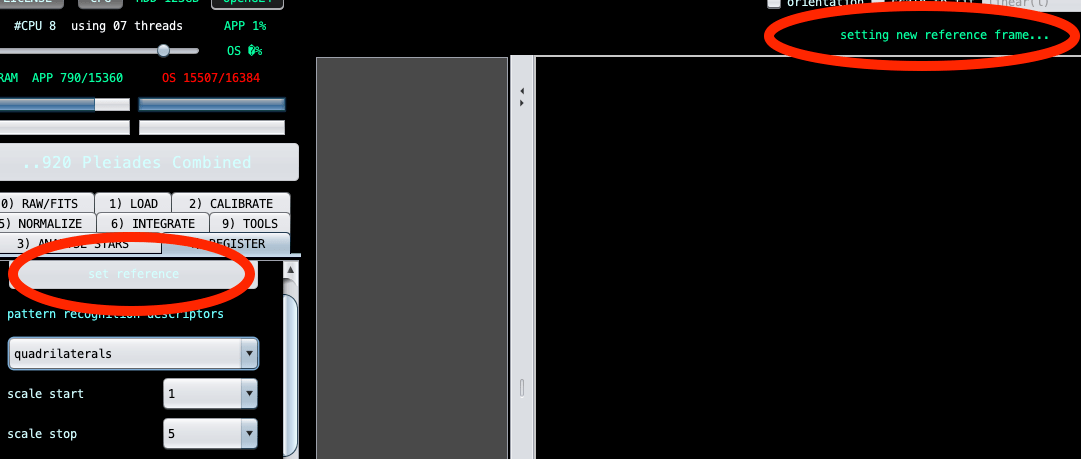
The selection box to the left is greyed out. Also the start registration box is greyed out. The above right message shows that it is still in the act of setting the reference.
In getting to this point I brought the 2 light frames in as 2 separate sessions. It questioned me as to whether I wanted to do this with each import.
I skipped Calibration.
I did Analyze the stars.
I believe I checked the option in Registration for making a Mosaic.
Of course I manually selected my desired light frame for setting in Registration. In doing so the loop started.
I suppose I should have given up prior to this, but I'd like to take advantage of the tools available for future projects as well as this one.
I tried this again; this time I didn't choose Mosaic and didn't manually select the light frame and finally I got an integration.
I further processed the integration in StarTools and unfortunately the separate results were better than the integration.
I was hoping that the combination of the 2 images would build on each other instead of subtract.
The good thing is that I got it through finally; perhaps with some experimentation I can find better results.
Just FYI I tried the stack up as a mosaic on an external drive. The processing took around 30 hours but surprisingly it did complete a 2 gig integration.
Unfortunately; even though it did complete the integration the results weren't too much better than doing this as 2 light images integrated together.
I was hoping to bring in nebulosity detail from the wide image into the closer narrower image. At least I was able to try the experimentation successfully. Perhaps some day I might be able to improve beyond this.
