

June 24 2026 APP 2.0.0-beta46 has been released !
Improved internal memory configuration (lower ! memory usage), fixed beta45 startup issue, fixed Set Save Directory & 2-panel mosaics.
May 27 2026 APP 2.0.0-beta45 has been released !
Fully Multi-Threaded LNC, many improvements for the registration engine, platform upgrade, and further tuning of internal memory consumption and memory release back to OS.
Apr 14 2026: Google Pay, Apple Pay & WeChat Pay added as payment options
Update on the 2.0.0 release & the full manual
We are getting close to the 2.0.0 stable release and the full manual. The manual will soon become available on the website and also in PDF format. Both versions will be identical and once released, will start to follow the APP release cycle and thus will stay up-to-date to the latest APP version.
Once 2.0.0 is released, the price for APP will increase. Owner's license holders will not need to pay an upgrade fee to use 2.0.0, neither do Renter's license holders.
I purchased a set from Insight Observatory: 58 Red, 58 Green, 58 Blue, 58 Luminance Master flats and master bias. APP Beta 41 shut down whilst at 71% during the integration phase. When I tried a second time, it shut down at 63%. I installed Beta 39 and tested it; it worked normally.
Windows 11 Pro 25H2
13th Gen Intel Core i7-13700H (2.40 GHz)
64-bit operating system, x64-based processor
Storage 2.73TB
RAM 64GB
Hi Volkan @volkanovun,
If APP shuts down randomly like that, it will almost always indicate an unstable computer. Is your RAM working normally? Is your CPU overclocked or not?
Beta41 has many code optimizations over beta39, so in fact the processing should be faster and consume less memory when compared to beta39. If you run it in beta39, it always goes without issues?
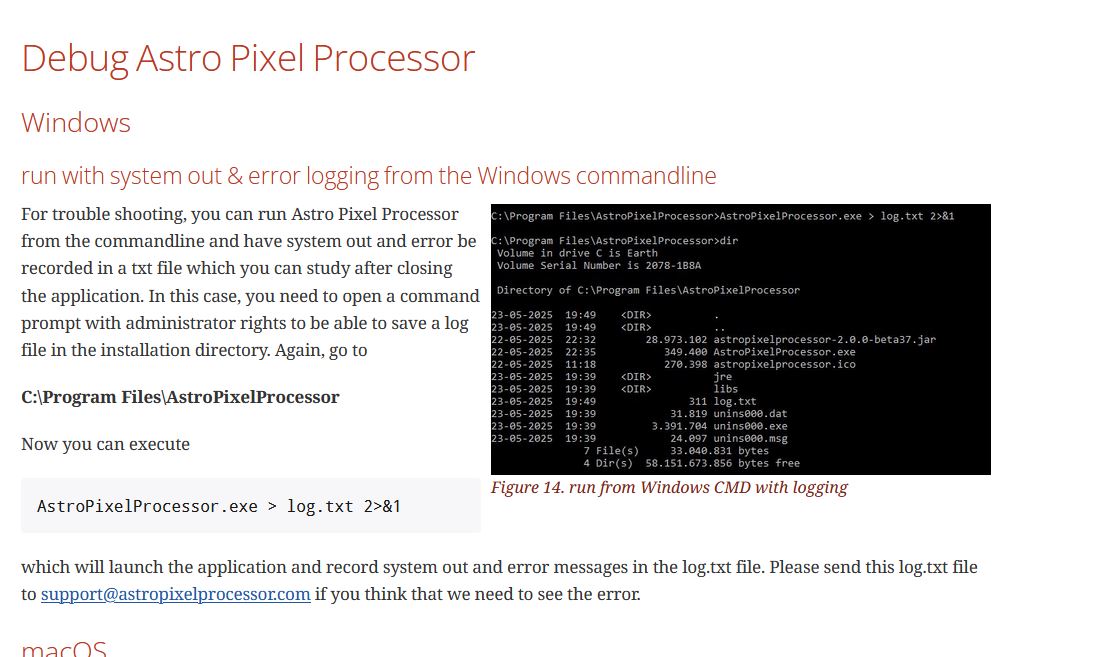
Can you run APP in the following way to produce a crash report for beta41 when it happens again and send it to me ? We can find the cause of the crash in that way. If you see that the errror log is even different each time, you need to stabilize the computer probably. If the log is each time the same, it will not be the computer but possibly APP code or a windows native part that is corrupt.
You can also try the following to be sure. Remove all APP installations first and then re-install beta41 cleanly, that might solve it possibly?
Thanks,
Mabula
@mabula-admin Yes, RAM works normally and my CPU is not overclocked. I had uninstalled Beta 39 before installing Beta 41. When the APP crashed, I uninstalled 41 and reinstalled 39, and everything worked without a hitch.
I have seen the same issue on that topic https://www.astropixelprocessor.com/community/windows/windows-crash-during-integration-on-latest-version/#post-34355
I’m going to uninstall Beta 39 again and install 41, and then try to capture the logs
Dear Volkan @volkanovun,
Yes, RAM works normally and my CPU is not overclocked.
Great, that is good to know, we can rule that out then.
Please send me the logs indeed, if you see the same problem as in the other windows 11 topic, we know that the error is definitely not in your computer, nor in APP code, but somewhere in the development platform JDK 25.0.2. That will really help to solve this quickly.
I can make a test version in the coming days with a different development version and or different memory handling to see if that solves it. Can you test if i send you a new test version based on the upcoming beta42?
If you and the other user can test we will quickly find the solution I think 😉
Mabula
@mabula-admin I apologise for the late reply, but I had to try it a few times to be sure of the results.
The app works fine when run with admin privileges, either via the command prompt or without it (right-click > Run as administrator). However, it crashes when run normally. There are only two lines in the Log.txt file. Rather than sending you the file, it would be more practical to copy the contents here. I’d be delighted to test and support Beta 42.
In the log file:
Java HotSpot(TM) 64-Bit Server VM warning: Process does not cover multiple NUMA nodes.
Java HotSpot(TM) 64-Bit Server VM warning: ...Ignoring UseNUMAInterleaving flag.
I’m not sure if this log file will be useful since the app isn’t crashing in admin mode.
Hi Volkan @volkanovun,
Thank you very much.
Hmm, that is really not normal behaviour. Did you install APP for 1 user or for all users of the computer? Did you install APP in the default installation path or in some other path?
The reason I ask is because APP on windows is explicitly designed to not need admin privileges, that is quite bad if it needs that I think. I run APP on 2 different windows 10 machines and on 1 windows 11 machine and I run it dozens of times each day for testing. I never get a crash in integration nor do I need it to run with admin privileges.
I am suspecting that there is some bug in the development platform that is manifesting on certain hardware somehow. The report from another user is also pointing in that direction.
That log is not useful unfortunately, that is not an error, just a message that your computer does not need NUMA support. If you have more than 1 physical CPU core, APP can now use that with NUMA support.
I really need a log from when APP crashes, can you run it without admin privileges so the crash might occur and we find it in that log?
I will try to release beta42 with several other fixed in the coming days, I will include a newer version of the development platform and safe memory controls. Maybe that will solve it as well.
Mabula
Hi Volkan @volkanovun,
I have prepared a test version for 2.0.0-beta42 with modifications that possibly fix this crash. I have created a test version for Windows.
You can download it here:
This version includes additional improvements as stated in the release notes for beta42:
Can you test beta42test1 and let me know if this has solved the issue or not?
Thanks,
Mabula
Hmm, that is really not normal behaviour. Did you install APP for 1 user or for all users of the computer? Did you install APP in the default installation path or in some other path?
I had installed it for all users and default path. I just downloaded beta-42 and gonna test tomorrow.
I’ve tested Beta-42 twice now, once with a galaxy and once with a nebula. There were no crashes.
May I make a suggestion? Could you set it up so that it generates a log file with every run without requiring the command prompt, and saves it to a folder named “Logs”? There could be multiple log entries with dates, or to prevent the folder from getting too large, only the log from the last run is saved—this log file can be used if a problem arises. Without the Command Prompt, Windows might not allow logging to the Program Files>AstroPixelProcessor directory, so it could be set to save to Users>xxxx>AppData>Local>AstroPixelProcessor>Logs.
Just a suggestion...
Hi Volkan @volkanovun,
Thank you very much for testing 🙂 Great to read that the problem is gone now.
I will think about your suggestion regarding a standard log like this.
Mabula
Hi Volkan @volkanovun,
Please check the just released 2.0.0-beta42 which was just released.
You can find it in the downloads section : https://www.astropixelprocessor.com/downloads/
Mabula
Hi again @mabula-admin
I've just finished testing final release of beta-42 . Everything is fine. No crash, no stuck. Thanks for your effort.
Hi Volkan @volkanovun,
That is really good news, I am very glad that all is okay now 🙂
Thank you very much for your patience and assistance with this issue and thanks for the feedback !
Mabula
