

UPDATE FROM MABULA
I have had a very rough 2 months unfortunately health wise. I was struck 3x in a row with bacterial infections. The second infection occurred after a routine hospital checkup and I became very sick. I had to rest and take a lot of antibiotics. Once I was recovering and restarting work 1 month ago, I again became sick. The infection was not yet gone, so even more antibiotics and rest was needed. Needless to say, it took a lot of my energy and I needed a lot of rest.
Finally, the infection is really gone and my energy is coming back step-by-step now and I have started work again. I am terribly sorry to have kept you waiting for support. I will address all outstanding questions and e-mails step-by step and will be on the forum daily from today.
APP 2.0.0-beta47 will come soon as well, a lot of work was already completed before I became very ill, so the release is also nearly ready for you. Beta47 will be much faster actually. Many workflows will be more than 2x faster, mosaics can even be 10x faster than before because registration really received a major boost... all compared to beta46. Before I release it, I will make sure that everything is working properly and then I will release it.
Astro Pixel Processor 2.0.0-beta41 release notes
Finally! The release is out, the improvements in this version over 2.0.0-beta39 and earlier are very significant, we have worked several months on this release to get everything ready for 2.0.0.
To summarize: 2.0.0-beta41 is roughly 1.5 faster than 2.0.0-beta39 from calibration to integration for regular stacks with calibration data, tested on all platfroms, macOS, Linux and Windows. For mosaics, the results will be much better than that! To calculate a 100 panel mosaic, which is 2 GigaPixel large, it took 6-7 hours on a macbook Pro M4 with beta39. Beta40 completed it successfully in 1,5 hour. This illustrates how much faster the registration is in beta40 with the implemented optimizations. LNC 2.0 and LN 2.0 outlier rejection are introduced as big functional improvements. Many bugs were solved, especially for Linux distributions that use Wayland instead of X11.

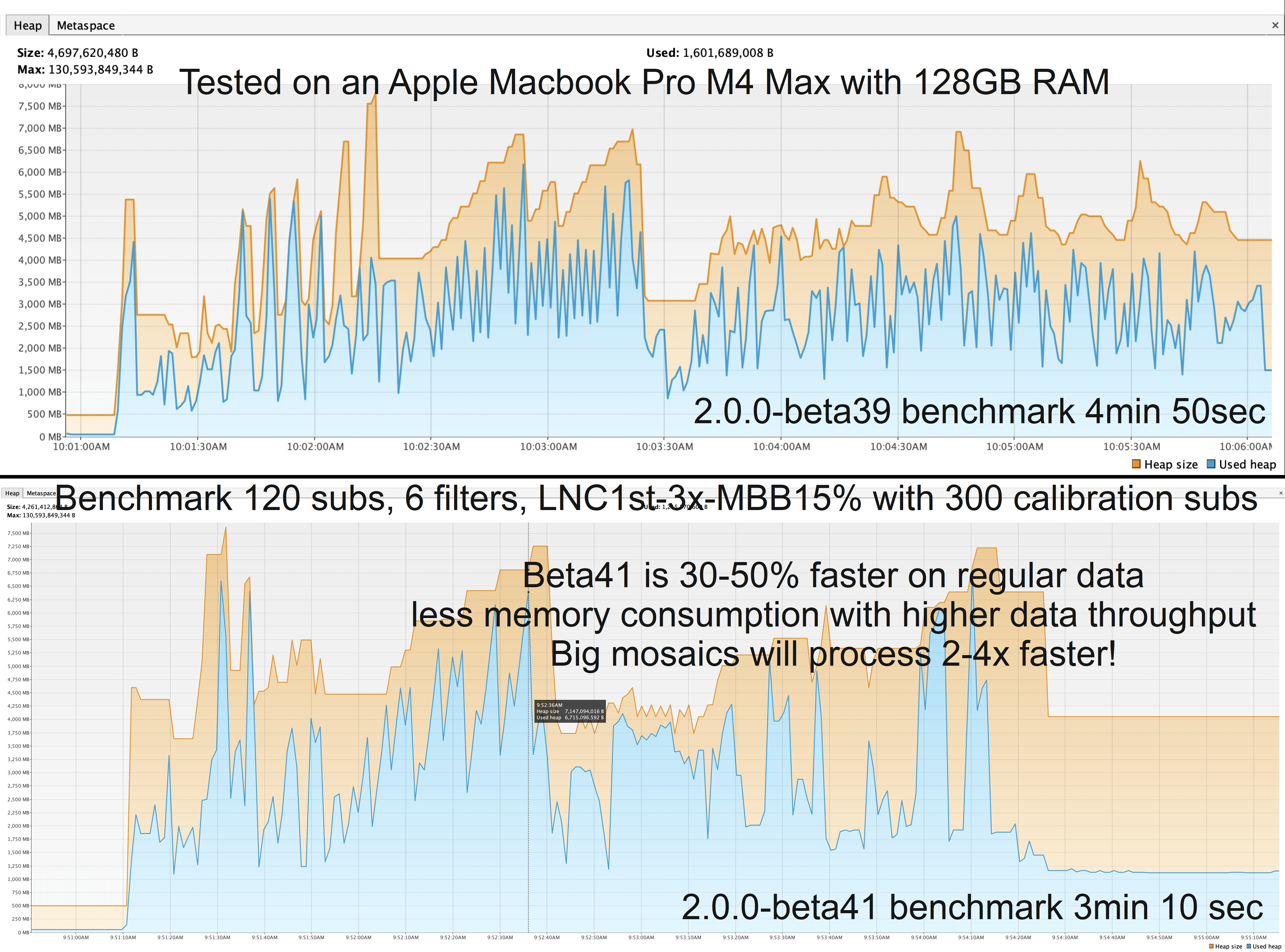

2.0.0-Beta40 : has 2 issues, which are solved in beta41:
- FIXED LNC 2.0 bug when using Drizzle or Bayer Drizzle
2.0.0-beta40 would produce an error when stacking has finished when LNC 2.0 was enabled in Bayer Drizzle (or Drizzle) integration mode. Reported here https://www.astropixelprocessor.com/community/main-forum/beta40-problem-error-warning-when-using-lnc/#post-34125 and here as well https://www.astropixelprocessor.com/community/main-forum/today-is-the-day-then-for-version-2-😃/#post-34138 . The issue is fixed. LNC2.0 with Bayer Drizzle or Drizzle works as expected now.
- FIXED set Save Directory in 2) Calibrate, 4) Register, 5) Normalize, 6) Integrate
2.0.0-beta40 would freeze all buttons when you click on any of the Set Save Directory buttons in 2) Calibrate, 4) Register, 5) Normalize, 6) Integrate and no directory chooser window would pop-up to actually change the save directory. This is fixed, the buttons work as expected now. Also the button in 2) Calibrate to set the save location for saving calibrated frames has been fixed. See https://www.astropixelprocessor.com/community/appreleases/app-2-0-0-beta40-freezes-once-trying-to-set-save-directory/#post-34117
2.0.0-beta39 :
- UPDATED DEVELOPMENT ENVIRONMENT TO Oracle JDK 25.0.2
We have upgraded our development environment from Oracle Graal 24.0.1 to Oracle 25.0.2. We will no longer use the Graal modified JDK because it will no longer support older macOS computers with Intel hardware. The update to Oracle 25.0.2 has a positive impact on performance again and it fixes many issues on Linux with the XWayland display server.
- WINDOWS INSTALLER FIXED
2.0.0-beta39 and earlier had a problem in the windows installer. If you did not completely remove the older APP version, before installing 2.0.0-beta39, APP would not start. This issue was caused by changes in our code and how APP needs to be started. APP is now a fully modular java application and it can no longer be run using the old java way like java -jar astropixelprocessor.jar. APP 2.0.0-beta40 can now safely be installed over an older installation and you don't need to uninstall APP first.
- Local Normalization Correction 2.0 is here ! finally, a much improved and better version of Local Normalization Correction has been implemented. This version has 1st, 2nd and 4th degree variants and you can still set the number of iterations. The higher degrees (6th, 8th) variants are no longer needed. This version is much better in many ways. The solutions are much more stable to keep the resulting sky background flat. The old LNC algorithms were very unstable in this regard. The calculations will need much less memory and they will converge much faster to a good stable solution, so you will need less iterations to get a better correction of your images. The actual calculations in general have been much optimized, so the calculations complete much faster and are 75% multi-threaded now. The overall corrections with LNC 2.0 are much better on a wide variety of datasets, especially with stacks with more images or very bright objects on the mosaic seams, LNC1 was very bad at that. You can easily use LNC2 1st degree to normalize a normal stack and quickly remove all linear gradients present now from all subs while integrating.
- macOS CMD+A to select all files in the native file chooser works now ! All the mac users will be very happy with this, including myself ! APP has been using Native File Choosers (this means, the same file chooser as the Operating System uses) for some time now. But we implemented this using a third party: javaFX and the way it was implemented was not great. It created a few minor and major problems. To solve the above Linux issue which is major, we have removed JavaFX completely from our project and that removed also a couple of minor issues that we had on our issue list. To still provide native File Choosers, we moved to another 3rd party library which has implemented it better clearly. The File Choosers should work better and faster now and the file chooser windows can now better be resized in all directions, this was a minor issue with the JavaFX implementation. And fortunately, CMD-A in the macOS file chooser to select all files works now, we have contacted upstream to ask for this if it is possible at all: https://github.com/JFormDesigner/FlatLaf/issues/1084 .
- Linux, much better support for new Linux distributions that run Wayland instead of X11, several issues related to Wayland have been solved. APP works as expected now on Wayland.
- Local Normalization 2.0 outlier rejection is here ! It now uses corrections for both lokation and scale locally to adjust pixels stacks to find and remove outliers. Because scale is now also used, outliers are removed even better from images with low relative dispersion locally, and signal is better preserved from images with high relative dispersion locally. In general, it thus gives better outlier rejection and better Signal to Noise ratio in the resulting integrations.
- IMPROVED, JavaFX dependency has been completely removed from APP
We were able to completely remove javaFX as a dependency from our project. The dependency was needed earlier for support for native file choosers, but by doing so, it created several other problems of which one was critical for Linux distributions with XWayland display server. By removing this dependency, the application has also reduced a bit in size and performs now better and more stable in many situations.
- Code optimizations !!! : We have worked extensively to optimize many critical modules in APP, some modules have been rewritten from scratch. The result is that APP is much faster in all modules from 2) Calibrate to 6) Integrate. For all optimizations, we have written tests to ensure that the results are the same or better than before. The following bulletpoints below here summarize all the optimizations:
- Whole New image alignment engine with
- rewritten image resample/interpolation module (3-4x faster) and
- rewritten drizzle image reconstruction (4-5x faster) the gaussian kernel is now the default kernel because it gives by far the best results with the new engine.
- and the Coordinate Transformation factory for alignment of images with resampling (inverse) and drizzle (forward) is much improved and way faster.
- Projections are greatly optimized, all projections like Stereographic, Mercator, Equirectangular, Hammer-Aitiff work much faster now.
- Star analysis, removed many memory consumption problems/leaks, calculation of a flat luminance for the actual star detection is way faster !
- BPM creation ! Much faster 10x for hot pixel detection from darks
- improved overall concurrency implementation using java's virtual threads for non-blocking code while waiting on cpu intensive tasks and less heavy thread/worker instances
- Analyse flats is faster because of improved statistics, see below.
- Registration, dynamic distortion correction is more optimized and thus faster.
- Algebra, Matrix Multiplications are optimized and much faster now
- Algebra solving linear least squares problems in calculating homographies in the registration engine and finding Local Normalization Correction parameters are much faster and consume less memory
- Registration, the actual calculation of both the desciptors and the testing of matching patterns have been optimized which immediately gives better registration performance in the pattern matchin phase of registration
- Registration, implementation of KD-tree for pattern matching has been much improved, nearly no memory creation and much faster find of matching patterns
- Registration engine concurrency has been changed to make it faster
- Integration, optimized performance of reading the pixel stacks and integration them.
- Integration, outlier rejection has been optimized no memory consumption/leak in stacker giving much more performance for both stacking calibration masters as light masters with MBB/drizzle weights
- Integration, big performance improvement in the file mapper for saving/loading all image parts in the stacks and when performing LNC and LN rejection, the read/write buffer sizes are now dynamic giving better performance beside faster implementation of the IO instructions to read/write data.
- Mutli-Band Blending has been optimized and is thus faster.
- Console Panel/Progess Monitors have been optimized to write progress fast and not block application performance using virtual threads
- Sorting of vectors/arrays performance and memory consumption has been improved, this is important in many calculations throughout the application
- CPU image viewer has a major performance boost ! partly because of the improved and new image resampling/interpolation module and partly because of better concurrent implementation
- Normalization, advanced is much faster, the calculation of the overlap area has been optimized and the resampling of the overlap area is faster and of higher quality with the new resample engine.
- Preview filter is faster with faster statistics as mentioned above
- Statistics calculations have been optimized extensively. There is less memory consumption, code is faster as well. All statistics are calculated using a buffer : Analyse Tools as mentioned in the console. Analyse Tools has been greatly improved to give faster performance and not use extra memory while performing calculations. This buffer is fixed with 0,5 GB of RAM and is used from the Calibration engine until the Integration module.
- Median calculation has been greatly improved for speed and no memory consumption
- Median Absolution Deviation or MAD scale calculation performance and memory consumption improved
- Multi-Resolution Support Gaussian Noise estimate is much faster and uses less memory
- SNR calculation has been optimized and is much faster, consumes less memory partly because MRS noise has been improved.
- Biweight MidVariance for dispersion calculation is 10x faster
- Lokation/sky background and dispersion calculation are optimized, faster and less memory consumption, this module is used in many parts of APP and thus improves performance in many parts of the application, most notably for the normalization engine
- LICENSE SERVER VPN TUNNEL issue fixed
Anyone that had issues to simply start APP, should try again now. On January 15th, our license server was upgraded with a new version with several improvements. The most important improvement is that we have fixed a network configuration issue that could have prevented APP to start normally in different situations like when trying to use APP on a remote computer over a VPN tunnel or another complicated network configuration. The problem was TCP/IP packet loss due to packet fragmentation when the remote computer had a high (1500) MTU network setting. Normally the network interfaces solve this by interchanging ICMP packets, but our firewall was blocking these packets for security measures. We have removed the block of ICMP packets and this has solved the issue clearly. Other improvements are that the license activation and verification is slightly faster now, which also means slightly faster application startup.
- Upgraded OpenGL support with JOGL 2.6.0
Support for OpenGL has been improved by uodating our JOGL dependency to 2.6.0 from 2.5.0. This has fixed several issues on all platforms especially the newer versions of macOS, Linux and Windows.
- Upgraded FITS read/write support to nom.tam.fits 1.21.2
- IMPROVED support for LINUX distributions with XWayland display server
We have fixed many issues on Linux distributions that use the new XWayland display server instead of the old X11 display server. Both upgrading our development platfrom to Oracle JDK 25.0.2 and upgrading OpenGL support to JOGL 2.6.0 has solved many issues. Issues like broken/interrupted graphics rendering of the application, stalling/crashing application etc. Several test runs on Ubuntu 24 with XWayland now works really fine.
- LINUX FIXED X11Util.Display warning at APP shutdown
If you would close APP with OpenGL enabled and the image viewer in the main panel, the below error/warning message would appear on the Linux terminal. This issue is solved by correctly closing OpenGL graphics hardware resources before closing APP.
X11Util.Display: Shutdown (JVM shutdown: true, open (no close attempt): 1/1, reusable (open, marked uncloseable): 0, pending (open in creation order): 1)
X11Util: Open X11 Display Connections: 1
X11Util: Open[0]: NamedX11Display[:0, 0x793508200440, refCount 1, unCloseable false]
- LINUX FIXED - solved and removed the warning Gdk-WARNING **: 22:01:01.835: XSetErrorHandler() called with a GDK error trap pushed. Don't do that.
The APP 2.0 beta's had a GDK warning, which was harmless on older Linux Distributions. But on newer Distributions (with Wayland instead of X11) this warning was actual a critical problem. The warning would be shown in the Linux terminal, if you would start it from there. The issue has been solved by completely removing JavaFX from the APP project. JavaFX was responsible for the error and upstream could not solve the problem apparantly. APP used JavaFX to use native file/directory choosers. We no longer need to use JavaFX for this, since we found another way, see the next release note:
- FIXED, INTEGRATE PRE-NORMALIZED LIGHTS WITHOUT A REFERENCE IN THE FRAME LIST
As mentioned in this thread https://www.astropixelprocessor.com/community/main-forum/app-beta-39-crashes-while-integrating-a-large-amount-of-frames/#post-33881 APP could crash if you load pre-normalized frames, thus skipping 5) NORMALIZE, and then rermove the reference frame from the list before starting integration. This bug is fixed.
- ADDED file filter for OM Digital Solutions ORF
- Fixed several bugs in save/load of the application settings
- Finally, we added many tests for all new improvements in our development environment
