

UPDATE FROM MABULA
I have had a very rough 2 months unfortunately health wise. I was struck 3x in a row with bacterial infections. The second infection occurred after a routine hospital checkup and I became very sick. I had to rest and take a lot of antibiotics. Once I was recovering and restarting work 1 month ago, I again became sick. The infection was not yet gone, so even more antibiotics and rest was needed. Needless to say, it took a lot of my energy and I needed a lot of rest.
Finally, the infection is really gone and my energy is coming back step-by-step now and I have started work again. I am terribly sorry to have kept you waiting for support. I will address all outstanding questions and e-mails step-by step and will be on the forum daily from today.
APP 2.0.0-beta47 will come soon as well, a lot of work was already completed before I became very ill, so the release is also nearly ready for you. Beta47 will be much faster actually. Many workflows will be more than 2x faster, mosaics can even be 10x faster than before because registration really received a major boost... all compared to beta46. Before I release it, I will make sure that everything is working properly and then I will release it.
Astro Pixel Processor 2.0.0-beta36 release notes
Please check out the Release Notes video tutorial here:
- IMPROVED 4) REGISTER more robust, especially for MOSAICS with little overlap !
We have improved the pattern recognition between a reference frame and the frame to be aligned to that reference frame substanially. With the same settings in 4) REGISTER, more frames will be successfully registered as a consequence. This change does not slow down the registration engine, but does make it more robust and smarter. Testing of several complicated mosaic datasets show that APP 2.0.0-beta36 can now register more of these complicated datasets successfully with less tweaking of the settings in 4) register like the scale stop setting so we really expect that more datasets will be registered succesfully with this improvement. Some examples to illustrate this improvement are:
- Example 1: As shown in this topic https://www.astropixelprocessor.com/community/main-forum/mosaic-fails-to-register-frames/#post-32601 a 3x3 mosaic of the Orion Nebula could not be registered for 2 of it's panels. The reason was very little stars in the areas that overlap the panels. APP could not successfully create patterns in those areas so they could be aligned properly. The improvement in beta36 has the effect that the mosaic does complete successfully with no tweaking at all in 4) register as shown in below screenshots:


- Example 2: This 28 panel mosaic from the WISE telescope can now be successfully registered in 2.0.0-beta36, beta34 and older could never do it. Beta35 could do it, because of better star detection but it would still break down more often. In beta36, the mosaic registration simply works robustly and really illustrates the improvement. This is a very hard mosaic to assemble because the overlap areas are narrow everywhere. The mosaic is 37989x21657 pixels.


- Example 3: This 3 panel 180 degree mosaic of the Milkyway is very difficult because it uses a 14mm objective with very strong optical distortion. 2.0.0-beta36 works clearly more robust than the earlier APP versions with less tweaking needed of the parameters in 4) Register.


- FIXED & IMPROVED LICENSE & SETTINGS menus
As reported in this topic https://www.astropixelprocessor.com/community/main-forum/question-on-menu-size/#post-32623 the new License & Settings menus could not be seen completely on low resolutions, for instance 1366x768 pixels. This has been fixed by putting both the menu for the settings and the menu for the license management into a panel with a vertical scrollbar. The menu for the license management has been updated as well as can be seen in the below screenshots:


- IMPROVED 4) REGISTER, calibrated projective dialog for focal length and pixel size
We have improved the dialog that asks for your focal lenght and your pixel size to give APP initial parameters for the calibrated projection registration model. The values that are entered will also be remembered now for subsequent registration retries, so you do not need to re-enter those values again.

- FIXED menu 0) RAW/FITS to 6) INTEGRATE & TOOLS layouts with different desktop scaling factors
As mentioned here https://www.astropixelprocessor.com/community/main-forum/integrate-tab-beta35-is-clipped/#post-32626 the menu of 6) INTEGRATE could like too wide for the panel it is in, also menu 2) CALIBRATE could look too wide. The exact look of the tabbed menus on the left side depends on the desktop scaling factor used. We have fixed the layouts for all these menus now and have tested that they all look fine with different desktop scaling factors.


- FIXED 6) INTEGRATE, WARNING message in Composition selector for crop composition
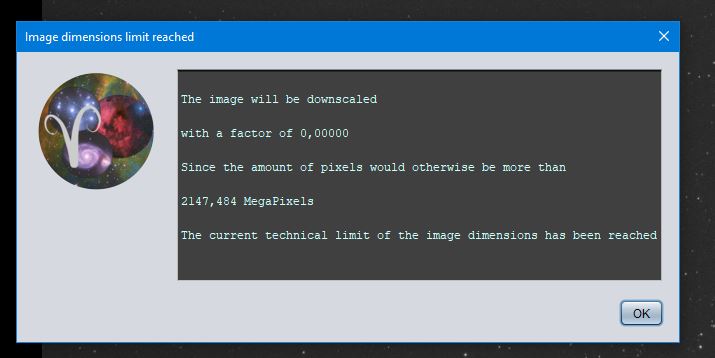
We have fixed a bug that would produce an error message where APP would say that the integration will be downscaled with a factor of 0.0x because the integration would exceed the maximum image dimensions. The bug would manifest if you would first set a crop composition successfully by drawing a crop area and confirming the crop, after which you reselect the crop composition and then don't draw a new crop area but still confirm the crop. We have also added output for the composition selector in the console panel. The error message related to the bug and the new console output messages are shown in below screenshots:


- FIXED 4) REGISTER, Null Pointer Exception when starting calibrated projective registration model without dynamic distortion correction enabled.
If you started registration without dynamic distortion correction enabled and the calibrated projective model, a Null Pointer Exception would occur after a warning message from APP that it will do registration with the projective model. This error has been fixed.
- FIXED 2) CALIBRATE, APP would throw a ClassCastException in the calibration modules if you would load 64bits masters.
APP can now properly process 64bits calibration masters without throwing this error. It is worth pointing out though that 64bits masters add nothing at all for precision over 32bits masters in data calibration from 16bits camera's.
- IMPROVED 6) INTEGRATE, temporary integration file removal warning
As reported in this topic https://www.astropixelprocessor.com/community/tutorials-workflows/memory-to-file-mapper-still-trying-to-remove-mapped-file/#post-32643 APP gave a warning in the console panel that the mapped file could not be removed. The mapped file is the temporary file that APP creates to store all integration data and to perform Local Normalization Correction on the layers to be stacked possibly. In this case, an external disk was used and the operating system lost connection to the drive while integrating causing the integration to break down, and a failure to remove that temporary file since APP could no longer access it. We have improved the warning that APP gives now to include: "MEMORY TO FILE MAPPER: !!! maybe the harddisk was disconnected or unmounted unexpectedly?"
- FIXED 2) CALIBRATE, NullPointerException in module: ReMatchCalibrationMasters in combination with MasterDark scaling
We have fixed a rare bug in the ReMatchCalibrationMasters module that could produce a NullPointerException. This exception can no longer occur. The issue could manifest when dark scaling was enabled and both a masterbias and masterdark was loaded to be able to perfrom dark scaling.
