

June 24 2026 APP 2.0.0-beta46 has been released !
Improved internal memory configuration (lower ! memory usage), fixed beta45 startup issue, fixed Set Save Directory & 2-panel mosaics.
May 27 2026 APP 2.0.0-beta45 has been released !
Fully Multi-Threaded LNC, many improvements for the registration engine, platform upgrade, and further tuning of internal memory consumption and memory release back to OS.
Apr 14 2026: Google Pay, Apple Pay & WeChat Pay added as payment options
Update on the 2.0.0 release & the full manual
We are getting close to the 2.0.0 stable release and the full manual. The manual will soon become available on the website and also in PDF format. Both versions will be identical and once released, will start to follow the APP release cycle and thus will stay up-to-date to the latest APP version.
Once 2.0.0 is released, the price for APP will increase. Owner's license holders will not need to pay an upgrade fee to use 2.0.0, neither do Renter's license holders.
Good Morning!
I have an issue with registering only 2-3 of the frames on my 3x3 mosaic with the target M42. At first I just assumed I would need more integration time on those last 3 frames so I added about 5 more nights worth of data to those frames and I'm still getting this error. Visual inspection shows they should align as I did the mosaic with 15% overlap and I can see lots of overlap but no matter how I change the settings I can't get the final frames to register.
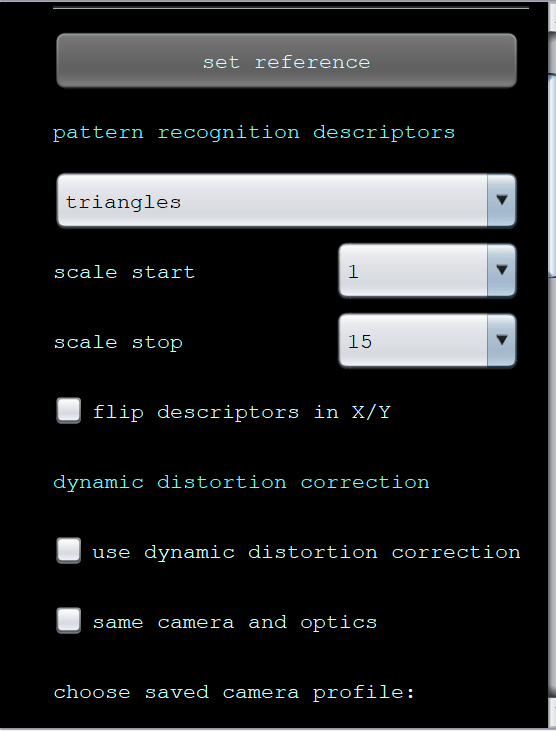
When I use triangles as the pattern recognition, it fails to find a match for 2 but if I do quadrilaterals it fails to get 3 frames.
Star registration is set to 10000
Scale Start: 1
Scale Stop: 15
Is there a way to try to force those last two frames? I've watched every tutorial but I have been bashing my head against the wall on this problem for a few weeks now. I've even background extracted and denoised to try and get them to match and I've tried using the raw files as well. Any help is appreciated.

The problematic images that aren't being integrated are the bottom 3.


Can you share some of your other settings, especially in the Register section
How are you performing the mosaic, are you creating the mosaic from the individual camera files or from stacks of each mosaic panel?
Simon
Hi! I am using stacks for the mosaic, as I use Sirilic to combine the multiple nights of stacks before using APP.
Regarding the Register Settings I'm using:
Pattern Recognition: Triangles
Scale Start: 1
Scale Stop: 15
Use dynamic distortion correction
Registration mode: Mosaic
Registration Model: Projective
I've been able to successfully combine Panels 1 - 7, and in a separate mosaic Panels 8-9 as two files. But if I put stacks 1-9 together it will fail to register Panels 8-9 no matter how many stars I'm using in Analyze Stars / Pattern Recognition settings.
Maybe I can bypass this issue if I'm able to combine two mosaics but I cannot find a tutorial. I'm attaching the two mosaics combined in paint

Have you tried de-selecting the "Same camera and optics". For mosaics (And I have currently done 12 panels so far), I never have this option selected (even though I do use the same camera and optics), you will usually see in the console output why frames are not being included. I have never needed to have the star count as high either, usually 1500 works for me with my ASI 6200.
Try de-selecting the option I selected. If that does not work, I'd like to try your data on my system.
Hi @amonzon11 and @stastro,
Thank you very much for posting your issue.
I can see from the screenshots that you are using an older APP version. Can you please try to register this mosaic with the latest APP version 2.0.0-beta35. It has a great improvement in star analysis that could really help and solve this issue I think.
Please download it from the Downloads section at the top of the website.
I suggest the following settings:
3) Analyse stars, set the max star count to 2500. (10000 usually does not improve things, maybe only make it more complicated and the calculations will take much longer)
4) Register, set it to mosaic mode, enable dynamic distortion correction, disable same camera and optics and scale stop = 10. Only increase scale stop if it does not work then still.
Please let me know if 2.0.0-beta35 solves this issue.
The improvement in star analysis makes the star detection way more robust and I can register very complicated mosaics now without a problem with beta35. See this in the release notes for beta 35:
- IMPROVED & FIXED 3) ANALYSE STARS - cosmic ray / noise reducer is almost redundant now ! Mosaics should register more easily !
We have made several modifications in star recognition to make star analysis and the star count more robust for data that is a bit noisy or has very under- or oversampled stars. Some APP users had to enable the cosmic ray/noise reducer to be able to get the images register properly because APP would register on hot pixels or cosmic rays instead of stars and that would produce a weird and fuzzy result which is shown in the below screenshots. All reported data where this happened should now work without having to enable the cosmic ray/noise reducer. Only data with an extreme amount of actual cosmic rays would need to enable the cosmic ray reducer to get accurate results now. All the code changes in 3) Analyse Stars makes this module much more robust now for normal data, but definitely also for mosaic data. APP will detect more stars now on the borders of your images, so registration with little overlap in your mosaic should work better now. And the stars that are found now, should really be stars. Finally, the star counts are high and realistic now if you disable the automatic stars target as well. We have tested this on several complicated mosaics and they work fine now, we were even able to register a mosaic that would never work easily until now, a 23 panel mosaic from infrared data from the WISE telescope (see screenshot below), APP finds more and better stars now and thus registration is more robust.


@amonzon11 Are you able to mosaic each row or column and then mosaic the rows/columns? It is clear that it is failing on the star registration part.
Might need you to upload your data
Good Morning!
So I've tried registering multiple ways, 3 x 1, 3 x 2, 3 x 3.1 (excluding last two frames) and integrating the last two frames that I'm able to easily make a mosaic but none of those methods work. They fail to see the last 2 x 2 frame and align them. I can send you the raw stacks if you like!
I have them formatted at FITS and in the following lables
S1-1, S1-2, S1-3 (No issues here)
S2-1, S2-2, S2-3 (No issues here)
S3-1, S3-2, S3-3 (Issues arise from the last two)
I think it may be due to the fact that despite having 15% overlap, there aren't very many stars in the S3-2 - S3-3 images which is why I decided to add an additional 100 x 120 second subs to those last two stacks to try to bring more stars forward but it didn't seem to matter.
@amonzon11 Please upload your data, and I will test on my system as well but also take a look at the files independently
Hi ART @amonzon11,
Thank you very much, we have received the upload in good order. I will test it myself a.s.a.p. and will report back soon !
Mabula
@amonzon11 What's your Focal Length and Camera? I am playing with your data but need to do some testing, so I want to AstroMetric resolve the frames
Hi @amonzon11 & @stastro,
I have been testing your 3x3 mosaic. Beta35 and older APP versions are not able to register this because there are very little stars in the overlap area indeed. I am trying to improve our registration engine now to see if we can make this work in beta36. I have done an initial test with an expansion of our pattern recognition code and it seems to work beautifully! I need to test more, but this is very promising I think!

Will keep you up-to-date and will report when a new release is out with this improvement 😉
Mabula
@mabula-admin I have also been looking at the images on their own, there is definite problems with S3-1 and S3-3 as I am unable to use any AstroMetric tools to resolve these images, even with using the hints for RA and DEC in the FITS header.
Astrometric tools worked on all the other images using GAIA DR3, even worked out that the pixel size is 3.76um and the FL is 2582.2075, I just cannot resolve those two frames, and I have tried lots of settings to at least try and resolve them. I am going ot try a couple of other Astrometric tools as well. Interestingly though, I converted the images to 16BIt FITS and loaded them up in SGPro and their ASTAP resolver resolved them.

@mabula-admin what's funny is that I was able to get the 3 x 3 to register using two mosaics but it was only after disabling the dynamic distortion. Obviously the results turned out a bit janky. 8 was getting the best results with using triangles.
Also focal length: 2438 mm Meade LX850 12" f/8
Camera is 2600MC Pro
Hi @amonzon11,
Thank you very much for reporting your issue. It inspired me to improve the registration engine. The improvement will be part of the next release 2.0.0-beta36:
In beta36, the mosaic registers easily and well without dynamic distortion correction. With dynamic distortion correction on and same camera and optics on, the result is the best. If you disable same camera and optics, it does not yet work well, it becomes unstable because your optics clearly have very little optical distortion which is very good and also to be expected with such a long focal length of 2438mm.
- IMPROVED 4) REGISTER more robust, especially for MOSAICS with little overlap !
We have improved the pattern recognition between a reference frame and the frame to be aligned to that reference frame substanially. With the same settings in 4) REGISTER, more frames will be successfully registered as a consequence. This change does not slow down the registration engine, but does make it more robust and smarter. Testing of several complicated mosaic datasets show that APP 2.0.0-beta36 can now register more of these complicated datasets successfully with less tweaking of the settings in 4) register like the scale stop setting so we really expect that more datasets will be registered succesfully with this improvement. Some examples to illustrate this improvement are:
- Example 1: As shown in this topic https://www.astropixelprocessor.com/community/main-forum/mosaic-fails-to-register-frames/#post-32601 a 3x3 mosaic of the Orion Nebula could not be registered for 2 of it's panels. The reason was very little stars in the areas that overlap the panels. APP could not successfully create patterns in those areas so they could be aligned properly. The improvement in beta36 has the effect that the mosaic does complete successfully with no tweaking at all in 4) register as shown in below screenshots:


- Example 2: This 28 panel mosaic from the WISE telescope can now be successfully registered in 2.0.0-beta36, beta34 and older could never do it. Beta35 could do it, because of better star detection but it would still break down more often. In beta36, the mosaic registration simply works robustly and really illustrates the improvement. This is a very hard mosaic to assemble because the overlap areas are narrow everywhere. The mosaic is 37989x21657 pixels.


- Example 3: This 3 panel 180 degree mosaic of the Milkyway is very difficult because it uses a 14mm objective with very strong optical distortion. 2.0.0-beta36 works clearly more robust than the earlier APP versions with less tweaking needed of the parameters in 4) Register.


