

Mar 28 2026 APP 2.0.0-beta40 will be released in 7 days.
It did take a long time to have the work finished on this and it will have a major performance boost of 30-50% over 2.0.0-beta39 from calibration to integration. We extensively optimized many critical parts of APP. All has been tested to guarantee correct optimizations. Drizzle and image resampling is much faster for instance, those modules have been completely rewritten. Much less memory usage. LNC 2.0 will be released which works much better and faster than LNC in it's current state. And more, all will be added to the release notes in the coming weeks...
Update on the 2.0.0 release & the full manual
We are getting close to the 2.0.0 stable release and the full manual. The manual will soon become available on the website and also in PDF format. Both versions will be identical and once released, will start to follow the APP release cycle and thus will stay up-to-date to the latest APP version.
Once 2.0.0 is released, the price for APP will increase. Owner's license holders will not need to pay an upgrade fee to use 2.0.0, neither do Renter's license holders.
Astro Pixel Processor 2.0.0-beta26 release notes
- Fixed, improved and faster Multi-Band Blending or MBB
As reported here : https://www.astropixelprocessor.com/community/main-forum/strange-horizontal-lines-in-mosaic-integrations/paged/2/#post-29618 MBB could remove data in overlap areas when the MBB % was set to a high level. We have found the cause of this. MBB was always removing 1% of the image borders relative to the set MBB percentage. This is completely fixed now. All data will always be used, so these strange artefacts should no longer happen. In addition, the MBB % was relative to the size of the entire field of view, which is not ideal for mosaics. Preferrably, the MBB % is relative for each image in the stack to the area where data is not 0 in that image, so we have implemented this improvement inlcluding code optimizations that improved MBB speed. For a big mosaic, the MBB calculation can be 3x-5x faster as well. This should improve Multi-Band Blending in all situations, especially when combining data from different setups and/or mosaics. The next image shows a mosaic where the issue occured which caused gaps/holes in the final mosaic. Now with beta26, this no longer happens and all data is preserved and MBB is about 5x faster causing the integration process to be faster as well. On the right side, the MBB weight map is shown where we used 50% MBB in this case:

- Fixed Multi-Band Blending with little frames
As reported here https://www.astropixelprocessor.com/community/main-forum/geometric-shapes-in-integration-results/#post-28004 , if you would enable MBB and would only integrate 2-5 frames, border artefacts would appear in the integration results in automatic integration mode. If you would use median integration with equal weights it would also happen. This is fixed by forcing average integration whenever Multi-Band Blending is used, which is in fact critical for it to work correctly since it applies different weights per pixel in the image borders where MBB is active.
- Improved RGB Combine
When stacks are loaded into the RGB Combine Tool created with beta26 or later, the load speed is improved because we no longer need to analyse the input data for location and scale. We can use the metadata values directly from the FITS header as described in the next release note for this version.
- Improved FITS header storage of analytical results
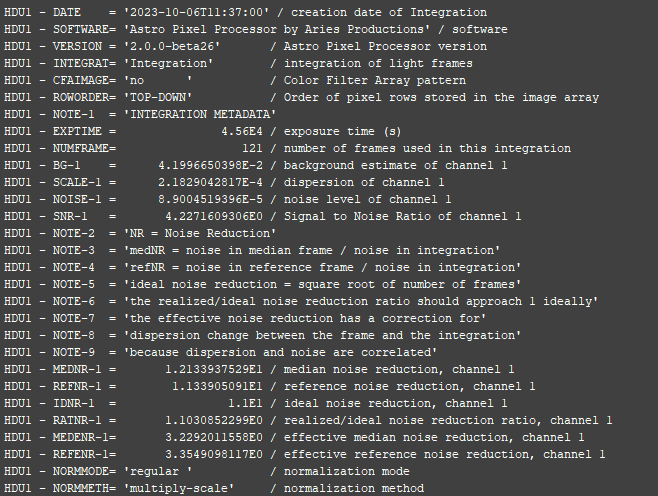
We have made several improvements with regard to data stored in the FITS header which applies to both save and load of the fits header. First of all, analytical results saved in the fits header like noise values, were saved in scientific format as a String. We have changed this to an actual double value in scientific formation with 10 decimals. This ensures that we can use those values with better precision in processing down the road. In the next screenshot, you can see how this looks now in the header of an integration of light frames where we show the background value, SNR, noise, noise reduction values etc... :
- Fixed Working Directory set without write permissions
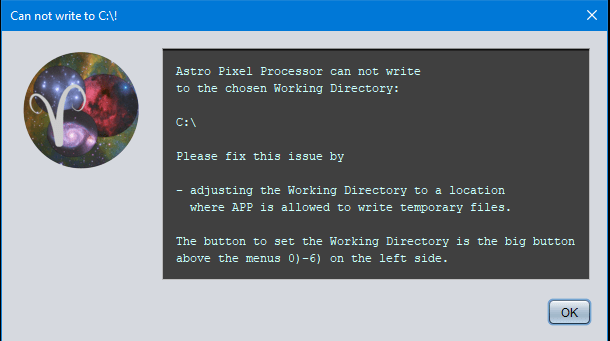
As reported here, https://www.astropixelprocessor.com/community/main-forum/read-write-error/ it was possible to set the Working Directory to a location where APP does not have write access. This can no longer be done, if you try to set the working directory to a location like c:\ or / APP will warn you that you need to set the Working Directory to a different location. If APP starts with a Working Directory from a previous APP session, write access will be checked as well, and if it is not possible, APP will prompt you to set a new Working Directory.
- Fixed Tooltips enabled at startup
If tooltips are enabled in the CFG menu, they were not actually enabled at application startup. This bug is a regression from beta24 due to the newer and faster startup. The CFG settings are all correctly restored now when APP starts including the tooltips.
- FIXED interpretation Siril output data
As reported here https://www.astropixelprocessor.com/community/main-forum/problem-loading-oiii-fits-files-processed-with-siril-into-app/#post-29027 , APP could not stretch a 32bits float FITS file produced by Siril. Data analysis of the data inside the FITS file showed that the data did not conform correctly to normalized floats in the data range of 0-1. Once actually clipped to this range, the data shows correcly, something Siril forgot to do perhaps. We have added an exception in our FITS converter for Siril data to check for this data problem and apply the clipping.
- FIXED 64bits interpretation JWST CERRS data
As reported here https://www.astropixelprocessor.com/community/main-forum/jwst-data-processing/#post-29560 APP had trouble with stretching 64bits data from JWST CERRS. This now works correctly:

- FIXED computer identification on windows 11
If you have Astro Pixel Processor activated on windows 11, the emails that contain your activation(s) or the info in the License menu in APP, would not show the User Directory, instead it would be attached to the Operating System name. This is now fixed. So previously it would show for Operating System something like : windows11cusersariesproductions and the User directory would be null. Now the OS will show windows11 and the User directory will show : cusersariesproductions
