

Mar 28 2026 APP 2.0.0-beta40 will be released in 7 days.
It did take a long time to have the work finished on this and it will have a major performance boost of 30-50% over 2.0.0-beta39 from calibration to integration. We extensively optimized many critical parts of APP. All has been tested to guarantee correct optimizations. Drizzle and image resampling is much faster for instance, those modules have been completely rewritten. Much less memory usage. LNC 2.0 will be released which works much better and faster than LNC in it's current state. And more, all will be added to the release notes in the coming weeks...
Update on the 2.0.0 release & the full manual
We are getting close to the 2.0.0 stable release and the full manual. The manual will soon become available on the website and also in PDF format. Both versions will be identical and once released, will start to follow the APP release cycle and thus will stay up-to-date to the latest APP version.
Once 2.0.0 is released, the price for APP will increase. Owner's license holders will not need to pay an upgrade fee to use 2.0.0, neither do Renter's license holders.
Hi,
I have Ha, oiii, sii, and rgb data on a 2 panel NA nebula. I managed to stitch them together, register them and now when I did the rgb combine, I have super magenta colored stars.
just curious the best method to process this data as sho?
data is here
if you have time, that would be great. if not, any advice is helpful!!
Adam
https://drive.google.com/open?id=1R_9t_dV4HF1qk7ATSvADwqT73QWHWx68
https://drive.google.com/open?id=17ah0f9l693EvWOIsx7GVKI_IzzJGSIoW
https://drive.google.com/open?id=1kd-9lSrlMUom2o2fBm6afHkjx0RJLcxP
https://drive.google.com/open?id=1-5oCipivfjux25Ih_rPjimohSqOcssrr
https://drive.google.com/open?id=1ETr8wB12rqg7XHrys0HIE94hKS_Kh31k
https://drive.google.com/open?id=12E_Ea9QyZOXpsRhTzmRgC2ec1R_iY0jf
Hi Adam @singding,
Registration is not okay yet, I have downloaded your 6 panels an I have loaded them into the RGB Combine tool:
This is what I see in the tool when I load all the 6 panels and assign them to R,G,B, SII, OIII, H-alpha:


We clearly see registration errors in the bottom and top panels.
I think we need to fix this first. How did you create the mosiacs now, all 6 channels in 1 go ? If you don't do this, you can never have the gaurantee that the mosaics are perfectly registered to each other.
My workflow would be:
1) per channel, first register and integrate the top and bottom panels. So for the 6 channels, that will give you 6 X 2 (top and bottom filed of view) = 12 panels.
2) then these 12 panels need to be loaded using the multi-channel feature in 1) Load
3) register these 12 panels as a complete multi-channel mosaic using
- not same camera and optics
- scale stop at least 10
- make sure in 3) that you detect at least 2000-2500 stars, more could improve the registration but it will take a bit longer
- enable dynamic distortion correction
- mosaic mode
- projective model
After registration these errors should be gone. Check the Registration RMS in the bottom panel after registration, should be well below 1 pixel !
In the meantime, I will play a bit with the panels as they are now to find suitable composite settings 😉
Kind regards,
Mabula
Quick question, when you say there should be 12 panels, I was under the assumption when I load top and bottom panels for Ha for example, I would then come up with the integrated 2 panel "mosaic" stitched together, is this not accurate? I integrated each channel and each panel separate, meaning I did get 12 separate panels...
So I should register and integrate top and bottom, so after this is done, should I then have 6 channels of the 2 connected panels, or 12 separate panels, I'm confused...
Should I load, for example, ha top and bottom panels in same channel( as hydrogen alpha) or separate...wouldn't they integrate together if i click on integrate?
Thanks
Adam
Hi Adam @singding,
This is an example of initial composite settings for your 6 channels of data:
Before mixing in R,G,B, first try to have a nice result for the SII-Halpha-OIII (SHO) composite.
Assign the SII & OIII to green as well partly, as you can see in the screenshot, that will greatly reduce the magenta stars 😉 to start with...
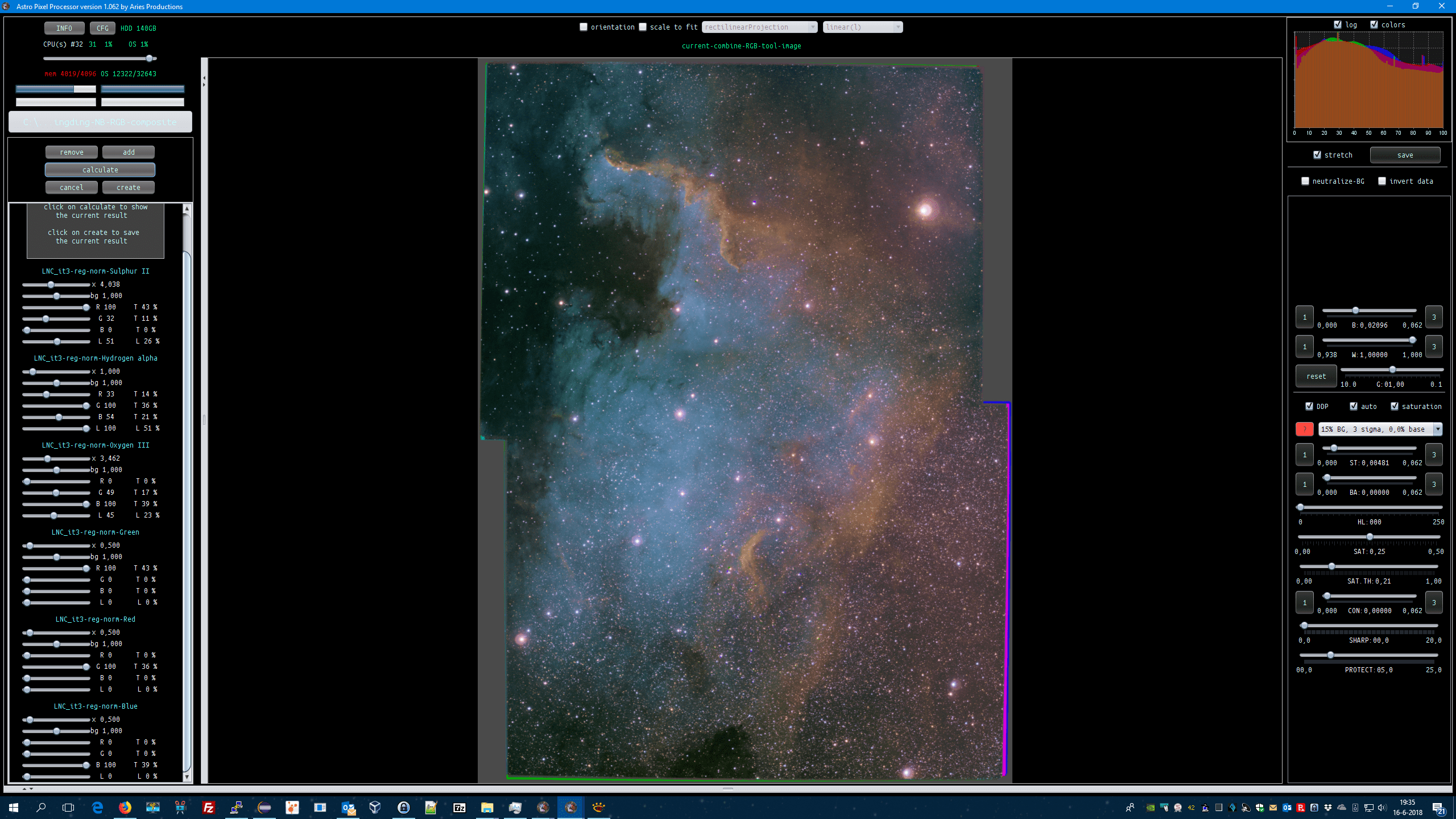
Let us first try to get your mosaic registration perfect, before continuing.
Cheers,
Mabula
Quick question, when you say there should be 12 panels, I was under the assumption when I load top and bottom panels for Ha for example, I would then come up with the integrated 2 panel "mosaic" stitched together, is this not accurate? I integrated each channel and each panel separate, meaning I did get 12 separate panels...
So I should register and integrate top and bottom, so after this is done, should I then have 6 channels of the 2 connected panels, or 12 separate panels, I'm confused...
Should I load, for example, ha top and bottom panels in same channel( as hydrogen alpha) or separate...wouldn't they integrate together if i click on integrate?
Thanks
Adam
When you create a multi-channel mosaic, all the 12 panels = (top&bottom=)2 * 6(channels) need to be registered as a mosaic in one single calculation, otherwise you have no gaurantee that the registration is good. And to turn it around, it will give you the best and most robust registration possible.
If you create 6 separate mosaics of the top & bottom panels for all 6 channels, you will have a very hard time to get those registered properly. The argument is very technical, but let me say this, it's simply not the way to do it. This has to do with how optical distortion works.
So if you have the 12 panels, top & bottom for all 6 channels, then you are good to go 😉
Did you create the 12 panels with LNC and MBB enabled? Especially MBB needs to be enabled to have as little stack artefacts at the borders as possible. This will help in creating the mosaic.
- Load the 12 panels as lights while assigning the 2 halpha panels to H-alpha. (2 panels of h-alpha need to be assigned to the same H-alpha channel) Do the same for the other channels.
- Register all 12 as a mosaic (check which frame is chosen as the reference after 3), perhaps best to choose a Green or H-alpha frame)
- Normalize,
- integrate per channel, that should give you then 6 perfectly registered mosaics for each channel.
Let me know if this is clear 😉
Mabula
Understood, so in the end I get 6 stacks, one for each channel, not 12 separate panels. I am starting over now lol and will try again. Thank you. I'll post final results tonight or tomorrow and one last question...
In your tutorial on mosaic, this technically isn't a mosaic right?? Since it's only a 2 panel.... in that tutorial it said to not use mosaic mode, but above you said to.... just want to confirm, use mosaic mode then? Even for a 2 panel "mosaic" or integration?
Hi Adam @singding,
Good question 😉
In case of so little overlap, you are best to use the mosaic mode, especially since you are doing a multi-channel mosaic.
If it was only 1 channel of data, then yes, you could simply use the normal registration mode.
What happens in normal registration mode: all frames are only registered to 1 single reference frame, so that will only gaurantee that the registration is good on the reference frame where the other frames overlap.
In mosaic mode however: all frames will become reference frames for the other frames, and that will gauarantee that registration is good everywhere where the frames overlap, not just the reference frame area.
Mabula
All right this may take a bit but I just started a brand new integration 🙂
Hi Mabula,
Registration seems to be taking forever, more 20 hours and I'm at 35%...
Should I just wait it out?
Hi Adam @singding, a mosaic of 12 panels should be done in less than 1 hour in most cases.
Have you loaded only the 12 panels? So not all the subs of all panels.
How many stars did you detect in 3) ?
Which settings, especially, scale stop, in 4) ?
Mabula
I was under the assumption I had to load everything ( all subs, darks. Flats dark flats and bpm)
Then register all frames under mosaic mode no?
Hi Adam @singding,
No that's very inefficient and even less robust, it will take forever in the mosaic mode 😉 if you load all individual subs.
First you simply need to create the individual mosaic panels using both LNC and MBB. LNC and MBB will reduce possible stacking artefacts at the borders.
An example:
if you have 12 panels with all 12 panels having 20 individual subs. That would mean 20 x 12= 240 subs in total.
If you load and try to register these 240 subs as a mosaic, APP would need to calculate the mosaic for 240 frames combined. That's very complicated and therefor it will take a very long time 😉 It takes so long because APP needs to verify how all frames are related to all other frames to be able to do this.
If you create the 12 panels from the 20 individual subs (so regular/not mosaic registration) then APP would only needs to calculate the mosaic over 12 frames (12 frames containing all the 20 inidvidual subs due to being integrated). This makes the mosaic calculation much simpler and even more robust, because the quality of the integrated panels from the individual subs is much higher as wel 😉
Let me know if this will improve processing time considerably (it should 😉 ).
Mabula
https://drive.google.com/open?id=1ZesbXTwkCHLP-rM7KyhqQ8OkDYwzvRlO
hi Mabula, here are the 6 registered stacks. what do you think?

https://drive.google.com/open?id=1ZesbXTwkCHLP-rM7KyhqQ8OkDYwzvRlO
hi Mabula, here are the 6 registered stacks. what do you think?
Registration of the 6 channel 2-panel = 12 panel mosaic looks very good now 😉


The registration looks spot on everywhere now 🙂 I can't see errors like before.
Have you tried creating a composite from it?
Kind regards,
Mabula
This is awesome Adam 😉 !!!
Thank you! It's my second version, first one had magenta stars and I redid it.
Now I know how to register, each panel of each filter type first, then combine filter types, then register the combined panels 🙂
Adam
Thank you! It's my second version, first one had magenta stars and I redid it.
Now I know how to register, each panel of each filter type first, then combine filter types, then register the combined panels 🙂
Adam
Excellent Adam @singding,
the result is simply stunning 😎 you managed to get very nice star colors in your composite as well!
Mosaicing is difficult but with the right approach, it can be done quick and accurate 😉
I took the liberty to do a processing of my own, I have used these composite settings:

then rotated and did a crop... then pretty aggresive with selective color and the preview filter...
I hope you like this:


I think, since you have 6 channels of data, there are a lot of color combinations possible here for the final composite 😉 !
Cheers,
Mabula
Quick question, what does inverting do? What is the point, just curious;)
Adam
Hi Adam @singding,
Inverting the data is a means of looking at your data from a different perspective.
In some cases, it can reveal some faint structures , but in other cases it won't, it depends a bit on how you prefer to look at the data 😉
In case of color images, all colors are inverted. blue become yellow, green becomes magenta etc... For monochrome images, it's simpler, black and white are switched.
I usually like the inverted effect on color images, so I sometimes add them to results.
So in a nutshell, inverting can be usefull, but also fun 😉 . Scientifically, it's used mostly for better seeing really faint structures that are hard to see against the normal dark sky background.
Mabula
