

June 24 2026 APP 2.0.0-beta46 has been released !
Improved internal memory configuration (lower ! memory usage), fixed beta45 startup issue, fixed Set Save Directory & 2-panel mosaics.
May 27 2026 APP 2.0.0-beta45 has been released !
Fully Multi-Threaded LNC, many improvements for the registration engine, platform upgrade, and further tuning of internal memory consumption and memory release back to OS.
Apr 14 2026: Google Pay, Apple Pay & WeChat Pay added as payment options
Update on the 2.0.0 release & the full manual
We are getting close to the 2.0.0 stable release and the full manual. The manual will soon become available on the website and also in PDF format. Both versions will be identical and once released, will start to follow the APP release cycle and thus will stay up-to-date to the latest APP version.
Once 2.0.0 is released, the price for APP will increase. Owner's license holders will not need to pay an upgrade fee to use 2.0.0, neither do Renter's license holders.
I have been using APP for bit over 18months now and the problem I keep running into is the handling of the colour channel distribution in RGB combine.
At the moment the colour assignment is done on the basis of the total assigned colour *percentage* across all channels. so for basic HOO - Ha is 100% red, Oiii is 100% Green and 100% Blue. Fine. But if I only have a value of 1 of a colour in one channel, and that is the only chanel with that colour - that channel will then be rendered with 100% for that colour - which just results in very erratic colour assignments and makes it very difficult to make subtle colour corrections. For example - I was rendering HOO1 - I want to add just a fraction green into Ha - and pull all green out green in Oiii - if I make Ha green 1, and Oiii green 0. The Ha channel will be rendered to yellow - as that "1" green unit is 100% of the green across all the channels. Obviously this is not what I want - waht I want is Ha to be rendered just a fraction off solid red. Doesn't matter on the scaling (Multiple-Scale, Add-Scale etc). Is there a way we can modify how APP handles the colour rendering so the RGB distribution for each channel is only scaled within that channel as a percentage or fraction of the total colour assigned in that channel - rather then across all channels. So in the example above I want 99% red, 1% green for Ha. not 100% red (only red in all channels) and 100% green (only green in all channels).
Thx
@chris_g_bne This is already possible. You can use the sliders to adjust the amounts of color assigned to each channel. To do so, choose the formula that you want to use (for instance HOO1) and add your images. Then you can use the sliders to adjust the percentages for each channel until you are happy. Note that you can click on a slider to select it and then use the arrow keys to increment or decrement the value with 1 %.
@wvreeven thanks you for responding. My point is obviously not clear, as of course I realise the sliders are there and their function.
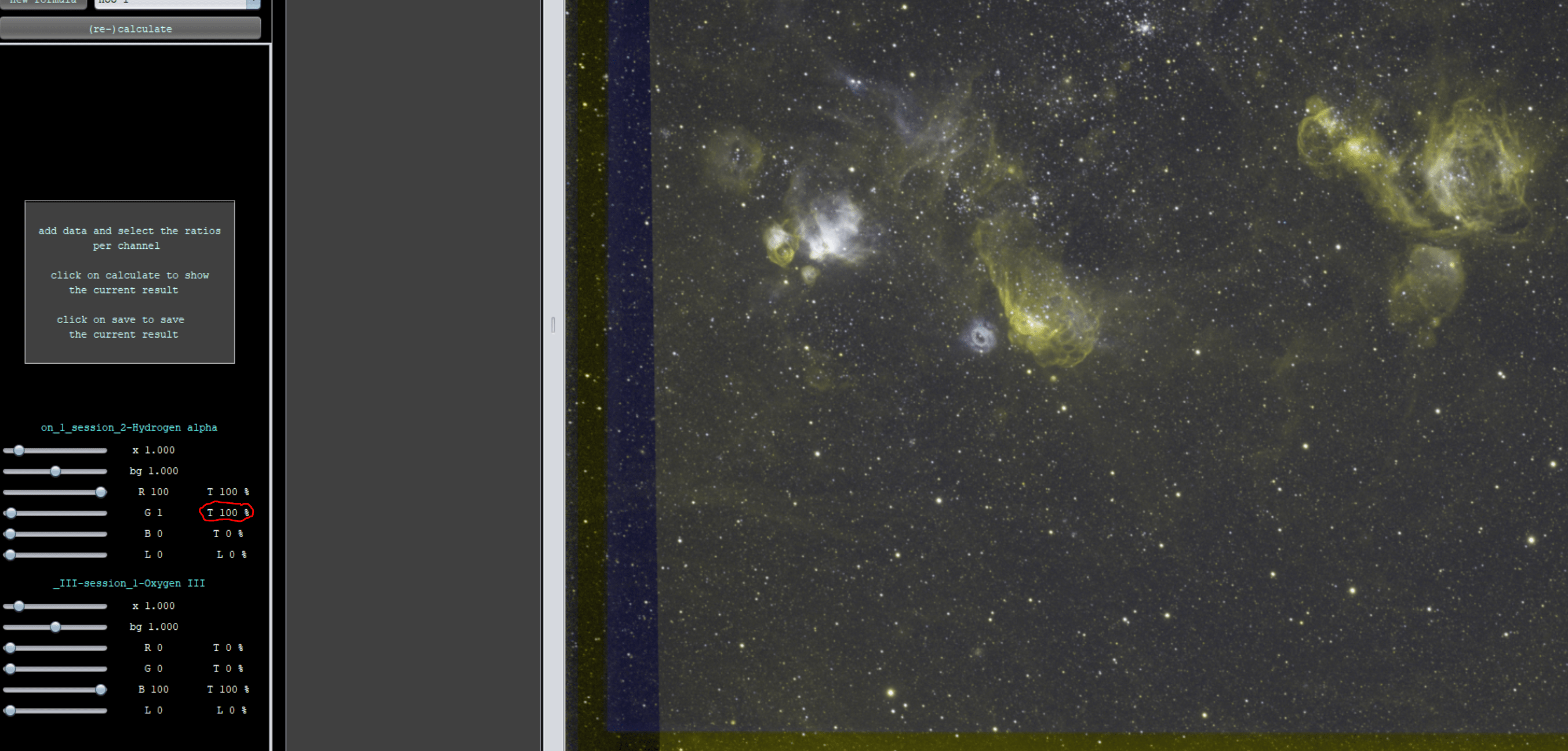
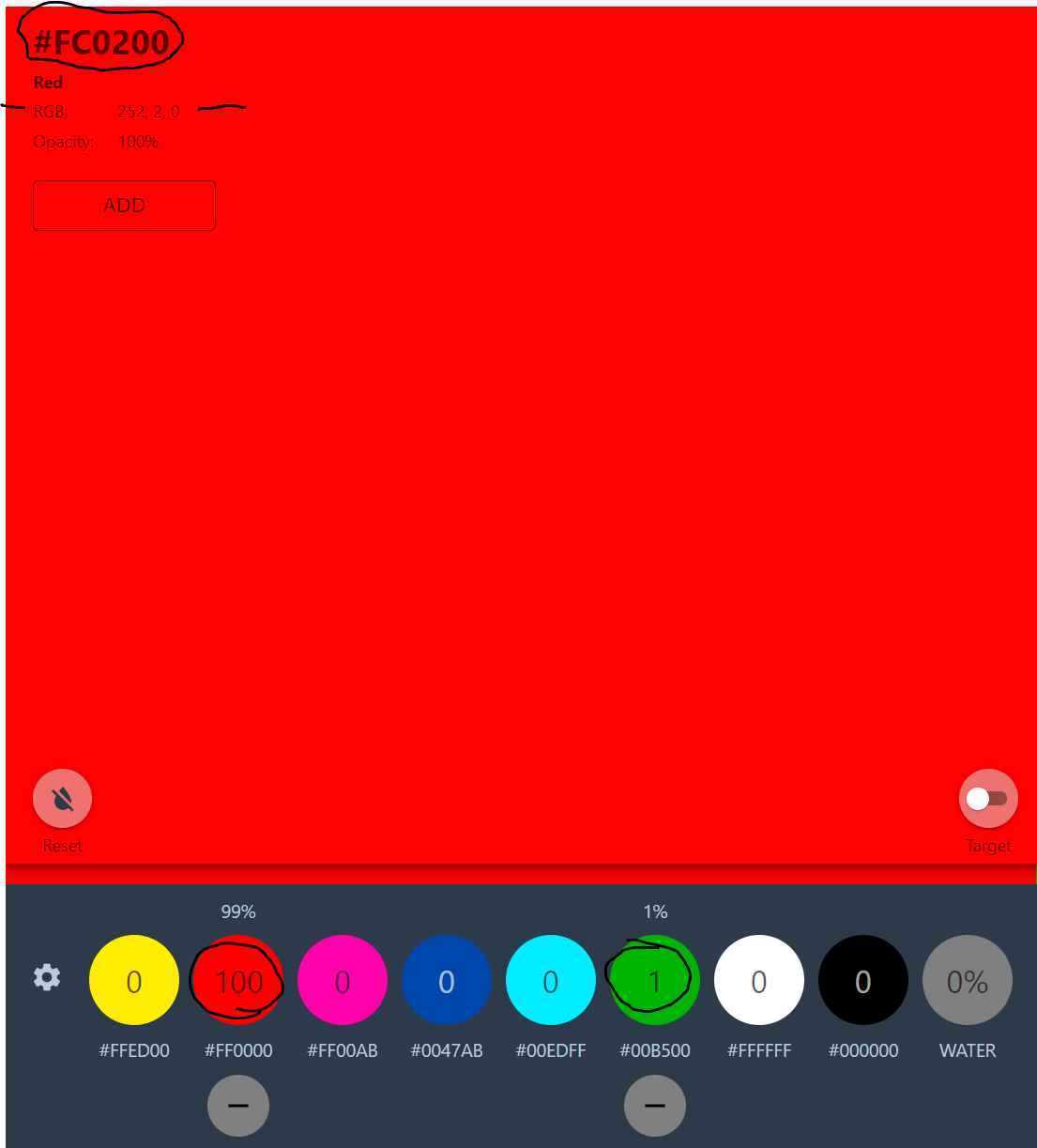
My point is that the colour rendered in the image to an image channel scales as the percentage of the total percentage of colour of that channel across all channels in the blend. So to go to my example above. If I load Ha adn Oiii (example only) I make an adjustment so Ha channel is 100 Red, 1 Green, 0 Blue - this colour combination should not be rendered as yellow... it should be rendered just about solid red. But that is *not* what APP does. If there is no green in any other channel (lets say for example the Oiii channel only has 100 Blue and 0 Red, 0 Green) - the T value for green in the Ha will be 100% - so it will render the Ha channel as Yellow (100% red + 100% Green). It makes colour rendering, and specifically fine tuning of the colour rendering nearly impossible to do very well and I am constantly running into a limit with all my data sets. At a basic level it is OK - but do to any fine rendering it is impossible the way it is implemented as it is too unpredictable. Hope my example image will help explain what I am talking about.
Hi Christian, @chris_g_bne, @wvreeven,
Thank you for sharing your question, i think what you want is possible though 😉
Please try to load that H-alpha channel twice 🙂 !
Then you can assign it 100 red with multiplier 1,0 and the second time that you load it, you can assign it to green, of course it will be 100% green if no other channels are assigned to green, it merely means that from all channels, that channel is the only one that makes op the green information in the composite.
Now to get to the fine-tuning of the H-alpha signal in the green channel, simply use the multiplier for that second h-alpha channel 😉 That should accomplish exactly what you want i think?
Mabula
@mabula-admin - thank you. I will give it a go - though an initial try this morning I feel this is going to get pretty tedious in a LRGBHSO 😆. I would suggest to rework the colour engine in the RGB combine to remove the cross channel percentage calculation rescaling to 100% total colour - it would then make the colour rendering much more logical. This is not just my challenge, but one I hear a few times now from others, so I thought to raise it up. So in my simple example (and agreed unrealistic) - the total green should be 1 part in 200 (HOO has total 200 for each RGB channel - 100 from Ha and 100 from Oiii) - so total green rendered should be 0.5%. Rather then what APP does now which is 100%. Without using the multipler - the cross channel percentage dependency even with 3x ha and 3x Oii channels is still quite course. Yes, I can adjust the multiplier - but again - getting pretty tedious. In my simple, non-programmer mind there is an easy solution, but of course I understand that is not going to be the case in reality. Other then this one gripe - this is great software in every other way - thank you.
