

Mar 28 2026 APP 2.0.0-beta40 will be released in 7 days.
It did take a long time to have the work finished on this and it will have a major performance boost of 30-50% over 2.0.0-beta39 from calibration to integration. We extensively optimized many critical parts of APP. All has been tested to guarantee correct optimizations. Drizzle and image resampling is much faster for instance, those modules have been completely rewritten. Much less memory usage. LNC 2.0 will be released which works much better and faster than LNC in it's current state. And more, all will be added to the release notes in the coming weeks...
Update on the 2.0.0 release & the full manual
We are getting close to the 2.0.0 stable release and the full manual. The manual will soon become available on the website and also in PDF format. Both versions will be identical and once released, will start to follow the APP release cycle and thus will stay up-to-date to the latest APP version.
Once 2.0.0 is released, the price for APP will increase. Owner's license holders will not need to pay an upgrade fee to use 2.0.0, neither do Renter's license holders.
Hello, is there a way to integrate pictures with weight coming from meta data in fits headers ?
Hi Sebatien @sebastienmenot,
If you can share which Fits tag would be used for that, we can make that possible. Currently it is not. Is there an accepted FITS tag for this in the community that you are aware of?
If you share data with this tag, I can implement this for you.
Mabula
Hi Mabula! Thank you very much for your answer. I would like to create a weighting for each image when integrating. The weight value coming from subframe selector from pixinsight for each image calculated from parameters such as noise or PSF. The calculated value would be recorded in the FITS header COEF. (see attached example). Is it possible?
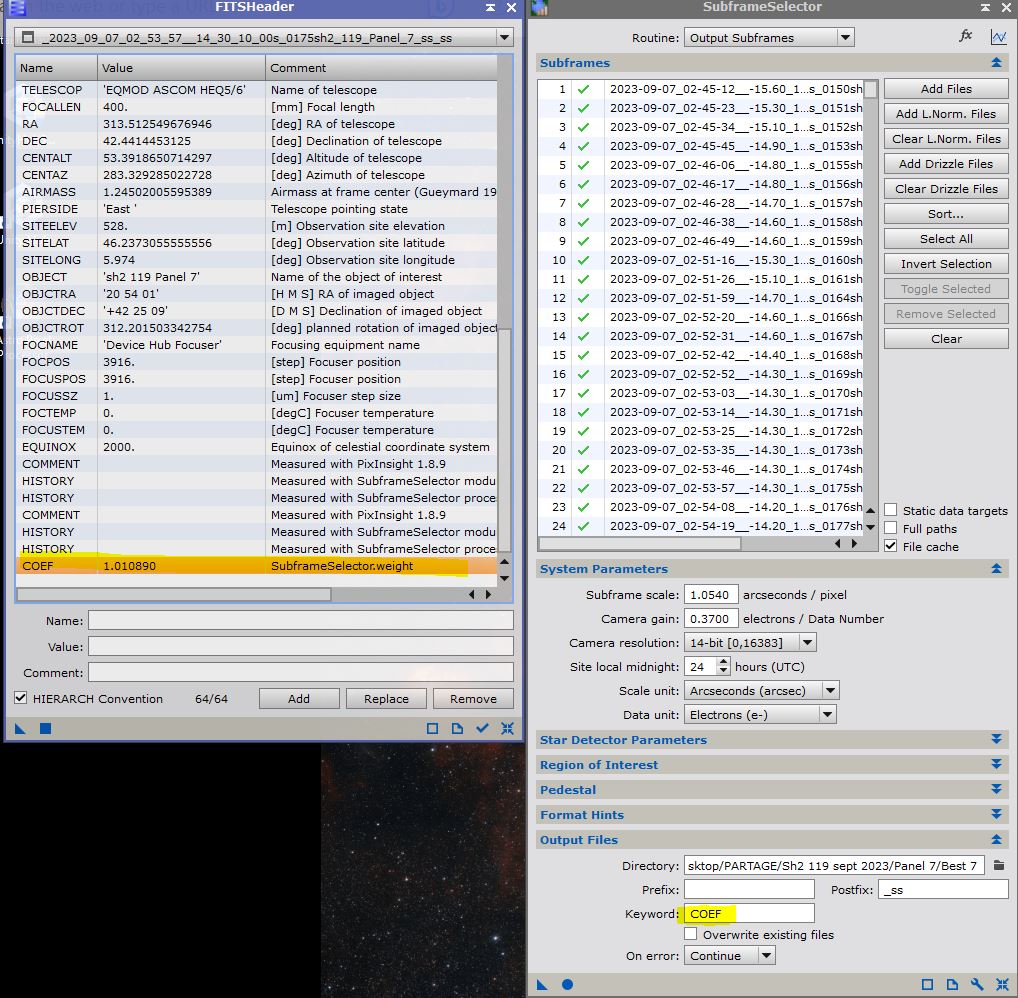
Hi @sebastienmenot,
Sure that is possible, it will help me if you can upload a batch of frames with this COEF tag so I can implement this and fully test it to make sure it all works as expected.
Can you upload it here:
https://upload.astropixelprocessor.com/
username: uploadData
password: uploadTestData
Please make a folder with your name and the issue like : SebastienMenot-COEF-weights
and upload the dataset there and then let me know once done, I will make it possible quickly 😉
Oh, 1 more question, how would we assign weights if you combine data with this tag and also add frames without this COEF tag? I would assume that the other weights can still come from APP, right? Then we need to know to base weight from Pixinsight COEF, I assume that it is simply 1.0, right?
Mabula
Hi Mabula, thank you considering this possible !!!
I would suggess that if the COEF tag doesn't exist in the FITS file, then you apply weight = 1 by default. If the tag COEF exists, then you apply the value associated to the tag on the image. See below how the weight could varie depending on the formula.

The formula in this exemple was:
Weight = (FWHMMedian/FWHM)*(EccentricityMedian/Eccentricity)*((SNRWeight*SNRWeight)/(SNRWeightMedian*SNRWeightMedian))
As you can see, the weight can be above or below 1, so it is up to the user to define the right formula to favour the best images in a reasonable way.
I am uploadin files right now in the shared folder.
Thanks a lot Mabula, I can't wait for testing this !
Hi @sebastienmenot,
Thanks ! we have received the upload in good order, we will try to implement soon, because it will not be too difficult 😉
Mabula
