

June 24 2026 APP 2.0.0-beta46 has been released !
Improved internal memory configuration (lower ! memory usage), fixed beta45 startup issue, fixed Set Save Directory & 2-panel mosaics.
May 27 2026 APP 2.0.0-beta45 has been released !
Fully Multi-Threaded LNC, many improvements for the registration engine, platform upgrade, and further tuning of internal memory consumption and memory release back to OS.
Apr 14 2026: Google Pay, Apple Pay & WeChat Pay added as payment options
Update on the 2.0.0 release & the full manual
We are getting close to the 2.0.0 stable release and the full manual. The manual will soon become available on the website and also in PDF format. Both versions will be identical and once released, will start to follow the APP release cycle and thus will stay up-to-date to the latest APP version.
Once 2.0.0 is released, the price for APP will increase. Owner's license holders will not need to pay an upgrade fee to use 2.0.0, neither do Renter's license holders.
Hi, I got the following failure integration messages:

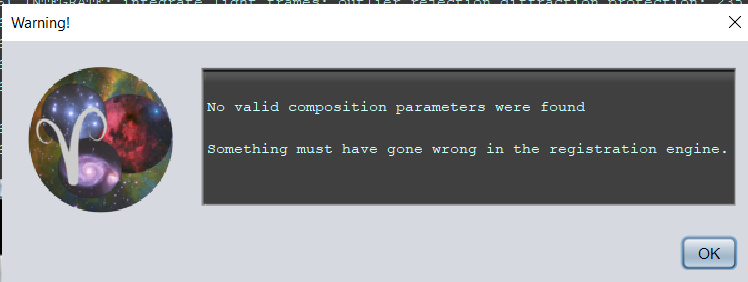
Now, I'm doing an unusual integration so I'm sure that's impacting it, let me explain:
1) Sometimes I want to modestly expand my field of view, but don't want to do a full mosaic.
2) So what I do is shoot 4 panels with a fair bit of overlap, say 30-50% overlap. I can, in theory, just stack them all together as long as I get enough stars and set the parameters correctly, Ex: set "scale stop" parameter to a high number.
3) However, since I'm shooting Alt/Az, this causes a huge output frame as some lights rotate and if I integrate in "Full" it creates a massive frame to hold them all. But I can't integrate to a reference frame as that will be only 1 panel.
4) So what I do is I integrate 2-3 of the best lights from each panel that were captured early in the evening with no field rotation to create a nice rectangular full final representative frame. I then crop that as desired and save it as a new expanded reference frame that has just the area I'm interested in. This provides a nice big area for all panels to be registered against, but minimizes the size of the final stacked output frame, because I'll select this frame as my reference and integrate with "reference frame" mode, not "full".
5) I then calibrate all my lights and save them as calibrated lights (usually, aligning RGB planes along the way).
6) Now I load them all up, along with this stacked "expanded reference frame".
7) I analyze stars and select my expanded reference frame as the reference frame. Usually this larger stacked frame is already selected by APP as the best frame.
8) I set "reference" integration mode for the frame size. I also tend to turn off "same camera and optics" and turn on "correct for optical distortion" for registration and sometimes expand the field stop to ensure good registration. I then register and make sure it all is good.
9) Then I integrate. Usually it works well, but occasionally I get this error above.
What do you think the cause is?
@readyjetty Do you set the number of stars in tab 3? If you expect only a partial overlap between the frames then you probably need to increase that number as well so APP has more stars to register each frame with. That would probably get rid of the second failure message. No idea about the first.
HTH, Wouter
@readyjetty Do you set the number of stars in tab 3?
Thanks for thinking about this problem.
Yes, I forgot to mention I typically set more stars, often 4000. It turns out, in this case I forgot to do this so it defaulted to 500, I got the error, so thinking this could have been the factor I went back and analyzed stars with 4000, re-registered and redid it and still got the error.
Remember, that I didn't get any registration failures in either case and my panels have very high (>70%) overlap with the expanded reference frame.
I ran some additional tests and if I do it with only about 120 lights, it works fine, then I loaded a few more so I had about 206 lights, then it failed with this error. So it's either an issue with the number of lights, or with some particular light causing the issue... perhaps it registered really strangely.
OK, even more testing, I think I know what I did, it was an additional step. After rregistering and selecting my master frame, I integrated in "crop" mode so I could apply a bit more additional cropping on that frame. I think that killed it, because when I integrate my 206 lights in "reference" mode, it works, but if I apply a small additional crop, it fails. I wonder if this is related to me cropping a section that was required by the reference engine on some of the lights?
I believe I found a key factor: If I stack to my larger reference frame without defining a further crop on that reference frame, it works, but if I stack in "crop" mode and slightly crop down that reference frame, it fails with the error I described above. For some reason the combination of a larger reference frame, lots of subs, and cropping that larger reference frame appears to have caused the issue.
Mmm, you're not using the mosaic mode I assume then?
@vincent-mod
No, mosaic mode would take impossibly long with a large number of frames.
Also, I found that if I simply load up 100 16-megapixel OSC lights, selected "Ha-Oiii Extract Ha", did star analysis, select a crop of the master to about 50% of the area, and I got this error:

But if I just integrate with "reference" not "crop" it proceeds correctly. I've had numerous errors with this "crop" integration option, I think it has some bugs in it for sure.
This may have to do with the limit you're running into actually, Mabula is working on trying to get rid of that limit for a mosaic, which is important with the new sensors coming out.
