

June 24 2026 APP 2.0.0-beta46 has been released !
Improved internal memory configuration (lower ! memory usage), fixed beta45 startup issue, fixed Set Save Directory & 2-panel mosaics.
May 27 2026 APP 2.0.0-beta45 has been released !
Fully Multi-Threaded LNC, many improvements for the registration engine, platform upgrade, and further tuning of internal memory consumption and memory release back to OS.
Apr 14 2026: Google Pay, Apple Pay & WeChat Pay added as payment options
Update on the 2.0.0 release & the full manual
We are getting close to the 2.0.0 stable release and the full manual. The manual will soon become available on the website and also in PDF format. Both versions will be identical and once released, will start to follow the APP release cycle and thus will stay up-to-date to the latest APP version.
Once 2.0.0 is released, the price for APP will increase. Owner's license holders will not need to pay an upgrade fee to use 2.0.0, neither do Renter's license holders.
Hey there!
Its the first time for me posting in this forum. But I got my buyers license for some time now (about a year or two) and I am still really happy with what app is doing! As every stacking software has its pro and cons, I think it suits best for what I am doing. Didn't try mosaics at all, so there is much potential left unused or untested.
As I am shooting dslr deep sky pics, with what I would call not the best equipment for that purpose, most problems did arise as early as taking the pics...
I got a Lumix GX9 and I really do like how APP is debayering my raw files, because you got all the backround informations implemented (like color matrix and so on, I did try to get before on my own, developing my raws with rawtherapee before stacking, what was a nice aproach before i got to APP). And its doing a wonderful job in that.
Well as the M43 System offers some wonderful lenses that give very nice results on stars and all, i really have trouble with hat the camera is doing with all those possible coorections in camera and even doing that to my raw files...
So first thing I learned in APP was, that bias frames taken by this setup, really do a good job in worsening my calibration. So I really fast dropped that approach. Next for years I got really trouble with ring appearing while stretching my integrations that didnt get corrected by flats or whatever I did. Up to the point I even thought about dropping that damed thing. But atlast I stumbled upon some posting inanother forum, where they hinted something about in camera shadow correction, an that horrible option got activated some month before, stomping a bit fat circle (seenb when stretched to infinity) down on every raw file i took.
So well, you really have to know your gears...
Digging deeper, I found out to take good flats. Following your hint about how to inspect my in camera histograms ( https://www.astropixelprocessor.com/community/postid/2741/), and that really did raise the quality of my flat files and my understanding how to expose just right.
Next I did optimise a bit about my darks, checking even more on doing everything right about them.
The thing i am struggling now, because I stumbled upon some hot pixels not removed to my liking, is creating am good BPM.
As I was following your guide ( https://www.astropixelprocessor.com/community/postid/107/) and doing some testing I got some really bad BPMs overcorrecting as far as (as it seems) adding kind of new hot pixels or something like that.
I got better results with high sigma for detection hot pixels (10 and above!)
For cold pixels, I dont even know if thats helpful at all: my corrected files seem to get more darker pixels after calibration (it gets better if I reduce detection % of cold pixels in creating BPM)
As it is really hard to inspect the calibrated files and iterpreting what the BPMs are doing in calibration, I am like 99% positive that I get best results in just calibrating my lights with darks flats, darkflats. period.
So, as you are saying BPMs are REALLY necessary for good calibration, what am I doing wrong? Or what did i get wrong in following your guide.
Sorry for not getting back to you earlier. Are you now using bias frames together with a BPM? I think a bias is very important as it makes APP know about the proper background signal.
@vincent-mod
Thank you for your reply!
Well, you got me there. I did use BIAS Frames in the past, but skipped that recently, due to APP giving this pedestal warning, if I am using BIAS Frames for calibration. So it seems my camera is doing something to them. As I didnt want to do more harm in using them, I did drop them.
I did read it could be of help to take some Fake-BIAS by raising exposure time a bit? I will give it a try this evening, raising the time in small steps until I dont get a warning anymore.
Ok, I am still getting this error.
19:39:06 - 2) CALIBRATE: WARNING !!! we have detected a possible sensor offset issue between the MasterBias and the Masterdark !
19:39:06 - 2) CALIBRATE: WARNING !!! the MasterBias has a median value of: 2,193E-03 for channel 1
19:39:06 - 2) CALIBRATE: WARNING !!! the MasterDark has a median value of: 2,127E-03 for channel 1
19:39:06 - 2) CALIBRATE: WARNING !!! normally, the median value of the MasterDark should be the same or larger than the median value of the MasterBias
19:39:06 - 2) CALIBRATE: WARNING !!! because a dark should always contain the entire bias signal plus the dark current and possible amp glow signals
19:39:06 - 2) CALIBRATE: WARNING !!! some CMOS sensors however exhibit this behaviour due to CMOS technology
I will try to expose longer. How long is to much for taking BIAS frames?
With these frames my bad BPM are still inserting artifacts to the calibrated lights...
@xyfus Can you give more info about your darks and bias? What ISO setting do you use for them? Exposure time? File format (raw or something else)?
How do you take the darks and bias? Is the camera still connected to the lens? Are you absolutely sure that no light hits the sensor when taking the darks and bias? Light leaks may be hard to track down and could easily explain the warning that APP gives.
Depending on your answers I may have more questions 🙂
Thanks, Wouter
Thx wouter for joining in.
Well, we get a bit offtopic, but as it is related to calibration frames…
For creating a very good flat frame (it is!) i did:
60x 1/10s ISO200 for both flats and flatdarks, no bias
My testcase related to creating a good BPM was:
120s ISO800 for both lights and darks (30x)
yesterday, i did try different versions of bias frames (because of clear skies, i had to quit testing before getting some useful exposure time):
1/4000s, 1/2000s, 1/1000s, 1/500s, 1/125s all returning this warning on calibration (i did a delay of 1s after taking each bias, not to stess the sensor to much, i always do for taking lights/darks by about 4s)
edit: ISO800
Yes, I don’t remove lenses, just attaching the lens cover AND covering it with the lens bag, just to be sure! (I close the window shutters and turn off lights OR in my garden its mostly dark anyways)
The only difference between these darks and bias i can see is temperature. While i took the darks in the field @15°C (after taking the lights, so the sensor/body will surely have had a higher temperature!). Bias frames where taken yesterday at home @20°C but with a still „cold“ body.
edit:
I do recall that i even got this warning even if i took bias right after darks in the field. Thats why i was suspecting my camera to be responsible in the first place.
Today I will try to take some test lights, darks and bias in one go and see what app says about them...
@xyfus Hi Sebastian,
For APP to calibrate lights well, it either needs darks with the same ISO and exposure time (and ideally also temperature but that's hard with an uncooled camera) OR darks and bias with the same ISO (and ideally also temperature). In the latter case the exposure time of the darks may be different. APP will then assume that the sensor is linear when it comes to scaling to another exposure time, which most CMOS sensors are in the range.
You wrote in your comment to me that you managed to get a good BPM when using only darks with the same ISO and exposure time as the lights and good master flats with using only flats and dark flats of the same ISO and exposure time. Just out of curiosity, why do you want to take bias now? If you get a good BPM and good master flats without a warning about calibration, you're set, aren't you? It seems to me that you have no need for bias at all.
Just my €0,02
Well, thats why I dropped taking BIAS frames in the first place and why i said we are getting offtopic here.
I did manage to get a good BPM only by screwing with the preset options as i wrote in my original post. If i follow steps mabula described for taking a good BPM for longtime use i do get the bad one. Thats why i asked...
Vincent then pointed out that if i dont use bias frames it could be a possible problem. Then i tried that, failed and you joined in.
So we are back to zero now. I only can get a good bpm if i set hot pixel detection to as high a sigma as 12 and above and percentage for cold pix about 5 or lower. What seemed strange to be but works out ok (not perfect but ok)...
Maybe i dont need a bpm at all, because i do get best results on just using dark and flat calibration
I just was curious if i was doing something really wrong, because if these settings.
Maybe i dont need a bpm at all, because i do get best results on just using dark and flat calibration
I just was curious if i was doing something really wrong, because if these settings.
Like I wrote before, APP only needs bias if either the exposure time of the darks isn't the same as that of the lights OR if the exposure time of the darkflats isn't the same as that of the flats. Since you seem to make sure that those exposure times are the same, I'd simply do without bias. @vincent-mod do you agree?
In those cases you can do without yes, if they indeed match with the lights or the flats. The bias will be in the darks as well and a flatdark is basically a bias. A BPM by itself can be created using a very bad dark at high iso, no cooling and long exposure time. If that doesn't work at all in this case that is quite strange indeed.
A BPM by itself can be created using a very bad dark at high iso, no cooling and long exposure time.
Of course! I forgot about that option. The only purpose of a BPM is to identify bad pixels so the darks used for it don't need to match the ISO, exposure time and temperature of the lights at all.
Hi @xyfus, @wvreeven & @vincent-mod,
The issue with the Bad Pixel being correct with a hot pixel kappa around 10 (meaning 10*sigma of dark current) sounds like the main issue to solve here. In my experience, this means that the dark current signal in the darks is really not close to having a nice normal distributed dark current signal. So I would be very interested in seeing one of the darks myself.
Sebastian, can you upload a couple of darks and light frames? It will be nice if you can share darks with different isos and exposure times, then I can tell you much better what is going in your Lumix camera. Please upload 2 or 3 light frames, I can then easily test how the BPM function is working here and I can show you how to check this easily as well in APP.
Can you upload it here:
https://upload.astropixelprocessor.com/
username: uploadData
password: uploadTestData
Please make a folder like SebastianRichter-BadBPM and upload your data there and then let me know you have finished the upload 😉
Now the warning message of
19:39:06 - 2) CALIBRATE: WARNING !!! the MasterBias has a median value of: 2,193E-03 for channel 1
19:39:06 - 2) CALIBRATE: WARNING !!! the MasterDark has a median value of: 2,127E-03 for channel 1
Is there because normally you expect the median/average value in a dark to be higher than in a bias frame becaus of dark current increasing the sensor adu values with longer exposure times. Now, with CCD camera's this holds up really well. But with CMOS camera's it does less and this is 100% caused by sensor technology in the newer CMOS sensors. It can occur that a dark frame indeed has a slighly lower value than a bias with cmos sensors. But if this difference is marginal like in your case (about 3% ?) it might not be a problem but simply the way your sensor works. IF the difference is more than 10% the warning needs to be taken very seriously and usually indicates that the user is shooting with different sensor offset, which normally only is possible with astro camera's and not with consumer camera's. I do know that there are a few camera models that internally use different sensor offsets if you change the iso value, in that case, you need to be very careful. Checking a couple of darks with different iso values will easily tell me if this is happening here 😉
Finally, if darks, dark flats and flats work well (beside using a BPM), I agree that bias will only help if you need or want to use the dark-scaling function in APP. Dark-scaling needs darks and bias and it will help make the darks match the lights better in terms of differences in both temperature but also iso values.
Mabula
Sebastian, can you upload a couple of darks and light frames? It will be nice if you can share darks with different isos and exposure times, then I can tell you much better what is going in your Lumix camera. Please upload 2 or 3 light frames, I can then easily test how the BPM function is working here and I can show you how to check this easily as well in APP.
If you can spare the time, I will be really happy. It would be nice to know what is happening and how my camera sensor is doing what it does. Sadly I didn't find any clues on google, manufacturers seem to like secrets (and i am too unexperienced to have a look at it myself)...
That said, I really hope my problems in creating a nice bpm are related to my sensor and how it handles the dark current signal (and that it is not just me failing to do well 🙄)
I did upload a couple of different iso/exposure darks (and related lights). If you need more or different ones I can add those tomorrow.
A BPM by itself can be created using a very bad dark at high iso, no cooling and long exposure time.Of course! I forgot about that option. The only purpose of a BPM is to identify bad pixels so the darks used for it don't need to match the ISO, exposure time and temperature of the lights at all.
Thats what me got to open this thread in the first place. I did try with some long exposed dark frames (taken on a hot day) to do a bpm. This one was the worst of all...
Sadly i deleted these before thinking of asking here...
Lets wait and see, what mabula can make out of my other darks.
Thank you so much for your tips and hints!
Hi Sebastian @xyfus,
Thank you very much for your upload of the data. I had a good look at it.
Using APP's automatic Bad Pixel Map creation using your darks and flats works very well I think. No need to tweak this yourself with setting Hot pixel kappa. The automatic BPM using a kappa of about 6-7, not as high as 10 to get to around 3% of bad pixels on your sensor which is rather normal on recent sensors and older ones.
I think that if you create a Bad Pixel Map with kappa of 10 or higher, too little bad pixels are detected and thus corrected in your lights.
I do not completely understand the following in your initial post:
I got some really bad BPMs overcorrecting as far as (as it seems) adding kind of new hot pixels or something like that.
Can I assume that this happens if you create a BPM with kappa values of 2-3 ? Then too much is corrected clearly for you sensor.
The reason why the kappa value is a bit higher to get a good BPM seems to be the sensor technology in your camera. I think Panasonic does some minor noise reduction in-camera before storing the RAW data and this causes the data to be not completely raw anymore. But the data does look okay to me, so I would not worry about this.
Let me show you how you can check the Bad Pixel Map correction in your data now which confirms all is okay and nice.
I have loaded the uploaded lights, darks, flatdarks and flats. Then I clicked on 2) Create masters and assign to lights, giving me this in the frame list :
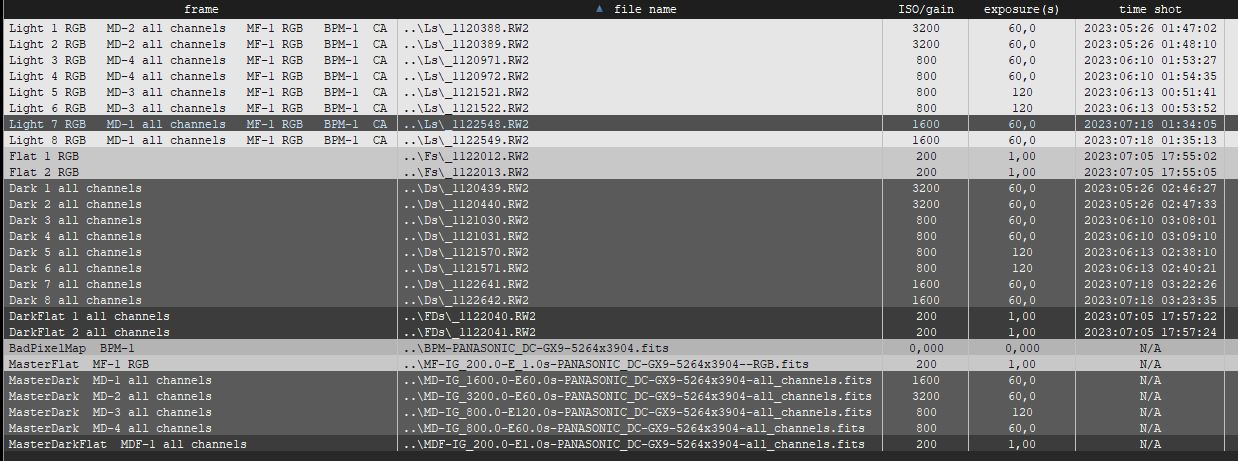
Then I first look at a light frame by double clicking one in the list:

Then I zoom in on a part of the image with sky background to inspect/study the present Hot Pixels:

Now if the Bad Pixel Map works correctly, I expect those blue, red and green hot pixels to be gone if I look at the image calibrated. 2 ways to do this, change the dropdown box above the image viewer from RAW to calibrated, or in the frame list, use the right-mouse click menu to load the image calibrated:

To me this looks good and I see no problems here. As I said before, this is with APP detecting the correct Hot Pixel kappa itself and it uses a kappa of about 6-7 depending on the different masterdarks created from the different iso and exposure values. The resulting BPM will work nicely on all those different ISO and exposure light frames as well.
Mabula
Hello Mabula,
first of all, thank you so much for getting into my data and giving such a useful review of what you did!
Using APP's automatic Bad Pixel Map creation using your darks and flats works very well I think. No need to tweak this yourself with setting Hot pixel kappa. The automatic BPM using a kappa of about 6-7, not as high as 10 to get to around 3% of bad pixels on your sensor which is rather normal on recent sensors and older ones.
I wasn't aware that app's automatic function does give such a nice estimation of the right configuration. My bad, I should have thought about that in the first place. It does a wonderful job in other functions, so why shouldnt it in this case!
Instead of that I followed an old tutorial of yours, how you can tweak settings to get a good BPM, ant here you suggested to go low on sigma. Sorry again, I could have saved you some trouble while trying to help me solve my issue.
But I am very happy, because I learned some new things. Its always nice to read your explanations about how to handle app!
I do not completely understand the following in your initial post:
I got some really bad BPMs overcorrecting as far as (as it seems) adding kind of new hot pixels or something like that.
Can I assume that this happens if you create a BPM with kappa values of 2-3 ? Then too much is corrected clearly for you sensor.
The reason why the kappa value is a bit higher to get a good BPM seems to be the sensor technology in your camera. I think Panasonic does some minor noise reduction in-camera before storing the RAW data and this causes the data to be not completely raw anymore. But the data does look okay to me, so I would not worry about this.
You were asuming 100% right by that. I startet with low kappa settings. Mostly because if you set "automatic" to "enable" on creating BPM, this is the preset (I think it was?)
And panasonic is definitely manipulating raws doing some things the consumer cant tweak. Whats nice for day time photography, did give me some hard time in the past for my astrophotos. So if you think they are doing some noise reduction, they surely do!
Good thing is, that you dont see that as a big problem in this case.
Let me show you how you can check the Bad Pixel Map correction in your data now which confirms all is okay and nice.
Nice! You described here, what I did more or less intuitively by creating the BPM. Seems I stumbled on one or two pixels that my low kappa BPM was "inserting" that vanished at the point I reached a kappa >10.
(Well, its an estimation, so it could happen that not everything gets identified the right way. And I did try too hard in solving this. Nothing to loose sleep over, I think. But sometimes one seems to overdo things.)
To me this looks good and I see no problems here. As I said before, this is with APP detecting the correct Hot Pixel kappa itself and it uses a kappa of about 6-7 depending on the different masterdarks created from the different iso and exposure values. The resulting BPM will work nicely on all those different ISO and exposure light frames as well.
Thats the essence this comes to. I will just lay some more trust in app. It proves one more, that it works nice, on its own (well I think you implemented some nice mathematical analysis of the frames, so why shouldnt it)!
Thank you again, Mabula. And keep up the good work!
Sebastian
edit: I created a BPM from several different recent dark & flat frames, BPM creation set to "automatic", kappa was about 6,7-7,1. This one works just fine for new and older lights. 🙂
