

June 24 2026 APP 2.0.0-beta46 has been released !
Improved internal memory configuration (lower ! memory usage), fixed beta45 startup issue, fixed Set Save Directory & 2-panel mosaics.
May 27 2026 APP 2.0.0-beta45 has been released !
Fully Multi-Threaded LNC, many improvements for the registration engine, platform upgrade, and further tuning of internal memory consumption and memory release back to OS.
Apr 14 2026: Google Pay, Apple Pay & WeChat Pay added as payment options
Update on the 2.0.0 release & the full manual
We are getting close to the 2.0.0 stable release and the full manual. The manual will soon become available on the website and also in PDF format. Both versions will be identical and once released, will start to follow the APP release cycle and thus will stay up-to-date to the latest APP version.
Once 2.0.0 is released, the price for APP will increase. Owner's license holders will not need to pay an upgrade fee to use 2.0.0, neither do Renter's license holders.
Hello
I made the LRGB image which unified each image of L,R,G,B.
It shows a green point on the star when I enlarge an image, what should I improve?
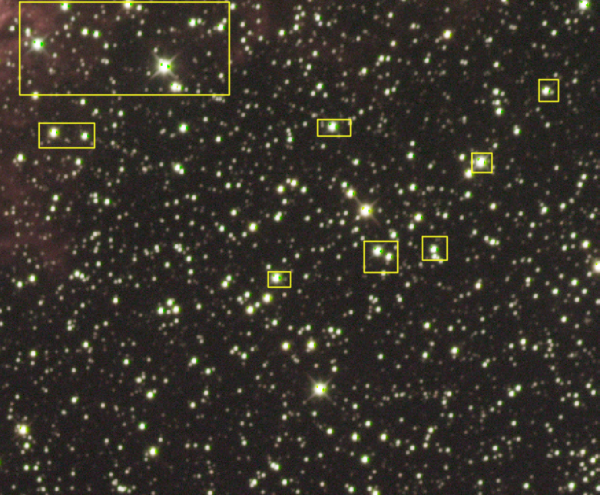
combine RGB
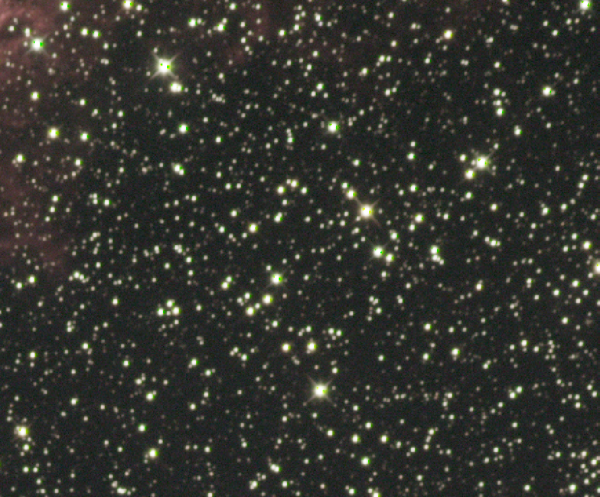
after lpc

after lpc and cbg
Can you try the color correction tool? That should be able to calibrate the colors based on full spectrum data from the stars.
Hello Vincent
Is there a possibility that a green point may occur as a result that I got a wrong operation of APP?
Is there color correction tool in APP?
I do not have me if there is not it.
Thank you for an answer
Maybe you can tweak the formula a little to remove the greenish result?
There is a color correction tool yes, you can find it under "tools" called "calibrate star colors".
Hello Vincent
I saw the screen of calibrate star colors, what should I do?
I am confused.
Do you mind watching a video tutorial on it? It's done by Cristian Sasse from iTelescope and really nice: video link
I made it skip to the part where he explains the color correction. If you have any questions on it, please ask and I'll explain further. It's very technical, but you can focus on what the sliders do and usually the standard setting is working nice already.
Hello
I watched this video before, but saw it once again.
As for what I understood, this TOOL can do the color adjustment of the whole screen,
but is that I cannot adjust the small portion of the screen.
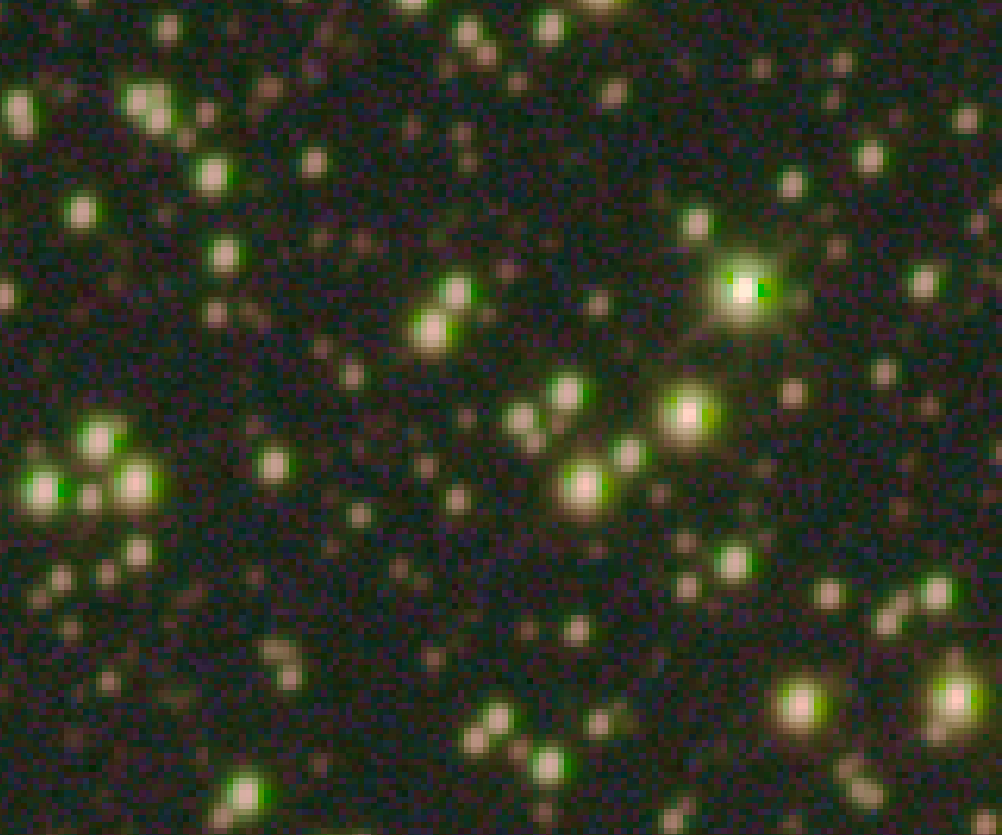
I attach the image which enlarged more to share the situation of the green point.
I think this TOOL not to be able to get rid of this point.
Thank you

Ah, I think you're talking about chromatic abberation here, not the color in itself, this is likely due to a slight misalignment between the data. You can try to perform "align channels", in tab 2 (calibrate) all the way down. You first load in your data again as R, G and B with calibration frames and then align the channels. These are then saved and can be reloaded for further processing.
Thank you Vincent
I will try to align channels on the weekend.
I hope to work well.
Thank you
Hello
I executed "align channels" as follows, but the result was not improved.
1.I checked "align channels, in tab 2)CALIBRATE".
2.Then click "Save Calibrated Frames" and saved.
The saved file was incorporated from LOAD LIGHT with (-CAL at the end).
Calibration files (such as FLAT) were not used at all.
3. I clicked "integrate" on the 6)INTEGRATE screen.
The above procedure was individually performed on LRGB files.
5. I have aligned the 4 files (LRGB) with "4) REGISTER".
6. 4 files (at the end of the -reg) that combined the position were colorized using "combine RGB" on the 9)TOOLS screen.
In the above procedure, I would like to be correct if I'm making a mistake.
Ok, let me ask Mabula what could be wrong here, I'll forward your findings.
Hi @mo-mo,
Could it be that the star sizes in your green channel are clearly bigger than your red and blue stars? I think that will be the cause of your problem.
I think the best way to fix this will be to use the HSL Selective Color tool, to kill any green present.
1) load the image in the HSL Selective Color tool
2) select green
3) add magenta to green and decrease saturation strongly with the sliders in the tool
4) Let us know if that helps
Mabula
Could it be that the star sizes in your green channel are clearly bigger than your red and blue stars? I think that will be the cause of your problem.
@mo-mo I think Mabula is right. All bright stars have green both on the left and the right so it looks like the stars in the green channel are slightly elongated w.r.t. the stars in the red and blue channels. I suspect that the star profiles (the PSF or point spread function) in green have a clear spike which APP uses to register the green channel with the red and blue channels. But possibly due to slightly sub-optimal guiding the stars in the green channel are slightly elongated causing the green spots on both sides of the stars. You can investigate by looking at the integrated red, green and blue images and inspecting the star shapes in the same areas in the pictures.
Hello@mabula-admin
It is pleased that it was found that the error in my operation procedure is not the cause.
I will try to do advice.
The cause is green channel stars are slightly bigger or distorted than the other channel stars, isn't it?
It is understood that it does not occur with OSC cameras, but what is the cause of LRGB ? e.g. Exposure, tracking accuracy, alignment
I got two images of HSL.
The value is 0.80 and 0.70.
I lowered saturation storongly with the menu on the left side of the screen.
Green disappeared when I increase the magenta, but it became Mazenda.
Green and magenta are mixed because the green does not disappear uniformly .


Hello@wvreeven
I encounter this phenomenon for the first LRGB shoot.
And I am exciting to learn and I am thinking of an opportunity to understand this software more for me.
I try to adjust by HSL.
Also, is there any possibility of any mistake in shooting green channels?
Thank you for the help
Hello
I regulate HSL delicately a little more.
I expect it to lead to a good result.
It be fine!
