

UPDATE FROM MABULA
I have had a very rough 2 months unfortunately health wise. I was struck 3x in a row with bacterial infections. The second infection occurred after a routine hospital checkup and I became very sick. I had to rest and take a lot of antibiotics. Once I was recovering and restarting work 1 month ago, I again became sick. The infection was not yet gone, so even more antibiotics and rest was needed. Needless to say, it took a lot of my energy and I needed a lot of rest.
Finally, the infection is really gone and my energy is coming back step-by-step now and I have started work again. I am terribly sorry to have kept you waiting for support. I will address all outstanding questions and e-mails step-by step and will be on the forum daily from today.
APP 2.0.0-beta47 will come soon as well, a lot of work was already completed before I became very ill, so the release is also nearly ready for you. Beta47 will be much faster actually. Many workflows will be more than 2x faster, mosaics can even be 10x faster than before because registration really received a major boost... all compared to beta46. Before I release it, I will make sure that everything is working properly and then I will release it.
Hi, first try with Beta22 and on the final Integration Im getting this error box

Any ideas ?
EDIT by Mabula: solved in 2.0.0-beta23
Could you explain more about the type of data you were processing and the workflow?
Hi @russ-telfer,
Thank you for reporting this, I will investigate immediately and will report back later.
One question, is this occuring on Windows, or?
Mabula
Hi @russ-telfer,
Can you give more information? What kind of data are you processing? Multi-Filter perhaps? Or Multi-session, or both?
Mabula
@mabula-admin Hi Mabula
it was on a Windows 11 (fully updated) PC. Yes it was adding recent Oiii data to existing Oiii and Ha data. It first crashed when finally integrating the original Ha although it did save the stacked Ha Fits. I then tried it with just the Oiii (latest 58 subs with the original 70+subs) and it crashed about half way through ‘writing to mapper’. If I ran with just the latest data it integrates fine, so it seems to be a multi session issue
Hi Russel @russ-telfer,
I just did some tests with multi-session and everything works fine here, so I need more information and probably your data to understand what is happening.
How do you load the data of the sessions and what settings do you use in 6)Integrate to integrate the sessions, the Multi-Session options at the top in menu 6) ?
Can you upload the data here:
https://upload.astropixelprocessor.com/
username : uploadData
password : uploadTestData
Please make a folder with your name and issue like Russel-MultiSession-Integration-error
and upload there, then let me know when the upload is finished and I will look at it.
Mabula
Hi @russ-telfer,
I have found the integrator bug which you posted at the start of the topic finally !
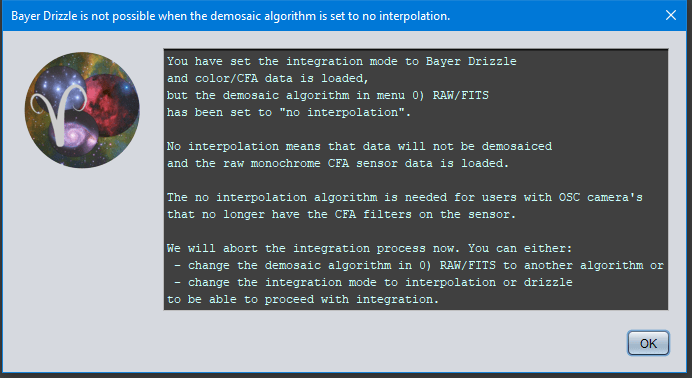
It is triggered when you try to integrate OSC CFA (so color data that needs to be demosaiced/debayered) and you have set the Bayer/X-Trans alogrithm in 0) RAWE/FITS to no interpolation which is not the right setting for your purpose probably. Simply set it to Adpative Airy Disc and things should be fine.
I will fix the error as well now, it is caused by this unexpected processing of CFA data without actually debayering it.
Mabula
Hi @russ-telfer,
Fixed in the next release 2.0.0-beta23:
- FIXED INTEGRATION BAYER DRIZZLE BUG
If OSC data that still needs to be debayered is loaded and the user want to integrate with Bayer Drizzle ,but has set the demosaic algorithm in 0) RAW/FITS to no interpolation, an error was thrown in the Integrator stating an ArrayIndexOutOfBoundsException Index 1 out of bounds for length 1. The no interpolation algorithm is for users with OSC camera's that have the CFA filters removed from the sensor. The algorithm enables them to shoot monochrome narrowband with a camera that was previously a color camera. This exception is now caught properly with the following message:
Hi @russ-telfer,
The issue is fixed, you can try 2.0.0-beta23 which was released today 😉
https://www.astropixelprocessor.com/downloads/
Mabula
