I have had a very rough 2 months unfortunately health wise. I was struck 3x in a row with bacterial infections. The second infection occurred after a routine hospital checkup and I became very sick. I had to rest and take a lot of antibiotics. Once I was recovering and restarting work 1 month ago, I again became sick. The infection was not yet gone, so even more antibiotics and rest was needed. Needless to say, it took a lot of my energy and I needed a lot of rest.
Finally, the infection is really gone and my energy is coming back step-by-step now and I have started work again. I am terribly sorry to have kept you waiting for support. I will address all outstanding questions and e-mails step-by step and will be on the forum daily from today.
APP 2.0.0-beta47 will come soon as well, a lot of work was already completed before I became very ill, so the release is also nearly ready for you. Beta47 will be much faster actually. Many workflows will be more than 2x faster, mosaics can even be 10x faster than before because registration really received a major boost... all compared to beta46. Before I release it, I will make sure that everything is working properly and then I will release it.
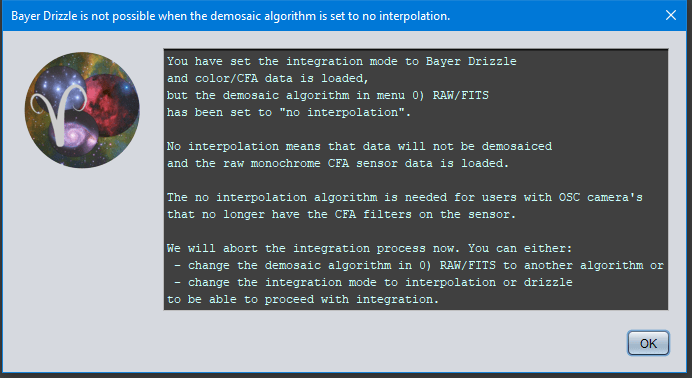
Hi, when trying to intergrate, this error occurs (combining different sezzions data, all worked so far except this)
any idea what to try, to look for?
looking at the subs in registration display, it all looks normal, at the right place. I tried to integrate at scale 0.1 so even with these larger subs which i have done before it should work...
Thanks for reporting, it seems someone else has the same issue. I'll notify Mabula! I may need the data and exact workflow to replicate this, would that be possible?
Can you give more information? What kind of data are you processing? Multi-Filter perhaps? Or Multi-session, or both?
Mabula
Hi registered two mosaics, one done by APP with subs of a Nikon D810a and the other a h-alpha mosaic done with a mono 6200mm. this works. displaying them as registered works. integration does not. this error occurs. then I thought I save the registered files and continue in pixinsight. the error occurs. the reason i do this was PI star alignment failed so this seemd a good idea. I want to insert Ha into the RGB mosaic. the original mono consists of Ha LRGB each about 1 billion pixels
I
when trying to save them, it apperas APP saves the Ha frame but then the error occurs, as seen in the screenshots here. failure to save the rgb frame:
Thank you very much for reporting this, this is in fact a rather different issue it seems. Can you upload the 3 stacks that you tried to combine here, so I can test it myself and fix it ?
I will work on it today and will let you know if I can fix it 😉
Mabula
Hi Mabula, any news here?
No, i have tested a lot, I have never run into the initial integrator error whatever I try with your data or the data of others that have reported this issue.
To be sure, is this error always occuring on this dataset on your computer? Did you try on another computer? What kind of computer are you using?
And can you test the following, click on the CFG menu and then on RESET all menu tabs to defaults. Restart APP and try again, does the error occur again? If so, please be as thorough as you can, so please share all the settings that you set in menus 2) to 6) apart from the default settings. Then surely I must find this nasty bugger 😉
I have found the integrator bug which you posted at the start of the topic finally !
It is triggered when you try to integrate OSC CFA (so color data that needs to be demosaiced/debayered) and you have set the Bayer/X-Trans alogrithm in 0) RAWE/FITS to no interpolation which is not the right setting for your purpose probably. Simply set it to Adpative Airy Disc and things should be fine.
I will fix the error as well now, it is caused by this unexpected processing of CFA data without actually debayering it.
If OSC data that still needs to be debayered is loaded and the user want to integrate with Bayer Drizzle ,but has set the demosaic algorithm in 0) RAW/FITS to no interpolation, an error was thrown in the Integrator stating an ArrayIndexOutOfBoundsException Index 1 out of bounds for length 1. The no interpolation algorithm is for users with OSC camera's that have the CFA filters removed from the sensor. The algorithm enables them to shoot monochrome narrowband with a camera that was previously a color camera. This exception is now caught properly with the following message:
This post was modified 3 years ago by Mabula-Admin
I have tested your data and everything seems to works fine on my test computers, so I need more information to be able to solve the problem.
What steps do you take in the RGB Combine to produce the error ? Does the error happen everytime you push calculate or was it a time occurence? Of does it happen at random times perhapds?
On a side note, I have looked at your data, and the LPC versions are really weird. They are monochrome but there is metadata telling that it is CFA without a CFA pattern in there. Can you tell me how you created these files? So if you load the LPC files into the tool, the tool thinks it is RGB/3-channel data which it is not clearly.
@mabula-admin I did try multiple times running the Combine RGB and got the error. I tried loading the 3 files 2 different ways: one at a time and assigning channel (Ha, Oiii or Sulfur ii) or loading the 3 files then assigning the channels. Set: Normalize-Add, then Calculate.
*Here might be a possible problem (though I thought I always did this): I left the Force Bayer/X-Trans CFA checked (after I ran the Ha-Oiii Color algorithm) when I ran the Ha-Oiii Extract Ha, Oiii, or Mono.
*The LPC version: I ran LPC on the Ha, Oiii and Mono files. Can this be done, or is this incorrect?
I have found the integrator bug which you posted at the start of the topic finally !
It is triggered when you try to integrate OSC CFA (so color data that needs to be demosaiced/debayered) and you have set the Bayer/X-Trans alogrithm in 0) RAWE/FITS to no interpolation which is not the right setting for your purpose probably. Simply set it to Adpative Airy Disc and things should be fine.
I will fix the error as well now, it is caused by this unexpected processing of CFA data without actually debayering it.
Mabula
Hi Mabula, it does not seem to work just simply setting it to adaptive airy disk. APP does not realize it has mono data even when forced to "it is h-alpha" and just believes the wrong header that it is RGB instead??
do you have the beta 23 with the correction for testing somewhere to download/ when will it come?