
2026-10-09 APP 2.0.0-beta48 has been released !
This is mainly a bug fix release for the reported bugs in beta47. In addition it has a significant User Interface performance improvement noticable when you need to process 1000s of images in APP.
2026-10-03 APP 2.0.0-beta47 has been released !
This is a very big release... many code optimizations/rewrites, many parts of APP are much faster and more precise, especially star analysis and registration are much faster ! Big mosaics will go much faster 🙂
And we introduce a new preview filter, which includes the new Adaptive Deep Sky Stretch and a General Levels Stretch, this has been long over due. The old preview filter (the panel on the right side to stretch and preview your data) has not been updated for a couple of years and it is a critical part of any APP session.
Adaptive Deep Sky Stretch or ADSS is a much more intuitive stretch algorithm. It is also color preserving (which is a great new addition in itself ! ) which means that the highlights are no longer bleached, color is maintained from the linear data while stretching. You can simply stretch your data using the sky background level and signal width sliders which work much easier and more intuitive. You no longer need to fiddle with the old complicated sliders with zoom buttons. All the zoom buttons for the sliders are made redundant. And you can enter slider values in the slider value fields yourself. I will make a youtube video in the coming days to explain and fully introduce ADSS. Once the video is ready, it will be highlighted on the forum.
RGB Combine upgrade !. The RGB Combine Tool has been rewritten mostly. The tool is faster and easier to use and most importantly, the Luminance slider to inject a luminance channel or channels into the RGB composite is now working correctly. It no longer bleaches the RGB colors. Combined with the new ADSS preview, you will get much better and easier great composites with great color! I will also explain this in a new youtube video.
Hi everyone, and thanks for reading this. Although I'm a seasoned veteran in astronomy, I'm pretty new to astrophotography. APP has helped a lot with my pursuits, for sure. For my latest session last night, I was using an 80mm f/7 refractor with a Canon 60D DSLR. Messier 17, about 120 lights (30s, 1600 ISO), 20 darks, 30 bias, and 30 flats. This was my first session doing flats (I know, I know...), which I did basically with the "white T-shirt method" and a white image with my iPad. Darks were the same exposure/ISO/temp as lights, bias used same ISO at 1/8000s, and flats were 1/6 second at ISO 1600.
In the Normalizing phase, APP popped up a CRITICAL WARNING (see below) which I don't completely understand given my process last night and many identical processes I've done recently that didn't include flats. After receiving the warning, I did exactly the same M17 process except that I didn't include any flats, and received no warning. I also did a similar process on another data set and received the warning (with flats), but I did not receive the warning when I left out the flats.
I'm sure that I'm just missing something, but I'm not clear what it is. Were my flat exposures too short (iPad panel too bright)? I've also attached the histogram from my camera for one of the flats. Any suggestions are appreciated - thanks!
- Kevin

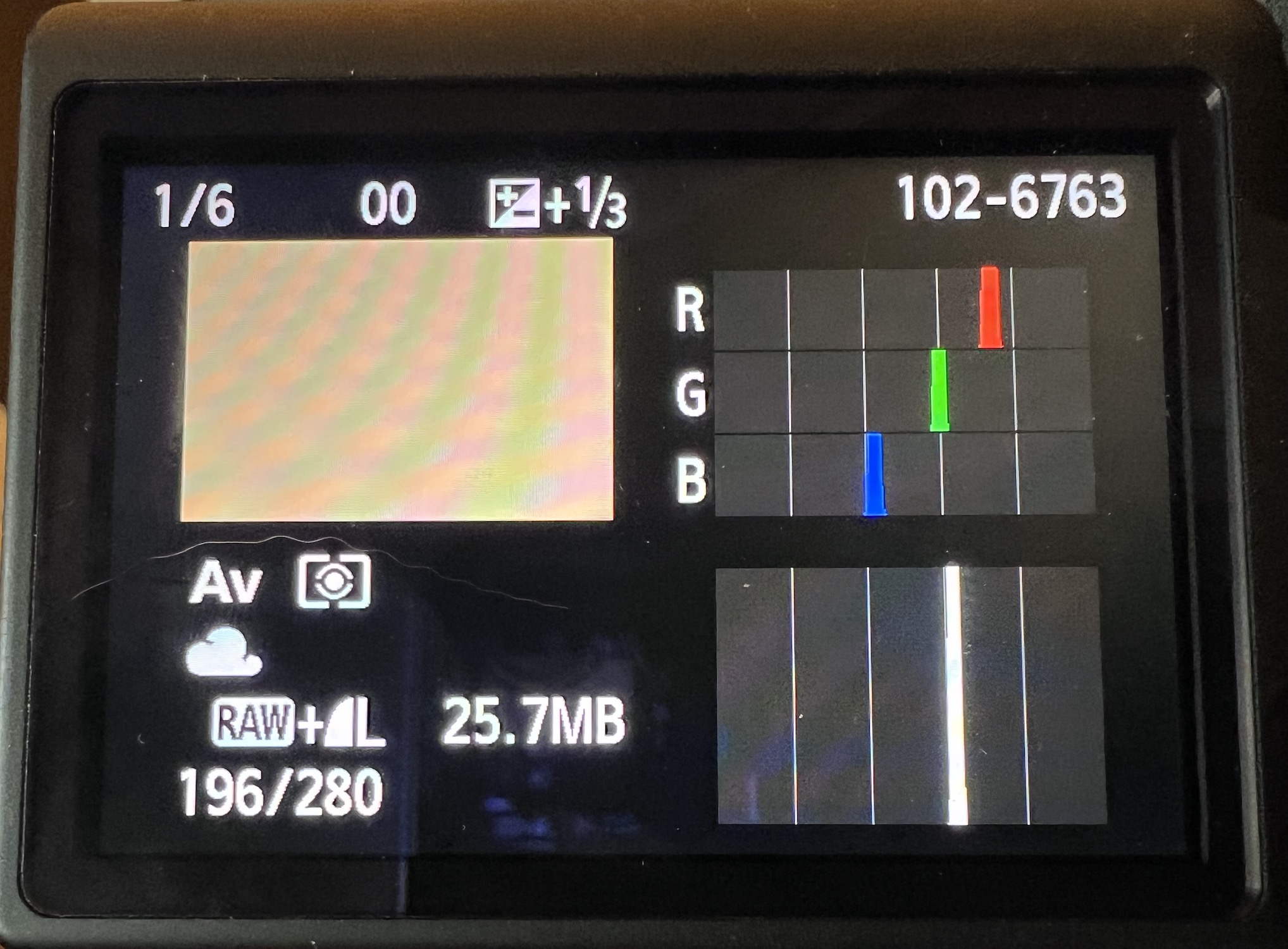
This means that you have an issue in the calibration data. Very simply said, when using that data, APP sees that subtracting the noise from the lights causes pixels to go black (too much signal is removed). It then tries to inject noise to get it to a decent level, but even that doesn't work, meaning there is something going wrong with the calibration data for sure. It's indeed very good to try a few things like removing the flats, removing the darks etc. to see which data is causing it. Looking at the flats, you're showing a screenshot of your camera I think? These usually show non-linear histograms, in APP you can load in a flat and then go to the preview section on the right and select "no stretch", that should have the peaks roughly in the middle or 2/3 the way.

Hi Jon @macejk,
Were you able to find the source of the issue with your calibration data? Do we need to have a look to help out?
Mabula
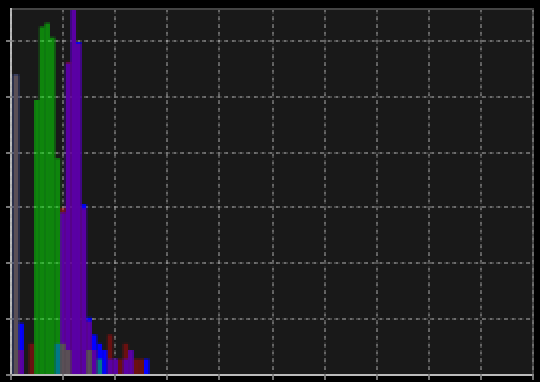
Hi Mabula, and thanks for checking in on me. Since I posted this, I have had better - although not perfect - luck with flats. Attached is a screenshot of the master flat histogram in APP (no stretch) for which I was having troubles when processing my M17 data. It seems a bit underexposed.
-Kevin
@vincent-mod Vincent, also thanks to you for pointing me in the right direction. I'm still experimenting with flats and am slowly progressing in my newbie trials.
Hi Kevin, @macejk
Okay, let us know if you need more assistance. Indeed, looking at the masterflat unstretched does indicate that you could have exposed a bit longer, that should increase the quality of the flats as well 😉
Mabula
