

UPDATE FROM MABULA
I have had a very rough 2 months unfortunately health wise. I was struck 3x in a row with bacterial infections. The second infection occurred after a routine hospital checkup and I became very sick. I had to rest and take a lot of antibiotics. Once I was recovering and restarting work 1 month ago, I again became sick. The infection was not yet gone, so even more antibiotics and rest was needed. Needless to say, it took a lot of my energy and I needed a lot of rest.
Finally, the infection is really gone and my energy is coming back step-by-step now and I have started work again. I am terribly sorry to have kept you waiting for support. I will address all outstanding questions and e-mails step-by step and will be on the forum daily from today.
APP 2.0.0-beta47 will come soon as well, a lot of work was already completed before I became very ill, so the release is also nearly ready for you. Beta47 will be much faster actually. Many workflows will be more than 2x faster, mosaics can even be 10x faster than before because registration really received a major boost... all compared to beta46. Before I release it, I will make sure that everything is working properly and then I will release it.
Hi,
Just purchased a license and installed APP.
Crashes on startup, cannot locate the logs to troubleshoot.
Please advise.
Cheers
Chris
Hi Chris,
What operating system are you on? Can you open a terminal, go to the directory that contains the APP executable and start it from the command line? That should print out error messages that could indicate the cause of the problem.
Wouter
Hi Wouter,
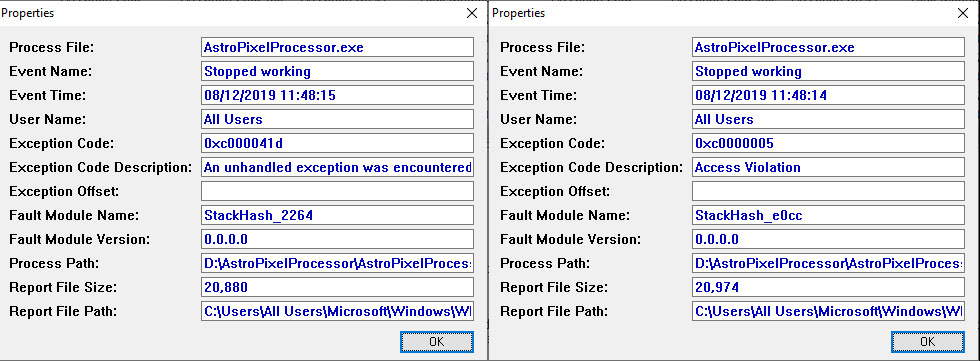
This is the error from the windows 10 application event log (I have used AppCrashView to render the information from the .wer file)
It appears to be an access violation which implies that application does not have permissions to write to a specific directory.
I have tried starting the app with administrator privileges and that has not helped.
EDIT : I have not yet received my license code to activate the application - is that preventing it from starting up ?
I would normally expect the application to start and then the license code to be entered to activate the application.
Cheers
Chris
Maybe you can put APP in a directory that you know for sure works? And the activation code should be send immediately after payment, did you check your junk mail?
I have tried installing it on the root of both of my drives but experience the same issue.
Yes i checked my junk mail. I received an order complete mail/invoice but no licence code.
And you are sure the root is a place you can write to? I would try putting it in a standard applications folder... or was that already what you started with?
Yeah i started with the default and then tried a variety of other locations. Simply cant get it to start on my main image processing rig. Also tried several older versions of the software to rule that out.
UPDATE : I have just installed it on my imaging laptop system and it starts up ok.
I have requested a license code via the support e-mail address so hopefully once that arrives i will be up and running, at least on the laptop.
Ok, another possibility might be.. a virus scanner. Do you use one and can you check if it might be blocking APP somehow. Maybe Windows Defender for instance?
I have Windows Defender disabled.
Problem solved, i created a new local windows account and it runs fine under that.
Generated a mosaic this evening - very happy with the result.
Interesting, I will keep that in mind as a possible solution. Have fun! 🙂
