It did take a long time to have the work finished on this and it will have a major performance boost of 30-50% over 2.0.0-beta39 from calibration to integration. We extensively optimized many critical parts of APP. All has been tested to guarantee correct optimizations. Drizzle and image resampling is much faster for instance, those modules have been completely rewritten. Much less memory usage. LNC 2.0 will be released which works much better and faster than LNC in it's current state. And more, all will be added to the release notes in the coming weeks...
Update on the 2.0.0 release & the full manual
We are getting close to the 2.0.0 stable release and the full manual. The manual will soon become available on the website and also in PDF format. Both versions will be identical and once released, will start to follow the APP release cycle and thus will stay up-to-date to the latest APP version.
Once 2.0.0 is released, the price for APP will increase. Owner's license holders will not need to pay an upgrade fee to use 2.0.0, neither do Renter's license holders.
Can help me with the next problem, yesterday i instal the 1.058 version and want to make a orion rgb an ha combination, but there are a few strange things happen.
First question:
I try to register the rgb stack (no stretch file) to the Ha stack (also no stretch file), i set the tab 0 to supported and no CFA. Than run the registration and this works fine, save the files. Than i try directly to normalize the files, everytime i get an Java error.
When i set tab 0 to supported an no CFA i pres directly on normalize i get an other Java error, but when i set it to Bayer pattern RGGB and Force CFA it normalizes the frames and than ik can save them.
Second question:
When i use the Combine tool there are a few things i notice like:
1e When i load a RGB stack (which is only reg.) the tool gives me R for channel 1, G for channel 2, B for channel 3, when i load the Ha stack (also only reg.) it gives me a custom file, i can change it to a HA file so i end u with 4 channels (what seems to be logical to me)
2e When i load a RGB stack (which is normalized) the tool gives me again R for channel 1, G for channel 2, B for channel 3 (so far so good), Now the strange thing... when i load the HA stack (also normalized) the tool gives me again 3 channels Red Green and Blue.
What am i doing wrong?
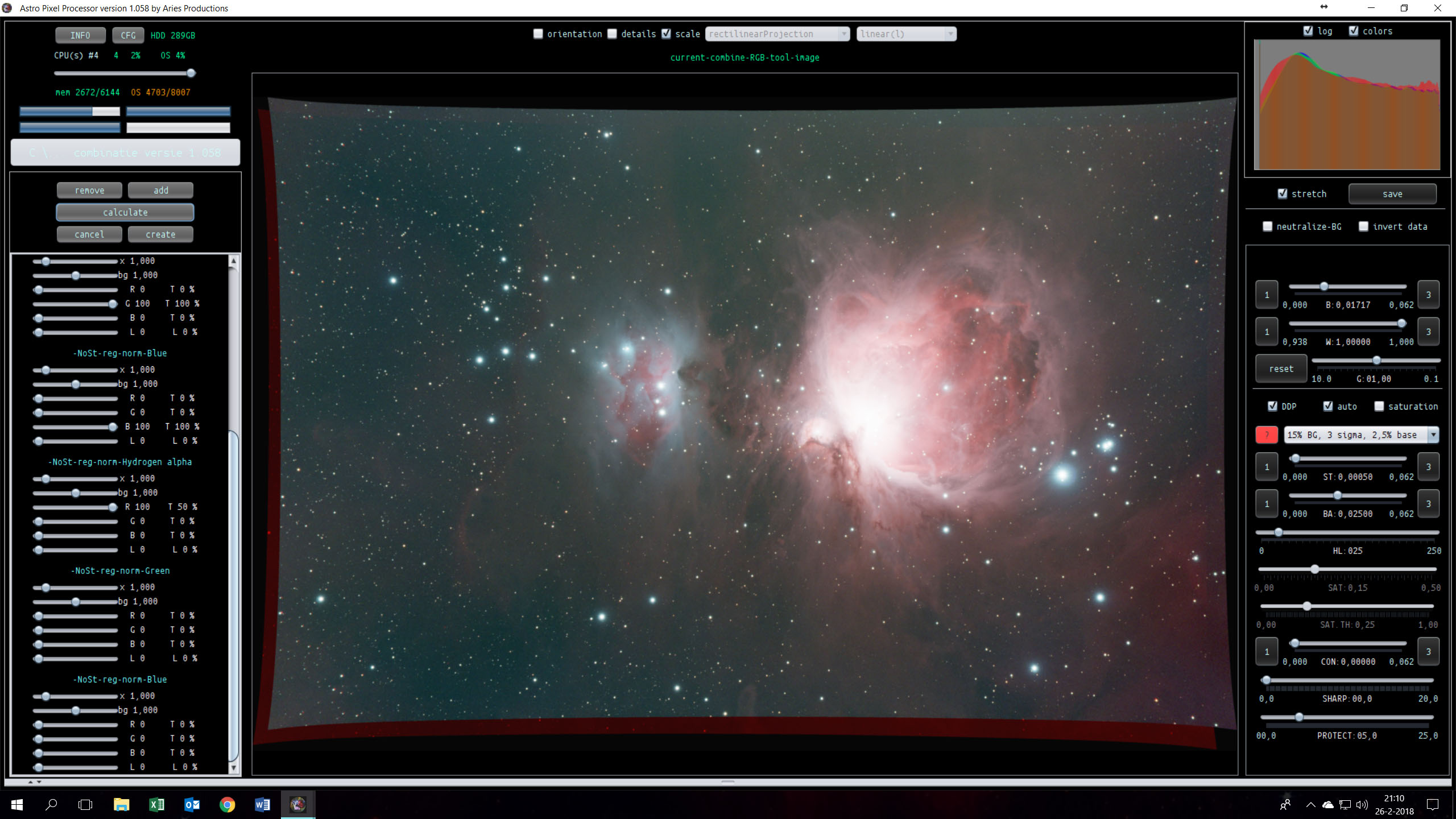
3e Question, when i load the stacks in the combine tool, the overlap of the frames isn't quit right, for example, in the left upper corner the stars are shifted. Also a other strange thing happens, the picture which i loaded is curved on al sides.
Please can you help me with these questions. I think i am doing something wrong but can not figure out what.
Just quickly, I also got a Java error but only when I was doing star color calibration. It turned out I needed to update the drivers on my GeForce video now it's fine.
Hi GW, thanks for you're reply. I only don't think this is a problem with my video driver or something like that.
In version 1.056 I didn't had this similar problem. It now occurs in the new version. Especially the registration of the frames is different now than before. I had a stack and composite made in version 1.056 and had "pinpoint" stars now the field is cureved and stars have shifted. So or I am doing something wrong or there is something else happening.
I hope somebody can give me a "push" in the right way.
Meanwhile i was investigeting my problem, and i think i found something. Perhaps it is my fault but i callibrated al my files with the Dynamic Distortion Correctionon.
I did a quick run on 10 frames RGB and 10 frames HA, 1 stack with DDC and one without.
Next i did only a register to each other (not a normalize) and also disabled the DDC. (i did try a normalize but also now did get a java error like above).
Than used the combine tool and merge them together.
The results you can see that without the DDC the combine is perfect, and with DDC the stars near the edges has shifted.
Can help me with the next problem, yesterday i instal the 1.058 version and want to make a orion rgb an ha combination, but there are a few strange things happen.
First question:
I try to register the rgb stack (no stretch file) to the Ha stack (also no stretch file), i set the tab 0 to supported and no CFA. Than run the registration and this works fine, save the files. Than i try directly to normalize the files, everytime i get an Java error.
When i set tab 0 to supported an no CFA i pres directly on normalize i get an other Java error, but when i set it to Bayer pattern RGGB and Force CFA it normalizes the frames and than ik can save them.
Second question:
When i use the Combine tool there are a few things i notice like:
1e When i load a RGB stack (which is only reg.) the tool gives me R for channel 1, G for channel 2, B for channel 3, when i load the Ha stack (also only reg.) it gives me a custom file, i can change it to a HA file so i end u with 4 channels (what seems to be logical to me)
2e When i load a RGB stack (which is normalized) the tool gives me again R for channel 1, G for channel 2, B for channel 3 (so far so good), Now the strange thing... when i load the HA stack (also normalized) the tool gives me again 3 channels Red Green and Blue.
What am i doing wrong?
3e Question, when i load the stacks in the combine tool, the overlap of the frames isn't quit right, for example, in the left upper corner the stars are shifted. Also a other strange thing happens, the picture which i loaded is curved on al sides.
Please can you help me with these questions. I think i am doing something wrong but can not figure out what.
Kind regards,
Jan-Willem
Hi Jan-Willem @jw_duijndamhetnet-nl,
Let me respond to your questions:
I try to register the rgb stack (no stretch file) to the Ha stack (also no stretch file), i set the tab 0 to supported and no CFA. Than run the registration and this works fine, save the files. Than i try directly to normalize the files, everytime i get an Java error.
When i set tab 0 to supported an no CFA i pres directly on normalize i get an other Java error, but when i set it to Bayer pattern RGGB and Force CFA it normalizes the frames and than ik can save them.
First of all, when you have created the integrations, the CFA settings for debayering no longer have any influence, because the data is then debayered already before registration and normalization parameters are applied.
I know that APP 1.058 had some bugs in the normalization engine. This should be fixed in 1.059 however 😉
Why the normalization worked while setting the bayer pattern is a bit strange, (maybe because then you are telling APP to threat the H-alpha stack as bayer data which it shouldn't be because it's already integrated data.)
When i use the Combine tool there are a few things i notice like:
1e When i load a RGB stack (which is only reg.) the tool gives me R for channel 1, G for channel 2, B for channel 3, when i load the Ha stack (also only reg.) it gives me a custom file, i can change it to a HA file so i end u with 4 channels (what seems to be logical to me)
2e When i load a RGB stack (which is normalized) the tool gives me again R for channel 1, G for channel 2, B for channel 3 (so far so good), Now the strange thing... when i load the HA stack (also normalized) the tool gives me again 3 channels Red Green and Blue.
What am i doing wrong?
Yes, the number 1 is logical and correct.
Regarding 2), you normalize 1 channel data to 3-channel data, I will look it up but apparently APP will then create a 3 channel version to be compatible with the 3 channel RGB data. I think you can safely disregard the 2nd and third channel in that case. What you can do as well to be on the safe side: load the RGB stack and split in 2) the channels, that will give you the 3 channels. Load these 3 channels together with the H-alpha channel and register and normalize them. Then the output should be 4x 1 channel reg-norm data.
3e Question, when i load the stacks in the combine tool, the overlap of the frames isn't quit right, for example, in the left upper corner the stars are shifted. Also a other strange thing happens, the picture which i loaded is curved on al sides.
Yes, this has to do with distortion correction. Optical distortion correction will correct for barrel/pincushion and more complex forms of optical distortion. Basically, only turn it on if registration is off without it. You can verify that from the registration RMS. It should be below 0.2 pixels for monochrome data and below 0.3 for CFA data. On the other hand, turning it on should not be a problem. I can only assume that APP detected too little stars to do a good optical distortion correction between the 2 frames and therefore registration was off in the corners in this case.
Meanwhile i was investigeting my problem, and i think i found something. Perhaps it is my fault but i callibrated al my files with the Dynamic Distortion Correctionon.
I did a quick run on 10 frames RGB and 10 frames HA, 1 stack with DDC and one without.
Next i did only a register to each other (not a normalize) and also disabled the DDC. (i did try a normalize but also now did get a java error like above).
Than used the combine tool and merge them together.
The results you can see that without the DDC the combine is perfect, and with DDC the stars near the edges has shifted.
I hope this is helpfull for you?
Cheers
,
Jan-Willem
Thank you Jan-Willem @jw_duijndamhetnet-nl,
Yes, it's the optical distortion correction. Best is to turn it on only if registration is off without it (it's safe to assume it's off/not optimal when registration RMS is larger than 0.3 pixel).
If you turn it on and registration is off like this, usually, too little stars are detected in star analysis to have a stable and correct optical distortion correction.
Oh, and from your first post, the bend curves alongside the images is not strange, it's the optical distortion correction being applied, only not correct in this case due to too little stars probably. APP is probably the only application for astrophotography out there that does this correctly. It's one of the main reasons for APP to be able to create huge mosaics on auto-pilot.
An example so you can see what optical distortion does to the field of view. If the field of view is bent due to optical distortion then if you correct it (properly), off course, the field of view as recorder by your rectangular sensor no longer will be rectangular due to this correction.
First a camera shot uncorrected, you can see a rectangular field of view and obviously the optics are distorted, you expect the lines in the brick wall to stay lines.
After optical distortion correction, you can see that the brick wall is now correct, but the field of view is no longer rectangular due to this correction. Notice that no data is lost as well in this correction in APP. That's why you see these bend image borders.
This is an extreme example from a Samyang 14mm f/2.8 objective attached to a Canon EOS 6D.
Without this optical correction a 180 degree mosaic from horizon through zenit to horizon like this would never be possible, same camera and objective, data courtesy of Ralph Wagter:
Sorry for the late response, but i did have a small vacation.
Thank you so much for this extreem good answer, i did not realize that if i have "good" RMS values that DDS is working against me. Most of my data the RMS value is below the 0.2 ( most of the time betweeen the 0.10 and 0.18).
I did not try the new normalization but this is going to be verry soon.