

May 27 2026 APP 2.0.0-beta45 has been released !
Fully Multi-Threaded LNC, many improvements for the registration engine, platform upgrade, and further tuning of internal memory consumption and memory release back to OS.
Apr 14 2026: Google Pay, Apple Pay & WeChat Pay added as payment options
Update on the 2.0.0 release & the full manual
We are getting close to the 2.0.0 stable release and the full manual. The manual will soon become available on the website and also in PDF format. Both versions will be identical and once released, will start to follow the APP release cycle and thus will stay up-to-date to the latest APP version.
Once 2.0.0 is released, the price for APP will increase. Owner's license holders will not need to pay an upgrade fee to use 2.0.0, neither do Renter's license holders.
@vincent-mod
Thanks kindly Vincent. I repeated yout steps and its reproducible so I think its just the settings used on the integration tab that makes the difference. I was just using the stock settings. I'm not sure which makes the difference but its great that the artefacts can be removed. I need to read more about each setting - as well as get more data on this target 😉 Many many thanks.
You're most welcome! If you need any more help with a particular step, just give me a shout. Glad I could easily beat DSS, not a huge challenge but still. 😉
Hello!
I am getting a similar set of streaks that appears to be walking noise. DSS seems to be able to calibrate it out, but i am having issues. I tried to follow the steps above but it does not help. I have never had a problem like this with this set up, so I am not sure what is going on.
I can provide the master dark, flat and bias and BPM. I can also upload about 50 subs for testing.
This is an awesome shot and I really hope I can get the calibration right!

Oeh, that looks like a different problem actually. Seems like it's noise from somewhere, but not random. What happens if you process like 20 frames (to quickly test) without doing any calibration?
I am running the test now and will post the image. I did a test using DSS and the artifacts are not there.
See below, no streaks

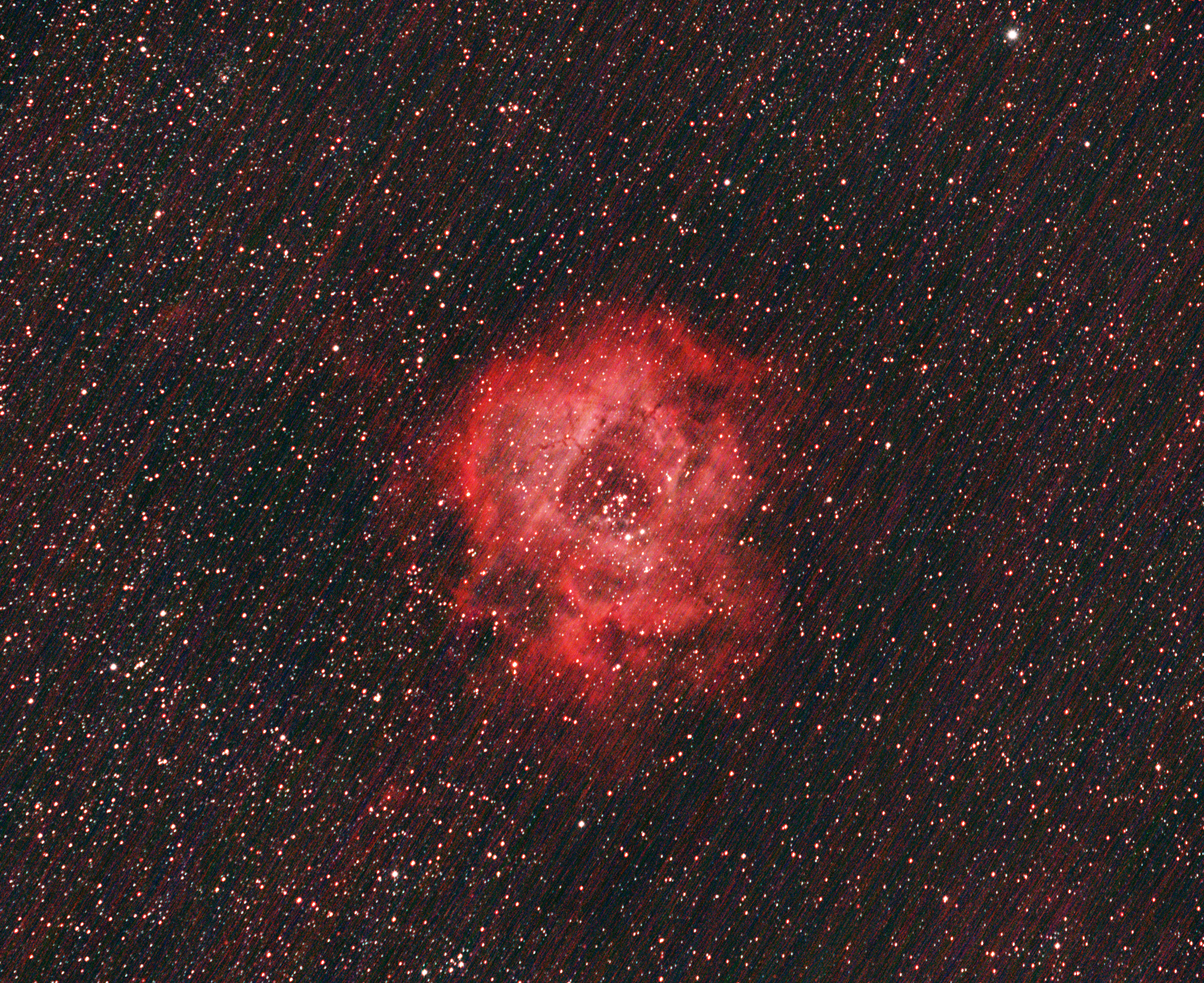
Well, I do see them, just much less noticable due to much higher background noise. It almost seems like APP got rid of much of the noise and then the stripes stand out more.. it looks like APP calibrated the image much better. But it does then show an issue you have in the data more.
So what you are saying is... APP calibrated out the noise so well that it really showed another kind of noise? Well that's... good? 🙂
Very interesting. Do you have any insight for what this could be? Happy to upload some raw data to you.
Yes, that's good as now you actually have a nicer image (noise-wise and with better signal for your nebula) and you can work on the actual problem, when resolved would produce an even better image. 🙂 What the issue is I don't know, but it must be something really regular in each of your lights. Usually this kind of regular noise could be something like electrical interference that the sensor is picking up, or an issue with the sensor or an issue with the calibration data.
Yes, you can upload some raws and calibration files to our server, would be very interesting to check further. The server is here and the password is: appuser. Please create a directory with your name on it + "ResgularNoiseIssue". Greatly appreciated!
ps. do you dither your images during aquisition? And what happens if you leave out your darks in APP? Dithering might help as this kind of noise is also called "walking noise".
I cannot dither with my skytracker pro mount,
EDIT: It works! Uploading the files now to alpaca_ResgularNoiseIssue
Excellent! Thanks for uploading. Not being able to dither might actually be the cause of it. Google "walking noise" and you will see very similar streak problems, due to not being able to dither.
Were you able to see the same result?
I didn't process your data yet, need a bit more time for that sorry. But it's a good candidate for the cause.
I guess I would assume the walking noise would be calibrated out with the darks, we will see what you get when you get to it! Thank you very much for the help
No, walking noise isn't about bad pixels perse (well, technically they probably are but bad pixels are usually hot, clipped pixels for me), it can be fixed pattern noise coming from the sensor. When dithering, this type of noise will also become more random and hence is filtered out. But without, hot pixels can still be removed with darks because they usually clip and are easy to spot, pattern noise is subtle as you can see in 1 raw frame. Therefore it's not removed, but still fixed and thus seen as signal and stacked to increase that signal.
I will give your data a go when I manage to get the wifi going here ofcourse. But my gut feeling says this is highly likely. A good test might be to perform "manual dithering" next time for a test. So manually shifting the telescope after each frame just a bit and stack that. If that removes it, you have the cause for sure.
Hi Alex,
I get those same artifacts in my images. I found a way to correct them in APP. First let me say that I believe these are not hot pixels, instead they are warm pixels. They appear to misbehave intermittently.
The fix can be found on the Calibration tab. Scroll down to the bottom just above the Begin Calibration button. Check the box that says something like "cosmetic correction of hot pixels". (I don't have my APP machine in front of me but the operative word is "cosmetic".)
EDIT:
Sorry, this is a long thread with multiple authors. My reply, seen above, addresses Callum's problem.
Thankfully I can relate to Alex's problem too. I've had my share of "raining noise" until I started experimenting with longer exposures. As a general rule I choose the exposure that makes dead, dark space record above 1000 ADU. In other words if space in your subframes is at the bias level then you are suffering from underexposure. I like to "bake" my subframes. You will get higher signal-to-noise when increasing exposure versus stacking more shorter exposures. For example, my scope is f/5.9 and I have Bortle 4.5 skies. With my 10 year old Atik 314E CCD with the luminance filter I take 120-second subframes. For narrowband I take 10-minute exposures. Your equipment and seeing conditions are different. I recommend using the 1000 ADU guideline.
