

UPDATE FROM MABULA
I have had a very rough 2 months unfortunately health wise. I was struck 3x in a row with bacterial infections. The second infection occurred after a routine hospital checkup and I became very sick. I had to rest and take a lot of antibiotics. Once I was recovering and restarting work 1 month ago, I again became sick. The infection was not yet gone, so even more antibiotics and rest was needed. Needless to say, it took a lot of my energy and I needed a lot of rest.
Finally, the infection is really gone and my energy is coming back step-by-step now and I have started work again. I am terribly sorry to have kept you waiting for support. I will address all outstanding questions and e-mails step-by step and will be on the forum daily from today.
APP 2.0.0-beta47 will come soon as well, a lot of work was already completed before I became very ill, so the release is also nearly ready for you. Beta47 will be much faster actually. Many workflows will be more than 2x faster, mosaics can even be 10x faster than before because registration really received a major boost... all compared to beta46. Before I release it, I will make sure that everything is working properly and then I will release it.
I began using my Canon 800D this past week, just to play with it some, and when I start the processing I keep getting about 41% into the 2)
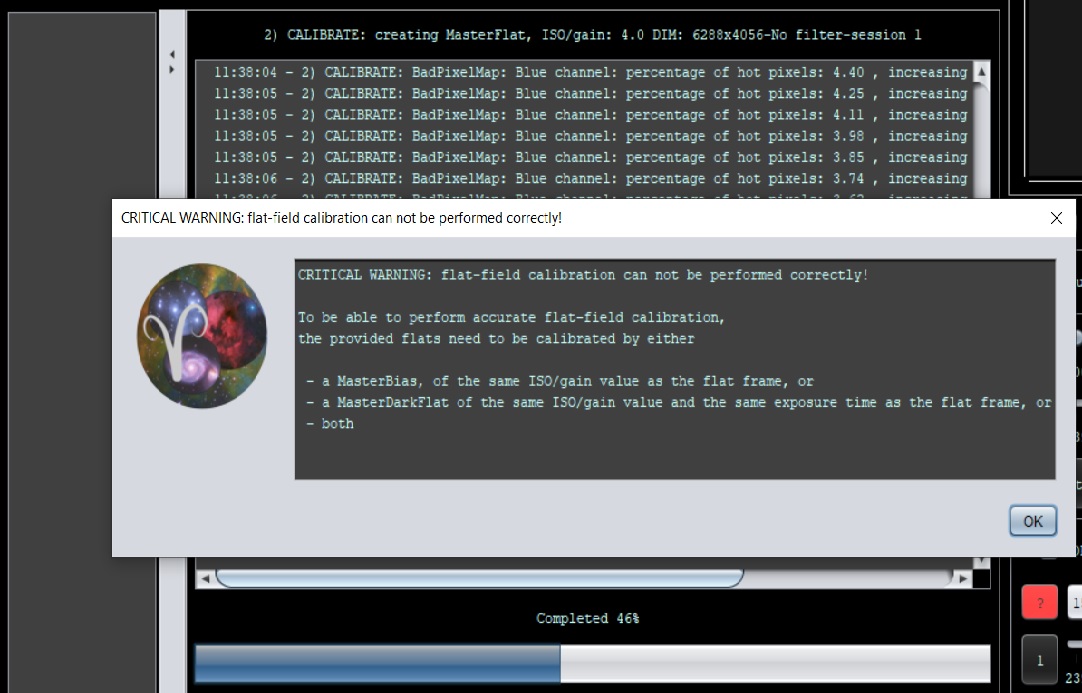
Calibration process I keep getting this error...See attached photo...I've tried everything.
Do I need to take my calibration frames using the same software? I do the Flats with Nebulosity, and the Bias with APT...
Note too that I am taking these with the 1600ISO the same as my Light frames, and Darks...
I also noticed that when using my DSLR the image flips 90 degrees when the scope slews during the night making these Light frames different sizes. I processed using just the Lights and Darks and it worked, but when you throw in the Flats and Bias frames I get these Errors...
Not sure what to do...
THANKS,
ROD
Well it seems like this isn't the first time I've found my issues, before getting a reply here. So, with that being said, I will tell you what I found, (I think)...
When I had the calibration errors I was doing the Flats and Bias frames using different software apps. I switched just now to APT for doing both, and now the errors have gone...Not sure why this would matter, since I had them both the same ISO of 1600...hmmm? Don't have a clue...
Please respond to this message, anyone out there who had similar issues...Thanks,
Rod
Yes, it's not advised to use different programs for your data taking. The reason is that different programs can write different information in the FITS header, sometimes being incomplete or even with the wrong info. If you always use 1 program, you can deal with that, different programs in the mix then complicate things quite a bit and it may be that something is throwing APP off with differences in the way these programs saved the data.
@vincent-mod
That seemed to have fixed it Vince...I went thru a list of possible causes and that was the last one I could think of.
Still not sure why my images rotate during the image session using my Canon T7i. Maybe the camera position when it slews from SE at 20 degrees up to 80 degrees during the night. See photo.
My ASI294MC Pro doesn't do that, which is why I thought that could be the issue. I made note of this in my notes! These Bias and Flats are very picky critters...!
Thanks again!
Rod

@rockinrod Check the manual of the camera for an auto-rotate option and disable that.
Well now another error in the Calibrate mode, about 90% in to it...
I didn't screen shoot it, but it said something about too many artifacts on my Flats, and something about stars. Very strange, I've never seen this one. The Canon is really causing problems!
Sorry I cannot be more specific...I'll run it again and see if it pops up.
Rod
Interesting, well if it happens again I'll likely ask for some data to upload. 🙂
@vincent-mod
I just took another set of 5 each for trial purposes...
@vincent-mod
Well unfortunately I could not duplicate the problem. So I'll send it over next time, if it happens again
Rod
