

Mar 28 2026 APP 2.0.0-beta40 will be released in 7 days.
It did take a long time to have the work finished on this and it will have a major performance boost of 30-50% over 2.0.0-beta39 from calibration to integration. We extensively optimized many critical parts of APP. All has been tested to guarantee correct optimizations. Drizzle and image resampling is much faster for instance, those modules have been completely rewritten. Much less memory usage. LNC 2.0 will be released which works much better and faster than LNC in it's current state. And more, all will be added to the release notes in the coming weeks...
Update on the 2.0.0 release & the full manual
We are getting close to the 2.0.0 stable release and the full manual. The manual will soon become available on the website and also in PDF format. Both versions will be identical and once released, will start to follow the APP release cycle and thus will stay up-to-date to the latest APP version.
Once 2.0.0 is released, the price for APP will increase. Owner's license holders will not need to pay an upgrade fee to use 2.0.0, neither do Renter's license holders.
When I tried to place an order for the renters licence I filled in all the details where's an asterix filled in my card details then clicked the checkout button at the bottom. I then get the following message :- please virify yourself before submitting the form. Can you explain what I can do to stop this message.
Mm, never heard anyone having this issue before. I'll forward this one to Mabula @mabula-admin
Dear @diesel & @vincent-mod,
You need to see this at checkout:
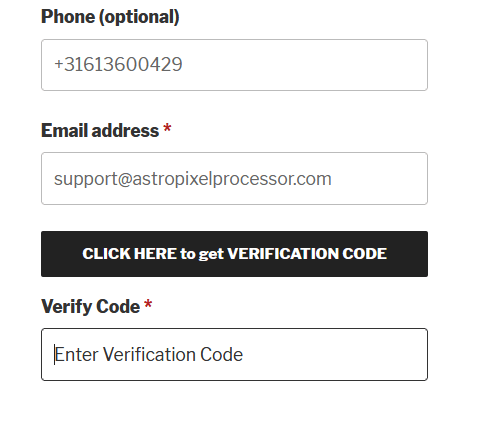
Fill in a valid email address and click on CLICK HERE to get VERIFICATION CODE, then you should wait for an email to arrive with an email verification code of 6 digits.
Enter this code in the Verify Code field and then you will be verified.
If you don't see the CLICK HERE to get VERIFICATION CODE button, you will need to use a different browser or perhaps you need to disable some unwanted caching of your browser, like a caching plugin. I know that on some platforms with some browsers, the button is not shown. I am working to improve this.
Kind regards,
Mabula
Tried get verification code, entered the code still get the error message.
Here is a wild guess: You may need to "whitelist" https://astropixelprocessor.com
In my case I run a tight ship. I have Firefox configured to block all website's cookies, tracking content, and cryptominers. You can configure all modern browsers to something similar. If your browser is configured to block cookies then you need to whitelist https://astropixelprocessor.com
EDIT: Here is some additional information about whitelisting. Notice that I used "https://astropixelprocessor.com". I purposely removed "www." This may not necessarily pertain to Mabula's site but it is good to know this going forward. Sometimes websites will redirect to a subdomain, for example "https://account.example.com". If you permit "https://example.com" then you are OK but if you permit "https://www.example.com" then cookies will fail.
EDIT: There could be another possibility. I've noticed in the last 24 hours or so that when I post a reply to a new topic that it takes a very long time to get a response after I click the "Reply" button. This is the time it takes to queue up a process that sends me an email asking me to verify my subscription. In the last couple hours the system has degraded to the point where I don't receive the email and my browser redirects with ERROR 503 SERVICE UNAVAILABLE. This indicates that there is a possible failure in the back-end of APP's website.
Yes good one @oopfan, I've not seen this issue before so it seems it's very specific to your browser settings.
I'm having the same issue trying to get a renewal.
Could you try using a different browser? Just to see if it's a setting of your browser you're currently using?
