

UPDATE FROM MABULA
I have had a very rough 2 months unfortunately health wise. I was struck 3x in a row with bacterial infections. The second infection occurred after a routine hospital checkup and I became very sick. I had to rest and take a lot of antibiotics. Once I was recovering and restarting work 1 month ago, I again became sick. The infection was not yet gone, so even more antibiotics and rest was needed. Needless to say, it took a lot of my energy and I needed a lot of rest.
Finally, the infection is really gone and my energy is coming back step-by-step now and I have started work again. I am terribly sorry to have kept you waiting for support. I will address all outstanding questions and e-mails step-by step and will be on the forum daily from today.
APP 2.0.0-beta47 will come soon as well, a lot of work was already completed before I became very ill, so the release is also nearly ready for you. Beta47 will be much faster actually. Many workflows will be more than 2x faster, mosaics can even be 10x faster than before because registration really received a major boost... all compared to beta46. Before I release it, I will make sure that everything is working properly and then I will release it.
Hi,
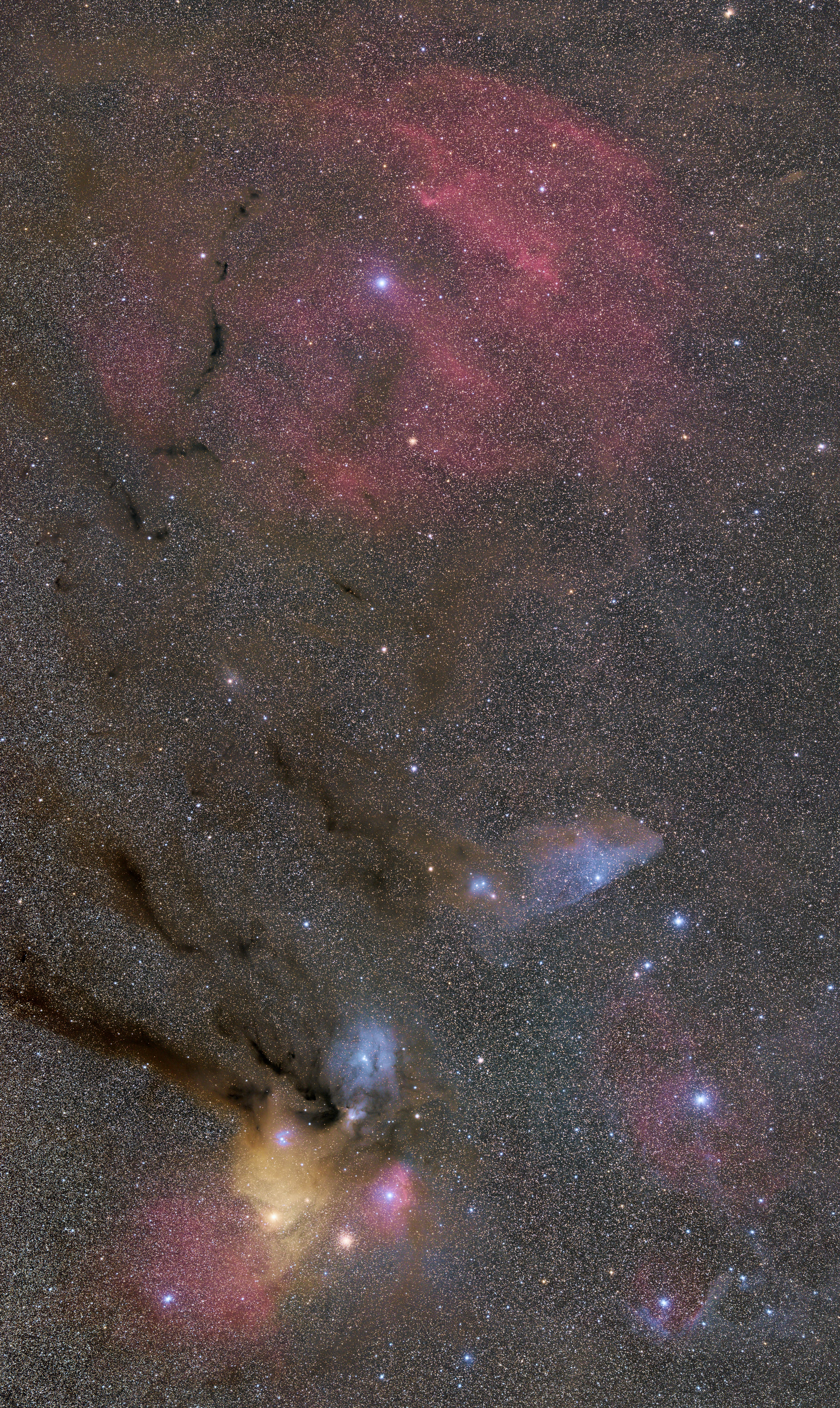
This is my first 100% APP processed picture.
It's a 3 tiles mosaic around Rho complex.
Gear : Sony A7S modified, Samyang 135 at f2, Star adventurer.
180 to 240 x 30 sec per tile, at ISO 3200.
I'm quite satisfied with this picture, but the more I look, the more I see the defaults : the background is to flat and darks are clipped. I think the gradient removal as been to rough.
Any idea or suggestion to improve the result ?
CS
David
Great pic David 🙂
Thats one of my favorite regions in the night sky!
CS Gernot
I think it's amazing! It's difficult to judge if improvements are necessary, for that a 100% crop would be nice to see. 🙂
Hi guy, thanx for your comments !
@vinvent-mod, the picture is a direct jpeg exported at 80% quality with APP.
So this is normally a 100% picture (you can display the picutre at 100% by opening it in a new tab - right clic).
As mentionned above, the gradient removal was a bit strong and it has also removed the "natural" gradient created by the milky way. The background should be brighter in the lower left and left sides, and darker in the right side.
And the blacks seems to be clipped too : the dust clouds should be more brown than black.
Ah right, doh I should know that. haha It might just be my monitor (which is calibrated), but it doesn't seem to me that the clouds are completely black. Could this be an artefact of converting it to jpeg? What does the original look like?
The exported jpeg looks similar to the picture displayed in APP.
Maybe a to strong rejection setting (winsor at 1 int. and kappa 3).
I think it would be nice to have a specific black control, similar to the HL control.
Interesting it looks so similar, I mean the compression is huge from 32-bit to 8 of a JPG and then at a 80% level even. I'd expect with that to have clipping and with the 32-bit one not. The rejection setting is mainly for noise, it shouldn't affect the black level, and your setting is relatively mild. But testing it without any rejection might be interesting.
